Windows 7 Forums Search
Welcome to Windows 7 Forums. Our forum is dedicated to helping you find solutions with any problems, errors or issues you are experiencing with Windows 7. The Windows 7 forum also covers news and updates and has an extensive Windows 7 tutorial section that covers a wide range of tips and tricks.


Windows 7 - Back up system?

 
03-11-2010   #21


7 Home Pre x64, Windows XP Pro, Ubuntu 9.04


Quote   Quote: Originally Posted by jonesnewton View Post
Hi, here is a screen print of my options and there is an option of both, well thats what I think.

I think I will do Create a System Image. And the a back up of pics music, etc, just in case.

How will it be moved? It would only be copied?
or am I missing something?
I have never had a problem with the Windows Backup and Imaging Utility. It is simple (and without many advanced features) compared to the paid utilities available, but it suits my simple needs.

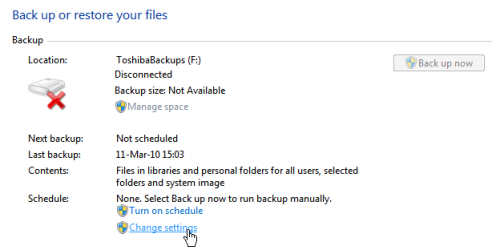
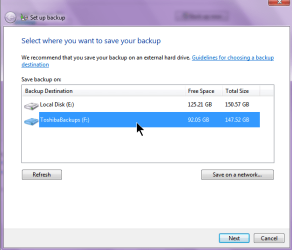
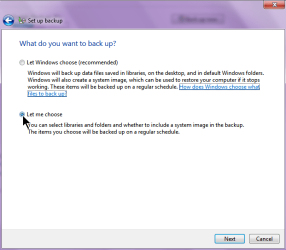
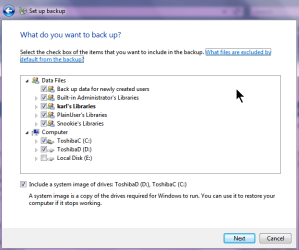
I have my computer re-imaged once each week and stored on a second hard drive. The files can be moved anywhere (I suggest putting them in an identifying folder) but must be located in the root of a hard drive (internal or external, and not in a folder) before Windows can find them:

Back up system?-backup_image.png

A couple of options, if in the worst case senerio the hard drive crashes and must be replaced, the DVD can restore your image to a blank hard drive, or you can reinstall Windows to re-create the exact partition sizes then restore your image.

Cheers!
Robert


Last edited by iseeuu; 03-12-2010 at 11:47 AM..
My System SpecsSystem Spec
03-12-2010   #22


Win 7 X64 bit HP


Hi All and thanks.

I am going to send the laptop to service on Monday and I am NOW trying to Create a System Image to an external harddrive.

My problem now is, the Ext HD says it is not formatted to NTFS??

I have used this drive before to do a back up but not Create a System Image

I can make more space on the Ext HD, but I dont think that is the problem?

Need some help with this please.

Thanks in advance.
Attached Thumbnails
Back up system?-capture-back-up-2.png  
My System SpecsSystem Spec
03-12-2010   #23


7 Home Pre x64, Windows XP Pro, Ubuntu 9.04


Quote   Quote: Originally Posted by jonesnewton View Post
Hi All and thanks.

I am going to send the laptop to service on Monday and I am NOW trying to Create a System Image to an external harddrive.

My problem now is, the Ext HD says it is not formatted to NTFS??

I have used this drive before to do a back up but not Create a System Image

I can make more space on the Ext HD, but I dont think that is the problem?

Need some help with this please.

Thanks in advance.
Can we have a look at the external drive with Windows Explorer (not IE) and Disk Management drive map?
My System SpecsSystem Spec
.


03-12-2010   #24


Win 7 X64 bit HP


Is this what you require?

Not sure about Disk Management drive??
Attached Thumbnails
Back up system?-capture-back-up-3.png  
My System SpecsSystem Spec
03-12-2010   #25


7 Home Pre x64, Windows XP Pro, Ubuntu 9.04


Quote   Quote: Originally Posted by jonesnewton View Post
Is this what you require?

Not sure about Disk Management drive??
Well ... based on the error message you received, you are going to have to create the Image Backup on a NTFS partition, either on a partition on an internal drive, or reformat (at least part of) the external drive?

Example Disk Management:

Back up system?-xp_plus_7_01.png

Cheers!
Robert
My System SpecsSystem Spec
03-12-2010   #26


Windows 7 64x


Macrium Reflect has never let me down. It will backup and compress an exact image of your hard drive. The best part about it is that it's free.

Macrium Reflect FREE Edition - Information and download
My System SpecsSystem Spec
03-12-2010   #27


Win 7 X64 bit HP


OK

Can I create a partition on my Ext hard drive and have both Fat 32 and NTFS? Or do I have to format it and then make it NTFS??
How do I do this? Either way?

Macrium Reflect is it good, can you rely on it? Will it store to my Ext HD with it being FAT32?

Thanks
My System SpecsSystem Spec
03-12-2010   #28


7 Home Pre x64, Windows XP Pro, Ubuntu 9.04


Quote   Quote: Originally Posted by jonesnewton View Post
OK

Can I create a partition on my Ext hard drive and have both Fat 32 and NTFS? Or do I have to format it and then make it NTFS??
How do I do this? Either way?

Macrium Reflect is it good, can you rely on it? Will it store to my Ext HD with it being FAT32?

Thanks
With your external hard drive plugged in, type disk management in the start search box. You will see something similar to the screen shot I just posted. Right click on the external drive, select "Shrink". Then create a new partition in the empty space and format it as NTFS. You will have two partitions on your external hard drive, one FAT32, and one NTFS.

Cheers!
My System SpecsSystem Spec
03-12-2010   #29


Win 7 X64 bit HP


Shrink volume and extend volume are greyed out, I cannot do anything with it? Only delete volume is available?
Do I have to format it and start from scratch?
My System SpecsSystem Spec
03-12-2010   #30


7 Home Pre x64, Windows XP Pro, Ubuntu 9.04


Quote   Quote: Originally Posted by jonesnewton View Post
Shrink volume and extend volume are greyed out, I cannot do anything with it? Only delete volume is available?
Do I have to format it and start from scratch?
I must confess, I have not formatted anything in FAT32 in a long time. However, my Windows 7 Disk Management will format in FAT32. Likewise, I have not tried to format an external usb drive either.

So I leave it to you, if you are in a hurry and there is nothing on your external drive you must save, you could try to reformat the existing partition in NTFS?

Can you easily remove the hard drive from the external case and plug it into the computer? It may be possible to shrink and format an internal drive?
My System SpecsSystem Spec
Reply

 Back up system? problems?


Thread Tools


Similar Threads for: Back up system?
Thread Forum
System Restore How far back is ok? Backup and Restore
Advice on Restoring System from Back-up Performance & Maintenance
dual boot system how do I get XP back Installation & Setup
back my windows 7 operating system Performance & Maintenance
Need my system sounds back! Sound & Audio


All times are GMT -5. The time now is 09:43 PM.


Windows 7 Forums is an independent web site and has not been authorized,
sponsored, or otherwise approved by Microsoft Corporation.
"Windows 7" and related materials are trademarks of Microsoft Corp.
© Designer Media Ltd
  

1 2 3 4 5 6 7 8 9 10 11 12 13 14 15 16 17 18 19 20 21 22 23 24 25 26 27 28 29 30