| Windows 7: Windows goes to sleep and won't wake up |
20 Mar 2010
|
#1 | | |
Windows goes to sleep and won't wake up Hi Guys,
would like some help/advice please. I have installed Windows 7 clean install on my computer, my problems is that if I leave mu computer for say 30+ minutes windows goes to sleep/hibernates and I find it hard to wake up normally have to reboot.
I have been through all the power management settings, and selected Never to all the selections in the advanced section, also in my power plan. I have even formatted my Drive and reinstalled Windows 7 but still have the same problem.
When it is asleep, I have a halfmoon key on my keyboard, I have tried pressing this to wake it up but to no avail, also pressed the main power button, but this normally shuts it down.
Is there anything I can do to stop this happening, run a small program to keep it awake, or alter something in commands to stop it.
Your help and advice is really appreciated
Thanks and Regards
Bob | My System Specs |
| System Manufacturer/Model Number i386 OS Windows 7 CPU Amd2 triple core 2.8 Motherboard gigabyte ma Memory 4GB 1333Mhz Sound Card ATI Radeon HD 4670 Monitor(s) Displays BebQ PSU 650W Case CoolerMaster Scout Cooling 4 x Fanx Hard Drives WD 2 x 500Gb SATA2 |
20 Mar 2010
|
#2 | | W 7 64-bit Ultimate The Lowcountry |
Hello metro5053, welcome to Seven Forums!
Have a look at the tutorial at the link below to see if you can find something that may help you resolve your issue; though it says Vista the principal is the same with Windows 7; be sure to keep us informed as to how it sorts out. Power Options and Sleep Mode Problems - Vista Forums | My System Specs | | System Manufacturer/Model Number * BFK Customs * OS W 7 64-bit Ultimate CPU Intel Q9550 Yorkfield Motherboard ASUS P5Q Pro Memory 8GB Dominator 8500C5D Graphics Card ATI : XFX 5870 Sound Card Realtek HD Audio 7-1 Monitor(s) Displays 1x 47" LCD HDMI & 3x 26" LCD HDMI Screen Resolution 1920x1080P & 1920x1200 Keyboard Microsoft 500 Mouse Razer Diamondback 3G PSU Corsair 620HX Case Cooler Master RC-690 Cooling Tuniq Tower 120, 2x 140mm and 3x 120mm case fans Hard Drives 1x 80GB Intel X25-M G2 SSD : 1x 500GB & 1x 640GB WD Caviar Black(s) Internet Speed 14 Mb/s Other Info 1x Koutech 3Gb/s SATA HDD Hot Swap Rack |
21 Mar 2010
|
#3 | | |
Hi Guys,
thanks for the link, tried to disable the sleep/hibernation mode through the admin command prompt, unfortunately did not work, I have the latest drivers, the latest bios.
I wonder, is there a program that I can run in the background that would keep the computer awake?
Thanks for you help
Bob | My System Specs | | System Manufacturer/Model Number i386 OS Windows 7 CPU Amd2 triple core 2.8 Motherboard gigabyte ma Memory 4GB 1333Mhz Sound Card ATI Radeon HD 4670 Monitor(s) Displays BebQ PSU 650W Case CoolerMaster Scout Cooling 4 x Fanx Hard Drives WD 2 x 500Gb SATA2 |
21 Mar 2010
|
#4 | | W 7 64-bit Ultimate The Lowcountry |
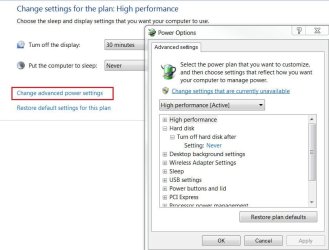
Hello Bob. In the start menu search box type "powercfg.cpl" without the quotes and select the "High Performance" plan, then to the right select "Change plan settings", go through the plan and disable anything to do with sleep including the HDD option; now the PC will not sleep. | My System Specs | | System Manufacturer/Model Number * BFK Customs * OS W 7 64-bit Ultimate CPU Intel Q9550 Yorkfield Motherboard ASUS P5Q Pro Memory 8GB Dominator 8500C5D Graphics Card ATI : XFX 5870 Sound Card Realtek HD Audio 7-1 Monitor(s) Displays 1x 47" LCD HDMI & 3x 26" LCD HDMI Screen Resolution 1920x1080P & 1920x1200 Keyboard Microsoft 500 Mouse Razer Diamondback 3G PSU Corsair 620HX Case Cooler Master RC-690 Cooling Tuniq Tower 120, 2x 140mm and 3x 120mm case fans Hard Drives 1x 80GB Intel X25-M G2 SSD : 1x 500GB & 1x 640GB WD Caviar Black(s) Internet Speed 14 Mb/s Other Info 1x Koutech 3Gb/s SATA HDD Hot Swap Rack |
05 Jan 2011
|
#5 | | Windows 7 Home Premium 32-bit |
Has anyone ever gotten some resolution on this??
I have some more to add to this. It has been months since this tread was last updated.
My system dual boots to Ubuntu 10. I also have a login set up for my wife on Windows 7. My systems does not exhibit the strange "not waking from sleep" when my sife is logged onto Windows 7, and when I am logged onto Ubuntu, no problems either. It is only when I am logged on as a user in Windows does the computer sleep on its own, and the only recourse I have is to reset or power down.
I also notice that all USB activity suspends, making my keyboard and mouse useless to try to wake up the system.
I have tried BIOS settings, and the last I checked, I let the OS decide how to sleep/suspend/etc. I have tried defaulting the power configurations via the methods described above.
Loading Windows 7 makes me nervous, and makes me want to run Ubuntu all the time of not for critical apps that are not written for Ubuntu.
I could use another login, though, but that makes absolutely no sense that Windows has this issue. | My System Specs | | System Manufacturer/Model Number Self built OS Windows 7 Home Premium 32-bit CPU AMD Phenom II X4 965 Processor 3.40 GHz Motherboard MSI 485G Memory 4 G Graphics Card On board Sound Card On board Monitor(s) Displays Philips HDTV Hard Drives DMI WD5000AAKB-22UKA USB Device
Seagate Desktop USB Device
WDC WD20EARS-00MVWB0 ATA Device |
05 Jan 2011
|
#6 | | Windows7 Pro 64bit SP-1; Windows XP Pro 32bit Grafton,IL |
Try this when you are logged into your account.
In the Start Search Bar type sleep. Click "Change when the computer sleeps" when it becomes visible.
Then use the drop down curtain in the new window to change to "Never". See picture below.
Not a cure exactly but it will negate the restart etc. needed and keep the mouse and keyboard working while you are logged on.
Mike
Last edited by Hopalong X; 26 Jan 2011 at 10:32 AM..
| My System Specs | | System Manufacturer/Model Number Hopalong/ Godzilla OS Windows7 Pro 64bit SP-1; Windows XP Pro 32bit CPU Intel Core i7-870 Lynnfield 2.93GHz LGA 1156 95W Quad-Core Motherboard ASUS P7P55D-E PRO Memory 8GB@1400MHz Crucial Ballistix DDR3-1600 4x2GB Graphics Card ASUS ENGTX460 DirectCU/2DI/1GD5 1GB 256-bit GDDR5 Sound Card VIA Onboard Monitor(s) Displays Asus VS248H-P 24"; Samsung SyncMaster 941BW 19"ws Screen Resolution 1920x1080; 1440x900 Keyboard Logitech K-320 Mouse Kensington PSU COOLER MASTER Silent Pro RS850-AMBAJ3-US 850W Modular Case COOLER MASTER HAF 932 RC-932-KKN5-GP Black Cooling Scythe "Mugen-2 Rev.B" (2 ScytheKaze-Jyuni PWM fans) Hard Drives Samsung 830 120GB SSD
Intel 320 120GB SSD
Western Digital Caviar Black WD7501AALS 750GB 7200 RPM SATA 3.0Gb/s
Western Digital Caviar Black WD6401AALS 640GB 7200 RPM SATA 3.0Gb/s Antivirus Avast Inernet Suite Browser IE 9 ; Chrome |
05 Jan 2011
|
#7 | | Windows 7 Home Premium 32-bit |
Thnak you, but that was already done. Throw any other ideas at me anytime. | My System Specs | | System Manufacturer/Model Number Self built OS Windows 7 Home Premium 32-bit CPU AMD Phenom II X4 965 Processor 3.40 GHz Motherboard MSI 485G Memory 4 G Graphics Card On board Sound Card On board Monitor(s) Displays Philips HDTV Hard Drives DMI WD5000AAKB-22UKA USB Device
Seagate Desktop USB Device
WDC WD20EARS-00MVWB0 ATA Device |
05 Jan 2011
|
#8 | | Windows 7 Home Premium 32-bit |
Windows 7 just "sleeps" Maybe it is something else...
I posted before about this problem on this thread, and now I have some more information. I created another user, hoping that it would exhibit the same bejaviour as when my wife logs on. This just fell asleep on me too. The first thing I notice is the LED's on my lighted keyboard turn off, indicating that the USB no longer has power. Then I hear a rush of speed on the harddrive, then the screen goes blank. I can still hear the fans and hard drives, but no matter what I DO, THE SYSTEM WILL NOT COME BACK. i HAVE TO HOLD IN THE POWER BUTTON.
AGain, Ubuntu has no problems.
Really might have to migrate everything over. Too bad, too. Hope someone can help. | My System Specs | | System Manufacturer/Model Number Self built OS Windows 7 Home Premium 32-bit CPU AMD Phenom II X4 965 Processor 3.40 GHz Motherboard MSI 485G Memory 4 G Graphics Card On board Sound Card On board Monitor(s) Displays Philips HDTV Hard Drives DMI WD5000AAKB-22UKA USB Device
Seagate Desktop USB Device
WDC WD20EARS-00MVWB0 ATA Device |
07 Jan 2011
|
#9 | | Windows 7 Home Premium 32-bit |
More news.
Seems to sleep very quickly when I process some video files. Using Handbrake to convert vob files to mp4.
Happened twice today already. | My System Specs | | System Manufacturer/Model Number Self built OS Windows 7 Home Premium 32-bit CPU AMD Phenom II X4 965 Processor 3.40 GHz Motherboard MSI 485G Memory 4 G Graphics Card On board Sound Card On board Monitor(s) Displays Philips HDTV Hard Drives DMI WD5000AAKB-22UKA USB Device
Seagate Desktop USB Device
WDC WD20EARS-00MVWB0 ATA Device |
10 Jan 2011
|
#10 | | Windows 7 Ultimate X64 bit |
This is an interesting thread and I have been reading some of the unique posts. I was having some interesting occurrences with my system with regards to the sleep function. It seems as though my system will only enter sleep mode every other time when I select it from the shutdown menu. I have my power button set to shut down when I press it and I had it set to sleep before but it wouldn't always work for some reason.
I have win 7 ult X64 installed but I think I might need a bios flash in order to fix the problem. I'll see how it goes. I'm gonna be re-installing win 7 on a new ssd I just bought anyway so I can update the bios previous to doing that.
Jones | My System Specs | | OS Windows 7 Ultimate X64 bit CPU E8400 Motherboard Asus P5Q Premium Memory 4Ghz ocz reaper Graphics Card Sapphire HD4850 Sound Card Xfi Extreme Gamer Monitor(s) Displays asus 24" LCD PSU Enermax Modu 82+ Case HAF X Hard Drives OCZ Vertex 2 120 gb, 2 WD Black 750 gb, WD My Book Essential External 1tb Windows goes to sleep and won't wake up problems? All times are GMT -5. The time now is 03:44 AM. | |