
Windows 7 Forums Search
Welcome to Windows 7 Forums. Our forum is dedicated to helping you find solutions with any problems, errors or issues you are experiencing with Windows 7. The Windows 7 forum also covers news and updates and has an extensive Windows 7 tutorial section that covers a wide range of tips and tricks.


Windows 7 - want to run chkdsk on f drive


03-29-2010   #1


windows 7 ultimate 32 bit


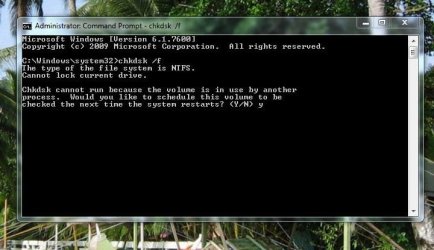
want to run chkdsk on f drive

this is what windows is telling me
see attached

pleas advise thanks

Attached Thumbnails
want to run chkdsk on f drive-f-error.jpg  
My System SpecsSystem Spec
03-29-2010   #2


Windows 7 Professional x64


Hello,

Have you tried scheduling the test for the next boot? Probably a program is using the drive, such as Google Desktop or your anti-virus.
My System SpecsSystem Spec
03-29-2010   #3


Windows 7 Enterprise x64


That's the best way to run CHKDSK anyway.
My System SpecsSystem Spec
.


03-30-2010   #4


windows 7 ultimate 32 bit


still states there is a lock on the drive
My System SpecsSystem Spec
03-30-2010   #5


Windows 7 Home Premium


You're trying to run it from C: drive, which will only run after next boot. You need to go to F: drive in the command prompt then run chkdsk, I believe.

It still won't run until the next boot, if I'm not mistaken.
My System SpecsSystem Spec
03-31-2010   #6


XP Pro SP3 X86 / Win7 Pro X86


Quote   Quote: Originally Posted by njnitehawk View Post
this is what windows is telling me
see attached

pleas advise thanks
I can't believe nobody's caught this...

To run chkdsk on a given drive you have to tell it which drive. If you want drive F: the command line would be:

CHKDSK F: /F
My System SpecsSystem Spec
03-31-2010   #7


Windows 7 Home Premium


Quote   Quote: Originally Posted by CommonTater View Post
Quote   Quote: Originally Posted by njnitehawk View Post
this is what windows is telling me
see attached

pleas advise thanks
I can't believe nobody's caught this...

To run chkdsk on a given drive you have to tell it which drive. If you want drive F: the command line would be:

CHKDSK F: /F
I think I did catch that in the post above yours. But, apparently he's not been back.
My System SpecsSystem Spec
03-31-2010   #8


XP Pro SP3 X86 / Win7 Pro X86


Quote   Quote: Originally Posted by Cato View Post
Quote   Quote: Originally Posted by CommonTater View Post
Quote   Quote: Originally Posted by njnitehawk View Post
this is what windows is telling me
see attached

pleas advise thanks
I can't believe nobody's caught this...

To run chkdsk on a given drive you have to tell it which drive. If you want drive F: the command line would be:

CHKDSK F: /F
I think I did catch that in the post above yours. But, apparently he's not been back.
Yes you did, sort of but why wouldn't you type in the command line for him?

CHKDSK is one of the very few CMD tools where you actually have to specify a drive letter.
My System SpecsSystem Spec
04-02-2010   #9


windows 7 ultimate 32 bit


hey guys thanks for advice
on chkdsk

please see the results (see attached)

one area of concern is

this:

The master file table's (MFT) BITMAP attribute is incorrect.
The Volume Bitmap is incorrect.
Windows found problems with the file system.
Run CHKDSK with the /F (fix) option to correct these.

how do correct that
Attached Files
File Type: txt chkdsk.txt (3.7 KB, 146 views)
My System SpecsSystem Spec
04-02-2010   #10


XP Pro SP3 X86 / Win7 Pro X86


Quote   Quote: Originally Posted by njnitehawk View Post
hey guys thanks for advice
on chkdsk

please see the results (see attached)

one area of concern is

this:

The master file table's (MFT) BITMAP attribute is incorrect.
The Volume Bitmap is incorrect.
Windows found problems with the file system.
Run CHKDSK with the /F (fix) option to correct these.

how do correct that
Ok, based on your text file I believe you've misunderstood the CHKDSK command...

To run CHKDSK on drive F the command is chkdsk f: /f
To run it on drive c the command is chkdsk c: /f

In Windows command shell...
Drive letters end in a colon: c: d: f: etc.
Command flags start with a / as in /F /R /? etc.

The /? flag is worth remembering since it calls up command line help for each program... For example: chkdsk /? would bring up a help list of all the command line switches available in chkdsk...

I do see that you have some problem on drive C .... Now this drive is locked by windows so you'll get a rather odd message when you try to make this work...

CHKDSK /F C:

You will be told the check cannot run right now and it will ask you if you want to schedule it for the next reboot... you can Y for yes or N for no... In this case you should say yes, close the command shell and then reboot... When the system restarts chkdsk will run with your command line parameters.
My System SpecsSystem Spec
Reply

want to run chkdsk on f drive problems?


Thread Tools


Similar Threads for: want to run chkdsk on f drive
Thread Forum
chkdsk? Performance & Maintenance
Do these chkdsk messages mean that I need to replace the drive? Crashes and Debugging
CHKdsk shows a different drive letter General Discussion
Why did chkdsk run? Performance & Maintenance
Dismount for chkdsk, diff HDD, E: drive missing Hardware & Devices


All times are GMT -5. The time now is 04:20 AM.


Windows 7 Forums is an independent web site and has not been authorized,
sponsored, or otherwise approved by Microsoft Corporation.
"Windows 7" and related materials are trademarks of Microsoft Corp.
© Designer Media Ltd
  

1 2 3 4 5 6 7 8 9 10 11 12 13 14 15 16 17 18 19 20 21 22 23 24 25 26 27 28 29 30