|
Welcome to Windows 7 Forums. Our forum is dedicated to helping you find solutions with any problems, errors or issues you are experiencing with Windows 7. The Windows 7 forum also covers news and updates and has an extensive Windows 7 tutorial section that covers a wide range of tips and tricks.
Windows 7 - Sleep mode not working |
04-17-2010
|
#1 | | |
Sleep mode not working hello,
i reformatted my computer from windows vista to windows 7 ultimate just 3 days ago. and i noticed that the "sleep" mode does not work.
i selected the screen to turn off after 5 minutes with battery and charging, but it doesn't work, the screen is just always on...
i also selected to sleep when i close the lid. but instead my computer just shuts down and next time when i start it on, it says that i have shut down the computer unexpectedly and needs to do a scan.
please help!
| My System Specs | | |
04-17-2010
|
#2 | | Windows 7 Ultimate, Ubuntu 10.04 LTS - the Lucid Lynx |

Quote: Originally Posted by sweetOCchick hello,
i reformatted my computer from windows vista to windows 7 ultimate just 3 days ago. and i noticed that the "sleep" mode does not work.
i selected the screen to turn off after 5 minutes with battery and charging, but it doesn't work, the screen is just always on...
i also selected to sleep when i close the lid. but instead my computer just shuts down and next time when i start it on, it says that i have shut down the computer unexpectedly and needs to do a scan.
please help!
Hello !! Welcome to SF !!
Lets see what is going on !! Start > CMD > Right Click and Run as administrator > powercfg -ENERGY The utility will take a while to generate the report, sometimes more than the 60 seconds it quotes you—but when it finishes you can open up the generated file in your browser or C:\Windows\system32\energy-report.html. Post us the Report !!
Hope this helps,
Captain | My System Specs | | System Manufacturer/Model Number Custom Build OS Windows 7 Ultimate, Ubuntu 10.04 LTS - the Lucid Lynx Motherboard Asus A8N-VM Memory 2 GB Graphics Card Nvidia GeForce 6150 Sound Card Sound Blaster Audigy 24-Bit Monitor(s) Displays Samsung SyncMaster 2253LW 21.6" Widescreen LCD Monitor Hard Drives 320 GB - Internal
1 TB WD External |
04-18-2010
|
#3 | | |
here it is Power Efficiency Diagnostics Report Code:
Computer Name JULIAZHU-PC
Scan Time 2010-04-18T17:28:04Z
Scan Duration 60 seconds
System Manufacturer Hewlett-Packard
System Product Name Pavilion dv2310ca (GA154UA#ABL)
BIOS Date 11/22/2007
BIOS Version F.39
OS Build 7600
Platform Role PlatformRoleMobile
Plugged In false
Process Count 60
Thread Count 745
Report GUID {016a7164-855e-49c4-86d3-c0b094641d15}
Analysis Results
Errors
CPU Utilization:Processor utilization is high
The average processor utilization during the trace was high. The system will consume less power when the average processor utilization is very low. Review processor utilization for individual processes to determine which applications and services contribute the most to total processor utilization.
Average Utilization (%) 25.69
Warnings
Power Policy:802.11 Radio Power Policy is Maximum Performance (Plugged In)
The current power policy for 802.11-compatible wireless network adapters is not configured to use low-power modes.
CPU Utilization:Individual process with significant processor utilization.
This process is responsible for a significant portion of the total processor utilization recorded during the trace.
Process Name chrome.exe
PID 828
Average Utilization (%) 3.54
Module Average Module Utilization (%)
\Users\Julia Zhu\AppData\Local\Google\Chrome\Application\4.1.249.1045\chrome.dll 1.28
\SystemRoot\System32\win32k.sys 0.76
\SystemRoot\system32\ntkrnlpa.exe 0.62
CPU Utilization:Individual process with significant processor utilization.
This process is responsible for a significant portion of the total processor utilization recorded during the trace.
Process Name chrome.exe
PID 3092
Average Utilization (%) 2.16
Module Average Module Utilization (%)
\Users\Julia Zhu\AppData\Local\Google\Chrome\Application\4.1.249.1045\chrome.dll 1.72
\SystemRoot\system32\ntkrnlpa.exe 0.16
\SystemRoot\System32\win32k.sys 0.13
CPU Utilization:Individual process with significant processor utilization.
This process is responsible for a significant portion of the total processor utilization recorded during the trace.
Process Name SearchFilterHost.exe
PID 3884
Average Utilization (%) 2.09
Module Average Module Utilization (%)
\Windows\System32\msxml3.dll 0.44
\SystemRoot\system32\ntkrnlpa.exe 0.31
\Program Files\Common Files\microsoft shared\Filters\offfiltx.dll 0.26
CPU Utilization:Individual process with significant processor utilization.
This process is responsible for a significant portion of the total processor utilization recorded during the trace.
Process Name ekrn.exe
PID 1748
Average Utilization (%) 1.95
Module Average Module Utilization (%)
1.21
\SystemRoot\system32\ntkrnlpa.exe 0.31
\SystemRoot\System32\Drivers\Ntfs.sys 0.10
CPU Utilization:Individual process with significant processor utilization.
This process is responsible for a significant portion of the total processor utilization recorded during the trace.
Process Name wlmail.exe
PID 4032
Average Utilization (%) 1.94
Module Average Module Utilization (%)
\SystemRoot\system32\ntkrnlpa.exe 0.48
\Device\HarddiskVolume1\Program Files\Windows Live\Mail\uxcore.dll 0.34
\SystemRoot\System32\win32k.sys 0.26
CPU Utilization:Individual process with significant processor utilization.
This process is responsible for a significant portion of the total processor utilization recorded during the trace.
Process Name SearchIndexer.exe
PID 3220
Average Utilization (%) 1.72
Module Average Module Utilization (%)
\SystemRoot\system32\ntkrnlpa.exe 0.30
\Device\HarddiskVolume1\Windows\System32\esent.dll 0.26
\Device\HarddiskVolume1\Windows\System32\tquery.dll 0.22
CPU Utilization:Individual process with significant processor utilization.
This process is responsible for a significant portion of the total processor utilization recorded during the trace.
Process Name chrome.exe
PID 3736
Average Utilization (%) 1.57
Module Average Module Utilization (%)
\Users\Julia Zhu\AppData\Local\Google\Chrome\Application\4.1.249.1045\chrome.dll 1.33
\SystemRoot\system32\ntkrnlpa.exe 0.09
\SystemRoot\System32\win32k.sys 0.04
CPU Utilization:Individual process with significant processor utilization.
This process is responsible for a significant portion of the total processor utilization recorded during the trace.
Process Name SearchProtocolHost.exe
PID 516
Average Utilization (%) 1.23
Module Average Module Utilization (%)
\SystemRoot\system32\ntkrnlpa.exe 0.40
\SystemRoot\System32\ntdll.dll 0.13
\Windows\System32\rpcrt4.dll 0.09
CPU Utilization:Individual process with significant processor utilization.
This process is responsible for a significant portion of the total processor utilization recorded during the trace.
Process Name svchost.exe
PID 3180
Average Utilization (%) 1.10
Module Average Module Utilization (%)
\Device\HarddiskVolume1\ProgramData\Microsoft\Windows Defender\Definition Updates\{7141978E-8239-4BE7-A4F4-7A493901E09E}\mpengine.dll 0.88
0.06
\SystemRoot\system32\ntkrnlpa.exe 0.06
CPU Utilization:Individual process with significant processor utilization.
This process is responsible for a significant portion of the total processor utilization recorded during the trace.
Process Name msfeedssync.exe
PID 2144
Average Utilization (%) 0.92
Module Average Module Utilization (%)
\Windows\System32\msxml3.dll 0.27
\SystemRoot\system32\ntkrnlpa.exe 0.25
\Device\HarddiskVolume1\Windows\System32\ntdll.dll 0.10
CPU Utilization:Individual process with significant processor utilization.
This process is responsible for a significant portion of the total processor utilization recorded during the trace.
Process Name dwm.exe
PID 1288
Average Utilization (%) 0.89
Module Average Module Utilization (%)
\Device\HarddiskVolume1\Windows\System32\nvd3dum.dll 0.43
\Device\HarddiskVolume1\Windows\System32\dwmcore.dll 0.18
\SystemRoot\system32\ntkrnlpa.exe 0.05
CPU Utilization:Individual process with significant processor utilization.
This process is responsible for a significant portion of the total processor utilization recorded during the trace.
Process Name System
PID 4
Average Utilization (%) 0.75
Module Average Module Utilization (%)
\SystemRoot\system32\ntkrnlpa.exe 0.54
\SystemRoot\system32\halmacpi.dll 0.06
\SystemRoot\System32\Drivers\cng.sys 0.02
CPU Utilization:Individual process with significant processor utilization.
This process is responsible for a significant portion of the total processor utilization recorded during the trace.
Process Name svchost.exe
PID 992
Average Utilization (%) 0.46
Module Average Module Utilization (%)
\SystemRoot\system32\ntkrnlpa.exe 0.18
\Device\HarddiskVolume1\Windows\System32\esent.dll 0.13
\Device\HarddiskVolume1\Windows\System32\ntdll.dll 0.03
CPU Utilization:Individual process with significant processor utilization.
This process is responsible for a significant portion of the total processor utilization recorded during the trace.
Process Name lsass.exe
PID 524
Average Utilization (%) 0.44
Module Average Module Utilization (%)
\SystemRoot\system32\ntkrnlpa.exe 0.26
\Device\HarddiskVolume1\Windows\System32\rpcrt4.dll 0.07
\Device\HarddiskVolume1\Windows\System32\ntdll.dll 0.04
CPU Utilization:Individual process with significant processor utilization.
This process is responsible for a significant portion of the total processor utilization recorded during the trace.
Process Name GoogleDesktop.exe
PID 2420
Average Utilization (%) 0.36
Module Average Module Utilization (%)
\SystemRoot\system32\ntkrnlpa.exe 0.18
\Device\HarddiskVolume1\Windows\System32\ntdll.dll 0.05
\Device\HarddiskVolume1\Windows\System32\rpcrt4.dll 0.03
CPU Utilization:Individual process with significant processor utilization.
This process is responsible for a significant portion of the total processor utilization recorded during the trace.
Process Name WMIADAP.exe
PID 4020
Average Utilization (%) 0.33
Module Average Module Utilization (%)
\SystemRoot\system32\ntkrnlpa.exe 0.16
\Windows\System32\msvcrt.dll 0.02
\Windows\System32\KernelBase.dll 0.02
CPU Utilization:Individual process with significant processor utilization.
This process is responsible for a significant portion of the total processor utilization recorded during the trace.
Process Name explorer.exe
PID 1376
Average Utilization (%) 0.31
Module Average Module Utilization (%)
\SystemRoot\System32\win32k.sys 0.09
\SystemRoot\system32\ntkrnlpa.exe 0.05
\Device\HarddiskVolume1\Windows\System32\usp10.dll 0.03
CPU Utilization:Individual process with significant processor utilization.
This process is responsible for a significant portion of the total processor utilization recorded during the trace.
Process Name SynTPEnh.exe
PID 2724
Average Utilization (%) 0.27
Module Average Module Utilization (%)
\SystemRoot\system32\ntkrnlpa.exe 0.05
\SystemRoot\System32\win32k.sys 0.03
\SystemRoot\system32\drivers\Wdf01000.sys 0.02
CPU Utilization:Individual process with significant processor utilization.
This process is responsible for a significant portion of the total processor utilization recorded during the trace.
Process Name chrome.exe
PID 2868
Average Utilization (%) 0.25
Module Average Module Utilization (%)
\Users\Julia Zhu\AppData\Local\Google\Chrome\Application\4.1.249.1045\chrome.dll 0.18
\SystemRoot\system32\ntkrnlpa.exe 0.03
\SystemRoot\System32\ntdll.dll 0.00
CPU Utilization:Individual process with significant processor utilization.
This process is responsible for a significant portion of the total processor utilization recorded during the trace.
Process Name svchost.exe
PID 952
Average Utilization (%) 0.23
Module Average Module Utilization (%)
\Device\HarddiskVolume1\Windows\System32\sysmain.dll 0.14
\SystemRoot\system32\ntkrnlpa.exe 0.03
\Device\HarddiskVolume1\Windows\System32\msvcrt.dll 0.01
Information
Platform Timer Resolution:Platform Timer Resolution
The default platform timer resolution is 15.6ms (15625000ns) and should be used whenever the system is idle. If the timer resolution is increased, processor power management technologies may not be effective. The timer resolution may be increased due to multimedia playback or graphical animations.
Current Timer Resolution (100ns units) 156000
Power Policy:Active Power Plan
The current power plan in use
Plan Name OEM Power Saver
Plan GUID {a1841308-3541-4fab-bc81-f71556f20b4a}
Power Policy:Power Plan Personality (On Battery)
The personality of the current power plan when the system is on battery power.
Personality Power Saver
Power Policy:Video Quality (On Battery)
Enables Windows Media Player to optimize for quality or power savings when playing video.
Quality Mode Balance Video Quality and Power Savings
Power Policy:Power Plan Personality (Plugged In)
The personality of the current power plan when the system is plugged in.
Personality Power Saver
Power Policy:Video quality (Plugged In)
Enables Windows Media Player to optimize for quality or power savings when playing video.
Quality Mode Balance Video Quality and Power Savings
System Availability Requests:Analysis Success
Analysis was successful. No energy efficiency problems were found. No information was returned.
USB Suspend:Analysis Success
Analysis was successful. No energy efficiency problems were found. No information was returned.
Battery:Battery Information
Battery ID Hewlett-Packard Primary
Manufacturer Hewlett-Packard
Serial Number
Chemistry LION
Long Term 1
Design Capacity 47520
Last Full Charge 31946
Platform Power Management Capabilities:Supported Sleep States
Sleep states allow the computer to enter low-power modes after a period of inactivity. The S3 sleep state is the default sleep state for Windows platforms. The S3 sleep state consumes only enough power to preserve memory contents and allow the computer to resume working quickly. Very few platforms support the S1 or S2 Sleep states.
S1 Sleep Supported false
S2 Sleep Supported false
S3 Sleep Supported true
S4 Sleep Supported true
Platform Power Management Capabilities:Adaptive Display Brightness is supported.
This computer enables Windows to automatically control the brightness of the integrated display.
Platform Power Management Capabilities:Processor Power Management Capabilities
Effective processor power management enables the computer to automatically balance performance and energy consumption.
Group 0
Index 0
Idle (C) State Count 1
Performance (P) State Count 2
Throttle (T) State Count 0
Platform Power Management Capabilities:Processor Power Management Capabilities
Effective processor power management enables the computer to automatically balance performance and energy consumption.
Group 0
Index 1
Idle (C) State Count 1
Performance (P) State Count 2
Throttle (T) State Count 0
Last edited by Brink; 04-21-2010 at 12:10 PM..
Reason: code box
| My System Specs | | |
04-18-2010
|
#4 | | |
so i have 1 error and 21 warnings? i just reformatted it...hmm please help me fix it! thanks so much! | My System Specs | | |
04-18-2010
|
#5 | | Xp Pro SP3 x64, Win7 x86 (Ult 7600), Win7 x64 Ult 7600, TechNet RTM on AMD x64 (2.8Ghz) |
I searched your model # & this is what I found:
Processor & ChipsetProcessor ManufacturerAMDProcessor Type Turion 64 X2Processor ModelTL-52Processor Speed1.60 GHz Processor TechnologyAMD64 Technology | PowerNow Technology | HyperTransport TechnologyBus Speed1600 MHzL2 Cache1 MB Memory
Standard Memory 1 GB Memory TechnologyDDR2 SDRAM
Memory Card ReaderYesMemory Card SupportMemory Stick | Memory Stick PRO | xD-Picture Card | MultiMediaCard (MMC) | Secure Digital (SD) Card
StorageHard Drive Capacity120 GB ********************************************** Have you upgraded any of this, or is it basically correct ? | My System Specs | | System Manufacturer/Model Number Built them myself, Science Experiments ! OS Xp Pro SP3 x64, Win7 x86 (Ult 7600), Win7 x64 Ult 7600, TechNet RTM on AMD x64 (2.8Ghz) CPU AMD-64 3000mhz, AMD-32 2400mhz, AMD-64 3200mhz, AMDx64 2.8G Motherboard SIS 755, ECS-K8M890M-M (Ult 7600), & others Memory 2gb, 4gb on the Ult 7600, 4gb on Technet RTM Graphics Card Draw my own Graphics, several nVidia cards Sound Card on motherboard Monitor(s) Displays 19" flat scr, 19" Acer widescr, 22" Emprex Widescr, 23" Acer Screen Resolution 1280 x 1024, 1440 x 900, 1920 x 1080 Keyboard Compaq & Dell recycled from GoodWill Mouse Made in China Optical Wired Mouse PSU 430w, 550w, 600w, etc Case All Generic Full Towers Cooling Open Air & a few fans Hard Drives 6 pata Ide HD's & 2 Sata HD's
added 80gb external on Ult 7600 computer,
several extra 1tb & 2TB SATA HD's Internet Speed Fast Cable InterNet Other Info Linksys Routers, switches, & Hubs
Too Many USB Flash Drives to count, Biggest is 64GB !
Eight computers in my home network.
Twelve computers at my business network.
Linked via TeamViewer !
Lots of old used spare computer parts everywhere! |
04-18-2010
|
#6 | | |
hey no, i upgrated my ram to 2 GB
i went to my computer and right clicked on properties and here is what i found:
processor: AMD TUrion (tm) 64X2 1.60 GHz
installed memory (RAM): 2.00 GB (1.87 GB usable)
System type: 32 bit operating system
pen and touch: no pen or touch input is available for this display
windows is activated
product id:
i'm not sure if any of that was useful but that's all i can find and i'm not sure what the storagehard drive is...
thanks!
Last edited by Brink; 04-21-2010 at 12:09 PM..
Reason: removed product id number
| My System Specs | | |
04-19-2010
|
#8 | | Windows 7 Ultimate, Ubuntu 10.04 LTS - the Lucid Lynx |

Quote: Originally Posted by sweetOCchick can someone help me solve this issue please? Hello !!
Try this article and change the Power Plans Power Plan Settings - Change try with different Plan and see whether you having the same problem !! Also try this link Sleep and hibernation: frequently asked questions
Hope this helps,
Captain | My System Specs | | System Manufacturer/Model Number Custom Build OS Windows 7 Ultimate, Ubuntu 10.04 LTS - the Lucid Lynx Motherboard Asus A8N-VM Memory 2 GB Graphics Card Nvidia GeForce 6150 Sound Card Sound Blaster Audigy 24-Bit Monitor(s) Displays Samsung SyncMaster 2253LW 21.6" Widescreen LCD Monitor Hard Drives 320 GB - Internal
1 TB WD External |
04-20-2010
|
#9 | | |
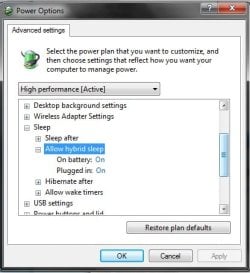
Hey, I had the same problem after going from Vista to Seven. I figured out that my computer's hardware did not support S1? and S2? sleep. To use sleep I had to go to the power settings and within the plans enable 'Hybrid Sleep', after this it sleeps perfectly. Your problem sounded exactly the same as mine, so hopefully this works for you to.
Tim | My System Specs | | System Manufacturer/Model Number HP Dv3-2137tx OS 7 Home Premium x64 CPU Core 2 P8700 2.53ghz Motherboard Compaq Memory 4gb DDR2 Graphics Card Nvidia GeForce 105M Sound Card Integrated Monitor(s) Displays 13" 1366x768 Cooling Stock Hard Drives 500gb 5400rpm |
04-21-2010
|
#10 | | |
Capt.Jack Sparrow:
i tried all those steps but didn't do anything...i went to hp chat support and the person told me to change some settings in the advanced power options. he told me to change under "power buttons and lid" to "do nothing" and "hard disk" to "never" and that didn't work either!! and this morning windows action center told me to download some chipset and media driver so i did those...still nothing...!!! this is really stressing me out
205tim:
thanks for your reply i will def try that tonight. because i noticed only after the lid is closed for a long time, the computer shuts down by itself so i will try that when i sleep and hopefully in the morning i will wake up to a a working computer.. fingers crossed! | My System Specs | | Sleep mode not working problems? All times are GMT -5. The time now is 09:45 PM. |  |