Disk Partitions Help

fynx

New member
Local time
1:30 AM
Messages
12
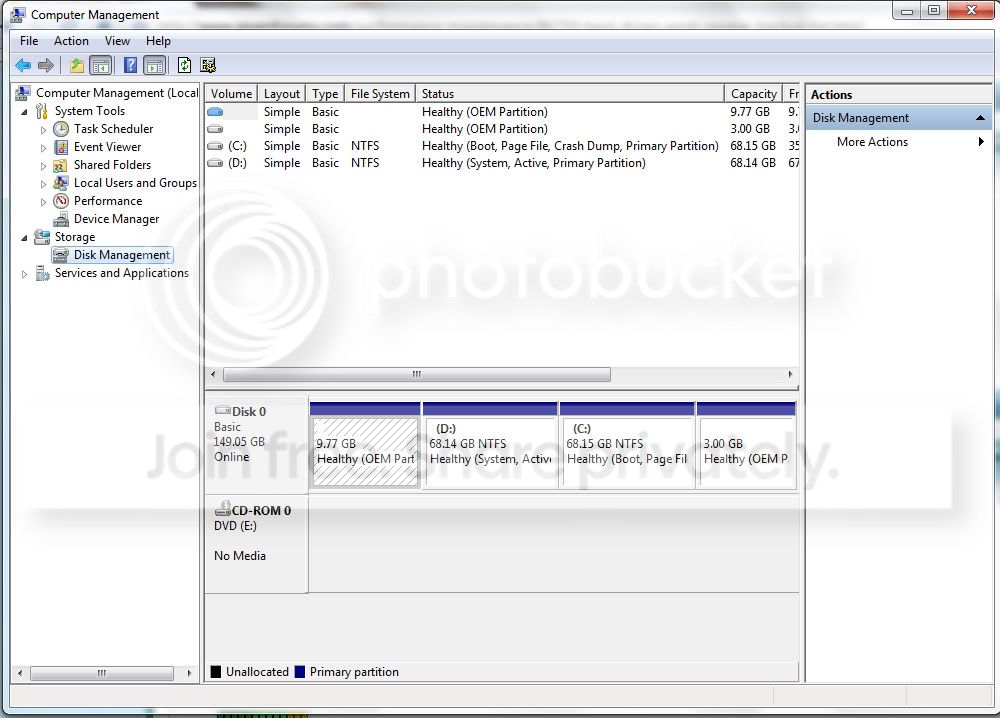
so here's my problem, i used to have a Disk 0(this is where C: was) and a Disk 1(my Drive D:) but since i installed win7 my two drives (C and D) were merged into just Disk 0.

what i want to do is get the Disk 1 label or volume (i dunno what that is called) back.

heres a screenie of what my new HD looks like

screen3.jpg


please help
 

My Computer

Computer Manufacturer/Model Number
Acer Aspire 4920G
OS
Windows 7 Professional
This is the screen shot from your previous thread about a similar problem,

screen2.jpg


The problem is that according to that you only have one hard drive with four partitions, there is no second drive showing.

Start with going into the bios and making sure that the second drive is being detected there, and also make sure that both the power and data cable (either IDE or SATA) are connected firmly to the drive.
 

My Computer

Computer type
PC/Desktop
Computer Manufacturer/Model Number
Me
OS
Win 7 Ultimate x64
CPU
FX-8350 @ 4.6 GHz so far
Motherboard
Asus M5A97 EVO
Memory
ADATA XPG V1 Series Black 8GB DDR3 1600
Graphics Card(s)
Sapphire R9 270x Dual-X
Sound Card
Xonar DGX w/ Corsair Vengence 1300
Monitor(s) Displays
Acer S232HL Abid
Screen Resolution
1920x1080
Hard Drives
120 GB OCZ Vertex 3
500 GB Seagate 7200.12
PSU
Antec Earthwatts 650W Green
Case
Antec Three Hundred
Cooling
Cooler Master 212 EVO
Keyboard
Logitech G510
Mouse
Logitech G500s
Internet Speed
35000/3000
need help partitioning....

can someone pls help me out...my C drive there is 382 GB of free space from a total of 452 GB and i want to shrink it to 80 GB but when i do it from computer management as shown it only is allowing me to only shrink down to 216 GB not any lesser
 

My Computer

Computer Manufacturer/Model Number
HP G62-144 DX (Notebook)
OS
Windows 7 Home Premium 64-bit
CPU
Intel Core i3 M330 @ 2.13 GHz
Memory
4 GB DDR3 SDRAM
Monitor(s) Displays
15.6" HD LED
Screen Resolution
1366x768
can someone pls help me out...my C drive there is 382 GB of free space from a total of 452 GB and i want to shrink it to 80 GB but when i do it from computer management as shown it only is allowing me to only shrink down to 216 GB not any lesser

Please avoid double-posting.

I've already submitted an approach for you in another post.

Please check you other post.
Thanks,
 

My Computer

Computer Manufacturer/Model Number
Toshiba Satellite S875D-S7239 laptop
OS
MS Windows 7 Ultimate SP1 64-bit
CPU
AMD A10-4600M
Motherboard
AMD Pumori (Socket FT1)
Memory
6.00 GB Dual-Channel DDR3 @ 798MHz (11-11-12-28)
Graphics Card(s)
AMD Radeon HD 7660G
Sound Card
High Definition Audio Device
Monitor(s) Displays
Generic PnP Monitor (1600x900@60Hz)
Screen Resolution
1600x900@60Hz
Hard Drives
SSD 119GB Corsair CSSD-V128GB2 ATA Device
Keyboard
Standard PS/2 Keyboard
Mouse
HP Wireless Optical Mobile Mouse Model FHA-3410
Internet Speed
What the local pub, local coffee shop offers.
Other Info
Optical Drive:MATSHITA BD-CMB UJ160B ATA Device


Also have an Asus ha1002xp netbook with Win 7 Ultimate installed.
sorry abt the double post i was just a bit confused as to where would be the best place to post my issue...thanx again karlsnooks for the help...
 

My Computer

Computer Manufacturer/Model Number
HP G62-144 DX (Notebook)
OS
Windows 7 Home Premium 64-bit
CPU
Intel Core i3 M330 @ 2.13 GHz
Memory
4 GB DDR3 SDRAM
Monitor(s) Displays
15.6" HD LED
Screen Resolution
1366x768
can someone pls help me out...my C drive there is 382 GB of free space from a total of 452 GB and i want to shrink it to 80 GB but when i do it from computer management as shown it only is allowing me to only shrink down to 216 GB not any lesser
.
Assuming that you have significantly less then 80 gigs of info on drive C: the most likely cause is file fragmentation. In this situation I use Perfectdisk which does a good job of moving everything and shows a disk map so you can actually see what is preventing the partition from being shrunk.
 

My Computer

Computer type
PC/Desktop
OS
Windows 7 x64
CPU
Intel Core2 Extreme Q6850 3.00GHz
Motherboard
EVGA 132-CK-NF79
Memory
8 GB
Graphics Card(s)
Radeon R7 260X
Sound Card
Xonar DS
Hard Drives
Hitachi Deskstar 1 tb
no fragmentations. i did something when i cleaned installed win7. i formatted both drives and when the OS booted up and i looked at disk management. the structure was like that. before it has a Disk 0 which contains C: and the two OEM partitions and a Disk 1 whick has D:
 

My Computer

Computer Manufacturer/Model Number
Acer Aspire 4920G
OS
Windows 7 Professional
Did you do this?

Start with going into the bios and making sure that the second drive is being detected there, and also make sure that both the power and data cable (either IDE or SATA) are connected firmly to the drive.
 

My Computers

System One System Two

  • Computer type
    PC/Desktop
    OS
    7 X64
    CPU
    i5 8400
    Motherboard
    gigabyte b365m ds3h
    Memory
    2x8gb 3200mhz
    Hard Drives
    various
    PSU
    pure power 11 400w cm
    Case
    Coolermaster
    Cooling
    cryorig m9i
  • Computer type
    PC/Desktop
    OS
    7x64
    CPU
    g5400
    Motherboard
    ga b365m ds3h
    Memory
    8gb ddr4 2400
    PSU
    xfx pro 450w
yes. i did those, same as before my only hard drive is detected on the bios. but i don't see the relevance because i only have one hard drive. the thing is that when i bought this laptop the structure had a disk 0 and a disk 1.
 

My Computer

Computer Manufacturer/Model Number
Acer Aspire 4920G
OS
Windows 7 Professional
Disk 1 should only be an actual physical disk, not a logical partition. If you only have one harddisk on your computer, there should be no Disk 1, unless you have an external drive connected to your computer at that time.
 

My Computer

OS
Windows 7
i know about assigning a letter to a drive.. and thats not my problem...

@surfasb

hmm. is that so. ok.
but how come i had a DIsk 1 when i bought my laptop and was running vista.
but if its like that sorry for the trouble.
 

My Computer

Computer Manufacturer/Model Number
Acer Aspire 4920G
OS
Windows 7 Professional
Back
Top