
| Windows 7: Hot weather overloading my fan. |
29 May 2010
|
#1 | | |
Hot weather overloading my fan. The other day, when it was nearly 100 degrees out, I came home and could hear the computer from the door. The fan was working hard. I cleaned the fan, and it DID need a good cleaning, but it didn't get much softer. After I put on the a/c the fan got quieter than I've heard it in awhile. The next morning was cool and the pc was quiet. When I got home, after the temp rose to upper 80's, it was very loud again. I only have 1 fan in there. The PSU is 800 or 850. I decided that on hot days, I'll just shut off my pc when I'm not using it, but how many fans should I have to support that PSU?
Thank you | My System Specs |
| System Manufacturer/Model Number ZT Affinity 7552Ma Desktop OS Windows 7 Professional Motherboard ACPI X64 Memory 8 GB Graphics Card ATI Radeon HD 6670 Sound Card ATI T200 Unified AVstream Driver Monitor(s) Displays Westinghouse TV Screen Resolution 1366x768 Keyboard Standard PS/2 PSU AMD Phenom II 955 Quad-Core Hard Drives 1TB SATA |
29 May 2010
|
#2 | | W 7 64-bit Ultimate The Lowcountry |
Hello Tousdae.
I'd be hard to say how many fans you may need, who manufactured the case and what model is it? | My System Specs | | System Manufacturer/Model Number * BFK Customs * OS W 7 64-bit Ultimate CPU Intel Q9550 Yorkfield Motherboard ASUS P5Q Pro Memory 8GB Dominator 8500C5D Graphics Card ATI : XFX 5870 Sound Card Realtek HD Audio 7-1 Monitor(s) Displays 1x 47" LCD HDMI & 3x 26" LCD HDMI Screen Resolution 1920x1080P & 1920x1200 Keyboard Microsoft 500 Mouse Razer Diamondback 3G PSU Corsair 620HX Case Cooler Master RC-690 Cooling Tuniq Tower 120, 2x 140mm and 3x 120mm case fans Hard Drives 1x 80GB Intel X25-M G2 SSD : 1x 500GB & 1x 640GB WD Caviar Black(s) Internet Speed 14 Mb/s Other Info 1x Koutech 3Gb/s SATA HDD Hot Swap Rack |
29 May 2010
|
#3 | | 64-bit Windows 7 Ultimate SP1 & Windows 8 Enterprise Texas |
Hello Tousdae,
If you do not require your computer to run when not sitting in front of it, then you might consider putting it in sleep mode instead of letting it stay running all of the time. You'll save money on your electric bill, and it will start up fast when needed.
You can also set your Advanced Power Plan settings to have the Minimum processor state set to 5% under the Processor power management option to not have the CPU run as hard when not needed by Windows 7.
Hope this helps
Shawn | My System Specs | | Computer type PC/Desktop System Manufacturer/Model Number Self built custom OS 64-bit Windows 7 Ultimate SP1 & Windows 8 Enterprise CPU Intel i7-3930K 3.2 Ghz (O/C 4 Ghz) Motherboard ASRock X79 Extreme11 Memory 32 GB (8GBx4) G.SKILL DDR3 Quad PC3-19200 2400MHz Graphics Card Sapphire HD5870 Eyefinity 6 2GB Sound Card SB Recon 3Di Integrated Chip Monitor(s) Displays 3x 27" Asus VE278Q Screen Resolution 1920x1080 Keyboard Logitech Cordless Desktop MX 5500 Revolution Mouse Logitech Cordless Desktop MX 5500 Revolution PSU OCZ Series Gold OCZZ1000M 1000W Case Thermaltake Level 10 GT Snow Edition Cooling Corsair Hydro H100 Hard Drives 256GB OCZ Vector
160GB OCZ RevoDrive X2
2 x 1TB Samsung HDD HD154UI SATA Internet Speed 50 Mb/s Download and 2 Mb/s Upload Other Info Microsoft LifeCam Cinema
Lite-On iHBS212 12x BD Writer
Samsung CLX-3175FW Printer
Netgear WNDR3800 Router
Motorola SBG6580 Cable Modem
2x APC Back-UPS XS 1500 |
29 May 2010
|
#4 | | Vista, Windows7, Mint Mate, Zorin, Windows 8 Florida in winter, Black Forest/Germany |
Apart from wasting a lot of energy it is really not a good idea to leave the PC noodling when you are not around. The energy is better used if you set your AC to e.g. 80F - that keeps the mildew out of your house. | My System Specs | | System Manufacturer/Model Number HP, Dell, Gateway, Toshiba - 4 laptops and 2 desktops OS Vista, Windows7, Mint Mate, Zorin, Windows 8 CPU from 1.6GHz Duo to i7 Monitor(s) Displays 2x HP w2207 Keyboard with trackball - no mices Mouse Trackball mice Hard Drives 5x HDD, 7x SSD, 12x Externals Internet Speed DSL 6000 |
29 May 2010
|
#5 | | Dual boot XP Pro SP3x86 and Win7 Pro x64 New Mexico |
To shut or not shut a machine off between uses is a controversy that will rage long after most of us are dead. I always shut mine off if not at home: it's a fire hazard, no matter how benign. I usually shut it off if I am going to be away for, say, more than 30 minutes (no hard/fast rule though). It seems to me I have read many more articles on the tangible benefits of shutting down v. the dubious benefits gained by leaving it on regardless of the time period between uses. I build a new machine about every two years so it is entirely possible that I build anew before any deleterious effects of my frequent ons/offs become manifest. On the other hand, I have used "old" HDDs as backup or utility drives and they forever seem to spin away regardless of how many on/off cycles they have endured.
Regarding the fan speed. Depending on the design of your mobo, as the CPU heats up, fan speeds increase. For me, the first order of business, clean the dust from my case paying particular attention to the CPU heat sink which is prone to clogging with dust. What I do about every three months, is to hook up the hose to my shopvac to the exhaust port and then blast away. I then closely check all of the heat sinks/cooling fins/pipes on all my devices (CPU, GPU, RAM) to make sure they are clean.
One other option (that elicits an "OMG!!" from some) if you continually run hot with the machine on, take off the case side panel that faces your mobo. Then place a small portable fan maybe three four inches away directed toward the middle of the case. This is a fan I have used on any number of occasions. I think WalMart has these for less than Amazon. One of these 8-inch, large blade, high velocity, high volume fans will cool your entire case/components by blasting a stream of air in a 360 degree radius eliminating hot spots/dead zones. The reviews at Amazon testify to the output; one user mentions that he cools his receiver with it.
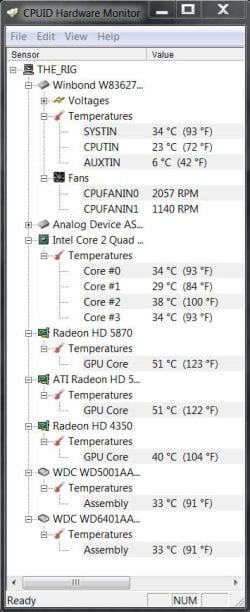
Now some object that the air is not channeled front to back over the components so that they cool. And it is not: the air is blasted at the components which blasts the heat away. Or, in the case, you can hang as many fans as space/connectors permit. Finally, you might DL the free HWMonitor which will monitor a variety of temps/fan speeds/voltages, etc. and see what your temps are and how various suggestions you receive effect cooling.
Monk | My System Specs | | System Manufacturer/Model Number Custom OS Dual boot XP Pro SP3x86 and Win7 Pro x64 CPU AMD Phenom II x3 720 BE OCed to 3.3 GHz Motherboard Asus M3A79T Deluxe Memory 2x2GB OCZ OCZ2RPR10664GK PC2-8500 DDR2 Graphics Card Sapphire ATi Radeon 4830 HD x2 (XFire) Sound Card Integrated (SoundMax) Monitor(s) Displays Dual: LG L227WTG/LG M237WD Screen Resolution 1680 x 1050; 1920 x1280 Keyboard Black with lots of keys Mouse Razer Lachesis, Logitech RumbePad2, Logitech Marble PSU Zalman 750HD Modular Case Antec 900 Cooling 4 120mm, 1 200mm fans Hard Drives 3 WDC WD7501AALS-00J7B0 Internet Speed Who counts Other Info 7:1 SS |
29 May 2010
|
#6 | | Windows 7 Home Premium SP1, clean install, upgrade disc CT |

Quote: Originally Posted by HMonk To shut or not shut a machine off between uses is a controversy that will rage long after most of us are dead. I always shut mine off if not at home: it's a fire hazard, no matter how benign. I usually shut it off if I am going to be away for, say, more than 30 minutes (no hard/fast rule though). It seems to me I have read many more articles on the tangible benefits of shutting down v. the dubious benefits gained by leaving it on regardless of the time period between uses. I build a new machine about every two years so it is entirely possible that I build anew before any deleterious effects of my frequent ons/offs become manifest. On the other hand, I have used "old" HDDs as backup or utility drives and they forever seem to spin away regardless of how many on/off cycles they have endured. Regarding the fan speed. Depending on the design of your mobo, as the CPU heats up, fan speeds increase. For me, the first order of business, clean the dust from my case paying particular attention to the CPU heat sink which is prone to clogging with dust. What I do about every three months, is to hook up the hose to my shopvac to the exhaust port and then blast away. I then closely check all of the heat sinks/cooling fins/pipes on all my devices (CPU, GPU, RAM) to make sure they are clean. One other option (that elicits an "OMG!!" from some) if you continually run hot with the machine on, take off the case side panel that faces your mobo. Then place a small portable fan maybe three four inches away directed toward the middle of the case. This is a fan I have used on any number of occasions. I think WalMart has these for less than Amazon. One of these 8-inch, large blade, high velocity, high volume fans will cool your entire case/components by blasting a stream of air in a 360 degree radius eliminating hot spots/dead zones. The reviews at Amazon testify to the output; one user mentions that he cools his receiver with it. Now some object that the air is not channeled front to back over the components so that they cool. And it is not: the air is blasted at the components which blasts the heat away. Or, in the case, you can hang as many fans as space/connectors permit. Finally, you might DL the free HWMonitor which will monitor a variety of temps/fan speeds/voltages, etc. and see what your temps are and how various suggestions you receive effect cooling. Monk Excellent post worthy of rep, which was just awarded. Keep it up my friend. | My System Specs | | System Manufacturer/Model Number Dell XPS 420 OS Windows 7 Home Premium SP1, clean install, upgrade disc CPU Intel Core2 processsor Q8200(2.33Ghz 1333FSB) Quad Core Tech Motherboard Dell Memory 6 gb Graphics Card ATI Radeon 256MB HD3650 Sound Card Intergrated 7.1 Channel Audio Monitor(s) Displays Dell SP2009W 20" Keyboard Dell USB Keyboard Mouse Dell Premium Optical USB Cooling Fan Hard Drives 640 GB Serial ATA Hard drive Internet Speed DSL 2.85 |
30 May 2010
|
#7 | | Dual boot XP Pro SP3x86 and Win7 Pro x64 New Mexico |
@Richc46
Hey thanks - I am truly humbled.
I sometimes worry that I may be too verbose or give more suggestions than are called for by the author of the thread. Your comments are most reassuring.
Monk | My System Specs | | System Manufacturer/Model Number Custom OS Dual boot XP Pro SP3x86 and Win7 Pro x64 CPU AMD Phenom II x3 720 BE OCed to 3.3 GHz Motherboard Asus M3A79T Deluxe Memory 2x2GB OCZ OCZ2RPR10664GK PC2-8500 DDR2 Graphics Card Sapphire ATi Radeon 4830 HD x2 (XFire) Sound Card Integrated (SoundMax) Monitor(s) Displays Dual: LG L227WTG/LG M237WD Screen Resolution 1680 x 1050; 1920 x1280 Keyboard Black with lots of keys Mouse Razer Lachesis, Logitech RumbePad2, Logitech Marble PSU Zalman 750HD Modular Case Antec 900 Cooling 4 120mm, 1 200mm fans Hard Drives 3 WDC WD7501AALS-00J7B0 Internet Speed Who counts Other Info 7:1 SS |
30 May 2010
|
#8 | | |
Shawn, I checked the advanced tab and it's already set up like you told me to set it up. I hope that's not bad news. Thanks for taking the time
Kid - It's this - Lifetime Series Pro 650W Psu. Hmm, I wonder why I was believing I bought an 800/850? Oh that is not what you asked. Well, I don't know how to answer that. I bought a HP, right. It had a 450 psu in it and I swear that case had 6 fans in it. I can't remember for certain the amount. There were a lot. 6 is stuck in my head. The motherboard died. It wasn't even a year old and the motherboard died. I took it to my pc guy and he just gave me a new case. It wasn't until about 3 months later when cleaning my fan the first time that I realized all my fans were gone.  So, I don't know how to answer your question. I spoke to him yesterday too. He told me that I don't need any more fans and to shut off the pc in weather over 80. ...
Thank you Monk. I'll download that monitor. I also work part-time on my pc so despite 100 degree weather sometimes it'll have to be used. I'll pick up one of those little fans. I saw them at CVS yesterday.
Thanks everyone for the time | My System Specs | | System Manufacturer/Model Number ZT Affinity 7552Ma Desktop OS Windows 7 Professional Motherboard ACPI X64 Memory 8 GB Graphics Card ATI Radeon HD 6670 Sound Card ATI T200 Unified AVstream Driver Monitor(s) Displays Westinghouse TV Screen Resolution 1366x768 Keyboard Standard PS/2 PSU AMD Phenom II 955 Quad-Core Hard Drives 1TB SATA |
30 May 2010
|
#9 | | |
I downloaded the monitor.
TMPIN0 is at 80 degrees
TMPIN2 is at 98 degrees. Bad?
Fanin0 is 2782 RPM.
The sound is very soft right now. What shouldn't the temp go over?? | My System Specs | | System Manufacturer/Model Number ZT Affinity 7552Ma Desktop OS Windows 7 Professional Motherboard ACPI X64 Memory 8 GB Graphics Card ATI Radeon HD 6670 Sound Card ATI T200 Unified AVstream Driver Monitor(s) Displays Westinghouse TV Screen Resolution 1366x768 Keyboard Standard PS/2 PSU AMD Phenom II 955 Quad-Core Hard Drives 1TB SATA |
30 May 2010
|
#10 | | W 7 64-bit Ultimate The Lowcountry |
There is an option as stated, take the side panel off the case and aim an electric fan at the inside, just make sure nothing gets in there to short it out; your PC guy is an idiot.
What temp is the CPU showing? That's the one to be concerned with. | My System Specs | | System Manufacturer/Model Number * BFK Customs * OS W 7 64-bit Ultimate CPU Intel Q9550 Yorkfield Motherboard ASUS P5Q Pro Memory 8GB Dominator 8500C5D Graphics Card ATI : XFX 5870 Sound Card Realtek HD Audio 7-1 Monitor(s) Displays 1x 47" LCD HDMI & 3x 26" LCD HDMI Screen Resolution 1920x1080P & 1920x1200 Keyboard Microsoft 500 Mouse Razer Diamondback 3G PSU Corsair 620HX Case Cooler Master RC-690 Cooling Tuniq Tower 120, 2x 140mm and 3x 120mm case fans Hard Drives 1x 80GB Intel X25-M G2 SSD : 1x 500GB & 1x 640GB WD Caviar Black(s) Internet Speed 14 Mb/s Other Info 1x Koutech 3Gb/s SATA HDD Hot Swap Rack Hot weather overloading my fan. problems? All times are GMT -5. The time now is 12:26 PM. | |