| Windows 7: CPU temps seem very high =/ |
30 May 2010
|
#1 | | 6.1.7600 Build 7600 Professional 64bit |
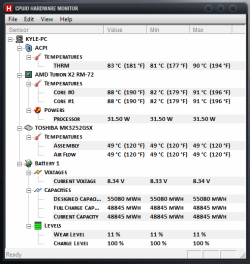
CPU temps seem very high =/ So I download hwmonitor to check my temps and my cpu's are at a constant 84-90 degrees celcius... which is around 190 degrees farenheit... Is this too high? It is an amd turion x2 64bit processor at 2100 mhz. Is there a program I can use to turn my fan speed up? I'm on a laptop | My System Specs |
| System Manufacturer/Model Number Custom OS 6.1.7600 Build 7600 Professional 64bit CPU AMD Phenom II x4 overclocked to 3.2GHZ Motherboard MSI 880gm-e43 Memory 8gb Patriot DDR3 Graphics Card ATI Radeon HD 5670 Monitor(s) Displays 1 Screen Resolution 1920 x 1080 Keyboard Saitek Mouse Cyborg R.A.T. 3 PSU 450 Watt Case ThermalTake Cooling Air Hard Drives 1TB Internet Speed Horrible... |
31 May 2010
|
#2 | | Windows 7 x64 pro/ Windows 7 x86 Pro/ XP SP3 x86 |
1) 90 degrees is definitely very high for the processor. At those temps, the computer should be shutting down randomly to prevent cpu damage. But download a couple of other apps like coretemp and see what they show. A buggy sensor can give all kinds of wierd readings.
2) HP doesnt have a propreitary fan speed utility like some other OEMs. Also, their BIOS is dumbed down and there are hardly any customizable options. But HPs historically have had a heat problem because of poor case design and they sometimes release bios updates with modified fan algorithms. Check the HP website for a bios update and HP forums for this subject.
You can download Speedfan, if you're lucky it may detect the fans.
3) Otherwise, there are a few generic solutions I can suggest:
-make sure the laptop vents are not clogged. You can clean them out with a can of compressed air.
-Try using a chill pad (also called cooling pad). They come cheap and can be quite effective.
-Switch from High Performance power plan to balanced or power saver. You can change maximum and minimum processor states in advanced settings of power plans.
-Make sure your fans dont have a mechanical problem.
-Ultimately, one can change the thermal paste and clean out the laptop from the inside. That depends on how comfortable you are with opening the laptop case.
-Undervolting the cpu is another option, but you'll need to understand and research the process beforehand. | My System Specs | | System Manufacturer/Model Number Too many to describe... OS Windows 7 x64 pro/ Windows 7 x86 Pro/ XP SP3 x86 |
31 May 2010
|
#3 | | Windows 7 Home Premium x64 SP1 Bay Area Peninsula |
Yikes, that is hot? As Bill2 says, you must be at least almost hitting TJ Max temps. Download Real Temp and it will display temp and how close you are to TJ Max (Tj max is the maximum allowable temp for a processor's internal cores, if you reach Tj max the processor will shut down to prevent damage). I'd also suspect obstructed cooling or clogged fans. I believe a non functioning fan would also shut off the PC. A Guy Real Temp | My System Specs | | OS Windows 7 Home Premium x64 SP1 CPU INTEL Core i5-750 Quad-Core 3.37GHz Motherboard ASUS P7P55D Memory KINGSTON 4GB (2 x 2GB) HyperX PC3-12800 DDR3 1600MHz CL8 Graphics Card MSI N240GT-MD1G/D5 GeForce GT 240 1GB 128-bit GDDR5 Monitor(s) Displays Samsung SyncMaster B2430H 24" Screen Resolution 1920 x 1080 PSU ANTEC TruePower New TP-550, 80 PLUS, 550W Case ANTEC Three Hundred Illusion Cooling COOLER MASTER Hyper 212 Plus, 4 x 120mm 1 x 140mm Noctua's Hard Drives Intel X25M Gen2 80GB, SEAGATE 500GB Barracudaź 7200.12, SATA 3 Gb/s, 7200 RPM, 16MB cache Internet Speed 20 + Mbps Antivirus Avast Browser Opera |
31 May 2010
|
#4 | | window's 7 bermuda triangle |
My.the highest temp i get with my compac laptop is 77 and it's because the air conditioner having a problem.
try check your temperature either using
Core Temp or Real Temp | My System Specs | | OS window's 7 CPU core 2 quad Motherboard gigabyte Memory 2gb corsair Graphics Card ati hd4850 Monitor(s) Displays lg Screen Resolution 1600 X 900 Case power logic Other Info none of the spec above is accurate |
31 May 2010
|
#5 | | Win 7 Pro x64/Win Server 2008 R2 Canada |
Sorry guys, Real Temp only works for Intel chips, and AMD chips don't have a TjMax type value that equates to Intel's TjMax parameter. AMD's max temp value is called Tcase, and it's calculated differently, and doesn't quite mean the same thing as TjMax.
The OP has an AMD Turion, which is basically a mobile version of the Athlon dual core that uses less power. I have one in my laptop, and my temps never get above 55 to 60C. Laptops do run hot, but your temps are way too hot.
Core Temp or Speedfan are the programs that will be useful in this situation. | My System Specs | | System Manufacturer/Model Number Mellon Labs OS Win 7 Pro x64/Win Server 2008 R2 CPU Phenom II X4 955 BE @ 3400 Motherboard ASUS M4A79XTD EVO Memory 8 GB Mushkin Blackline DDR3-12800 @ 1600 7-7-7-20 Graphics Card 2 x Sapphire Radeon 1GB 4670 - Crossfire Sound Card VIA HD Audio on MB. Sounds great. Monitor(s) Displays Acer 23" HDMI Screen Resolution 1920 x 1080 Keyboard Logitech G15 Mouse MS Comfort 3000 optical PSU OCZ Stealthstream 600 Case Antec 200 Cooling Coolermaster V8 w/AS 5, too many fans. Hard Drives 1 x WD Silicon Edge 64GB SSD
1 x WD 160GB SATA
1 x WD 500GB SATA Internet Speed Fast enough, kinda, but I'm in Canada. Waaay overpriced. :( Other Info A Mellon Labs X-1 - LCD Smartie driven system status display.
Brought to you by the letter C |
31 May 2010
|
#6 | | Windows 7 Home Premium x64 SP1 Bay Area Peninsula |
Ahhh, good info, never used AMD myself, thanks for the correction. A Guy | My System Specs | | OS Windows 7 Home Premium x64 SP1 CPU INTEL Core i5-750 Quad-Core 3.37GHz Motherboard ASUS P7P55D Memory KINGSTON 4GB (2 x 2GB) HyperX PC3-12800 DDR3 1600MHz CL8 Graphics Card MSI N240GT-MD1G/D5 GeForce GT 240 1GB 128-bit GDDR5 Monitor(s) Displays Samsung SyncMaster B2430H 24" Screen Resolution 1920 x 1080 PSU ANTEC TruePower New TP-550, 80 PLUS, 550W Case ANTEC Three Hundred Illusion Cooling COOLER MASTER Hyper 212 Plus, 4 x 120mm 1 x 140mm Noctua's Hard Drives Intel X25M Gen2 80GB, SEAGATE 500GB Barracudaź 7200.12, SATA 3 Gb/s, 7200 RPM, 16MB cache Internet Speed 20 + Mbps Antivirus Avast Browser Opera |
01 Jun 2010
|
#7 | | window's 7 bermuda triangle |
I usually use core temp myself and it's a good software for me | My System Specs | | OS window's 7 CPU core 2 quad Motherboard gigabyte Memory 2gb corsair Graphics Card ati hd4850 Monitor(s) Displays lg Screen Resolution 1600 X 900 Case power logic Other Info none of the spec above is accurate CPU temps seem very high =/ problems? All times are GMT -5. The time now is 10:56 AM. | |