Windows 7 Forums


Windows 7: Autoplay does not on flash media

06 Jun 2010   #1

Windows 7
 
 
Autoplay does not on flash media

Windows 7 Ultimate, 64 bit
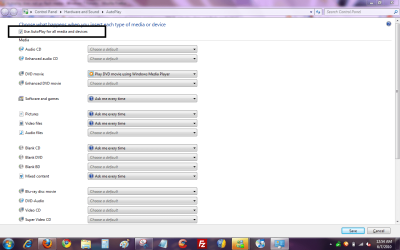
I've turned on Autoplay on all media. Default action is set to open in explorer for all except the blank media.
Autoplay works fine on CD-ROM and removable hard drive.
However, it's not working on any flash media (flash drive or card inserted into a reader).
How do I troubleshoot?
Thanks

My System SpecsSystem Spec

06 Jun 2010   #2

Windows® 8 Pro (64-bit)
Mumbai, India


My System SpecsSystem Spec
06 Jun 2010   #3

Windows 7


I've tried both and none is working. How do I troubleshoot?
My System SpecsSystem Spec
.


06 Jun 2010   #4

Windows® 8 Pro (64-bit)
Mumbai, India


Have you installed Panda USB vaccine by any chance?
My System SpecsSystem Spec
06 Jun 2010   #5

Windows 7


No. It's a clean installation. The following might-be-relevant software are installed

Blackberry with Media Manager
PowerISO
Symantec Antivirus
My System SpecsSystem Spec
06 Jun 2010   #6
Dom

Windows Seven Home Premium SP1
I Live At Home


I have an MP4 player that has an 8gb flash drive, that connects to my laptop through USB. That never comes up with autoplay, though I never had any use for it. Maybe autoplay isn't compatible with flash drives. To prove that though we need more people with the same problem.


If/when you had Vista, did autoplay work then?

Just checked autoplay control panel, flash drives are not listed. Only contents options and mixed data.
My System SpecsSystem Spec
06 Jun 2010   #7

Windows® 8 Pro (64-bit)
Mumbai, India


I have attached many diff types of flash drives and removable media. Autoplay comes up right away.
My System SpecsSystem Spec
06 Jun 2010   #8

win 7 ultimate
nottingham


hi cheerful, could you please tell us which version of Blackberry media manager you are using , maybe that is interfering with autoplay, have you updated the card reader software ? if you give us a little more info on your system [make/model] we may be able to help you further
My System SpecsSystem Spec
06 Jun 2010   #9
Dom

Windows Seven Home Premium SP1
I Live At Home


Quote   Quote: Originally Posted by Dinesh View Post
I have attached many diff types of flash drives and removable media. Autoplay comes up right away.
Actually, scrap what I said about my MP4 player not alerting autoplay, I had 'Take no action' selected for 'Mixed content'.
My System SpecsSystem Spec
06 Jun 2010   #10

win 7 ultimate
nottingham


Quote   Quote: Originally Posted by LilDomii View Post
Quote   Quote: Originally Posted by Dinesh View Post
I have attached many diff types of flash drives and removable media. Autoplay comes up right away.
Actually, scrap what I said about my MP4 player not alerting autoplay, I had 'Take no action' selected for 'Mixed content'.
that maybe a good point for the OP to check LilDom
My System SpecsSystem Spec
Reply

 Autoplay does not on flash media problems?


Thread Tools


Similar help and support threads for: Autoplay does not on flash media
Thread Forum
Autoplay Media Studio bootable Software
Windows 7 Autoplay and Media File Associations General Discussion
how to open any USB flash with AUTOPLAY in WINDOWS 7? Hardware & Devices
Solved SanDisk Cruzer Flash Drive-AUTOPLAY problem Hardware & Devices
Two Windows media player autoplay handlers General Discussion


All times are GMT -5. The time now is 07:26 AM.


Seven Forums Android App Seven Forums IOS App Follow us on Facebook

Windows 7 Forums is an independent web site and has not been authorized,
sponsored, or otherwise approved by Microsoft Corporation.
"Windows 7" and related materials are trademarks of Microsoft Corp.
© Designer Media Ltd
  

1 2 3 4 5 6 7 8 9 10 11 12 13 14 15 16 17 18 19 20 21 22 23 24 25 26 27 28 29 30 31 32