Windows 7 Forums


Windows 7: Installed vs Usable Ram

19 Jun 2010   #1

Windows 7 64 bit
 
 
Installed vs Usable Ram

I've got a new Dell XPS 8100, i5-750. Shows:

Installed Ram: 6 gb (2.96 gb usable)
System: 64 bit


System managed paging, which shows a page size of 3 gb. I have a GTS 240 1 gb card. Shouldn't all my Ram be usable? Suggestions?
My System SpecsSystem Spec

19 Jun 2010   #2

Windows 7 Home Premium x64 SP1
Bay Area Peninsula


Two things to try, 1st:

Memory - Set Maximum Amount Used by Windows 7

1) Start> In search box type msconfig.exe Click on msconfig.exe

2) On System Configuration dialog box select the Boot tab

3) Click Advanced Options

4) Uncheck the Maximum Memory option

5) OK your way out

6) Reboot

If that doesn't fix it, sometimes rearranging the physical Ram sticks can fix this. Move them to different slots.

A Guy

Last edited by Brink; 19 Jun 2010 at 10:33 PM.. Reason: added link
My System SpecsSystem Spec
23 Jun 2010   #3

Windows 7 64 bit


Did that, no change. I reseated the RAM and swapped the two 2 GB sticks with each other. Now I get 6 gb ram (4.96 gb usable) 3.75 available. I've read other posts that this is usually a MB problem. I'm going to try 1 stick at a time moving it from socket to socket to see if there's a dead socket.... then I guess it's a long call to Dell support.

edit: My bad, I "did that" before I moved the ram around. I just did the msconfig thing, unchecking the max ram bot, and now I show 6 gb! Thank you much.

Last edited by tcat7; 23 Jun 2010 at 08:24 PM..
My System SpecsSystem Spec
.


23 Jun 2010   #4

Windows 7 Home Premium x64 SP1
Bay Area Peninsula


Hey great. Sometimes it's the easy things. Bet Dell would have had you reformat, etc. You'd still be screaming, lol. A Guy
My System SpecsSystem Spec
22 Dec 2010   #5

win7


Thanks 4 the info, I upgraded from 4 to 8GB on my Windows 7 x64 and now all 8GB are usable.
My System SpecsSystem Spec
28 May 2012   #6

Window 7 Ultimate x64
 
 
window 7 64bit ultimate ram issue

my system configuration is Processor Intel i5 750 motherboard ASUS P7H55-V graphic card gefoece Nvidia 9800GTX+ ram 6GB so my window 7 64bit show usable ram 4GB how can i solve this error plz help me out??????
i use (msconfig.exe) five time and change the (boot tab advance option) and also five time restart the system and taskmeneger show me again in again usable ram 4GB Installed 6GB Ram plz help me out this troubleshooting
My System SpecsSystem Spec
28 May 2012   #7

Windows 7 SP1, Home Premium, 64-bit


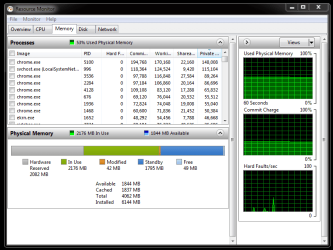
Go to the performance tab of Task Manager.

Choose Resource Monitor. Then choose the memory tab. Post a screenshot of that tab.
My System SpecsSystem Spec
29 May 2012   #8

Window 7 Ultimate x64
 
 
Windows 7 64bit Ultimate Ram Issue

ok sir thats my computer task manager screenshot..........
Attached Thumbnails
Installed vs Usable Ram-capture-01.png  
My System SpecsSystem Spec
30 May 2012   #9

Window 7 Ultimate x64
 
 
Windows 7 64bit Ultimate Ram Issue

Quote   Quote: Originally Posted by ignatzatsonic View Post
Go to the performance tab of Task Manager.

Choose Resource Monitor. Then choose the memory tab. Post a screenshot of that tab.
ok sir thats my computer task manager screenshot..........
Installed vs Usable Ram-capture-01.png
My System SpecsSystem Spec
30 May 2012   #10

Windows 7 home premium x64


Hello, I have checked the QVL from Asus for your board. Have you set the Bios correctly ? I don't see any mention of triple channel, what is the Corsair part number?
My System SpecsSystem Spec
Reply

 Installed vs Usable Ram problems?


Thread Tools


Similar help and support threads for: Installed vs Usable Ram
Thread Forum
6GB RAM Installed, only 3GB RAM Usable General Discussion
Solved 8gb Installed Ram - Only 3.74 Usable (HELP!) Hardware & Devices
Solved RAM: 4GB installed and only 2.93 usable. Hardware & Devices
6 GB RAM installed 1.74 GB Usable Hardware & Devices
6GB ram installed 5.5 usable ? Hardware & Devices


All times are GMT -5. The time now is 03:12 PM.


Seven Forums Android App Seven Forums IOS App Follow us on Facebook

Windows 7 Forums is an independent web site and has not been authorized,
sponsored, or otherwise approved by Microsoft Corporation.
"Windows 7" and related materials are trademarks of Microsoft Corp.
© Designer Media Ltd
  

1 2 3 4 5 6 7 8 9 10 11 12 13 14 15 16 17 18 19 20 21 22 23 24 25 26 27 28 29 30 31 32