| Windows 7: CPU / GPU temp questions |
13 Jul 2010
|
#1 | | |
CPU / GPU temp questions Hello,
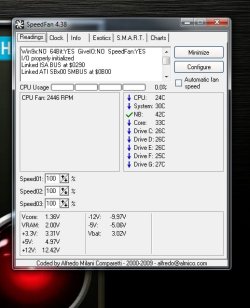
Out of curiosity I installed speedfan.
I ran it:
Should I be worried?
Thanks.
Mark | My System Specs |
| System Manufacturer/Model Number MSI OS Windows 7 64 Bit CPU Intel(R) Core(TM) i5 2500k @ 3.30GHz OC@ 4.4GHz Motherboard GA-Z68X-UD3H-B3 Memory Corsair 8GB DDR3 RAM LP @ 1600Mhz Graphics Card Nvidia GTS450 1GB Monitor(s) Displays 22" 16:10 Screen Resolution 1680x1050 Keyboard Steelseries G7 Mouse Steelseries Xai PSU Corsair 750Watt Internet Speed 10Mbit |
13 Jul 2010
|
#2 | | Windows 7 Ultimate 64-bit Puyallup, WA, USA |
Nah. You can set what temperatures SpeedFan gives you the flame icon. Anything below 70 C really isn't an issue. If under 100% load [which with 4 cores you have only a few things you can do] you break the 70C mark,it wouldn't hurt to look into a new or better heatsink. 53C is only 127F. | My System Specs | | OS Windows 7 Ultimate 64-bit CPU AMD Phenom II X6 1090T 3.2GHZ Motherboard MSI 890FXA-GD70 Memory G.SKILL RipJaw 3x2GB DDR3-1066 Graphics Card 2x HIS Radeon HD 6850 1 GB Sound Card VIA 8-channel Monitor(s) Displays 2x 20 inch Acer LCDs, 1x 32" Sony LCD TV Screen Resolution 4480x900 Keyboard Microsoft Wireless Keyboard 1000 Mouse Microsoft Wiresless Mouse 5000 PSU Kingwin 1000W Modular Case Coolermaster HAF 932 Cooling 1x 120mm, 3x 200mm, CoolerMaster Hyper 212+ Hard Drives 1x Crucial 64GB SSD
3x 1TB HDDs (WD, Seagate, Hitatchi)
1x 500GB Seagate External Internet Speed 20mbps Other Info Samsung BD-ROM/DVD-RW |
13 Jul 2010
|
#3 | | Operating System : Windows 7 Home Premium Edition 6.01.7600 SP1 (x64) MILTON KEYNES |
hello there i have the same system specs (almost as yours) i was thinking of installing this tool does it run ok ? | My System Specs | | System Manufacturer/Model Number packard bell IXTREME M5722 OS Operating System : Windows 7 Home Premium Edition 6.01.7600 SP1 (x64) CPU Processor : Intel Core 2 Quad Q8300 @ 2500 MHz Motherboard Mainboard : Packard Bell (Acer EG43M ) Memory Physical Memory :8GB Corsair4x 2GB 800MHz C5 DDR2 Graphics Card Video Card : XFX 6700 AMD Monitor(s) Displays Maestro 234DL - BenQ V2220 - BenQ VW2420H Screen Resolution Current Display :1920x1080p pixels at 60 Hz in HD LED Keyboard Gigabyte Aivia K8100 Mouse TRUST-Wireless Laser Mouse - Carbon edition MI-7770C PSU XFX ProSeries 550W PSU Case PACKARD BELL IXTREME Cooling System Blower Current: 150mA Air Flow16CFM ;Akasa 90mm rear Hard Drives Hard Disks : WDC (1000 GB)
Drive C: (Hard Disk) : 428 GB available on 491 GB
Drive D: (Hard Disk) : 426 GB available on 492 GB
SAMSUNG spinpoint HD103SJ 1000.2 GB
(X 2) KINGSTON SSD NOW V 30GB Internet Speed TP-LINK > TL-WN951N / AV500 Gigabit Powerline Adapters Other Info EXTRA COOLING>(FAN CONTROLLER) PC Bay Cooler 3 x 40mm fans; Akasa AK-HD-BL Blue hard drive cooler 2 x 40 mm fan 4500 rpm 29.7 dBA
Bios> American Megatrends Inc.
Version : P01-A1
Date : 08/31/2009 |
13 Jul 2010
|
#4 | | |

Quote: Originally Posted by jelyman Nah. You can set what temperatures SpeedFan gives you the flame icon. Anything below 70 C really isn't an issue. If under 100% load [which with 4 cores you have only a few things you can do] you break the 70C mark,it wouldn't hurt to look into a new or better heatsink. 53C is only 127F. Okay thank you.
And yes this tool works just fine  Try it out | My System Specs | | System Manufacturer/Model Number MSI OS Windows 7 64 Bit CPU Intel(R) Core(TM) i5 2500k @ 3.30GHz OC@ 4.4GHz Motherboard GA-Z68X-UD3H-B3 Memory Corsair 8GB DDR3 RAM LP @ 1600Mhz Graphics Card Nvidia GTS450 1GB Monitor(s) Displays 22" 16:10 Screen Resolution 1680x1050 Keyboard Steelseries G7 Mouse Steelseries Xai PSU Corsair 750Watt Internet Speed 10Mbit |
14 Jul 2010
|
#5 | | Win 7 Pro x64/Win Server 2008 R2 Canada |

Quote: Originally Posted by markvis14 Hello,
Out of curiosity I installed speedfan.
I ran it:
Should I be worried?
Thanks.
Mark Looking at those temps, yes, I would be worried a little bit. You're running at 4% load and your temps are that high?
Here is my Phenom II 955 @ 3800 idling:
Right now, my two Radeon 4670's are sitting at 31C and 34C. My CPU core temp doesn't break 55C under full load.
You might have an airflow problem in your case, and it looks like your CPU fan is only running at 1100 RPM. I would increase the CPU fan speed. Also, check the Advanced tab under the config in Speedfan, and make sure that SF hasn't applied any offsets to your temps. IMHO, all of those temps look off for an Intel system. They usually run cooler than an AMD rig does at the same speeds.
Speedfan is a good tool, but it doesn't hurt to double check with something like CPUID's Hardware Monitor or Coretemp. Both are linked in the Software forum, under Brink's Free software sticky. | My System Specs | | System Manufacturer/Model Number Mellon Labs OS Win 7 Pro x64/Win Server 2008 R2 CPU Phenom II X4 955 BE @ 3400 Motherboard ASUS M4A79XTD EVO Memory 8 GB Mushkin Blackline DDR3-12800 @ 1600 7-7-7-20 Graphics Card 2 x Sapphire Radeon 1GB 4670 - Crossfire Sound Card VIA HD Audio on MB. Sounds great. Monitor(s) Displays Acer 23" HDMI Screen Resolution 1920 x 1080 Keyboard Logitech G15 Mouse MS Comfort 3000 optical PSU OCZ Stealthstream 600 Case Antec 200 Cooling Coolermaster V8 w/AS 5, too many fans. Hard Drives 1 x WD Silicon Edge 64GB SSD
1 x WD 160GB SATA
1 x WD 500GB SATA Internet Speed Fast enough, kinda, but I'm in Canada. Waaay overpriced. :( Other Info A Mellon Labs X-1 - LCD Smartie driven system status display.
Brought to you by the letter C |
14 Jul 2010
|
#6 | | |
Hello Mellon Head,
Thank you for replying.
Is it possible to increase the fan speed with speedfan? (by the sound of the name it should be possible lol but I cant figure out where)
Thanks man!
Regards,
Mark | My System Specs | | System Manufacturer/Model Number MSI OS Windows 7 64 Bit CPU Intel(R) Core(TM) i5 2500k @ 3.30GHz OC@ 4.4GHz Motherboard GA-Z68X-UD3H-B3 Memory Corsair 8GB DDR3 RAM LP @ 1600Mhz Graphics Card Nvidia GTS450 1GB Monitor(s) Displays 22" 16:10 Screen Resolution 1680x1050 Keyboard Steelseries G7 Mouse Steelseries Xai PSU Corsair 750Watt Internet Speed 10Mbit |
14 Jul 2010
|
#7 | | Windows 7 Ultimate x64 SP1 Hampton VA |
Temperatures are dependent on a host of variables. In short, just because someone shows temps in the mid 30's while you show temps in the mid 50's just says there’s more to the story. You need to take the following into consideration before comparing temps of one CPU to that of another…. room temps, case/case design, location of case, case fans, design of fans, number of fans, CPU lot, voltages, motherboard, CPU cooler (water vs. air), thermo paste, programs running, etc ... As you can see, there's a lot to consider when looking at temps. So when one says they're running at 35c while you might be running at 50 only shows the end result of the variable above. Only when those are the same can you really compare temps. So... before you go chasing after someone else’s numbers understand what it took to get there. My two cents. | My System Specs | | Computer type PC/Desktop System Manufacturer/Model Number Built by me OS Windows 7 Ultimate x64 SP1 CPU Intel Core i7-950 (3.06GHz) OC to 3.8GHz Motherboard Gigabyte GA-X58A-UD5 rev 1, F6 Bios Memory 12 gig Corsair DDR3 Dominator GT Memory (3X 4GB) Graphics Card AMD Radeon HD6950 2gig (Sapphire) Sound Card X-Fi Titanium Fatality Pro Monitor(s) Displays HP ZR22w 22" LCD Monitor Screen Resolution 1920 x 1080 Keyboard Logitech Wireless Wave Mouse Logitech Performance MX PSU Antec Signature - SG-850 Case Cooler Master HAF X Cooling Noctua NH-C12P SE14 Hard Drives Primary - OCZ Vertex 4 SSD (256GB). Storage - OCZ Vertex 2 SSD (120GB) & 2TB WD Caviar Black. Internet Speed High Speed Cable Other Info Memory Timings - 1600MHz @ 8-8-8-20-1T @ 1.640 volts |
14 Jul 2010
|
#8 | | Windows 7 Ultimate X64 SP1 Cromer Norfolk UK |

Quote: Originally Posted by markvis14 Hello Mellon Head,
Thank you for replying.
Is it possible to increase the fan speed with speedfan? (by the sound of the name it should be possible lol but I cant figure out where)
Thanks man!
Regards,
Mark Idiots Guide to setting fan settings in Speedfan (not calling you an idiot  just saying its idiot proof)
1) click Configure then Advanced
2) select your chip from the drop down menu (you will know its the right one, it will say PWM Mode somewhere in the list below)
3) Change PWM Mode from "Smart Gaurdian" to "Software Controlled"
4) click OK
assuming your Mobo supports it, you can now change the fan speeds from Speedfan | My System Specs | | Computer type PC/Desktop System Manufacturer/Model Number Self Built OS Windows 7 Ultimate X64 SP1 CPU Intel(R) Core(TM) i5-2500K CPU @ 3.30GHz Motherboard Intel(R) Core(TM) i5-2500K CPU @ 3.30GHz Memory 8GB 1333Mhz DDR3 Graphics Card NVIDIA GeForce GTX 460 Sound Card Realtek Monitor(s) Displays Acer Al1980, Screen Resolution 1360*768 Keyboard Alba USB Mouse IT Works Wireless USB PSU 750W Cooler Master Case Cooler Master Haf X Cooling Cooler Master Hyper TX3 Hard Drives 500GB SATA WBC
1TB WD Caviar Green
80GB IDE Samsung Internet Speed 12Mb/s Down 1.2 Mb/s Up |
14 Jul 2010
|
#9 | | |
Thank you both for your replies. | My System Specs | | System Manufacturer/Model Number MSI OS Windows 7 64 Bit CPU Intel(R) Core(TM) i5 2500k @ 3.30GHz OC@ 4.4GHz Motherboard GA-Z68X-UD3H-B3 Memory Corsair 8GB DDR3 RAM LP @ 1600Mhz Graphics Card Nvidia GTS450 1GB Monitor(s) Displays 22" 16:10 Screen Resolution 1680x1050 Keyboard Steelseries G7 Mouse Steelseries Xai PSU Corsair 750Watt Internet Speed 10Mbit |
15 Jul 2010
|
#10 | | Win 7 Pro x64/Win Server 2008 R2 Canada |

Quote: Originally Posted by sygnus21 Temperatures are dependent on a host of variables. In short, just because someone shows temps in the mid 30's while you show temps in the mid 50's just says there’s more to the story. You need to take the following into consideration before comparing temps of one CPU to that of another…. room temps, case/case design, location of case, case fans, design of fans, number of fans, CPU lot, voltages, motherboard, CPU cooler (water vs. air), thermo paste, programs running, etc ... As you can see, there's a lot to consider when looking at temps. So when one says they're running at 35c while you might be running at 50 only shows the end result of the variable above. Only when those are the same can you really compare temps. So... before you go chasing after someone else’s numbers understand what it took to get there. My two cents. Very good advice, and I completely agree.
I'd just like to point out that I wasn't trying a "hey look at me" game on the OP. I was only trying to illustrate that his temps were quite high at idle IMO, and I used that screen shot to back it up. Since my machine is running at 600 MHz over stock, with a Vcore of 1.34, and no special cooling tricks, I thought that the comparison was valid in showing what a case with good airflow can do for you. I neglected to make that point and add some of the information that you mentioned, and I'm sorry if it caused any confusion.
For the details, my case has 4 120mm fans, 3 intake and one rear exhaust, plus a 140mm top exhaust fan. When the screen shot was taken, the ambient temp was 24C, and all but the CPU fan was running at 70%. The CPU fan always runs at 100%. I don't have a really sexy CPU HS either, It's just air cooled, and I use good thermal paste.
@OP: sygnus21 is correct. Don't use my numbers as numbers to chase. Rather, use them and other people's numbers as examples. Compare a number of systems, and how they are cooled, to see where your temps could be. If you'd like some more information on how I got my temps, please PM. | My System Specs | | System Manufacturer/Model Number Mellon Labs OS Win 7 Pro x64/Win Server 2008 R2 CPU Phenom II X4 955 BE @ 3400 Motherboard ASUS M4A79XTD EVO Memory 8 GB Mushkin Blackline DDR3-12800 @ 1600 7-7-7-20 Graphics Card 2 x Sapphire Radeon 1GB 4670 - Crossfire Sound Card VIA HD Audio on MB. Sounds great. Monitor(s) Displays Acer 23" HDMI Screen Resolution 1920 x 1080 Keyboard Logitech G15 Mouse MS Comfort 3000 optical PSU OCZ Stealthstream 600 Case Antec 200 Cooling Coolermaster V8 w/AS 5, too many fans. Hard Drives 1 x WD Silicon Edge 64GB SSD
1 x WD 160GB SATA
1 x WD 500GB SATA Internet Speed Fast enough, kinda, but I'm in Canada. Waaay overpriced. :( Other Info A Mellon Labs X-1 - LCD Smartie driven system status display.
Brought to you by the letter C CPU / GPU temp questions problems? All times are GMT -5. The time now is 10:34 AM. | |