Pinning programs to the RIGHT of the taskbar?

xChase

New member
Member
VIP
Local time
5:29 PM
Messages
155
Is this possible? By default, pins lock to the left side, but is it possible to lock SOME of the programs to the right? (Not in the notification area)
 

My Computer My Computer

At a glance

Microsoft Windows 7 Ultimate 64-bit 7600 Mult...Intel i5 66008.00 GBGTX 1060 6GB
Computer type
PC/Desktop
OS
Microsoft Windows 7 Ultimate 64-bit 7600 Multiprocessor Free
CPU
Intel i5 6600
Motherboard
B150M-A
Memory
8.00 GB
Graphics Card(s)
GTX 1060 6GB
Last edited:

My Computer My Computer

At a glance

Windows 10, Home Clean InstallIntel Core2 processsor Q8200(2.33Ghz 1333FSB)...6 gbATI Radeon 256MB HD3650
Computer type
PC/Desktop
Computer Manufacturer/Model Number
Dell XPS 420
OS
Windows 10, Home Clean Install
CPU
Intel Core2 processsor Q8200(2.33Ghz 1333FSB) Quad Core Tech
Motherboard
Dell
Memory
6 gb
Graphics Card(s)
ATI Radeon 256MB HD3650
Sound Card
Intergrated 7.1 Channel Audio
Monitor(s) Displays
Dell SP2009W 20"
Hard Drives
640 GB Serial ATA Hard drive
Cooling
Fan
Keyboard
Dell USB Keyboard
Mouse
Dell Premium Optical USB
Internet Speed
DSL 2.85
How does that work for a program though?
 

My Computer My Computer

At a glance

Microsoft Windows 7 Ultimate 64-bit 7600 Mult...Intel i5 66008.00 GBGTX 1060 6GB
Computer type
PC/Desktop
OS
Microsoft Windows 7 Ultimate 64-bit 7600 Multiprocessor Free
CPU
Intel i5 6600
Motherboard
B150M-A
Memory
8.00 GB
Graphics Card(s)
GTX 1060 6GB
Sorry, seems to apply to folders.
 

My Computer My Computer

At a glance

Windows 10, Home Clean InstallIntel Core2 processsor Q8200(2.33Ghz 1333FSB)...6 gbATI Radeon 256MB HD3650
Computer type
PC/Desktop
Computer Manufacturer/Model Number
Dell XPS 420
OS
Windows 10, Home Clean Install
CPU
Intel Core2 processsor Q8200(2.33Ghz 1333FSB) Quad Core Tech
Motherboard
Dell
Memory
6 gb
Graphics Card(s)
ATI Radeon 256MB HD3650
Sound Card
Intergrated 7.1 Channel Audio
Monitor(s) Displays
Dell SP2009W 20"
Hard Drives
640 GB Serial ATA Hard drive
Cooling
Fan
Keyboard
Dell USB Keyboard
Mouse
Dell Premium Optical USB
Internet Speed
DSL 2.85

My Computer My Computer

At a glance

Win 10 Pro x64Intel I5-2500K @3.3GHz16GB G.Skill Ripjaws X (4x4GB)EVGA GeForce 750 Ti SC 2GB
Computer type
PC/Desktop
Computer Manufacturer/Model Number
Self Built
OS
Win 10 Pro x64
CPU
Intel I5-2500K @3.3GHz
Motherboard
Asrock P67 Extreme4
Memory
16GB G.Skill Ripjaws X (4x4GB)
Graphics Card(s)
EVGA GeForce 750 Ti SC 2GB
Sound Card
ASUS Xonar DG 5.1 Channels 24-bit 96KHz PCI Interface Sound
Monitor(s) Displays
auria eq2367
Screen Resolution
1920 x 1080
Hard Drives
250GB Samsung 850 EVO SSD
1TB WD Blue
1TB Hitachi
PSU
SeaSonic X 650W 80 Plus Gold
Case
Corsair Obsidian 750D
Cooling
Corsair H60, Three 140mm case fans
Keyboard
Logitech Wireless Keyboard K520
Mouse
Logitech Wireless Mouse M310
Internet Speed
Wave Broadband ~ 100 dn 5 up
Antivirus
Windows Defender, Malwarebytes Premium
Browser
Edge, IE11, Chrome
Other Info
Laptop specs: HP g7-1365dx /
CPU: AMD A6-3420M APU with Radeon(tm) HD Graphics /
RAM: Crucial 8Gb (2x4Gb) /
SSD: Crucial M4-CT128M4SSD2 ATA Device/ FW 000F /
GFX: AMD Radeon HD 6520G /
OS: Windows 10 Pro x64

My Computer My Computer

At a glance

8 Pro x64i7 3770K 4.6GHz16GB G.Skill Trident X 2666mhzx2 EVGA 780 Ti Superclocked SLI
Computer type
PC/Desktop
Computer Manufacturer/Model Number
Systems by SmartEyeball
OS
8 Pro x64
CPU
i7 3770K 4.6GHz
Motherboard
ASUS P8Z77 WS
Memory
16GB G.Skill Trident X 2666mhz
Graphics Card(s)
x2 EVGA 780 Ti Superclocked SLI
Sound Card
SB X-FI Surround 5.1 PRO USB / ATH-AD900 Headphones
Monitor(s) Displays
x3 Dell U2410 / 58" Samsung
Screen Resolution
5760*1200/ 1920*1200
Hard Drives
2x Intel 520 240GB (RAID 0) * 2x WD Caviar Blacks 2TB (RAID 0) * 2TB WD Caviar Black * Sony Optirac DVD
PSU
Silverstone Strider Evolution 1200W
Case
Thermaltake Level 10 GT Snow Edition
Cooling
Noctua NH-D14
Keyboard
Topre Realforce // Ducky Shine MX Black // Filco Ninja TKL
Mouse
Thermaltake Theron (Highly Recommended) + Razer Imperator
Antivirus
MSE
Browser
IE, FF, WaterFox
Other Info
GT Extreme V2 Sim Racing Cockpit + 40" LCD and K/B Mouse stand ▼
Fanatec CSR Elite Wheel + Clubsport V1 Pedals + CSR shifter/7G-H ▼Saitek X52 Pro ▼ TrackIR 5 Pro
Buttkicker v2 Seat Rumbler with Dedicated 5.1 and Sub Woofer attached to frame ▼
=
Bloody Big Grin
I need 5 programs on the left, and then like 2 on the right.


The reason is, the other two programs take a while to start up, because they're big. Sometimes I misclick them.
 

My Computer My Computer

At a glance

Microsoft Windows 7 Ultimate 64-bit 7600 Mult...Intel i5 66008.00 GBGTX 1060 6GB
Computer type
PC/Desktop
OS
Microsoft Windows 7 Ultimate 64-bit 7600 Multiprocessor Free
CPU
Intel i5 6600
Motherboard
B150M-A
Memory
8.00 GB
Graphics Card(s)
GTX 1060 6GB

My Computer My Computer

At a glance

Win 10 Pro x64Intel I5-2500K @3.3GHz16GB G.Skill Ripjaws X (4x4GB)EVGA GeForce 750 Ti SC 2GB
Computer type
PC/Desktop
Computer Manufacturer/Model Number
Self Built
OS
Win 10 Pro x64
CPU
Intel I5-2500K @3.3GHz
Motherboard
Asrock P67 Extreme4
Memory
16GB G.Skill Ripjaws X (4x4GB)
Graphics Card(s)
EVGA GeForce 750 Ti SC 2GB
Sound Card
ASUS Xonar DG 5.1 Channels 24-bit 96KHz PCI Interface Sound
Monitor(s) Displays
auria eq2367
Screen Resolution
1920 x 1080
Hard Drives
250GB Samsung 850 EVO SSD
1TB WD Blue
1TB Hitachi
PSU
SeaSonic X 650W 80 Plus Gold
Case
Corsair Obsidian 750D
Cooling
Corsair H60, Three 140mm case fans
Keyboard
Logitech Wireless Keyboard K520
Mouse
Logitech Wireless Mouse M310
Internet Speed
Wave Broadband ~ 100 dn 5 up
Antivirus
Windows Defender, Malwarebytes Premium
Browser
Edge, IE11, Chrome
Other Info
Laptop specs: HP g7-1365dx /
CPU: AMD A6-3420M APU with Radeon(tm) HD Graphics /
RAM: Crucial 8Gb (2x4Gb) /
SSD: Crucial M4-CT128M4SSD2 ATA Device/ FW 000F /
GFX: AMD Radeon HD 6520G /
OS: Windows 10 Pro x64
The best I can get is a very small icon for another program, and when I open it, it still opens a new window in the task bar. I want 2 programs to the right while the rest to the left, and when I click them it performs the same as a program on the left.
 

My Computer My Computer

At a glance

Microsoft Windows 7 Ultimate 64-bit 7600 Mult...Intel i5 66008.00 GBGTX 1060 6GB
Computer type
PC/Desktop
OS
Microsoft Windows 7 Ultimate 64-bit 7600 Multiprocessor Free
CPU
Intel i5 6600
Motherboard
B150M-A
Memory
8.00 GB
Graphics Card(s)
GTX 1060 6GB
The other method is to enable Quick Launch and drag it to the far left as in the tutorial then drag your open windows slider to the right.

http://www.sevenforums.com/tutorials/888-quick-launch-enable-disable.html

Then navigate to the Quick launch folder (the path is below) and either delete or create a hidden folder for the icons you don't want displayed.

Then create desktop short cuts for the programs you do want displayed & drag them into your Quick Launch Folder

%userprofile%\AppData\Roaming\Microsoft\Internet Explorer\Quick Launch

View attachment 91659

EDIT: sorry i misread your post this method doesn't really apply to what you were asking

This method is more if you want your open windows on the right and quick launch icons (what was pinned icons beforehand) on the the left
 
Last edited:

My Computer My Computer

At a glance

Windows Seven Home Premium 32bit SP1AMD Athlon QI46 2.1Ghz2048 Mb DDR2 SD RAMNVidea GE GoForce 8200M G/256mb dedicated gra...
Computer Manufacturer/Model Number
Hewlett Packard Compaq Presario CQ60-305au
OS
Windows Seven Home Premium 32bit SP1
CPU
AMD Athlon QI46 2.1Ghz
Motherboard
Wistron 303c
Memory
2048 Mb DDR2 SD RAM
Graphics Card(s)
NVidea GE GoForce 8200M G/256mb dedicated graphics memory
Sound Card
MCP78S NVidea high definition
Monitor(s) Displays
15.6" High definition Brightview Widescreen
Screen Resolution
1336x768
Hard Drives
Toshiba MK2555GSX ATA
Thanks mitchell but that's not quite what I'm looking for :(.
 

My Computer My Computer

At a glance

Microsoft Windows 7 Ultimate 64-bit 7600 Mult...Intel i5 66008.00 GBGTX 1060 6GB
Computer type
PC/Desktop
OS
Microsoft Windows 7 Ultimate 64-bit 7600 Multiprocessor Free
CPU
Intel i5 6600
Motherboard
B150M-A
Memory
8.00 GB
Graphics Card(s)
GTX 1060 6GB
The best I can get is a very small icon for another program, and when I open it, it still opens a new window in the task bar. I want 2 programs to the right while the rest to the left, and when I click them it performs the same as a program on the left.

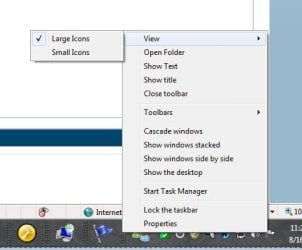
You can change the icon size under view
icon.JPG

The other part I'm not sure I understand what you're saying, can you post a screenshot of it?

http://www.sevenforums.com/tutorials/9717-screenshot-paint.html

http://www.sevenforums.com/tutorials/9733-how-post-screenshot-seven-forums.html
 

My Computer My Computer

At a glance

Win 10 Pro x64Intel I5-2500K @3.3GHz16GB G.Skill Ripjaws X (4x4GB)EVGA GeForce 750 Ti SC 2GB
Computer type
PC/Desktop
Computer Manufacturer/Model Number
Self Built
OS
Win 10 Pro x64
CPU
Intel I5-2500K @3.3GHz
Motherboard
Asrock P67 Extreme4
Memory
16GB G.Skill Ripjaws X (4x4GB)
Graphics Card(s)
EVGA GeForce 750 Ti SC 2GB
Sound Card
ASUS Xonar DG 5.1 Channels 24-bit 96KHz PCI Interface Sound
Monitor(s) Displays
auria eq2367
Screen Resolution
1920 x 1080
Hard Drives
250GB Samsung 850 EVO SSD
1TB WD Blue
1TB Hitachi
PSU
SeaSonic X 650W 80 Plus Gold
Case
Corsair Obsidian 750D
Cooling
Corsair H60, Three 140mm case fans
Keyboard
Logitech Wireless Keyboard K520
Mouse
Logitech Wireless Mouse M310
Internet Speed
Wave Broadband ~ 100 dn 5 up
Antivirus
Windows Defender, Malwarebytes Premium
Browser
Edge, IE11, Chrome
Other Info
Laptop specs: HP g7-1365dx /
CPU: AMD A6-3420M APU with Radeon(tm) HD Graphics /
RAM: Crucial 8Gb (2x4Gb) /
SSD: Crucial M4-CT128M4SSD2 ATA Device/ FW 000F /
GFX: AMD Radeon HD 6520G /
OS: Windows 10 Pro x64
By making the icons large it forces the system tray to rise a bit and it's really ugly.

Let me try to explain exactly what I want with as much detail as I can;
When you pin a program, and run it, it opens the program but it replaces the pin with the opened one. So if I pressed the iTunes button on the task bar, it'd open iTunes and 'replace' the pin with the program.

When I use the quick launch method it doesn't do that, it creates a whole new window in the task bar. I don't want that to happen, I want it to act the exact same as a pinned program, but locking it to the right (Only two to the right, the rest to the left side of the task bar).
 

My Computer My Computer

At a glance

Microsoft Windows 7 Ultimate 64-bit 7600 Mult...Intel i5 66008.00 GBGTX 1060 6GB
Computer type
PC/Desktop
OS
Microsoft Windows 7 Ultimate 64-bit 7600 Multiprocessor Free
CPU
Intel i5 6600
Motherboard
B150M-A
Memory
8.00 GB
Graphics Card(s)
GTX 1060 6GB
So if I understand you right, you open a program from one of the shortcuts on the right, it places an open (highlighted) icon on the left?
 

My Computer My Computer

At a glance

Win 10 Pro x64Intel I5-2500K @3.3GHz16GB G.Skill Ripjaws X (4x4GB)EVGA GeForce 750 Ti SC 2GB
Computer type
PC/Desktop
Computer Manufacturer/Model Number
Self Built
OS
Win 10 Pro x64
CPU
Intel I5-2500K @3.3GHz
Motherboard
Asrock P67 Extreme4
Memory
16GB G.Skill Ripjaws X (4x4GB)
Graphics Card(s)
EVGA GeForce 750 Ti SC 2GB
Sound Card
ASUS Xonar DG 5.1 Channels 24-bit 96KHz PCI Interface Sound
Monitor(s) Displays
auria eq2367
Screen Resolution
1920 x 1080
Hard Drives
250GB Samsung 850 EVO SSD
1TB WD Blue
1TB Hitachi
PSU
SeaSonic X 650W 80 Plus Gold
Case
Corsair Obsidian 750D
Cooling
Corsair H60, Three 140mm case fans
Keyboard
Logitech Wireless Keyboard K520
Mouse
Logitech Wireless Mouse M310
Internet Speed
Wave Broadband ~ 100 dn 5 up
Antivirus
Windows Defender, Malwarebytes Premium
Browser
Edge, IE11, Chrome
Other Info
Laptop specs: HP g7-1365dx /
CPU: AMD A6-3420M APU with Radeon(tm) HD Graphics /
RAM: Crucial 8Gb (2x4Gb) /
SSD: Crucial M4-CT128M4SSD2 ATA Device/ FW 000F /
GFX: AMD Radeon HD 6520G /
OS: Windows 10 Pro x64
So if I understand you right, you open a program from one of the shortcuts on the right, it places an open (highlighted) icon on the left?
That's what it does, and not what I want.
 

My Computer My Computer

At a glance

Microsoft Windows 7 Ultimate 64-bit 7600 Mult...Intel i5 66008.00 GBGTX 1060 6GB
Computer type
PC/Desktop
OS
Microsoft Windows 7 Ultimate 64-bit 7600 Multiprocessor Free
CPU
Intel i5 6600
Motherboard
B150M-A
Memory
8.00 GB
Graphics Card(s)
GTX 1060 6GB
Would that same shortcut open a second one if it was placed on the left? Some programs do that anyway, What program is it or is it more than one?
 

My Computer My Computer

At a glance

Win 10 Pro x64Intel I5-2500K @3.3GHz16GB G.Skill Ripjaws X (4x4GB)EVGA GeForce 750 Ti SC 2GB
Computer type
PC/Desktop
Computer Manufacturer/Model Number
Self Built
OS
Win 10 Pro x64
CPU
Intel I5-2500K @3.3GHz
Motherboard
Asrock P67 Extreme4
Memory
16GB G.Skill Ripjaws X (4x4GB)
Graphics Card(s)
EVGA GeForce 750 Ti SC 2GB
Sound Card
ASUS Xonar DG 5.1 Channels 24-bit 96KHz PCI Interface Sound
Monitor(s) Displays
auria eq2367
Screen Resolution
1920 x 1080
Hard Drives
250GB Samsung 850 EVO SSD
1TB WD Blue
1TB Hitachi
PSU
SeaSonic X 650W 80 Plus Gold
Case
Corsair Obsidian 750D
Cooling
Corsair H60, Three 140mm case fans
Keyboard
Logitech Wireless Keyboard K520
Mouse
Logitech Wireless Mouse M310
Internet Speed
Wave Broadband ~ 100 dn 5 up
Antivirus
Windows Defender, Malwarebytes Premium
Browser
Edge, IE11, Chrome
Other Info
Laptop specs: HP g7-1365dx /
CPU: AMD A6-3420M APU with Radeon(tm) HD Graphics /
RAM: Crucial 8Gb (2x4Gb) /
SSD: Crucial M4-CT128M4SSD2 ATA Device/ FW 000F /
GFX: AMD Radeon HD 6520G /
OS: Windows 10 Pro x64
Would that same shortcut open a second one if it was placed on the left? Some programs do that anyway, What program is it or is it more than one?
No it doesn't. It's Warcraft 3, and League of Legends (Both games that take a while to start up and I mis click them sometimes)
 

My Computer My Computer

At a glance

Microsoft Windows 7 Ultimate 64-bit 7600 Mult...Intel i5 66008.00 GBGTX 1060 6GB
Computer type
PC/Desktop
OS
Microsoft Windows 7 Ultimate 64-bit 7600 Multiprocessor Free
CPU
Intel i5 6600
Motherboard
B150M-A
Memory
8.00 GB
Graphics Card(s)
GTX 1060 6GB
Would that same shortcut open a second one if it was placed on the left? Some programs do that anyway, What program is it or is it more than one?
No it doesn't. It's Warcraft 3, and League of Legends (Both games that take a while to start up and I mis click them sometimes)

Sorry I'm out of ideas why it does that, maybe someone else has some better info for you.
 

My Computer My Computer

At a glance

Win 10 Pro x64Intel I5-2500K @3.3GHz16GB G.Skill Ripjaws X (4x4GB)EVGA GeForce 750 Ti SC 2GB
Computer type
PC/Desktop
Computer Manufacturer/Model Number
Self Built
OS
Win 10 Pro x64
CPU
Intel I5-2500K @3.3GHz
Motherboard
Asrock P67 Extreme4
Memory
16GB G.Skill Ripjaws X (4x4GB)
Graphics Card(s)
EVGA GeForce 750 Ti SC 2GB
Sound Card
ASUS Xonar DG 5.1 Channels 24-bit 96KHz PCI Interface Sound
Monitor(s) Displays
auria eq2367
Screen Resolution
1920 x 1080
Hard Drives
250GB Samsung 850 EVO SSD
1TB WD Blue
1TB Hitachi
PSU
SeaSonic X 650W 80 Plus Gold
Case
Corsair Obsidian 750D
Cooling
Corsair H60, Three 140mm case fans
Keyboard
Logitech Wireless Keyboard K520
Mouse
Logitech Wireless Mouse M310
Internet Speed
Wave Broadband ~ 100 dn 5 up
Antivirus
Windows Defender, Malwarebytes Premium
Browser
Edge, IE11, Chrome
Other Info
Laptop specs: HP g7-1365dx /
CPU: AMD A6-3420M APU with Radeon(tm) HD Graphics /
RAM: Crucial 8Gb (2x4Gb) /
SSD: Crucial M4-CT128M4SSD2 ATA Device/ FW 000F /
GFX: AMD Radeon HD 6520G /
OS: Windows 10 Pro x64
  • Like
Reactions: ryo
The taskbar does not natively support pinning to the right. The separate toolbar approach posted above is the closest you can get.
 

My Computer My Computer

At a glance

7
OS
7
Damn ok, thanks anyway.
 

My Computer My Computer

At a glance

Microsoft Windows 7 Ultimate 64-bit 7600 Mult...Intel i5 66008.00 GBGTX 1060 6GB
Computer type
PC/Desktop
OS
Microsoft Windows 7 Ultimate 64-bit 7600 Multiprocessor Free
CPU
Intel i5 6600
Motherboard
B150M-A
Memory
8.00 GB
Graphics Card(s)
GTX 1060 6GB
Back
Top