Screen Saver - Specify a Default for All Users

How to Specify a Default Screen Saver for All Users in Windows 7


   Information
This will show you how to set or change a specific screen saver of your choice to be used as the default screen saver for all users on the computer with the users also prevented from being able to change the screen saver.

You will have to be logged in as an administrator to be able to do this tutorial.

   Note
Screen Savers that come with Windows 7

Screen Saver | Location (full path) Bubbles.scr | C:\Windows\System32\Bubbles.scr
Mystify.scr | C:\Windows\System32\Mystify.scr
PhotoScreensaver.scr (Photos) | C:\Windows\System32\PhotoScreensaver.scr
Ribbons.scr | C:\Windows\System32\Ribbons.scr
scrnsave.scr (Blank) | C:\Windows\System32\scrnsave.scr
ssText3d.scr (3D Text) | C:\Windows\System32\ssText3d.scr


EXAMPLE: Screen Saver Settings
NOTE: The Screen Saver selectionis grayed out if you specified a default screen saver for all users.
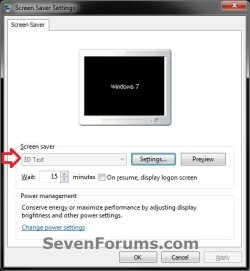
Example.jpg


OPTION ONE

Through the Local Group Policy Editor

1. Open the all users, specific users or groups, or all users except administrators Local Group Policy Editor for how you want this policy applied.

2. In the left pane, click on to expand User Configuration, Administrative Templates, Control Panel, and Personalization. (see screenshot below) GPEDIT-1.jpg
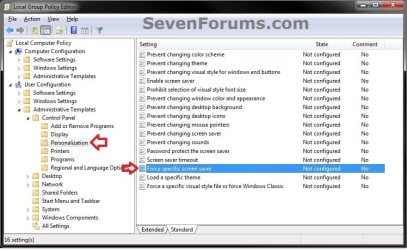
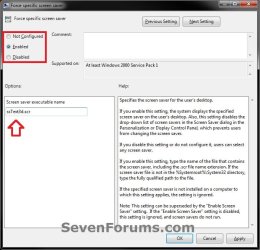
3. In the right pane, double click on Force a specific screen saver to edit it. (see screenshot above)

4. To Allow Users to Select their own Screen Saver A) Dot Disabled or Not Configured, and go to step 6 below. (see screenshot below step 6)
NOTE: Not Configured is the default setting.
5. To Set a Default Screen Saver for All Users A) Select (dot) Enabled, and go to step 6 below. (see screenshot below step 6)

B) Under Options, type in the full path of the .scr screen saver file.
NOTE: If the .scr screen saver file is located in the C:\Windows\System32 folder, then you will only need to type in the .scr screen saver file with it's extension included (ex: ssText3d.scr).
6. Click on OK. (see screenshot below) GPEDIT-2.jpg
7. Close the Local Group Policy Editor window.


OPTION TWO

Manually in Registry Editor

1. Open the Start Menu, and type regedit in the search box and press enter.

2. If prompted by UAC, then click on Yes.

3. To Set a Default Screen Saver for All Users A) In regedit, navigate to the location below. (see screenshot below) HKEY_CURRENT_USER\Software\Policies\Microsoft\Windows
Reg1.jpg
B) In the left pane right click on Windows, and click on New and Key. (see screenshot above)
NOTE: If you already have the Control Panel key (step 3C), then skip this step and go to step 3D.

C) Type in Control Panel, and press Enter. (see screenshot below) Reg2.jpg
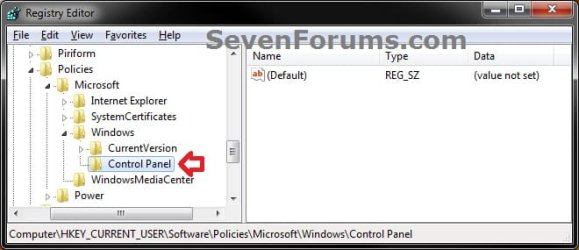
D) Right click on Control Panel, and click on New and Key. (see screenshot above)
NOTE: If you already have the Desktop key (step 3E), then skip this step and go to step 3F.

E) Type in Desktop, and press Enter. (see screenshot below) Reg3.jpg
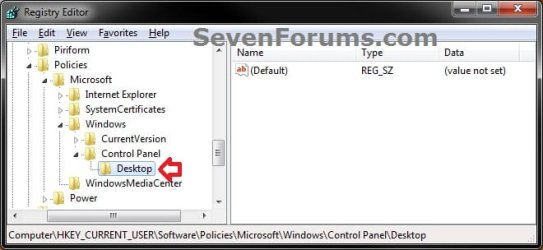
F) In the right pane of Desktop, right click on an empty space, and click on New and String Value. (see screenshot above)
NOTE: If you already have the SCRNSAVE.EXE string value (step 3G), then skip this step and go to step 3H.

G) Type in SCRNSAVE.EXE, and press Enter. (see screenshot below) Reg4.jpg
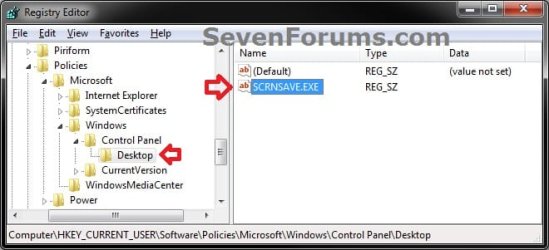
H) In the right pane of Desktop, right click on SCRNSAVE.EXE, and click on Modify. (see screenshot above)

I) Type in the full path of the .scr screen saver file, then click on OK. (see screenshot below)
NOTE: If the .scr screen saver file is located in the C:\Windows\System32 folder, then you will only need to type in the .scr screen saver file with it's extension included (ex: ssText3d.scr). Reg5.jpg
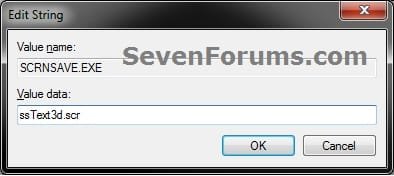
J) Go to step 5.
4. To Allow Users to Select their own Screen Saver A) In regedit, navigate to the location below. (see screenshot below)
Code:
HKEY_CURRENT_USER\Software\Policies\Microsoft\Windows\Control Panel\Desktop
B) In the right pane of Desktop, right click on SCRNSAVE.EXE, and click on Delete. (see screenshot above) Reg6.jpg
C) Click on Yes to approve deletion. (see screenshot below) Reg7.jpg
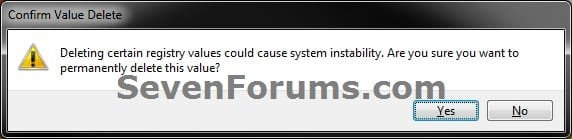
D) In regedit, navigate to the location below, and repeat steps 4B and 4C if there is a SCRNSAVE.EXE entry here as well.
Code:
HKEY_LOCAL_MACHINE\SOFTWARE\Policies\Microsoft\Windows\Control Panel\Desktop
5. Close regedit.
That's it,
Shawn


Last edited:
Awesome tutorial as always Brink. Thanks for all of your hard work.

Thanks,
Ben
 

My Computer My Computer

At a glance

Windows 7 Ultimate Professional x64Intel Core i7-740QM @ 1.73GHz 4Core2 X 4GB DDR3-SDRAM 667MHzATI Mobility Radeon HD 5870 1GB SDRAM
Computer type
Laptop
Computer Manufacturer/Model Number
Clevo W870CU
OS
Windows 7 Ultimate Professional x64
CPU
Intel Core i7-740QM @ 1.73GHz 4Core
Motherboard
Intel PM55
Memory
2 X 4GB DDR3-SDRAM 667MHz
Graphics Card(s)
ATI Mobility Radeon HD 5870 1GB SDRAM
Sound Card
Realtek High Definition Audio
Monitor(s) Displays
AUO149D 17.1" HD+/FHD @600Hz
Screen Resolution
1920X1080
Hard Drives
Seagate A0D-10F4 - 500 GB @7200RPM
PSU
43290mWh Intel Lithium-Ion Battery
Case
Cleveo W870CU
Cooling
2 Fans
Keyboard
Microsoft eHome MCIR 109
Mouse
Finger Sensing HID-Compliant Mouse Pad
Internet Speed
100 MB/s
Antivirus
avast! Antivirus
Browser
Google Chrome
Other Info
Biometric Enabled
2.0MP Cam
You're welcome Ben. Thank you. :)
 

My Computer My Computer

At a glance

64-bit Windows 11 Pro for WorkstationsIntel i7-8700K OC'd to 5 GHz64 GB (4x16GB) G.SKILL TridentZ RGB DDR4 3600...ASUS ROG-STRIX-GTX1080TI-O11G-GAMING
Computer type
PC/Desktop
Computer Manufacturer/Model Number
Self built custom
OS
64-bit Windows 11 Pro for Workstations
CPU
Intel i7-8700K OC'd to 5 GHz
Motherboard
ASUS ROG Maximus XI Formula Z390
Memory
64 GB (4x16GB) G.SKILL TridentZ RGB DDR4 3600 MHz
Graphics Card(s)
ASUS ROG-STRIX-GTX1080TI-O11G-GAMING
Sound Card
Integrated
Monitor(s) Displays
2 x Samsung Odyssey G7 27"
Screen Resolution
2560x1440
Hard Drives
1TB Samsung 990 PRO M.2,
4TB Samsung 990 PRO PRO M.2,
TerraMaster F8 SSD Plus NAS
PSU
Seasonic Prime Titanium 850W
Case
Thermaltake Core P3
Cooling
Corsair Hydro H115i
Keyboard
Logitech wireless K800
Mouse
Logitech MX Master 4
Internet Speed
2 Gb/s Download and 100 Mb/s Upload
Antivirus
Malwarebyte Anti-Malware Premium
Browser
Google Chrome
Other Info
Logitech Z625 speaker system,
Logitech BRIO 4K Pro webcam,
HP Color LaserJet Pro MFP M477fdn,
APC SMART-UPS RT 1000 XL - SURT1000XLI,
Galaxy S23 Plus phone
I have the ss3Dtxt screen saver setup under the Group Policy. Now I just need to add the default text for all users to it. I tried adding a DisplayString entry in this same location but it does not seem to see it. Can you advise me where I should add to so all users will get it.

Thank you,
 

My Computer My Computer

At a glance

Windows 7 32 and 64 bit
OS
Windows 7 32 and 64 bit
Hello GKP, and welcome to Seven Forums.

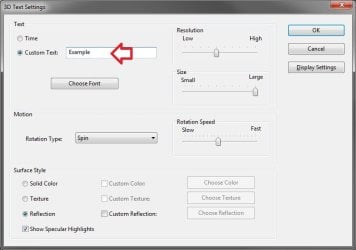
If you set the 3D text in the normal Screen Saver settings location below and apply in the administrator account first, then specify it as the default screen saver, does it display?

Settings.jpg

Hope this helps for now,
Shawn
 

My Computer My Computer

At a glance

64-bit Windows 11 Pro for WorkstationsIntel i7-8700K OC'd to 5 GHz64 GB (4x16GB) G.SKILL TridentZ RGB DDR4 3600...ASUS ROG-STRIX-GTX1080TI-O11G-GAMING
Computer type
PC/Desktop
Computer Manufacturer/Model Number
Self built custom
OS
64-bit Windows 11 Pro for Workstations
CPU
Intel i7-8700K OC'd to 5 GHz
Motherboard
ASUS ROG Maximus XI Formula Z390
Memory
64 GB (4x16GB) G.SKILL TridentZ RGB DDR4 3600 MHz
Graphics Card(s)
ASUS ROG-STRIX-GTX1080TI-O11G-GAMING
Sound Card
Integrated
Monitor(s) Displays
2 x Samsung Odyssey G7 27"
Screen Resolution
2560x1440
Hard Drives
1TB Samsung 990 PRO M.2,
4TB Samsung 990 PRO PRO M.2,
TerraMaster F8 SSD Plus NAS
PSU
Seasonic Prime Titanium 850W
Case
Thermaltake Core P3
Cooling
Corsair Hydro H115i
Keyboard
Logitech wireless K800
Mouse
Logitech MX Master 4
Internet Speed
2 Gb/s Download and 100 Mb/s Upload
Antivirus
Malwarebyte Anti-Malware Premium
Browser
Google Chrome
Other Info
Logitech Z625 speaker system,
Logitech BRIO 4K Pro webcam,
HP Color LaserJet Pro MFP M477fdn,
APC SMART-UPS RT 1000 XL - SURT1000XLI,
Galaxy S23 Plus phone
Hi Shawn,

Thanks for the fast response.

When I change it at the options screen it will only display for the user a account that it logged in at the time. I need to set this up as a default for all users who log in. I have the screen saver setup under the GP but just need to set the text. I would prefer a registry setting so I can deploy it to all users.

Gary
 

My Computer My Computer

At a glance

Windows 7 32 and 64 bit
OS
Windows 7 32 and 64 bit
Ok Gary. I'll do some testing tonight to see what I may be able to come up with for you, then post back with my results. :)
 

My Computer My Computer

At a glance

64-bit Windows 11 Pro for WorkstationsIntel i7-8700K OC'd to 5 GHz64 GB (4x16GB) G.SKILL TridentZ RGB DDR4 3600...ASUS ROG-STRIX-GTX1080TI-O11G-GAMING
Computer type
PC/Desktop
Computer Manufacturer/Model Number
Self built custom
OS
64-bit Windows 11 Pro for Workstations
CPU
Intel i7-8700K OC'd to 5 GHz
Motherboard
ASUS ROG Maximus XI Formula Z390
Memory
64 GB (4x16GB) G.SKILL TridentZ RGB DDR4 3600 MHz
Graphics Card(s)
ASUS ROG-STRIX-GTX1080TI-O11G-GAMING
Sound Card
Integrated
Monitor(s) Displays
2 x Samsung Odyssey G7 27"
Screen Resolution
2560x1440
Hard Drives
1TB Samsung 990 PRO M.2,
4TB Samsung 990 PRO PRO M.2,
TerraMaster F8 SSD Plus NAS
PSU
Seasonic Prime Titanium 850W
Case
Thermaltake Core P3
Cooling
Corsair Hydro H115i
Keyboard
Logitech wireless K800
Mouse
Logitech MX Master 4
Internet Speed
2 Gb/s Download and 100 Mb/s Upload
Antivirus
Malwarebyte Anti-Malware Premium
Browser
Google Chrome
Other Info
Logitech Z625 speaker system,
Logitech BRIO 4K Pro webcam,
HP Color LaserJet Pro MFP M477fdn,
APC SMART-UPS RT 1000 XL - SURT1000XLI,
Galaxy S23 Plus phone
Thank you
 

My Computer My Computer

At a glance

Windows 7 32 and 64 bit
OS
Windows 7 32 and 64 bit
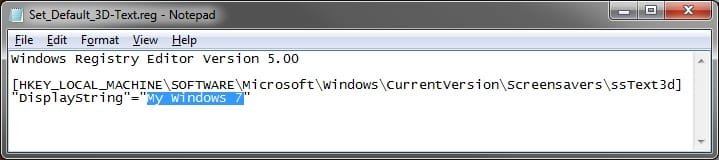
OK, I think I have something for you that may work for this. It will add the 3D Text screen saver settings for this to the HKLM location that should apply it to all user accounts. :)

  • Download the .reg file attached below to your desktop.
  • Right clink on the .reg file, and click on Edit.
  • In Notepad, chage the highlighted text inbetween quotes below (must be in quotes) for what you want to have displayed with the 3D Text screen saver.
  • In Notepad, click on File and Save.
  • Double click on the .reg file to merge it, then approve until finished.
  • Restart the computer to apply.
Notepad.jpg
 

Attachments

My Computer My Computer

At a glance

64-bit Windows 11 Pro for WorkstationsIntel i7-8700K OC'd to 5 GHz64 GB (4x16GB) G.SKILL TridentZ RGB DDR4 3600...ASUS ROG-STRIX-GTX1080TI-O11G-GAMING
Computer type
PC/Desktop
Computer Manufacturer/Model Number
Self built custom
OS
64-bit Windows 11 Pro for Workstations
CPU
Intel i7-8700K OC'd to 5 GHz
Motherboard
ASUS ROG Maximus XI Formula Z390
Memory
64 GB (4x16GB) G.SKILL TridentZ RGB DDR4 3600 MHz
Graphics Card(s)
ASUS ROG-STRIX-GTX1080TI-O11G-GAMING
Sound Card
Integrated
Monitor(s) Displays
2 x Samsung Odyssey G7 27"
Screen Resolution
2560x1440
Hard Drives
1TB Samsung 990 PRO M.2,
4TB Samsung 990 PRO PRO M.2,
TerraMaster F8 SSD Plus NAS
PSU
Seasonic Prime Titanium 850W
Case
Thermaltake Core P3
Cooling
Corsair Hydro H115i
Keyboard
Logitech wireless K800
Mouse
Logitech MX Master 4
Internet Speed
2 Gb/s Download and 100 Mb/s Upload
Antivirus
Malwarebyte Anti-Malware Premium
Browser
Google Chrome
Other Info
Logitech Z625 speaker system,
Logitech BRIO 4K Pro webcam,
HP Color LaserJet Pro MFP M477fdn,
APC SMART-UPS RT 1000 XL - SURT1000XLI,
Galaxy S23 Plus phone
I added the settings but it will not overwrite the local user settings. I put two different DisplayStrings in and the one from the local user account show up. I even logged off and see if it would make a change.

I found where I can add it to the default user for any new accounts but I am also looking to make changes to existing ones.

I add the DispalyString under the default user and then logged in as a new user. It did not add it to the new user account. Now I am really looking for a way to do this.

Gary
 
Last edited by a moderator:

My Computer My Computer

At a glance

Windows 7 32 and 64 bit
OS
Windows 7 32 and 64 bit
I added the settings but it will not overwrite the local user settings. I put two different DisplayStrings in and the one from the local user account show up. I even logged off and see if it would make a change.

I found where I can add it to the default user for any new accounts but I am also looking to make changes to existing ones.

I add the DispalyString under the default user and then logged in as a new user. It did not add it to the new user account. Now I am really looking for a way to do this.

Gary

Gary,

This is the default setting for this in the registry for the user that is currently logged in. You try logging in to each user account one at a time, change this registry setting for the 3D Text screen saver to what you want the text to say, then apply the group policy to specify the 3D Text screen saver.

Logged_in_User.jpg
 

My Computer My Computer

At a glance

64-bit Windows 11 Pro for WorkstationsIntel i7-8700K OC'd to 5 GHz64 GB (4x16GB) G.SKILL TridentZ RGB DDR4 3600...ASUS ROG-STRIX-GTX1080TI-O11G-GAMING
Computer type
PC/Desktop
Computer Manufacturer/Model Number
Self built custom
OS
64-bit Windows 11 Pro for Workstations
CPU
Intel i7-8700K OC'd to 5 GHz
Motherboard
ASUS ROG Maximus XI Formula Z390
Memory
64 GB (4x16GB) G.SKILL TridentZ RGB DDR4 3600 MHz
Graphics Card(s)
ASUS ROG-STRIX-GTX1080TI-O11G-GAMING
Sound Card
Integrated
Monitor(s) Displays
2 x Samsung Odyssey G7 27"
Screen Resolution
2560x1440
Hard Drives
1TB Samsung 990 PRO M.2,
4TB Samsung 990 PRO PRO M.2,
TerraMaster F8 SSD Plus NAS
PSU
Seasonic Prime Titanium 850W
Case
Thermaltake Core P3
Cooling
Corsair Hydro H115i
Keyboard
Logitech wireless K800
Mouse
Logitech MX Master 4
Internet Speed
2 Gb/s Download and 100 Mb/s Upload
Antivirus
Malwarebyte Anti-Malware Premium
Browser
Google Chrome
Other Info
Logitech Z625 speaker system,
Logitech BRIO 4K Pro webcam,
HP Color LaserJet Pro MFP M477fdn,
APC SMART-UPS RT 1000 XL - SURT1000XLI,
Galaxy S23 Plus phone
For All Users?

To Set a Default Screen Saver for All Users
A) In regedit, navigate to the location below. (see screenshot below) HKEY_CURRENT_USER\Software\Policies\Microsoft\Windows

Doesn't adding/changing these registry settings only apply to the currently logged-in user?

How do you change it for "All Users" without having to log in as each individual user?
 

My Computer My Computer

At a glance

Win 7 Pro 64
Computer type
PC/Desktop
OS
Win 7 Pro 64
Hello CSRTech, and welcome to Seven Forums.

Not when it's in the Policies key. Policies are applied to all users. :)
 

My Computer My Computer

At a glance

64-bit Windows 11 Pro for WorkstationsIntel i7-8700K OC'd to 5 GHz64 GB (4x16GB) G.SKILL TridentZ RGB DDR4 3600...ASUS ROG-STRIX-GTX1080TI-O11G-GAMING
Computer type
PC/Desktop
Computer Manufacturer/Model Number
Self built custom
OS
64-bit Windows 11 Pro for Workstations
CPU
Intel i7-8700K OC'd to 5 GHz
Motherboard
ASUS ROG Maximus XI Formula Z390
Memory
64 GB (4x16GB) G.SKILL TridentZ RGB DDR4 3600 MHz
Graphics Card(s)
ASUS ROG-STRIX-GTX1080TI-O11G-GAMING
Sound Card
Integrated
Monitor(s) Displays
2 x Samsung Odyssey G7 27"
Screen Resolution
2560x1440
Hard Drives
1TB Samsung 990 PRO M.2,
4TB Samsung 990 PRO PRO M.2,
TerraMaster F8 SSD Plus NAS
PSU
Seasonic Prime Titanium 850W
Case
Thermaltake Core P3
Cooling
Corsair Hydro H115i
Keyboard
Logitech wireless K800
Mouse
Logitech MX Master 4
Internet Speed
2 Gb/s Download and 100 Mb/s Upload
Antivirus
Malwarebyte Anti-Malware Premium
Browser
Google Chrome
Other Info
Logitech Z625 speaker system,
Logitech BRIO 4K Pro webcam,
HP Color LaserJet Pro MFP M477fdn,
APC SMART-UPS RT 1000 XL - SURT1000XLI,
Galaxy S23 Plus phone
OK, I must be missing something obvious then. I have a Win 7 Pro-32 machine with 1 Administrative user and 2 non-admin users. Under the Admin user's account I followed your instructions and created the registry settings:
2013-11-17_1538.png


I then log in as a non-admin user and I can still access/control the screensaver, it has not been set as specified by the policies, and if I check the Registry keys for the current user the policies are not there:
2013-11-17_1541.png


Rebooting does not change the results.


However, if I specify the settings in the Local Group Policy using GPedit; it does promlugate to the other users.

However I would rather deploy this to the other standalone PCs by doing a registry input rather then copying the Regitry.pol file to the other PCs as it would wipe out any other local group policies existing on those PCs.


So where is my mistake with the registry implementation?


And thanks for the warm welcome!
 

My Computer My Computer

At a glance

Win 7 Pro 64
Computer type
PC/Desktop
OS
Win 7 Pro 64
Hmm, I just tested, and sure enough the registry method is not working anymore.

That's the same registry location that group policy sets as shown using "Process Explorer", so I'm not sure why it's not working anymore when doing it manually in the registry and does in Group Policy when it the exact same setting set by both.

I'll have to do some more testing to see what may have changed.
 

My Computer My Computer

At a glance

64-bit Windows 11 Pro for WorkstationsIntel i7-8700K OC'd to 5 GHz64 GB (4x16GB) G.SKILL TridentZ RGB DDR4 3600...ASUS ROG-STRIX-GTX1080TI-O11G-GAMING
Computer type
PC/Desktop
Computer Manufacturer/Model Number
Self built custom
OS
64-bit Windows 11 Pro for Workstations
CPU
Intel i7-8700K OC'd to 5 GHz
Motherboard
ASUS ROG Maximus XI Formula Z390
Memory
64 GB (4x16GB) G.SKILL TridentZ RGB DDR4 3600 MHz
Graphics Card(s)
ASUS ROG-STRIX-GTX1080TI-O11G-GAMING
Sound Card
Integrated
Monitor(s) Displays
2 x Samsung Odyssey G7 27"
Screen Resolution
2560x1440
Hard Drives
1TB Samsung 990 PRO M.2,
4TB Samsung 990 PRO PRO M.2,
TerraMaster F8 SSD Plus NAS
PSU
Seasonic Prime Titanium 850W
Case
Thermaltake Core P3
Cooling
Corsair Hydro H115i
Keyboard
Logitech wireless K800
Mouse
Logitech MX Master 4
Internet Speed
2 Gb/s Download and 100 Mb/s Upload
Antivirus
Malwarebyte Anti-Malware Premium
Browser
Google Chrome
Other Info
Logitech Z625 speaker system,
Logitech BRIO 4K Pro webcam,
HP Color LaserJet Pro MFP M477fdn,
APC SMART-UPS RT 1000 XL - SURT1000XLI,
Galaxy S23 Plus phone
No, absolutely no other group policies on this testpc.


Admin User SS Control Panel:
2013-11-17_1641.png


Other Users:
2013-11-17_1642.png
 

My Computer My Computer

At a glance

Win 7 Pro 64
Computer type
PC/Desktop
OS
Win 7 Pro 64
Probably some Windows security update

:mad:
 

My Computer My Computer

At a glance

Win 7 Pro 64
Computer type
PC/Desktop
OS
Win 7 Pro 64
I found the following under [HKEY_LOCAL_MACHINE\SOFTWARE\Microsoft\Windows NT\CurrentVersion\IniFileMapping\system.ini\boot]:

"ScreenSaverActive"="USR:Control Panel\\Desktop"
"ScreenSaverIsSecure"="USR:Control Panel\\Desktop"
"SCRNSAVE.EXE"="USR:Control Panel\\Desktop"

but I wouldn't think INI file mapping should affect this? Should it?
 

My Computer My Computer

At a glance

Win 7 Pro 64
Computer type
PC/Desktop
OS
Win 7 Pro 64
Nar, it shouldn't.
 

My Computer My Computer

At a glance

64-bit Windows 11 Pro for WorkstationsIntel i7-8700K OC'd to 5 GHz64 GB (4x16GB) G.SKILL TridentZ RGB DDR4 3600...ASUS ROG-STRIX-GTX1080TI-O11G-GAMING
Computer type
PC/Desktop
Computer Manufacturer/Model Number
Self built custom
OS
64-bit Windows 11 Pro for Workstations
CPU
Intel i7-8700K OC'd to 5 GHz
Motherboard
ASUS ROG Maximus XI Formula Z390
Memory
64 GB (4x16GB) G.SKILL TridentZ RGB DDR4 3600 MHz
Graphics Card(s)
ASUS ROG-STRIX-GTX1080TI-O11G-GAMING
Sound Card
Integrated
Monitor(s) Displays
2 x Samsung Odyssey G7 27"
Screen Resolution
2560x1440
Hard Drives
1TB Samsung 990 PRO M.2,
4TB Samsung 990 PRO PRO M.2,
TerraMaster F8 SSD Plus NAS
PSU
Seasonic Prime Titanium 850W
Case
Thermaltake Core P3
Cooling
Corsair Hydro H115i
Keyboard
Logitech wireless K800
Mouse
Logitech MX Master 4
Internet Speed
2 Gb/s Download and 100 Mb/s Upload
Antivirus
Malwarebyte Anti-Malware Premium
Browser
Google Chrome
Other Info
Logitech Z625 speaker system,
Logitech BRIO 4K Pro webcam,
HP Color LaserJet Pro MFP M477fdn,
APC SMART-UPS RT 1000 XL - SURT1000XLI,
Galaxy S23 Plus phone
Brnk.
did you try putting the .reg file in the startup for all users. so when each person logs in, it
 

My Computer My Computer

At a glance

Win7
Computer type
PC/Desktop
Computer Manufacturer/Model Number
Dell
OS
Win7
Antivirus
Symantec
Back
Top