Media Center hangs in 'Movies - movie library'

Orbital Shark

New member
Guru
Gold Member
VIP
Local time
12:53 AM
Messages
6,298
Location
Milton Keynes, United Kingdom
Has anyone else experienced this?

Note: I have E:\Movies\ included in my library for 'Movies - movie library'

I have recently decided to have all my movie files in their own folders with a folder.jpg file.
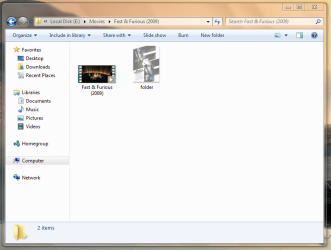
Capture 1.PNG

Whenever I run 7MC and access the 'Movies - movie library' the app hangs. I move the mouse & the selection sound can be heard :confused:
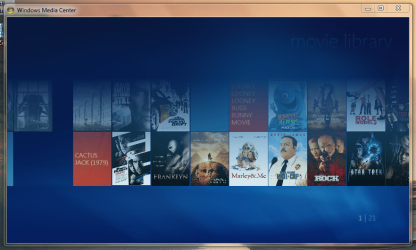
Capture.PNG

If I delete all the folder.jpg files from each directory 7MC has no issues with the 'Movies - movie library' but it just don't look as nice :(
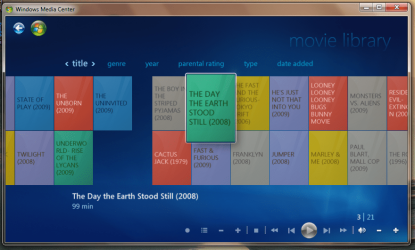
Capture 2.PNG

Any ideas would be great :p


Jeff
 

My Computer My Computer

At a glance

Windows 7 Ultimate x64AMD Sempron Dual Core3GBNVIDIA GeForce 6150SE nForce 430
Computer Manufacturer/Model Number
Compaq Desktop
OS
Windows 7 Ultimate x64
CPU
AMD Sempron Dual Core
Memory
3GB
Graphics Card(s)
NVIDIA GeForce 6150SE nForce 430
Screen Resolution
1024x768
Hard Drives
150GB Sata
For me HD recorded files were doing it.I record from DVBdream in .ts format. It hangs each time it access the video library. I removed the files and it works ok
 

My Computer My Computer

At a glance

1.Windows7 32bit 2. Win7 64 bitINTEL Core 2 Quad Q6600 2.4GhzRAM=2X2GB DDR2 667MHz kingstonGIGABYTE Nvidia GEFORCE 9500GT 512MB (Twin DVI)
Computer Manufacturer/Model Number
1.Custom PC 2.Acer laptop
OS
1.Windows7 32bit 2. Win7 64 bit
CPU
INTEL Core 2 Quad Q6600 2.4Ghz
Motherboard
GIGABYTE GA-EP45-DS3R
Memory
RAM=2X2GB DDR2 667MHz kingston
Graphics Card(s)
GIGABYTE Nvidia GEFORCE 9500GT 512MB (Twin DVI)
Sound Card
Realtek on Board + M-Audio delta 1010
Monitor(s) Displays
ViewSonic VA2226w
Screen Resolution
1680x1050
Hard Drives
Hitachi 160 GB
Seagate 500 GB
Keyboard
Logitech
Mouse
Logitech
Internet Speed
2048 MB
Other Info
Technisat Skystar 2 DVB PCI driver 4.5.1
I never understood the need for the folder.jpg in the "movie folder" thats created and holding the movie itself. Why the specific folder.jpg, i know i'm missing something, pls enlighten me a bit here. Is it somekind of placeholder for the movie cover? without the actual cover being present, or is it?
 

My Computer My Computer

At a glance

XP/win7 x86 build 7127Athlon64 X2 DUAL 4200+ 2.21ghz2GB Dual Chan DDR2 CorsairNvidia 6800GT
Computer Manufacturer/Model Number
CUSTOM
OS
XP/win7 x86 build 7127
CPU
Athlon64 X2 DUAL 4200+ 2.21ghz
Motherboard
ASUS K8 PRO SLI
Memory
2GB Dual Chan DDR2 Corsair
Graphics Card(s)
Nvidia 6800GT
Sound Card
nvidia
Monitor(s) Displays
19' LCD
Screen Resolution
1280x1024
Hard Drives
WD 250, 2x500, 2x1TB IDE/USB
WD 250 SATA (system)
SEAGATE 120 Sata
PSU
coolermaster 450
Case
SUPERFLOWER
Cooling
1 HDD bay fan, 5x80mm Case Fans, AEROGATE II Fan/Temp
Keyboard
MS wireless
Mouse
MS Wireless
Internet Speed
fassssssssst
Digger,

As far as i know the folder.jpg file is like a default poster file for the folder. Without it there's no poster in the 'movie library' as you can see in the third screenshot. The files i'm using are AVI files and not recorded media (Whatever windows default recorded media extention is) so the posters are not downloaded automatically, or so i think :p
 

My Computer My Computer

At a glance

Windows 7 Ultimate x64AMD Sempron Dual Core3GBNVIDIA GeForce 6150SE nForce 430
Computer Manufacturer/Model Number
Compaq Desktop
OS
Windows 7 Ultimate x64
CPU
AMD Sempron Dual Core
Memory
3GB
Graphics Card(s)
NVIDIA GeForce 6150SE nForce 430
Screen Resolution
1024x768
Hard Drives
150GB Sata
Digger,

As far as i know the folder.jpg file is like a default poster file for the folder. Without it there's no poster in the 'movie library' as you can see in the third screenshot. The files i'm using are AVI files and not recorded media (Whatever windows default recorded media extention is) so the posters are not downloaded automatically, or so i think :p

alright. few questions. 1) just create a file named folder.jpg? doesnt have to be the actual cover/poster named "folder.jpg"?
2) does having that *folder.jpg* in there "make or allow" windows to download or display the poster art? and if the folder.jpg isnt the actual poster of the movie renamed, then how is the poster being displayed? how is that info gotten/grabbed?.. other than thru WMP, which i assume it has to be, or MC.
 

My Computer My Computer

At a glance

XP/win7 x86 build 7127Athlon64 X2 DUAL 4200+ 2.21ghz2GB Dual Chan DDR2 CorsairNvidia 6800GT
Computer Manufacturer/Model Number
CUSTOM
OS
XP/win7 x86 build 7127
CPU
Athlon64 X2 DUAL 4200+ 2.21ghz
Motherboard
ASUS K8 PRO SLI
Memory
2GB Dual Chan DDR2 Corsair
Graphics Card(s)
Nvidia 6800GT
Sound Card
nvidia
Monitor(s) Displays
19' LCD
Screen Resolution
1280x1024
Hard Drives
WD 250, 2x500, 2x1TB IDE/USB
WD 250 SATA (system)
SEAGATE 120 Sata
PSU
coolermaster 450
Case
SUPERFLOWER
Cooling
1 HDD bay fan, 5x80mm Case Fans, AEROGATE II Fan/Temp
Keyboard
MS wireless
Mouse
MS Wireless
Internet Speed
fassssssssst
Problem solved.

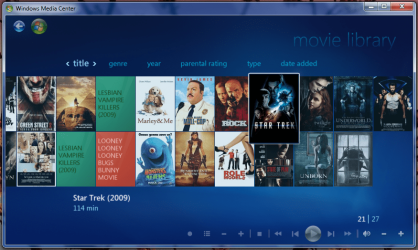
The issue was the resolution of the folder.jpg files that get downloaded by meta data retievers (some as high as 2000x3000 & 2.1MB in size) which is just rediculous for thumbnails. I changed the resolution to a width of 100 pixels maintaining the aspect ratio and it works perfectly even with full movie details downloaded from the net (as if it were a DVD).

Selection working
Untitled.png

With full synopsis
Capture.PNG
 

My Computer My Computer

At a glance

Windows 7 Ultimate x64AMD Sempron Dual Core3GBNVIDIA GeForce 6150SE nForce 430
Computer Manufacturer/Model Number
Compaq Desktop
OS
Windows 7 Ultimate x64
CPU
AMD Sempron Dual Core
Memory
3GB
Graphics Card(s)
NVIDIA GeForce 6150SE nForce 430
Screen Resolution
1024x768
Hard Drives
150GB Sata

My Computer My Computer

At a glance

Windows 7 Ultimate x64AMD Sempron Dual Core3GBNVIDIA GeForce 6150SE nForce 430
Computer Manufacturer/Model Number
Compaq Desktop
OS
Windows 7 Ultimate x64
CPU
AMD Sempron Dual Core
Memory
3GB
Graphics Card(s)
NVIDIA GeForce 6150SE nForce 430
Screen Resolution
1024x768
Hard Drives
150GB Sata
I'm going to look into how 7MC uses the folder.jpg files
 

My Computer My Computer

At a glance

Windows 7 Ultimate x64AMD Sempron Dual Core3GBNVIDIA GeForce 6150SE nForce 430
Computer Manufacturer/Model Number
Compaq Desktop
OS
Windows 7 Ultimate x64
CPU
AMD Sempron Dual Core
Memory
3GB
Graphics Card(s)
NVIDIA GeForce 6150SE nForce 430
Screen Resolution
1024x768
Hard Drives
150GB Sata
alright. few questions. 1) just create a file named folder.jpg? doesnt have to be the actual cover/poster named "folder.jpg"?
2) does having that *folder.jpg* in there "make or allow" windows to download or display the poster art? and if the folder.jpg isnt the actual poster of the movie renamed, then how is the poster being displayed? how is that info gotten/grabbed?.. other than thru WMP, which i assume it has to be, or MC.

Digger,
Actually you can use any photo you like as long as you keep the resolution low, as was found out here. If I can't find the dvdxml file for a particular movie, I get the image from Amazon.com, resize and viola! No, windows does not download anything, like it does when you insert a disc - it is taken from that locally stored picture.


You can do this with your home movies as well, select a photo, or make your own cover art, save it as a jpg then create the folder.jpg for the movie.

And now, thanks to Orbital Shark I can probably find more of the missing xml files for some of my rips and replace the folder.jpg file (I've been getting xmls from dvdxml and rolling my own for the missing ones). Even for DVD rips (vob's in the video TS folders) there is no information downloaded for the movie as it is when you insert a disc.

One last thing. I have downloaded the xml files for recorded concerts, (i.e. "Cream Reunion" DVD) and placed those in the folder of the recorded TV broadcast on PBS (stand alone DVD recorder, then ripped). Since the TV recording is obviously an edited version of the concert and my recorder sets chapters in minutes, rather than songs, as you scroll through the chapters in MC the chapter titles will not match up to what is playing. No big deal, just an observation. I would imagine this might be true if you downloaded an xml for a different version of a movie than what you actually ripped (not wide vs. std, but special editions with extra content kind of thing).

I hope I didn't "overstate the obvious" - just wanted to be helpful.
 

My Computer My Computer

At a glance

Windows 7 Home Premium x64,E52004GB Nvidia 6400EVGA8500GT + Onboard
Computer Manufacturer/Model Number
HTPC
OS
Windows 7 Home Premium x64,
CPU
E5200
Motherboard
EVGA 730i
Memory
4GB Nvidia 6400
Graphics Card(s)
EVGA8500GT + Onboard
Sound Card
Onboard S/Pdif to Sony STR DG710
Monitor(s) Displays
Bravia 40" LCD
Screen Resolution
1080p
Hard Drives
WD Black250g Sata
PSU
Ultra LSP 550w
Case
Thermaltake Bach with Pinnacle ir reciever in display window
Keyboard
BTC 9019URF, URC RF200 Remote
Mouse
Integrated joystick
Internet Speed
depends on the state of the dilithium crystal
Other Info
Workstation: Thermaltake Shark Dual Boot XP Pro, Windows 7 Home Premiumx64, 6GB Corsair 6400, Same Board and Processor as HTPC, WD Black 250GB(XP), WD Blue 250GB(7x64), 2x WDBlue 500GB
Server: Shuttle xpc, Freenas , 2TB
How does media center pull synopsis information? Based on file name...or?
 

My Computer My Computer

At a glance

7264x64/7260x86
OS
7264x64/7260x86
There is an ID # on every DVD. This is used to download the metadata from the web. In the case of Rips or AVI's, etc. this ID is not present, so you have to download the info from a site like the one Orbital Shark posted. This you include in the folder for the movie and it is stored permanently.
 

My Computer My Computer

At a glance

Windows 7 Home Premium x64,E52004GB Nvidia 6400EVGA8500GT + Onboard
Computer Manufacturer/Model Number
HTPC
OS
Windows 7 Home Premium x64,
CPU
E5200
Motherboard
EVGA 730i
Memory
4GB Nvidia 6400
Graphics Card(s)
EVGA8500GT + Onboard
Sound Card
Onboard S/Pdif to Sony STR DG710
Monitor(s) Displays
Bravia 40" LCD
Screen Resolution
1080p
Hard Drives
WD Black250g Sata
PSU
Ultra LSP 550w
Case
Thermaltake Bach with Pinnacle ir reciever in display window
Keyboard
BTC 9019URF, URC RF200 Remote
Mouse
Integrated joystick
Internet Speed
depends on the state of the dilithium crystal
Other Info
Workstation: Thermaltake Shark Dual Boot XP Pro, Windows 7 Home Premiumx64, 6GB Corsair 6400, Same Board and Processor as HTPC, WD Black 250GB(XP), WD Blue 250GB(7x64), 2x WDBlue 500GB
Server: Shuttle xpc, Freenas , 2TB
gmemore: yes, thank you, helpful indeed :)

copernicus: i was wondering the same thing. Filename is all it displays currently. How to do this anyone? Per the g/f's request actually. I am not in any way a big MC or WMP player guy until i've got my hands on 7. So any "obvious stuff" feel free :D That goes for anyone :)
 

My Computer My Computer

At a glance

XP/win7 x86 build 7127Athlon64 X2 DUAL 4200+ 2.21ghz2GB Dual Chan DDR2 CorsairNvidia 6800GT
Computer Manufacturer/Model Number
CUSTOM
OS
XP/win7 x86 build 7127
CPU
Athlon64 X2 DUAL 4200+ 2.21ghz
Motherboard
ASUS K8 PRO SLI
Memory
2GB Dual Chan DDR2 Corsair
Graphics Card(s)
Nvidia 6800GT
Sound Card
nvidia
Monitor(s) Displays
19' LCD
Screen Resolution
1280x1024
Hard Drives
WD 250, 2x500, 2x1TB IDE/USB
WD 250 SATA (system)
SEAGATE 120 Sata
PSU
coolermaster 450
Case
SUPERFLOWER
Cooling
1 HDD bay fan, 5x80mm Case Fans, AEROGATE II Fan/Temp
Keyboard
MS wireless
Mouse
MS Wireless
Internet Speed
fassssssssst
well doh! i missed that completely :o

also need a smiley with a hammer hitting one's head lol :P


see what i mean by the need to state the obvious? lmao
 

My Computer My Computer

At a glance

XP/win7 x86 build 7127Athlon64 X2 DUAL 4200+ 2.21ghz2GB Dual Chan DDR2 CorsairNvidia 6800GT
Computer Manufacturer/Model Number
CUSTOM
OS
XP/win7 x86 build 7127
CPU
Athlon64 X2 DUAL 4200+ 2.21ghz
Motherboard
ASUS K8 PRO SLI
Memory
2GB Dual Chan DDR2 Corsair
Graphics Card(s)
Nvidia 6800GT
Sound Card
nvidia
Monitor(s) Displays
19' LCD
Screen Resolution
1280x1024
Hard Drives
WD 250, 2x500, 2x1TB IDE/USB
WD 250 SATA (system)
SEAGATE 120 Sata
PSU
coolermaster 450
Case
SUPERFLOWER
Cooling
1 HDD bay fan, 5x80mm Case Fans, AEROGATE II Fan/Temp
Keyboard
MS wireless
Mouse
MS Wireless
Internet Speed
fassssssssst
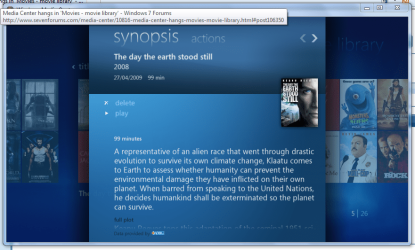
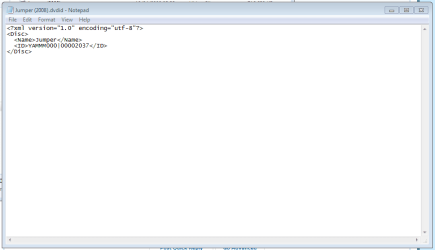
The Yammm software actually downloads the DVDID.xml file for each movie. This allows windows to download the exact details needed. It even adds 'Similar Movies', 'Cast & Crew' & 'Reviews' to the movie data.

Full Synopsis
synopsis.PNG

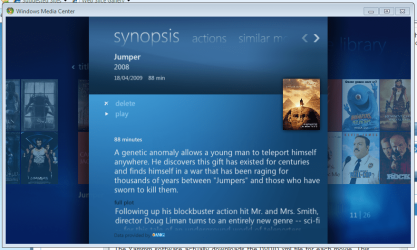
Similar Movies
similar movies.PNG

Even the full details of the similar movie, as if you actually owned it :p
similar 2.PNG

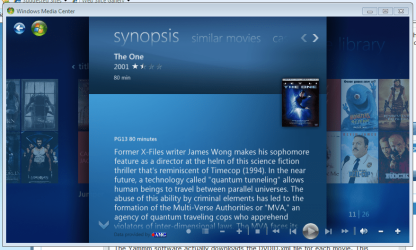
The 'Cast & Crew' detail shows all (currently cataloged movies) for that actor then shows the full detail of each movie selected.
 

My Computer My Computer

At a glance

Windows 7 Ultimate x64AMD Sempron Dual Core3GBNVIDIA GeForce 6150SE nForce 430
Computer Manufacturer/Model Number
Compaq Desktop
OS
Windows 7 Ultimate x64
CPU
AMD Sempron Dual Core
Memory
3GB
Graphics Card(s)
NVIDIA GeForce 6150SE nForce 430
Screen Resolution
1024x768
Hard Drives
150GB Sata
This is all the info downloaded by the 3rd party software.
Capture.PNG

Windows takes care of the rest. I'm gonna post a tutorial detailing how to exactly go about setting up your Movie Library but it wont be untill later :p
 

My Computer My Computer

At a glance

Windows 7 Ultimate x64AMD Sempron Dual Core3GBNVIDIA GeForce 6150SE nForce 430
Computer Manufacturer/Model Number
Compaq Desktop
OS
Windows 7 Ultimate x64
CPU
AMD Sempron Dual Core
Memory
3GB
Graphics Card(s)
NVIDIA GeForce 6150SE nForce 430
Screen Resolution
1024x768
Hard Drives
150GB Sata
thanks again orbital. If you wouldnt mind when you get around to the tutorial, do some exploration/research on having to setup somekind of filter system, be it the star rating/unrated system or by actual movie/audio parental rating. I have done a little fooling around with my movies. It seems a bit more tedious to get setup and going, but it may be the only answer to a parental style setup filter. Situation is i have "G" content, then say PG-PG17 group, then R and anthing above. I have a linksys extender I've been playing with and it seems tho i may have some hope. Atleast in a way to set the extender to not play anthing unrated or above a set parental tag unless the use of the parental code. As far as the pc or WMP way of viewing/accessing things, if possible, i wouldnt even want it to -ls any dir or file that doesnt meet the filter in place on that local pc.

many thanks again tho... you have given my sailboat a big puff of wind :D
 

My Computer My Computer

At a glance

XP/win7 x86 build 7127Athlon64 X2 DUAL 4200+ 2.21ghz2GB Dual Chan DDR2 CorsairNvidia 6800GT
Computer Manufacturer/Model Number
CUSTOM
OS
XP/win7 x86 build 7127
CPU
Athlon64 X2 DUAL 4200+ 2.21ghz
Motherboard
ASUS K8 PRO SLI
Memory
2GB Dual Chan DDR2 Corsair
Graphics Card(s)
Nvidia 6800GT
Sound Card
nvidia
Monitor(s) Displays
19' LCD
Screen Resolution
1280x1024
Hard Drives
WD 250, 2x500, 2x1TB IDE/USB
WD 250 SATA (system)
SEAGATE 120 Sata
PSU
coolermaster 450
Case
SUPERFLOWER
Cooling
1 HDD bay fan, 5x80mm Case Fans, AEROGATE II Fan/Temp
Keyboard
MS wireless
Mouse
MS Wireless
Internet Speed
fassssssssst
Yeah, I guess it would only be obvious if you had been doing it awhile :D.

Like I said, all commercial discs have an ID embedded in them. This is how Media Center knows you have "T2" and not "T2 Extreme DVD" in your dvd rom.
In the "old days" when you copied a CD, say with Roxio, you could retrieve the track info off the web automatically from the copy as well as the original. The same would be true for WMP, because the Copy was a true Copy. But if you had all of the tracks of a particular CD stored as mp3's (or as Audio Files), gathered all of them together in the same order as the CD, titled them exactly the same as the CD and burned a disc, that ID# would be missing = no info from the web

If you could do the same with a DVD, a true 1:1 copy like a CD then you could probably do the same thing. But you must alter a movie in some form or fashion to be able to play it again, even if you make a DVD copy. Therefore the unique ID is missing so whatever you are playing it on doesn't "know" it is the same disc.

This is why some downloads in WMP do not display cover art. It is also why when you download music that was on a particular album (did I just say "album"???, I'm dating myself here) it will show up as 3 or 4 different albums. You have to manually enter the information to replicate a particular collection of tracks or files.

DVDXML and the sights Orbital Shark suggested are a collection of uploaded metadata for movies from people, kinda like p2p for metadata, just on a website. If you are handy creating xml files you could create your own reviews or synosis' and cover art in one file. If you don't have that,(and I don't) you can at least put some cover art in you movie folder.
You can also rename the file without_all_of_the extra info so that it displays correctly on your MC screen...:D
 

My Computer My Computer

At a glance

Windows 7 Home Premium x64,E52004GB Nvidia 6400EVGA8500GT + Onboard
Computer Manufacturer/Model Number
HTPC
OS
Windows 7 Home Premium x64,
CPU
E5200
Motherboard
EVGA 730i
Memory
4GB Nvidia 6400
Graphics Card(s)
EVGA8500GT + Onboard
Sound Card
Onboard S/Pdif to Sony STR DG710
Monitor(s) Displays
Bravia 40" LCD
Screen Resolution
1080p
Hard Drives
WD Black250g Sata
PSU
Ultra LSP 550w
Case
Thermaltake Bach with Pinnacle ir reciever in display window
Keyboard
BTC 9019URF, URC RF200 Remote
Mouse
Integrated joystick
Internet Speed
depends on the state of the dilithium crystal
Other Info
Workstation: Thermaltake Shark Dual Boot XP Pro, Windows 7 Home Premiumx64, 6GB Corsair 6400, Same Board and Processor as HTPC, WD Black 250GB(XP), WD Blue 250GB(7x64), 2x WDBlue 500GB
Server: Shuttle xpc, Freenas , 2TB
Orbital Shark it sounds like you are onto something even better that the resources I have had

Thank you in advance for the tutorial:D

edit: Are you only downloading the xml file? If so, then that is stored permanently in the movie folder. Media center is only reading that info. Nothing further is downloading when you pull up the movie.

I misread the "windows takes care of the rest" part.:o Still, things are improved all of the time. I will be checking ot the YAMMM site later. Thanks

edit 2:It (yammm) is different, I stand corrected. Thanks for the info
 
Last edited:

My Computer My Computer

At a glance

Windows 7 Home Premium x64,E52004GB Nvidia 6400EVGA8500GT + Onboard
Computer Manufacturer/Model Number
HTPC
OS
Windows 7 Home Premium x64,
CPU
E5200
Motherboard
EVGA 730i
Memory
4GB Nvidia 6400
Graphics Card(s)
EVGA8500GT + Onboard
Sound Card
Onboard S/Pdif to Sony STR DG710
Monitor(s) Displays
Bravia 40" LCD
Screen Resolution
1080p
Hard Drives
WD Black250g Sata
PSU
Ultra LSP 550w
Case
Thermaltake Bach with Pinnacle ir reciever in display window
Keyboard
BTC 9019URF, URC RF200 Remote
Mouse
Integrated joystick
Internet Speed
depends on the state of the dilithium crystal
Other Info
Workstation: Thermaltake Shark Dual Boot XP Pro, Windows 7 Home Premiumx64, 6GB Corsair 6400, Same Board and Processor as HTPC, WD Black 250GB(XP), WD Blue 250GB(7x64), 2x WDBlue 500GB
Server: Shuttle xpc, Freenas , 2TB

My Computer My Computer

At a glance

Windows 7 Ultimate x64AMD Sempron Dual Core3GBNVIDIA GeForce 6150SE nForce 430
Computer Manufacturer/Model Number
Compaq Desktop
OS
Windows 7 Ultimate x64
CPU
AMD Sempron Dual Core
Memory
3GB
Graphics Card(s)
NVIDIA GeForce 6150SE nForce 430
Screen Resolution
1024x768
Hard Drives
150GB Sata
take ya time orbital... i'm in no hurry, still playing around with the thing as we speak. I'm like a blind man touring the taj mahal
 

My Computer My Computer

At a glance

XP/win7 x86 build 7127Athlon64 X2 DUAL 4200+ 2.21ghz2GB Dual Chan DDR2 CorsairNvidia 6800GT
Computer Manufacturer/Model Number
CUSTOM
OS
XP/win7 x86 build 7127
CPU
Athlon64 X2 DUAL 4200+ 2.21ghz
Motherboard
ASUS K8 PRO SLI
Memory
2GB Dual Chan DDR2 Corsair
Graphics Card(s)
Nvidia 6800GT
Sound Card
nvidia
Monitor(s) Displays
19' LCD
Screen Resolution
1280x1024
Hard Drives
WD 250, 2x500, 2x1TB IDE/USB
WD 250 SATA (system)
SEAGATE 120 Sata
PSU
coolermaster 450
Case
SUPERFLOWER
Cooling
1 HDD bay fan, 5x80mm Case Fans, AEROGATE II Fan/Temp
Keyboard
MS wireless
Mouse
MS Wireless
Internet Speed
fassssssssst
Back
Top