How to change card backs?

bug67

Hazard Avoidance
Pro User
VIP
Local time
7:00 PM
Messages
262
Location
Eagle River, AK
I'm afraid this may be beyond the scope of my abilities. I thought I might have been able to figure it out but, it's not looking like it.

I want to add a customized card back to the set of standard ones available in the card games in Windows 7. I would like to make it an option when I select card backs from the game options. Or, at least be able to replace one of the lesser desirable ones.

I downloaded Resource Hacker in the hopes that it would be a simple process. However, when I open the file C/Windows/System32/CardGames.dll in ResHacker, I am at a complete loss as to what to do next.

I know this probably sounds like a silly endeavor but, this is something I have wanted to do for as long as I can remember. :geek:

Any direction would be greatly appreciated.
 

My Computer My Computer

At a glance

Windows 7 X64 ProfessionalIntel® Pentium D Dual Core 3.6GHZ4GB DDR2 PC2-5300GeForce GT 440 (Fermi) 2GB 128-bit DDR3 PCI E...
Computer Manufacturer/Model Number
Dell XPS 400
OS
Windows 7 X64 Professional
CPU
Intel® Pentium D Dual Core 3.6GHZ
Motherboard
DELL Dimension 9150 MotherBoard DXP051 XPS400 FJ030
Memory
4GB DDR2 PC2-5300
Graphics Card(s)
GeForce GT 440 (Fermi) 2GB 128-bit DDR3 PCI Express 2.0 x16
Sound Card
ASUS XONAR DG 5.1 Channels PCI Interface Xonar DG
Monitor(s) Displays
2 X 23" Apple Cinema Display
Screen Resolution
1920 X 1200p
Hard Drives
250GB Intel® 510 Series SSD SATA 6G (w/TRIM) [500MB/s Reads]
1.0TB Western Digital Caviar Black SATA 6G 7200rpm 64MB Cache
PSU
375 Watt Dell
Case
Dell XPS 400 BTX Case
Cooling
Dell XPS 400 Air Cooling
Keyboard
Logitech Illuminated Keyboard
Mouse
Logitech M705 Marathon
Internet Speed
+/- 9929 Kbps
Other Info
This machine was given to me when my dad bought a new computer. I keep throwing upgrades at it and it keeps on ticking. Think I've done everything to it that can be done outside a PSU upgrade so I can run an even BETTER GPU.

My Computer My Computer

At a glance

Windows 7 Ultimate x641.80 GHz Intel Core 2 Duo processor T71003 gig ddr2NVIDIA GeForce 8400M GS
Computer Manufacturer/Model Number
HP dv6519tx
OS
Windows 7 Ultimate x64
CPU
1.80 GHz Intel Core 2 Duo processor T7100
Memory
3 gig ddr2
Graphics Card(s)
NVIDIA GeForce 8400M GS
Sound Card
Realtek High Definition Audio
Monitor(s) Displays
15.4” WXGA High Definition BrightView Widescreen
Screen Resolution
1280 x 800
Hard Drives
Hitachi 320 GB (5400 rpm)
PSU
90 W AC Power Adapter
Cooling
Kitchen plate under the lappy
Keyboard
101 key compatible
Mouse
Touch Pad with On/Off button and dedicated vertical Scroll
Internet Speed
Three Wireless internet prepaid using E160G USB dongle
I've had a look at this with Resource Hacker, Resource Hacker™ - Version 3.4.0. But something is puzzling me. Let me show you what I mean. This is from the 64-bit version of Windows 7:

The file, CardGames.dll, clearly exists in the System32 directory, as shown below:
Capture.PNG
When browsing that directory with Resource Hacker, the file apparently doesn't exist:
Capture1.PNG
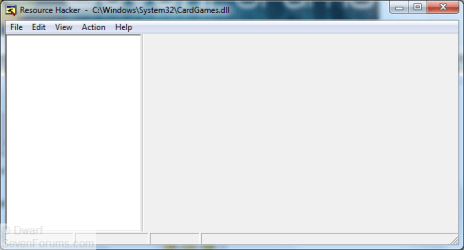
But it does exist, as proved in the first image and by the fact that the card games work. So, I then try typing CardGames.dll into the box, using the exact spelling format as found in the System32 directory. I then click Open and just receive an empty screen:
Capture2.PNG
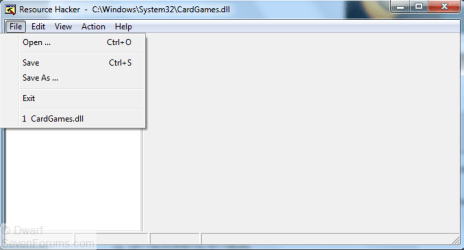
I then click on File and the entry CardGames.dll is clearly visible, as shown here:
Capture3.PNG
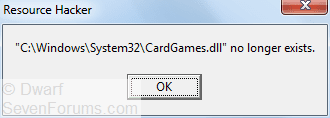
However, clicking on this entry yields the following:
Capture4.PNG
But it DOES exist, as proved in the first image above. :confused:
 

My Computer My Computer

At a glance

Windows 8.1 Pro RTM x64Intel Core-i5-3570K 4-core @ 3.4GHz (Ivy Brid...4 x 4GB DDR3-1600 Corsair Vengeance CMZ8GX3M2...MSI GeForce GTX770 Gaming OC 2GB
Computer type
PC/Desktop
Computer Manufacturer/Model Number
Dwarf Dwf/11/2012 r09/2013
OS
Windows 8.1 Pro RTM x64
CPU
Intel Core-i5-3570K 4-core @ 3.4GHz (Ivy Bridge) (OC 4.4GHz)
Motherboard
ASRock Z77 Extreme4-M
Memory
4 x 4GB DDR3-1600 Corsair Vengeance CMZ8GX3M2A1600C9B (16GB)
Graphics Card(s)
MSI GeForce GTX770 Gaming OC 2GB
Sound Card
Realtek High Definition on board solution (ALC 898)
Monitor(s) Displays
ViewSonic VA1912w Widescreen (VGA)
Screen Resolution
1440x900
Hard Drives
OCZ Agility 3 SSD 120GB SATA III x2 (RAID 0)
Samsung HD501LJ 500GB SATA II x2
Hitachi HDS721010CLA332 1TB SATA II
Iomega 1.5TB Ext USB 2.0
WD 2.0TB Ext USB 3.0
PSU
XFX Pro Series 850W Semi-Modular
Case
Gigabyte IF233
Cooling
1 x 120mm Front Inlet 1 x 120mm Rear Exhaust
Keyboard
Microsoft Comfort Curve Keyboard 3000 (USB)
Mouse
Microsoft Comfort Mouse 3000 for Business (USB)
Internet Speed
NetGear DG834Gv3 ADSL Modem/Router (Ethernet) ~4.0 Mb/s (O2)
Antivirus
Avast! 8.0.1497
Browser
IE 11
Other Info
Optical Drive: HL-DT-ST BD-RE BH10LS30 SATA Bluray
Lexmark S305 Printer/Scanner/Copier (USB)
WEI Score: 8.1/8.1/8.5/8.5/8.25
Asus Eee PC 1011PX Netbook (Windows 7 x86 Starter)

My Computer My Computer

At a glance

Windows 7 X64 ProfessionalIntel® Pentium D Dual Core 3.6GHZ4GB DDR2 PC2-5300GeForce GT 440 (Fermi) 2GB 128-bit DDR3 PCI E...
Computer Manufacturer/Model Number
Dell XPS 400
OS
Windows 7 X64 Professional
CPU
Intel® Pentium D Dual Core 3.6GHZ
Motherboard
DELL Dimension 9150 MotherBoard DXP051 XPS400 FJ030
Memory
4GB DDR2 PC2-5300
Graphics Card(s)
GeForce GT 440 (Fermi) 2GB 128-bit DDR3 PCI Express 2.0 x16
Sound Card
ASUS XONAR DG 5.1 Channels PCI Interface Xonar DG
Monitor(s) Displays
2 X 23" Apple Cinema Display
Screen Resolution
1920 X 1200p
Hard Drives
250GB Intel® 510 Series SSD SATA 6G (w/TRIM) [500MB/s Reads]
1.0TB Western Digital Caviar Black SATA 6G 7200rpm 64MB Cache
PSU
375 Watt Dell
Case
Dell XPS 400 BTX Case
Cooling
Dell XPS 400 Air Cooling
Keyboard
Logitech Illuminated Keyboard
Mouse
Logitech M705 Marathon
Internet Speed
+/- 9929 Kbps
Other Info
This machine was given to me when my dad bought a new computer. I keep throwing upgrades at it and it keeps on ticking. Think I've done everything to it that can be done outside a PSU upgrade so I can run an even BETTER GPU.
I've had a look at this with Resource Hacker, Resource Hacker™ - Version 3.4.0. But something is puzzling me. Let me show you what I mean. This is from the 64-bit version of Windows 7:

The file, CardGames.dll, clearly exists in the System32 directory, as shown below:
View attachment 94667
When browsing that directory with Resource Hacker, the file apparently doesn't exist:
View attachment 94670
But it does exist, as proved in the first image and by the fact that the card games work. So, I then try typing CardGames.dll into the box, using the exact spelling format as found in the System32 directory. I then click Open and just receive an empty screen:
View attachment 94671
I then click on File and the entry CardGames.dll is clearly visible, as shown here:
View attachment 94672
However, clicking on this entry yields the following:
View attachment 94673
But it DOES exist, as proved in the first image above. :confused:

Same for me with resource hacker Dwarf. Odd that as so many of the files we use it for are system files? Simply left click on the dll opens reshacker, but it is blank, and no options available. A Guy
 

My Computer My Computer

At a glance

Windows 10 Home x64INTEL Core i5-750 Quad-Core 3.37GHzHyperX Fury Black Series 8GB (2 x 4GB) 1866MhzEVGA GeForce GTX 750 Superclocked 1GB 128-Bit...
Computer type
PC/Desktop
OS
Windows 10 Home x64
CPU
INTEL Core i5-750 Quad-Core 3.37GHz
Motherboard
ASUS P7P55D
Memory
HyperX Fury Black Series 8GB (2 x 4GB) 1866Mhz
Graphics Card(s)
EVGA GeForce GTX 750 Superclocked 1GB 128-Bit GDDR5
Monitor(s) Displays
LG 32MA68HY 32" IPS
Screen Resolution
1920 x 1080
Hard Drives
Samsung 840 Evo 120GB, SEAGATE 500GB Barracuda® 7200.12, SATA 3 Gb/s, 7200 RPM, 16MB cache
PSU
ANTEC TruePower New TP-550, 80 PLUS, 550W
Case
ANTEC Three Hundred Illusion
Cooling
COOLER MASTER Hyper 212 Plus, 4 x 120mm 1 x 140mm Noctua's
Internet Speed
85 + Mbps
Antivirus
Avast
Browser
Vivaldi
I did further tests, and found that I could open the file from my 32-bit installs, but not my 64-bit ones. In addition, the file was listed in my 64-bit Vista installation (though not in the 64-bit Windows 7, as shown above), but it still wouldn't open. By listed, I am of course referring to the open file dialogue of Resource Hacker. All of this was done from my Windows 7 64-bit installation.
 

My Computer My Computer

At a glance

Windows 8.1 Pro RTM x64Intel Core-i5-3570K 4-core @ 3.4GHz (Ivy Brid...4 x 4GB DDR3-1600 Corsair Vengeance CMZ8GX3M2...MSI GeForce GTX770 Gaming OC 2GB
Computer type
PC/Desktop
Computer Manufacturer/Model Number
Dwarf Dwf/11/2012 r09/2013
OS
Windows 8.1 Pro RTM x64
CPU
Intel Core-i5-3570K 4-core @ 3.4GHz (Ivy Bridge) (OC 4.4GHz)
Motherboard
ASRock Z77 Extreme4-M
Memory
4 x 4GB DDR3-1600 Corsair Vengeance CMZ8GX3M2A1600C9B (16GB)
Graphics Card(s)
MSI GeForce GTX770 Gaming OC 2GB
Sound Card
Realtek High Definition on board solution (ALC 898)
Monitor(s) Displays
ViewSonic VA1912w Widescreen (VGA)
Screen Resolution
1440x900
Hard Drives
OCZ Agility 3 SSD 120GB SATA III x2 (RAID 0)
Samsung HD501LJ 500GB SATA II x2
Hitachi HDS721010CLA332 1TB SATA II
Iomega 1.5TB Ext USB 2.0
WD 2.0TB Ext USB 3.0
PSU
XFX Pro Series 850W Semi-Modular
Case
Gigabyte IF233
Cooling
1 x 120mm Front Inlet 1 x 120mm Rear Exhaust
Keyboard
Microsoft Comfort Curve Keyboard 3000 (USB)
Mouse
Microsoft Comfort Mouse 3000 for Business (USB)
Internet Speed
NetGear DG834Gv3 ADSL Modem/Router (Ethernet) ~4.0 Mb/s (O2)
Antivirus
Avast! 8.0.1497
Browser
IE 11
Other Info
Optical Drive: HL-DT-ST BD-RE BH10LS30 SATA Bluray
Lexmark S305 Printer/Scanner/Copier (USB)
WEI Score: 8.1/8.1/8.5/8.5/8.25
Asus Eee PC 1011PX Netbook (Windows 7 x86 Starter)
I did further tests, and found that I could open the file from my 32-bit installs, but not my 64-bit ones. In addition, the file was listed in my 64-bit Vista installation (though not in the 64-bit Windows 7, as shown above), but it still wouldn't open. By listed, I am of course referring to the open file dialogue of Resource Hacker. All of this was done from my Windows 7 64-bit installation.

Thanks guys for looking into this. I too noticed that when I navigated to the .dll from within ResHacker, I couldn't find it. What I did was made a copy of the CardGames.dll and put that on my desktop. I opened the copy with ResHacker. My plan was to make changes to the copy and then rename the original and replace it with the edited copy. Alas, I fear I am but a n00b.:o
 

My Computer My Computer

At a glance

Windows 7 X64 ProfessionalIntel® Pentium D Dual Core 3.6GHZ4GB DDR2 PC2-5300GeForce GT 440 (Fermi) 2GB 128-bit DDR3 PCI E...
Computer Manufacturer/Model Number
Dell XPS 400
OS
Windows 7 X64 Professional
CPU
Intel® Pentium D Dual Core 3.6GHZ
Motherboard
DELL Dimension 9150 MotherBoard DXP051 XPS400 FJ030
Memory
4GB DDR2 PC2-5300
Graphics Card(s)
GeForce GT 440 (Fermi) 2GB 128-bit DDR3 PCI Express 2.0 x16
Sound Card
ASUS XONAR DG 5.1 Channels PCI Interface Xonar DG
Monitor(s) Displays
2 X 23" Apple Cinema Display
Screen Resolution
1920 X 1200p
Hard Drives
250GB Intel® 510 Series SSD SATA 6G (w/TRIM) [500MB/s Reads]
1.0TB Western Digital Caviar Black SATA 6G 7200rpm 64MB Cache
PSU
375 Watt Dell
Case
Dell XPS 400 BTX Case
Cooling
Dell XPS 400 Air Cooling
Keyboard
Logitech Illuminated Keyboard
Mouse
Logitech M705 Marathon
Internet Speed
+/- 9929 Kbps
Other Info
This machine was given to me when my dad bought a new computer. I keep throwing upgrades at it and it keeps on ticking. Think I've done everything to it that can be done outside a PSU upgrade so I can run an even BETTER GPU.
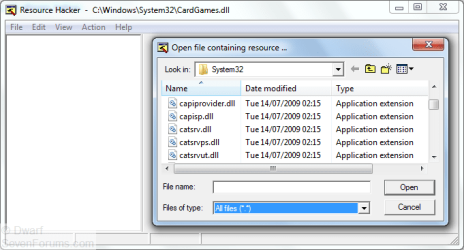
Reshacker 3.4.0 does not support 64 bit files. You need the 3.5.2 Beta which has 64 bit support.

Link from Vishal Gupta's site
Download New Updated “Resource Hacker 3.5.2 Beta” with 64-bit and PNG File Support - Tweaking with Vishal

There doesn't seem to be any info on Angus Johnson's site about this, but Vishal's site links to the file in Angus' site :huh:

EDIT: There IS some info on Angus' site about this
One off update - 19 December 2009 (version 3.5.2 beta):

I needed to access resources in a 64bit Windows executable so I've just updated Resource HackerTM to open (ie decompile/recompile) these files too. This new version also displays PNG image resources. However, please understand that I have no intention of reviving this project so please DON'T ask for other features. Also, because this version has only had limited testing I'm releasing it as a beta version.
You can download this beta version here - reshack_setup.exe
 

My Computer My Computer

At a glance

Windows 7 Ultimate x64 (XP, 98SE, 95, 3.11, D...Intel Core 2 Duo Processor P8600 (2.40 GHz, 3...4GB 800 MHz DDR2 SDRAMATI Mobility FireGL V5700 with 256 MB
Computer type
Laptop
Computer Manufacturer/Model Number
HP EliteBook 8530w Mobile Workstation
OS
Windows 7 Ultimate x64 (XP, 98SE, 95, 3.11, DOS 7.10 on VM) + Ubuntu 10.04 LTS Lucid Lynx
CPU
Intel Core 2 Duo Processor P8600 (2.40 GHz, 3 MB L2 cache)
Motherboard
Mobile Intel PM45 Express Chipset ICH9M-Enhanced
Memory
4GB 800 MHz DDR2 SDRAM
Graphics Card(s)
ATI Mobility FireGL V5700 with 256 MB
Sound Card
SoundMAX Integrated Digital HD Audio
Monitor(s) Displays
15.4-inch WXGA anti-glare (1280 x 800 resolution)
Screen Resolution
1280 x 800
Hard Drives
500GB + 1TB
Mouse
Synaptics PS/2 Port Touchpad, USB Mouse
Internet Speed
4 Mbps
Antivirus
MSE
Browser
Firefox, Chrome, IE
Other Info
Authentec AES2810 Fingerprint Reader

Yes but, I want to change the backs of the cards NOT the table (background) they are played on.

I guess you will have to change the card backs here

DATA\SHEETS\HIGHLIGHTSHEET1.JPG
DATA\SHEETS\HIGHLIGHTSHEET1X21.JPG
DATA\SHEETS\HIGHLIGHTSHEET1X22.JPG
DATA\SHEETS\HIGHLIGHTSHEET1X23.JPG
DATA\SHEETS\HIGHLIGHTSHEET1X24.JPG

I think this is where all the card and card back images are stored.
 

My Computer My Computer

At a glance

Windows 7 Ultimate x64 (XP, 98SE, 95, 3.11, D...Intel Core 2 Duo Processor P8600 (2.40 GHz, 3...4GB 800 MHz DDR2 SDRAMATI Mobility FireGL V5700 with 256 MB
Computer type
Laptop
Computer Manufacturer/Model Number
HP EliteBook 8530w Mobile Workstation
OS
Windows 7 Ultimate x64 (XP, 98SE, 95, 3.11, DOS 7.10 on VM) + Ubuntu 10.04 LTS Lucid Lynx
CPU
Intel Core 2 Duo Processor P8600 (2.40 GHz, 3 MB L2 cache)
Motherboard
Mobile Intel PM45 Express Chipset ICH9M-Enhanced
Memory
4GB 800 MHz DDR2 SDRAM
Graphics Card(s)
ATI Mobility FireGL V5700 with 256 MB
Sound Card
SoundMAX Integrated Digital HD Audio
Monitor(s) Displays
15.4-inch WXGA anti-glare (1280 x 800 resolution)
Screen Resolution
1280 x 800
Hard Drives
500GB + 1TB
Mouse
Synaptics PS/2 Port Touchpad, USB Mouse
Internet Speed
4 Mbps
Antivirus
MSE
Browser
Firefox, Chrome, IE
Other Info
Authentec AES2810 Fingerprint Reader
Reshacker 3.4.0 does not support 64 bit files. You need the 3.5.2 Beta which has 64 bit support.

That's the one I got.

I guess you will have to change the card backs here

DATA\SHEETS\HIGHLIGHTSHEET1.JPG
DATA\SHEETS\HIGHLIGHTSHEET1X21.JPG
DATA\SHEETS\HIGHLIGHTSHEET1X22.JPG
DATA\SHEETS\HIGHLIGHTSHEET1X23.JPG
DATA\SHEETS\HIGHLIGHTSHEET1X24.JPG

I think this is where all the card and card back images are stored.


Imma take another look...
 

My Computer My Computer

At a glance

Windows 7 X64 ProfessionalIntel® Pentium D Dual Core 3.6GHZ4GB DDR2 PC2-5300GeForce GT 440 (Fermi) 2GB 128-bit DDR3 PCI E...
Computer Manufacturer/Model Number
Dell XPS 400
OS
Windows 7 X64 Professional
CPU
Intel® Pentium D Dual Core 3.6GHZ
Motherboard
DELL Dimension 9150 MotherBoard DXP051 XPS400 FJ030
Memory
4GB DDR2 PC2-5300
Graphics Card(s)
GeForce GT 440 (Fermi) 2GB 128-bit DDR3 PCI Express 2.0 x16
Sound Card
ASUS XONAR DG 5.1 Channels PCI Interface Xonar DG
Monitor(s) Displays
2 X 23" Apple Cinema Display
Screen Resolution
1920 X 1200p
Hard Drives
250GB Intel® 510 Series SSD SATA 6G (w/TRIM) [500MB/s Reads]
1.0TB Western Digital Caviar Black SATA 6G 7200rpm 64MB Cache
PSU
375 Watt Dell
Case
Dell XPS 400 BTX Case
Cooling
Dell XPS 400 Air Cooling
Keyboard
Logitech Illuminated Keyboard
Mouse
Logitech M705 Marathon
Internet Speed
+/- 9929 Kbps
Other Info
This machine was given to me when my dad bought a new computer. I keep throwing upgrades at it and it keeps on ticking. Think I've done everything to it that can be done outside a PSU upgrade so I can run an even BETTER GPU.
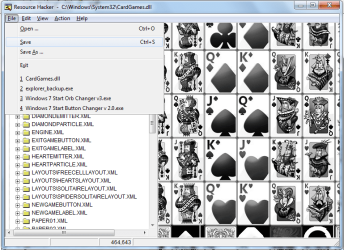
OK, well, that is indeed where the card backs are stored:
DATA\SHEETS\HIGHLIGHTSHEET1.JPG
DATA\SHEETS\HIGHLIGHTSHEET1X21.JPG
DATA\SHEETS\HIGHLIGHTSHEET1X22.JPG
DATA\SHEETS\HIGHLIGHTSHEET1X23.JPG
DATA\SHEETS\HIGHLIGHTSHEET1X24.JPG

Now what? I have a replacement .jpg but I can't figure out how to get it into the resource and save it there.
 

My Computer My Computer

At a glance

Windows 7 X64 ProfessionalIntel® Pentium D Dual Core 3.6GHZ4GB DDR2 PC2-5300GeForce GT 440 (Fermi) 2GB 128-bit DDR3 PCI E...
Computer Manufacturer/Model Number
Dell XPS 400
OS
Windows 7 X64 Professional
CPU
Intel® Pentium D Dual Core 3.6GHZ
Motherboard
DELL Dimension 9150 MotherBoard DXP051 XPS400 FJ030
Memory
4GB DDR2 PC2-5300
Graphics Card(s)
GeForce GT 440 (Fermi) 2GB 128-bit DDR3 PCI Express 2.0 x16
Sound Card
ASUS XONAR DG 5.1 Channels PCI Interface Xonar DG
Monitor(s) Displays
2 X 23" Apple Cinema Display
Screen Resolution
1920 X 1200p
Hard Drives
250GB Intel® 510 Series SSD SATA 6G (w/TRIM) [500MB/s Reads]
1.0TB Western Digital Caviar Black SATA 6G 7200rpm 64MB Cache
PSU
375 Watt Dell
Case
Dell XPS 400 BTX Case
Cooling
Dell XPS 400 Air Cooling
Keyboard
Logitech Illuminated Keyboard
Mouse
Logitech M705 Marathon
Internet Speed
+/- 9929 Kbps
Other Info
This machine was given to me when my dad bought a new computer. I keep throwing upgrades at it and it keeps on ticking. Think I've done everything to it that can be done outside a PSU upgrade so I can run an even BETTER GPU.
I think that the images are embedded into the .dll file itself and will be very difficult, if not impossible, to change. Sorry. :(
 

My Computer My Computer

At a glance

Windows 8.1 Pro RTM x64Intel Core-i5-3570K 4-core @ 3.4GHz (Ivy Brid...4 x 4GB DDR3-1600 Corsair Vengeance CMZ8GX3M2...MSI GeForce GTX770 Gaming OC 2GB
Computer type
PC/Desktop
Computer Manufacturer/Model Number
Dwarf Dwf/11/2012 r09/2013
OS
Windows 8.1 Pro RTM x64
CPU
Intel Core-i5-3570K 4-core @ 3.4GHz (Ivy Bridge) (OC 4.4GHz)
Motherboard
ASRock Z77 Extreme4-M
Memory
4 x 4GB DDR3-1600 Corsair Vengeance CMZ8GX3M2A1600C9B (16GB)
Graphics Card(s)
MSI GeForce GTX770 Gaming OC 2GB
Sound Card
Realtek High Definition on board solution (ALC 898)
Monitor(s) Displays
ViewSonic VA1912w Widescreen (VGA)
Screen Resolution
1440x900
Hard Drives
OCZ Agility 3 SSD 120GB SATA III x2 (RAID 0)
Samsung HD501LJ 500GB SATA II x2
Hitachi HDS721010CLA332 1TB SATA II
Iomega 1.5TB Ext USB 2.0
WD 2.0TB Ext USB 3.0
PSU
XFX Pro Series 850W Semi-Modular
Case
Gigabyte IF233
Cooling
1 x 120mm Front Inlet 1 x 120mm Rear Exhaust
Keyboard
Microsoft Comfort Curve Keyboard 3000 (USB)
Mouse
Microsoft Comfort Mouse 3000 for Business (USB)
Internet Speed
NetGear DG834Gv3 ADSL Modem/Router (Ethernet) ~4.0 Mb/s (O2)
Antivirus
Avast! 8.0.1497
Browser
IE 11
Other Info
Optical Drive: HL-DT-ST BD-RE BH10LS30 SATA Bluray
Lexmark S305 Printer/Scanner/Copier (USB)
WEI Score: 8.1/8.1/8.5/8.5/8.25
Asus Eee PC 1011PX Netbook (Windows 7 x86 Starter)
I think that the images are embedded into the .dll file itself and will be very difficult, if not impossible, to change. Sorry. :(

Ah, well, that's what I was afraid of. Between the 3 OSs I'm using, I wish I could find one that does it all. Guess that's why I use all 3! :p

Thanks for trying to help.
 

My Computer My Computer

At a glance

Windows 7 X64 ProfessionalIntel® Pentium D Dual Core 3.6GHZ4GB DDR2 PC2-5300GeForce GT 440 (Fermi) 2GB 128-bit DDR3 PCI E...
Computer Manufacturer/Model Number
Dell XPS 400
OS
Windows 7 X64 Professional
CPU
Intel® Pentium D Dual Core 3.6GHZ
Motherboard
DELL Dimension 9150 MotherBoard DXP051 XPS400 FJ030
Memory
4GB DDR2 PC2-5300
Graphics Card(s)
GeForce GT 440 (Fermi) 2GB 128-bit DDR3 PCI Express 2.0 x16
Sound Card
ASUS XONAR DG 5.1 Channels PCI Interface Xonar DG
Monitor(s) Displays
2 X 23" Apple Cinema Display
Screen Resolution
1920 X 1200p
Hard Drives
250GB Intel® 510 Series SSD SATA 6G (w/TRIM) [500MB/s Reads]
1.0TB Western Digital Caviar Black SATA 6G 7200rpm 64MB Cache
PSU
375 Watt Dell
Case
Dell XPS 400 BTX Case
Cooling
Dell XPS 400 Air Cooling
Keyboard
Logitech Illuminated Keyboard
Mouse
Logitech M705 Marathon
Internet Speed
+/- 9929 Kbps
Other Info
This machine was given to me when my dad bought a new computer. I keep throwing upgrades at it and it keeps on ticking. Think I've done everything to it that can be done outside a PSU upgrade so I can run an even BETTER GPU.
Images inside the dll file can be changed using Resource Hacker. I've included the steps to do it.
Make a backup of the CardGames.dll before making any changes.

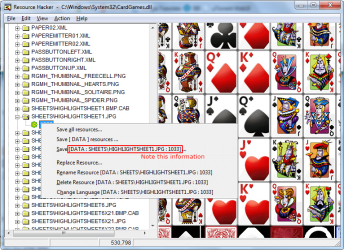
1. Open the CardGames.dll in Resource Hacker 3.5.2 and navigate to SHEETS\HIGHLIGHTSHEET1.JPG. Expand it and Save the resource at 1033
Snip 1.png

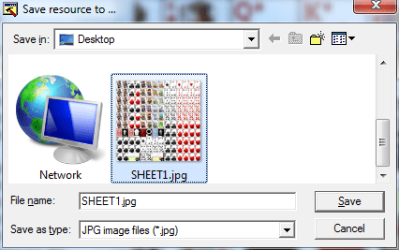
2. Make a note of the resource details while saving ([ DATA : SHEETS\HIGHLIGHTSHEET1.JPG : 1033 ])
Snip 2.png

Snip 3.png

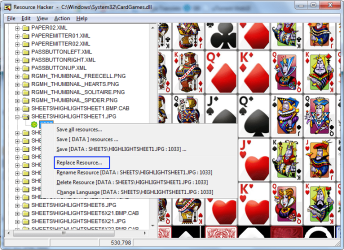
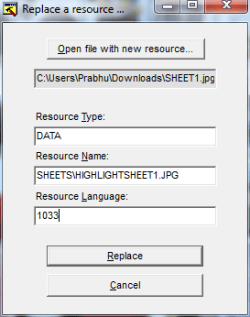
3. Make what ever changes are needed on the saved file and then Replace the resource. Select the file and then type the details that were noted while saving.
Snip 4.png
Snip 6.png

Snip 7.png

4. Save the dll file and you're done.
Snip 8.png
 

My Computer My Computer

At a glance

Windows 7 Ultimate x64 (XP, 98SE, 95, 3.11, D...Intel Core 2 Duo Processor P8600 (2.40 GHz, 3...4GB 800 MHz DDR2 SDRAMATI Mobility FireGL V5700 with 256 MB
Computer type
Laptop
Computer Manufacturer/Model Number
HP EliteBook 8530w Mobile Workstation
OS
Windows 7 Ultimate x64 (XP, 98SE, 95, 3.11, DOS 7.10 on VM) + Ubuntu 10.04 LTS Lucid Lynx
CPU
Intel Core 2 Duo Processor P8600 (2.40 GHz, 3 MB L2 cache)
Motherboard
Mobile Intel PM45 Express Chipset ICH9M-Enhanced
Memory
4GB 800 MHz DDR2 SDRAM
Graphics Card(s)
ATI Mobility FireGL V5700 with 256 MB
Sound Card
SoundMAX Integrated Digital HD Audio
Monitor(s) Displays
15.4-inch WXGA anti-glare (1280 x 800 resolution)
Screen Resolution
1280 x 800
Hard Drives
500GB + 1TB
Mouse
Synaptics PS/2 Port Touchpad, USB Mouse
Internet Speed
4 Mbps
Antivirus
MSE
Browser
Firefox, Chrome, IE
Other Info
Authentec AES2810 Fingerprint Reader
Thanks for the detailed instructions. Will undoubtedly prove useful. :)
 

My Computer My Computer

At a glance

Windows 8.1 Pro RTM x64Intel Core-i5-3570K 4-core @ 3.4GHz (Ivy Brid...4 x 4GB DDR3-1600 Corsair Vengeance CMZ8GX3M2...MSI GeForce GTX770 Gaming OC 2GB
Computer type
PC/Desktop
Computer Manufacturer/Model Number
Dwarf Dwf/11/2012 r09/2013
OS
Windows 8.1 Pro RTM x64
CPU
Intel Core-i5-3570K 4-core @ 3.4GHz (Ivy Bridge) (OC 4.4GHz)
Motherboard
ASRock Z77 Extreme4-M
Memory
4 x 4GB DDR3-1600 Corsair Vengeance CMZ8GX3M2A1600C9B (16GB)
Graphics Card(s)
MSI GeForce GTX770 Gaming OC 2GB
Sound Card
Realtek High Definition on board solution (ALC 898)
Monitor(s) Displays
ViewSonic VA1912w Widescreen (VGA)
Screen Resolution
1440x900
Hard Drives
OCZ Agility 3 SSD 120GB SATA III x2 (RAID 0)
Samsung HD501LJ 500GB SATA II x2
Hitachi HDS721010CLA332 1TB SATA II
Iomega 1.5TB Ext USB 2.0
WD 2.0TB Ext USB 3.0
PSU
XFX Pro Series 850W Semi-Modular
Case
Gigabyte IF233
Cooling
1 x 120mm Front Inlet 1 x 120mm Rear Exhaust
Keyboard
Microsoft Comfort Curve Keyboard 3000 (USB)
Mouse
Microsoft Comfort Mouse 3000 for Business (USB)
Internet Speed
NetGear DG834Gv3 ADSL Modem/Router (Ethernet) ~4.0 Mb/s (O2)
Antivirus
Avast! 8.0.1497
Browser
IE 11
Other Info
Optical Drive: HL-DT-ST BD-RE BH10LS30 SATA Bluray
Lexmark S305 Printer/Scanner/Copier (USB)
WEI Score: 8.1/8.1/8.5/8.5/8.25
Asus Eee PC 1011PX Netbook (Windows 7 x86 Starter)
Images inside the dll file can be changed using Resource Hacker. I've included the steps to do it.

Thank you, thank you THANK you! :D

Couple things to add to your awesome instructions.

1. I had to take ownership of the original CardGames.dll before I could replace it or change it's name.

2. I'm going to need to dig a little further into this. It seems that if I enlarge the playing field window, the card backs revert to their original state. Not sure about this. Also, I'm going to need to change the thumbnail image in the selection options so everything is consistent. That seems fairly straight forward.

Again, thank you so much. This has been something I have wanted to do since way, way back in Windows 98 even. Just found out about ResHacker with Windows 7 though.


This is what I've managed so far:
 

Attachments

  • CardBackCapture01.JPG
    CardBackCapture01.JPG
    64.2 KB · Views: 19

My Computer My Computer

At a glance

Windows 7 X64 ProfessionalIntel® Pentium D Dual Core 3.6GHZ4GB DDR2 PC2-5300GeForce GT 440 (Fermi) 2GB 128-bit DDR3 PCI E...
Computer Manufacturer/Model Number
Dell XPS 400
OS
Windows 7 X64 Professional
CPU
Intel® Pentium D Dual Core 3.6GHZ
Motherboard
DELL Dimension 9150 MotherBoard DXP051 XPS400 FJ030
Memory
4GB DDR2 PC2-5300
Graphics Card(s)
GeForce GT 440 (Fermi) 2GB 128-bit DDR3 PCI Express 2.0 x16
Sound Card
ASUS XONAR DG 5.1 Channels PCI Interface Xonar DG
Monitor(s) Displays
2 X 23" Apple Cinema Display
Screen Resolution
1920 X 1200p
Hard Drives
250GB Intel® 510 Series SSD SATA 6G (w/TRIM) [500MB/s Reads]
1.0TB Western Digital Caviar Black SATA 6G 7200rpm 64MB Cache
PSU
375 Watt Dell
Case
Dell XPS 400 BTX Case
Cooling
Dell XPS 400 Air Cooling
Keyboard
Logitech Illuminated Keyboard
Mouse
Logitech M705 Marathon
Internet Speed
+/- 9929 Kbps
Other Info
This machine was given to me when my dad bought a new computer. I keep throwing upgrades at it and it keeps on ticking. Think I've done everything to it that can be done outside a PSU upgrade so I can run an even BETTER GPU.
Not that it matters, but I already had/have the latest version, and still that dll won't show on ResHacker. Just a curiosity as I have no reason to open it. A Guy
 

My Computer My Computer

At a glance

Windows 10 Home x64INTEL Core i5-750 Quad-Core 3.37GHzHyperX Fury Black Series 8GB (2 x 4GB) 1866MhzEVGA GeForce GTX 750 Superclocked 1GB 128-Bit...
Computer type
PC/Desktop
OS
Windows 10 Home x64
CPU
INTEL Core i5-750 Quad-Core 3.37GHz
Motherboard
ASUS P7P55D
Memory
HyperX Fury Black Series 8GB (2 x 4GB) 1866Mhz
Graphics Card(s)
EVGA GeForce GTX 750 Superclocked 1GB 128-Bit GDDR5
Monitor(s) Displays
LG 32MA68HY 32" IPS
Screen Resolution
1920 x 1080
Hard Drives
Samsung 840 Evo 120GB, SEAGATE 500GB Barracuda® 7200.12, SATA 3 Gb/s, 7200 RPM, 16MB cache
PSU
ANTEC TruePower New TP-550, 80 PLUS, 550W
Case
ANTEC Three Hundred Illusion
Cooling
COOLER MASTER Hyper 212 Plus, 4 x 120mm 1 x 140mm Noctua's
Internet Speed
85 + Mbps
Antivirus
Avast
Browser
Vivaldi
Have you tried browsing to the file in explorer and copying it to the desktop then editing it? When I tried to open it from the system32 folder it opened with nothing inside. After copying it all the resources showed. On a side note gladson1976 was on the right track but there was another two images that still need to be edited. I made the same mistake where my cards reverted back to originals after maximizing the window.

Files needed to edit...

Card Deck Thumbnails:

DATA -> DECKS\CLASSICTHUMB.PNG
DECKS\CLASSICTHUMB_MCE.PNG
DECKS\HEARTSTHUMB.PNG
DECKS\SEASONSTHUMB.PNG

Game Play Cards:

DATA -> SHEETS\HIGHLIGHTSHEET1.JPG
SHEETS\HIGHLIGHTSHEET1X23.JPG
 

Attachments

  • changed_cards.png
    changed_cards.png
    255.3 KB · Views: 16

My Computer My Computer

At a glance

Windows 7 Enterprise RTM x644GB DDR2 800
Computer Manufacturer/Model Number
HP Compaq 6715b
OS
Windows 7 Enterprise RTM x64
Memory
4GB DDR2 800
Have you tried browsing to the file in explorer and copying it to the desktop then editing it? When I tried to open it from the system32 folder it opened with nothing inside. After copying it all the resources showed. On a side note gladson1976was on the right track but there was another two images that still need to be edited. I made the same mistake where my cards reverted back to originals after maximizing the window.

Files needed to edit...

Card Deck Thumbnails:

DATA -> DECKS\CLASSICTHUMB.PNG
DECKS\CLASSICTHUMB_MCE.PNG
DECKS\HEARTSTHUMB.PNG
DECKS\SEASONSTHUMB.PNG

Game Play Cards:

DATA -> SHEETS\HIGHLIGHTSHEET1.JPG
SHEETS\HIGHLIGHTSHEET1X23.JPG

Thanks for the pointer fritz. I hadn't tried it out myself, was just telling them how to replace resources in dll files. Good work. Repped.

On a side note, almost any resource can be replaced inside any dll file by this method.
 

My Computer My Computer

At a glance

Windows 7 Ultimate x64 (XP, 98SE, 95, 3.11, D...Intel Core 2 Duo Processor P8600 (2.40 GHz, 3...4GB 800 MHz DDR2 SDRAMATI Mobility FireGL V5700 with 256 MB
Computer type
Laptop
Computer Manufacturer/Model Number
HP EliteBook 8530w Mobile Workstation
OS
Windows 7 Ultimate x64 (XP, 98SE, 95, 3.11, DOS 7.10 on VM) + Ubuntu 10.04 LTS Lucid Lynx
CPU
Intel Core 2 Duo Processor P8600 (2.40 GHz, 3 MB L2 cache)
Motherboard
Mobile Intel PM45 Express Chipset ICH9M-Enhanced
Memory
4GB 800 MHz DDR2 SDRAM
Graphics Card(s)
ATI Mobility FireGL V5700 with 256 MB
Sound Card
SoundMAX Integrated Digital HD Audio
Monitor(s) Displays
15.4-inch WXGA anti-glare (1280 x 800 resolution)
Screen Resolution
1280 x 800
Hard Drives
500GB + 1TB
Mouse
Synaptics PS/2 Port Touchpad, USB Mouse
Internet Speed
4 Mbps
Antivirus
MSE
Browser
Firefox, Chrome, IE
Other Info
Authentec AES2810 Fingerprint Reader
Have you tried browsing to the file in explorer and copying it to the desktop then editing it? When I tried to open it from the system32 folder it opened with nothing inside. After copying it all the resources showed.

No, I didn't bother as it isn't important. It's just odd that it won't show in System32 :D

A Guy
 

My Computer My Computer

At a glance

Windows 10 Home x64INTEL Core i5-750 Quad-Core 3.37GHzHyperX Fury Black Series 8GB (2 x 4GB) 1866MhzEVGA GeForce GTX 750 Superclocked 1GB 128-Bit...
Computer type
PC/Desktop
OS
Windows 10 Home x64
CPU
INTEL Core i5-750 Quad-Core 3.37GHz
Motherboard
ASUS P7P55D
Memory
HyperX Fury Black Series 8GB (2 x 4GB) 1866Mhz
Graphics Card(s)
EVGA GeForce GTX 750 Superclocked 1GB 128-Bit GDDR5
Monitor(s) Displays
LG 32MA68HY 32" IPS
Screen Resolution
1920 x 1080
Hard Drives
Samsung 840 Evo 120GB, SEAGATE 500GB Barracuda® 7200.12, SATA 3 Gb/s, 7200 RPM, 16MB cache
PSU
ANTEC TruePower New TP-550, 80 PLUS, 550W
Case
ANTEC Three Hundred Illusion
Cooling
COOLER MASTER Hyper 212 Plus, 4 x 120mm 1 x 140mm Noctua's
Internet Speed
85 + Mbps
Antivirus
Avast
Browser
Vivaldi
Back
Top