Dual booting, two hds vs partition?

alt

New member
What would be the easiest way to do a dual boot? Would it be:

1)Use a second hard drive, one with XP one with Windows 7? If I did this would I be able to plug the XP drive in and see it as my D:\ drive? What if I went and switched it back in the bios to the XP hard would I see windows 7 stuff in D:\? I’d like to do this since I have two hard drives one that is brand new.

2) Just partition my current hard drive and dual boot. If I did this would I be able to switch back and forth and see files on both boots? Also what about if I added my other new hard drive would both see it easily?

I don’t know much about dual boots so please fill me in and answer my questions.
 

My Computer

OS
XP
I put my W7 in a separate HDD ....
Didn't want to take a chance and break a perfectly good XP system.
 

My Computer

Computer Manufacturer/Model Number
HP d4996t (upgraded)
OS
XP MCE .... XP Pro 64 .... W7 U x64
CPU
E6750, 2.67GHz C2D
Memory
4GB, PC2 6400
Graphics Card(s)
GeForce 9400GT
Monitor(s) Displays
Twin Samsung 2443BWT
Screen Resolution
1920x1200
Hard Drives
Many .. 3 Installed
PSU
460W
Internet Speed
Cable
I put my W7 in a separate HDD ....
Didn't want to take a chance and break a perfectly good XP system.

Are you able to go into bios and switch back and fourth, As in as access files from each when the other one is what you boot from off say making the primary C:\ and the other boot D:\?

Or do you just remove one and add the other one at a time?
 

My Computer

OS
XP
I would dual boot with one HD. Put your 2 OS on one drive.

I do not need to access my data on another OS since I have my data on another partition of my HD but you can see the data if you so choose.

Whatever OS you are in will show "C" as the system disk.

You will have a choice on every restart to boot XP or W7. You can set whatever you want as default. I know I didn't answer all your questions but maybe one or two.

Good luck. If you have a specific question let us know. There are also great tutorials here you can use to do almost anything you would want.

Talk to you later.
 

My Computer

Computer Manufacturer/Model Number
Keeps changing - (Custom)
OS
Windows 7 Professional x64
CPU
Intel Core i7 860
Motherboard
Gigabyte GA-P55-UD4P
Memory
4GB DDR3 Mushkin 1600Mhz @ 7-8-7-20
Graphics Card(s)
MSI GTS250 1GB DDR3 Twin Frozr
Sound Card
Onboard realtek
Monitor(s) Displays
Samsung SyncMaster 24" P2450 + Samsung 20" 2033
Screen Resolution
1920 X 1080 and 1600 X 900 (#2 system 1440 X 900)
Hard Drives
Patriot Inferno 120GB SSD + 3 WD Blue 640GB drives
PSU
Corsair 750 HX Modular
Case
Lancool PC-K62
Cooling
Cooler Master TX3 CPU cooler and 4-140mm and 1-120mm case
Keyboard
Gigabyte USB keyboard
Mouse
Microsoft wireless laser mouse 5000
Internet Speed
7 Mb down 1.5 up
Other Info
System #2: AMD Phenom II X6 1055T (Freezer 7 Pro cooler) - Gigabyte 880GMA-UD2H - WD 500GB Black - 9500GT (1GB) 500W OCZ modular PSU - Antec 200 case. System #3 (LapTop) Core 2 Duo T6670 - 320GB 7200RPM HD - 4GB DDR3 RAM.
...do you just remove one and add the other one at a time?
This might be a safe way to do it .. that's how I make my installs .. to be safe.

I have a HP computer ... I can tap the Esc key at boot up ...
and enter a boot loader .. that lets me choose which HDD I want to boot from.

These discs are subject to change .. disc 3 is currently W7-7127x86
 

Attachments

  • 4996.gif
    4996.gif
    71.7 KB · Views: 40

My Computer

Computer Manufacturer/Model Number
HP d4996t (upgraded)
OS
XP MCE .... XP Pro 64 .... W7 U x64
CPU
E6750, 2.67GHz C2D
Memory
4GB, PC2 6400
Graphics Card(s)
GeForce 9400GT
Monitor(s) Displays
Twin Samsung 2443BWT
Screen Resolution
1920x1200
Hard Drives
Many .. 3 Installed
PSU
460W
Internet Speed
Cable
Well I'm sorry I'm still not totally clear. If I do winXP on one and win7 on another hard drive, can the other one be plugged in and read as another drive letter, it doesnt have to be D as long as it shows up, I just used that to be simple. I wnat to be able to access files from each one on the other.
 

My Computer

OS
XP

My Computer

Computer Manufacturer/Model Number
Keeps changing - (Custom)
OS
Windows 7 Professional x64
CPU
Intel Core i7 860
Motherboard
Gigabyte GA-P55-UD4P
Memory
4GB DDR3 Mushkin 1600Mhz @ 7-8-7-20
Graphics Card(s)
MSI GTS250 1GB DDR3 Twin Frozr
Sound Card
Onboard realtek
Monitor(s) Displays
Samsung SyncMaster 24" P2450 + Samsung 20" 2033
Screen Resolution
1920 X 1080 and 1600 X 900 (#2 system 1440 X 900)
Hard Drives
Patriot Inferno 120GB SSD + 3 WD Blue 640GB drives
PSU
Corsair 750 HX Modular
Case
Lancool PC-K62
Cooling
Cooler Master TX3 CPU cooler and 4-140mm and 1-120mm case
Keyboard
Gigabyte USB keyboard
Mouse
Microsoft wireless laser mouse 5000
Internet Speed
7 Mb down 1.5 up
Other Info
System #2: AMD Phenom II X6 1055T (Freezer 7 Pro cooler) - Gigabyte 880GMA-UD2H - WD 500GB Black - 9500GT (1GB) 500W OCZ modular PSU - Antec 200 case. System #3 (LapTop) Core 2 Duo T6670 - 320GB 7200RPM HD - 4GB DDR3 RAM.
What would be the easiest way to do a dual boot? Would it be:

1)Use a second hard drive, one with XP one with Windows 7? If I did this would I be able to plug the XP drive in and see it as my D:\ drive? What if I went and switched it back in the bios to the XP hard would I see windows 7 stuff in D:\? I’d like to do this since I have two hard drives one that is brand new.

2) Just partition my current hard drive and dual boot. If I did this would I be able to switch back and forth and see files on both boots? Also what about if I added my other new hard drive would both see it easily?

I don’t know much about dual boots so please fill me in and answer my questions.

You're not very clear as to exactly what you have for 2 HDDs.
Normally, when people talk about having 2 HDDs, they're both in the same
physical case (ie, the desktop computer). One does not normally plug one
in and unplug the other one...

It 'sounds like' you have at least one USB plugin HDD. If this is correct,
Win 7 will not install to USB or 1394 (Firewire) drives. I tried it anyway,
with a new USB HDD - didn't work...

You keep referring to 'plug one in' and the 'BIOS" selecting which drive,
so it sounds like you're referring to an "External" HDD, like USB or Firewire.
That won't work. Both drives have to be "bolted into" the computer chassis.

There is still another (I believe 'little-known') way to install Windows 7,
into a "virtual hard disk" or, a -BIG- file with a '.vhd' extension. This is what I
wound up doing with my first install, since he would not install to my new
external USB drive. (I just did a second install last night into another partition
(or volume) on the same single HDD in my Gateway chassis.)
It boots and runs just like any other 'full install', yet is all 'contained' within
the one big file...

The reason for the second install was mostly to play-around with Win 7.
The first went into a 20 GB Win7.vhd file which is filling-up with programs and
data, 2 GB left. So I made another 'install' into a 30 GB on another volume on
the same single HDD.

More info is here (where I first read about it):
Boot Windows 7 from VHD - an amazing concept - MSFN Forums

He also refers to a fine tutorial with pics, here on this board (Thanks Brink), at:
http://www.sevenforums.com/tutorials/2953-virtual-hard-drive-vhd-file-create-start-boot.html

>---> NOTE that this technique is NOT meant for the super-novice !!! <---<
Running "Diskpart" at the Administrator's Command-prompt is a very easy
way to 'screw-up' your entire current running system, irreparably, with one little mistake!!!

Be sure to 'understand' the procedures before attempting, though.
And, also be aware that, like a 'regular' normal install, it will modify your (main drive, C: 's )
MBR and Boot Sector, so it can load the new-style Windows Boot Manager, using the "BCD store"
method of booting...
(This isn't spoken much of, on the various boards.)

It sounds like we need more information from you, regarding "plugging-in"
the other hard drive, whatever that is...
Do you have only one HDD 'bolted-into' your chassis?
Is it 'partitioned' into more than one volume?

Good Luck,
ChuckR

 

My Computer

Computer Manufacturer/Model Number
Gateway GT5056
OS
XP_Pro, W7_7201, W7RC.vhd, SciLinux5.3, Fedora12, Fedora9_2x, OpenSolaris_09-06
CPU
AMD 64x2
Motherboard
Yes
Memory
1 gig
Graphics Card(s)
Dunno
Sound Card
Realtek something
Monitor(s) Displays
Samsung SyncMaster 940MW w/TV
Screen Resolution
1280x1024
Hard Drives
250 GB WD, USB Seagate Freedesk 1.5 T
Internet Speed
Cable modem
Other Info
1 + 1 = 10b,
7 + 7 = 16o,
a + b = 15h.
I have two INTERNAL hard drives. I mean unplug and unplug the SATA cable.

I guess I should have been more clear. I know how to do most things I just am very unfamiliar with dual boot. This is a selfmade computer.
 

My Computer

OS
XP
I'll just recommend you put two OSs on one HD and use the Windows 7 boot loader. You only need to use some third party software or the install disk to make that partition. You can then use the other HD for your data and there you are. (you will not WANT to use XP after using Windows 7 anyway so make that one small) Good luck to you.
 

My Computer

Computer Manufacturer/Model Number
Keeps changing - (Custom)
OS
Windows 7 Professional x64
CPU
Intel Core i7 860
Motherboard
Gigabyte GA-P55-UD4P
Memory
4GB DDR3 Mushkin 1600Mhz @ 7-8-7-20
Graphics Card(s)
MSI GTS250 1GB DDR3 Twin Frozr
Sound Card
Onboard realtek
Monitor(s) Displays
Samsung SyncMaster 24" P2450 + Samsung 20" 2033
Screen Resolution
1920 X 1080 and 1600 X 900 (#2 system 1440 X 900)
Hard Drives
Patriot Inferno 120GB SSD + 3 WD Blue 640GB drives
PSU
Corsair 750 HX Modular
Case
Lancool PC-K62
Cooling
Cooler Master TX3 CPU cooler and 4-140mm and 1-120mm case
Keyboard
Gigabyte USB keyboard
Mouse
Microsoft wireless laser mouse 5000
Internet Speed
7 Mb down 1.5 up
Other Info
System #2: AMD Phenom II X6 1055T (Freezer 7 Pro cooler) - Gigabyte 880GMA-UD2H - WD 500GB Black - 9500GT (1GB) 500W OCZ modular PSU - Antec 200 case. System #3 (LapTop) Core 2 Duo T6670 - 320GB 7200RPM HD - 4GB DDR3 RAM.
I have two INTERNAL hard drives. I mean unplug and unplug the SATA cable.

I guess I should have been more clear. I know how to do most things I just am very unfamiliar with dual boot. This is a selfmade computer.

The tutorial that mate42nd posted will be the largest help once you review that. You can easily shrink the XP primary to see a new second one created or elect to see a stand alone install of 7 on the new drive and later copy the XP boot files over to it along with using a free program available to editing the 7 BCD in order to add the XP entry in.

If you plug the new drive in as the first sata and install 7 while the XP drive is still plugged in chances are that the installer will take care of seeing that done simply from detection of XP. Dual booting across drives allows more drive space for each installation if you need the local drive space. If not simply repartition the XP drive and use the new drive for primary storage.

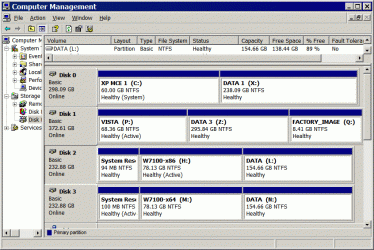
The image here shows how a triple boot of both RCs and Vista turned out.
 

Attachments

  • CURRENT PARTITIONS WITHOUT USB FLASH DRIVE.jpg
    CURRENT PARTITIONS WITHOUT USB FLASH DRIVE.jpg
    64.7 KB · Views: 16

My Computers

System One System Two

  • Computer type
    PC/Desktop
    Computer Manufacturer/Model Number
    Custom builds = 2
    OS
    W7 Ultimate x64/W10 Pro x64/W11 Pro Triple Boot - Main PC W7 Remote PC Micro ATX W7 Pro x64/W11 Pro
    CPU
    AMD Phenom II X4 975 Deneb 3.6ghz - 965 2nd remote pc
    Motherboard
    Gigabyte GA-790XTA-UD4-Gigabyte GA-880GM-D2H remote pc
    Memory
    Kingston Hyper X DDR3 1600 1.5v 16gb - Hyper X Fury 8gb 2nd
    Graphics Card(s)
    MSI HD Radeon 5750 1gb - MSI HD Radeon 6450 on mini tower
    Sound Card
    Creative Labs X-Fi Xtreme Audio P - Realtek onooard 2nd case
    Monitor(s) Displays
    ASUS VW199T-P 19" HP 2082a Main-HP 2082a 20" remote pc
    Screen Resolution
    Asus 1440x900 - HP 1600x900
    Hard Drives
    WD Black 1TB HD per OS W7, W10, and pending W11 presently on 500gb OS Drive - Pending Triple 1TB HDs for Spanned Storage/backup volume
    Single 2TB external USB enclosure, single 1TB System 7 Host/Boot drive, Pending 8TB external HD for system image b
    PSU
    Corsair 750TX - primary / Corsair CX600 - second
    Case
    Antec 900-2 - SSD compatible / NZXT Vulcan mini tower
    Cooling
    Zalman CNPS9900A
    Keyboard
    AZIO L70 Backlit Letters Gaming - ONN Cordless/USB
    Mouse
    MSI DS200 Programmable, Logitech Cordless
    Internet Speed
    30mbps upgrade - primary hard wired - mini tower usb WiFi
    Antivirus
    GFI VIPRE Internet Security 2014 on W7 2016 beta on W10,
    Browser
    Cyberfox, WaterFox 64bit FF variants, FireFox x64, Pale Moon
    Other Info
    Accomdata fan cooled usb 2.0 PIDE/Sata II, III external enclosure.
    Sambient usb/eSata PATA/Sata II, III external enclosure.
  • Computer type
    PC/Desktop
    System Manufacturer/Model Number
    CUSTOM ASSEMBLY
    OS
    W7 Pro x64/W11 Pro
    CPU
    AMD Deneb 3.6ghz - 965
    Motherboard
    Gigabyte GA-880GM-D2H remote pc
    Memory
    Kingston Hyper X Fury 8gb
    Graphics Card(s)
    MSI HD Radeon 6450 DVI Output
    Sound Card
    Realtek onooard Creative or Other separate PENDING
    Monitor(s) Displays
    VIZIO 32" LCD TV Separate LCD Pending
    Screen Resolution
    1600x1080
    Hard Drives
    WD 500GB OS Host/Boot WD Green 1TB Storage/Backup
    PSU
    Corsair 600W - THERMALTAKE 600W spare case
    Case
    NZXT Vulcan mini tower
    Cooling
    Twin 120mm Top Fans - 240mm Side Cover
    Keyboard
    ONN Cordless/USB Logitech Cordless
    Mouse
    ONN USB/Cordless - Logitech Cordless
    Internet Speed
    DSL 5G
    Browser
    MS Edge, FireFox, WaterFox x64, FireFox Nightly
    Other Info
    OS Testing-Remote Access to Main TeamViewer
Back
Top