My result in the " event viewer " ... and theme problem

kak2a2

New member
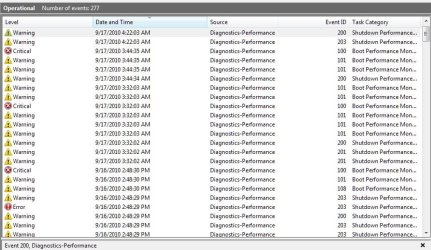
1- this is my result in event viewer
http://img96.imageshack.us/img96/3197/26608902.png
and all i can see is " warning " and " error "
should i be worried ? and how can i solve the problems ?

2- i just changed my theme ... and the computer makes sound when i enter or exit a folder ... basically when i do anything ... how to mute the theme's sound ?

thanks : )
 

My Computer

OS
Windows 7 Ultimate x64
CPU
intel i7-3770k @3.5GHz
Memory
8 GB
Graphics Card(s)
NVIDIA GeForce GTX 670
Screen Resolution
1920x1080
Keyboard
razer
Mouse
razer
Internet Speed
2.4 mb
I can't help you with #1 but I'm sure someone here can certainly do so.

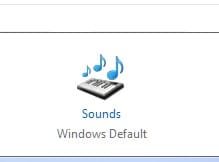
As to #2, go to your "personalize" options by right clicking on the desktop, select "Personalize" then select "Sounds" at the bottom of the Personalization Options window.
Screenshot_1.jpg

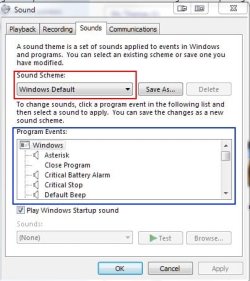
That will bring up the dialog pictured below. Your scheme (in the red box) will be different than mine. Just go to the blue box and change your sounds to your heart's content.

Note: the red and blue boxes are only for clarification - you will not see them.
Screenshot_2.jpg
 

My Computer

Computer Manufacturer/Model Number
Toshiba L355D
OS
Windows 7 Ultimate x64 SP1
CPU
Core2 Duo
Motherboard
Intel
Memory
4 GB
Graphics Card(s)
GM965 on-board
Sound Card
RealTek on-board
Monitor(s) Displays
19"+17"(laptop)
Screen Resolution
1440x900 (x 2)
Hard Drives
500GB Ext. 200GB Internal
PSU
N/A
Case
N/A
Cooling
N/A
Oh, BTW, I'd be curious to find a bit more about your #1 query as well:
Screenshot_1.jpg

:huh:
 

My Computer

Computer Manufacturer/Model Number
Toshiba L355D
OS
Windows 7 Ultimate x64 SP1
CPU
Core2 Duo
Motherboard
Intel
Memory
4 GB
Graphics Card(s)
GM965 on-board
Sound Card
RealTek on-board
Monitor(s) Displays
19"+17"(laptop)
Screen Resolution
1440x900 (x 2)
Hard Drives
500GB Ext. 200GB Internal
PSU
N/A
Case
N/A
Cooling
N/A
You can check your Boot options in your Bios Setup
Try changing it so your Hard Drive is first to boot.

It could also be something as simple as a need to Defrag.
Windows is sensing that it's taking way too long to boot up.
 

My Computer

Computer Manufacturer/Model Number
hp pavilion p6330f
OS
Windows 7 Ultimate 64 bit
CPU
2.93 ghz Intel I3 530 Multi Core
Motherboard
Iona 1.0
Memory
6 GB
Graphics Card(s)
Intel Hd
Sound Card
Realtek Hd
Monitor(s) Displays
ViewSonic 19 inch
Hard Drives
WDC 1 tb
1) Your event log shows 3 kind of errors- Boot performance, shutdown performance and DWM.

2) For the particular error highlighted in the snip, the boot duration is 43 seconds which is quite OK. However there are more severe errors there (Critical and warning) in the same task category. So the system occasionally thinks boot times are long.

3) For the the boot issues, you need to sort the event viewer list by "task category", then go through all the events you see in the “Boot Performance” category. Look for “Warnings” and “Critical” errors. For each such event, double click on the event, a window will pop up, click on the "General tab" and read carefully what it says. It would say "This application took longer than usual to start up.....".

Once you've done this for all critical and warning errors in Boot performance category, you'll know what the problematic apps are. If this event only crops up once, you don’t need to go on Red Alert. However, if you see the same warning more than once, then this is definitely a call to action. You can decide whether you really need that particular app installed on your computer, whether you need it to run at startup, whether you need to update drivers etc.

4) You can repeat this exercise for task category "shutdown performance monitoring".

5) Theres also a freeware program called Soluto which can trace boot times for you, you can try that too.

6) For the DWM errors, it may be a resource contention issue. Try turning off aero (either disable aero or switch to a classic theme), if that makes the errors go away it may have to do with the graphics driver or the video card or insufficient memory or maybe multiple monitors connected. Also, try turning off the screensaver and see if it helps.
 

My Computer

Computer Manufacturer/Model Number
Too many to describe...
OS
Windows 7 x64 pro/ Windows 7 x86 Pro/ XP SP3 x86
You might also check what is booting up with Windows
If you are running multiple " Real Time " security software, that will really affect bootup and shutdown.

I use Win patrol as my Start Up monitor
Allows me to manage exactly what I want there, delay things that are needed, but not at bootup.
 

My Computer

Computer Manufacturer/Model Number
hp pavilion p6330f
OS
Windows 7 Ultimate 64 bit
CPU
2.93 ghz Intel I3 530 Multi Core
Motherboard
Iona 1.0
Memory
6 GB
Graphics Card(s)
Intel Hd
Sound Card
Realtek Hd
Monitor(s) Displays
ViewSonic 19 inch
Hard Drives
WDC 1 tb
Bill2 ... for the boot performance .... here's the programs :

1- File Name : explorer.exe
Friendly Name : Windows Explorer ( found this 3 times )

2 - File Name : svchost.exe ( found this 2 times )

3- Name : PreShellInit

4- Name : SMSSInit ( 2 times )

5- File Name : MsMpEng.exe ( 3 times )

6- Name : MachinePolicyApplication ( 2 times )

7- File Name : VgaSave

Friendly Name : VGA/Super VGA Video Driver
8- File Name : audioendpointbuilder ( 2 times )

Friendly Name : Windows Audio Service

9- File Name : ctlcntrv.exe ( 4 times )
Friendly Name : Fingerprint Software Application

11- File Name : cdrom ( 2 times )
Friendly Name : SCSI CD-ROM Driver

12- File Name : PCIIDE\IDEChannel\4&2ab3c2e3&0&1
Friendly Name : IDE Channel

15- File Name : msnmsgr.exe
Friendly Name : Windows Live Messenger ( 2 times )

18- File Name : CSC
Friendly Name : Windows Client Side Caching Driver

for the messenger ... maybe because it's beta ?
for the finger print ... maybe because i turn the laptop on then go take a shower ( the laptop now on the finger print page ) then i come to slide my finger ... maybe that's what making it look slow to " event viewer " ?
and i don't no about the others ;\


My Computer

OS
Windows 7 Ultimate x64
CPU
intel i7-3770k @3.5GHz
Memory
8 GB
Graphics Card(s)
NVIDIA GeForce GTX 670
Screen Resolution
1920x1080
Keyboard
razer
Mouse
razer
Internet Speed
2.4 mb
DrivenOne
yeah when you mentioned the HD i remembered
i have an external hard disk .... could it be a problem ?
 

My Computer

OS
Windows 7 Ultimate x64
CPU
intel i7-3770k @3.5GHz
Memory
8 GB
Graphics Card(s)
NVIDIA GeForce GTX 670
Screen Resolution
1920x1080
Keyboard
razer
Mouse
razer
Internet Speed
2.4 mb
Well, in that list the only stuff that you can control are:

1) MSMPENG.EXE is part of MSE. I'm not surprised, on one of my machines MSE takes forever to start at bootup. So either switch to a different AV or wait for MS to tune it up.

2) Audio driver. Update the driver.

3) Video driver. Update the driver.

4) Windows live messenger. Do you HAVE to have it start at boot?

Also, update all possible drivers.
 

My Computer

Computer Manufacturer/Model Number
Too many to describe...
OS
Windows 7 x64 pro/ Windows 7 x86 Pro/ XP SP3 x86
^^
the audio and video driver are up-to-date
windows live messenger ... how to stop it from starting at boot ?

and yeah ... i turned disabled aero and turned off the screen saver ... didn't help for the DWM errors
 

My Computer

OS
Windows 7 Ultimate x64
CPU
intel i7-3770k @3.5GHz
Memory
8 GB
Graphics Card(s)
NVIDIA GeForce GTX 670
Screen Resolution
1920x1080
Keyboard
razer
Mouse
razer
Internet Speed
2.4 mb
Uncheck everything except AV and gadgets/stikynotes in msconfig>Startup.

Google repeat errrors in Event Viewer>Admin View and Performance to see how others have resolved them. This is how you learn to troubleshoot and educate yourself about your computer.
 
Back
Top