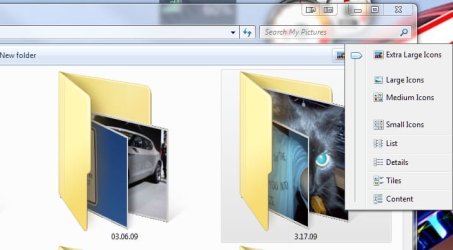
A AJR1988 New member Sep 29, 2010 #1 When viewing large and extra large photo previews, the jpeg thumbnails will not load. Is this a 64 bit issue? Any Ideas? My Computer OSwindows 7 professional 64 bit
When viewing large and extra large photo previews, the jpeg thumbnails will not load. Is this a 64 bit issue? Any Ideas?
mikedl Account closed by request Sep 29, 2010 #2 I can tell you it's not a 64 bit issue as I do not have this problem. Beyond that, I'll have to defer to another with more expertise in this matter. My Computer Computer Manufacturer/Model NumberToshiba L355DOSWindows 7 Ultimate x64 SP1CPUCore2 DuoMotherboardIntelMemory4 GBGraphics Card(s)GM965 on-boardSound CardRealTek on-boardMonitor(s) Displays19"+17"(laptop)Screen Resolution1440x900 (x 2)Hard Drives500GB Ext. 200GB InternalPSUN/ACaseN/ACoolingN/A
I can tell you it's not a 64 bit issue as I do not have this problem. Beyond that, I'll have to defer to another with more expertise in this matter.
A Guy Righteous Dude Sep 30, 2010 #3 Welcome to Seven Forums AJR1988. It is always helpful if you update your system specs in your control panel. It will help us see what your resources are, and if that is any issue. A Guy My Computer Computer typePC/DesktopOSWindows 10 Home x64CPUINTEL Core i5-750 Quad-Core 3.37GHzMotherboardASUS P7P55DMemoryHyperX Fury Black Series 8GB (2 x 4GB) 1866MhzGraphics Card(s)EVGA GeForce GTX 750 Superclocked 1GB 128-Bit GDDR5Monitor(s) DisplaysLG 32MA68HY 32" IPSScreen Resolution1920 x 1080Hard DrivesSamsung 840 Evo 120GB, SEAGATE 500GB Barracuda® 7200.12, SATA 3 Gb/s, 7200 RPM, 16MB cachePSUANTEC TruePower New TP-550, 80 PLUS, 550WCaseANTEC Three Hundred IllusionCoolingCOOLER MASTER Hyper 212 Plus, 4 x 120mm 1 x 140mm Noctua'sInternet Speed85 + MbpsAntivirusAvastBrowserVivaldi
Welcome to Seven Forums AJR1988. It is always helpful if you update your system specs in your control panel. It will help us see what your resources are, and if that is any issue. A Guy