Changing Title Bar Background Color

DwightStegall

New member
Below is how you change the background color of the title bar for Windows XP and Windows Vista. How do you do this in Windows 7? I want this so I can answer questions in Google Chrome Forum. Thanks. :)

★ In Windows Vista ★
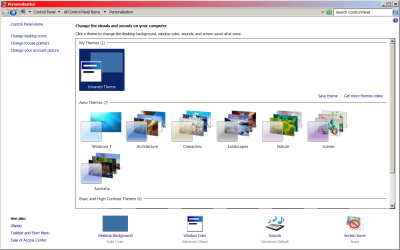
1. Right-click your computer's Desktop and click on "Personalize".
2. Click on the "Window Color And Apperance" link.
3. On the next page you can select 1 of 8 preset colors or click on "Show Color Mixer" to select any color you want.
4. You can change this back to the original color by click in "Default" in the 8 preset colors.

★ In Windows XP And Other Earlier Versions Of Windows ★
1. Right-click on an empty space on your computer's Desktop.
2. Choose Properties.
3. Click the Apperance tab.
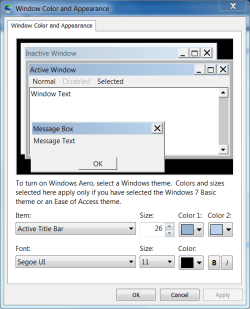
4. Click the Advanced button
5. Choose Active Titlebar or Inacvtive Titlebar from the "Item" drop-down menu.
6. Change color 1 and color 2 whatever color you want.
7. When finished press Apply the press OK.
 

My Computer

OS
Windows Vista
★ In Windows 7 ★
1. Right-click on an empty space on your computer's Desktop. (Screen 1)
2. Choose Personalize. (Screen 1)
3. Choose Window Color. (Screen 2)
4. Select the preset of your choice or use Advanced Appearance Settings to create your own. (Screen 3)
5. Select Save Changes.
 

Attachments

  • Tut_01.png
    Tut_01.png
    8.4 KB · Views: 5,469
  • Tut_02.png
    Tut_02.png
    161.4 KB · Views: 122
  • Tut_03.png
    Tut_03.png
    67.9 KB · Views: 139

My Computer

Computer type
PC/Desktop
Computer Manufacturer/Model Number
Custom Build/Mod
OS
Windows 7 Home Premium x64
CPU
Intel QX9650 Extreme 4.0 GHz
Motherboard
ASUS Rampage Extreme Rev2
Memory
8GB (4x2) Corsair Dominator DDR3
Graphics Card(s)
2x Radeon R390X [8GB]
Sound Card
SupremeFX X-Fi
Monitor(s) Displays
Dell 2408WFP 26" Panel
Screen Resolution
1920x1200
Hard Drives
4x WD 2TB (8TB+ Total)
2x Crucial SSD 128GB (RAID-0)
1x LG Blu-ray read/write
1x Phillips LightScribe DVD read/write
PSU
Corsair HX1000
Case
CoolerMaster - Cosmos S
Cooling
Custom Liquid - 320mm rad w/ 3x 80mm fans, CPU/NB/SB Blocks
Keyboard
Logitech Illuminater Pro
Mouse
Logitech
Internet Speed
Fractional T1 - 125Mbps
Antivirus
ESET Security Suite / Microsoft Security Essentials
Browser
Cyberfox Intel x64
Other Info
OC'd to 5.0GHz @ 44c under full load
Thanks

So it's pretty much the same as in Windows Vista.

Thanks and I don't believe I've seen so much work and detail go into answering a question before. I wish everyone answered questions this way.

Great job. :D
 

My Computer

OS
Windows Vista
It's the same for all three: Active title bar under advanced appearance settings
active.PNG

However it only appears to have any impact when using the classic theme.

act2.PNG

Aero and basic have no affect.

And we like to explain with pics ;)

EDIT: You can notice the colour when max/minimizing apps with basic themes.
 

My Computer

Computer type
PC/Desktop
Computer Manufacturer/Model Number
Systems by SmartEyeball
OS
8 Pro x64
CPU
i7 3770K 4.6GHz
Motherboard
ASUS P8Z77 WS
Memory
16GB G.Skill Trident X 2666mhz
Graphics Card(s)
x2 EVGA 780 Ti Superclocked SLI
Sound Card
SB X-FI Surround 5.1 PRO USB / ATH-AD900 Headphones
Monitor(s) Displays
x3 Dell U2410 / 58" Samsung
Screen Resolution
5760*1200/ 1920*1200
Hard Drives
2x Intel 520 240GB (RAID 0) * 2x WD Caviar Blacks 2TB (RAID 0) * 2TB WD Caviar Black * Sony Optirac DVD
PSU
Silverstone Strider Evolution 1200W
Case
Thermaltake Level 10 GT Snow Edition
Cooling
Noctua NH-D14
Keyboard
Topre Realforce // Ducky Shine MX Black // Filco Ninja TKL
Mouse
Thermaltake Theron (Highly Recommended) + Razer Imperator
Antivirus
MSE
Browser
IE, FF, WaterFox
Other Info
GT Extreme V2 Sim Racing Cockpit + 40" LCD and K/B Mouse stand ▼
Fanatec CSR Elite Wheel + Clubsport V1 Pedals + CSR shifter/7G-H ▼Saitek X52 Pro ▼ TrackIR 5 Pro
Buttkicker v2 Seat Rumbler with Dedicated 5.1 and Sub Woofer attached to frame ▼
=
Bloody Big Grin
Thanks and I don't believe I've seen so much work and detail go into answering a question before. I wish everyone answered questions this way.

Great job. :D

Thank you. Welcome to SevenForums.
 
Last edited:

My Computer

Computer type
PC/Desktop
Computer Manufacturer/Model Number
Custom Build/Mod
OS
Windows 7 Home Premium x64
CPU
Intel QX9650 Extreme 4.0 GHz
Motherboard
ASUS Rampage Extreme Rev2
Memory
8GB (4x2) Corsair Dominator DDR3
Graphics Card(s)
2x Radeon R390X [8GB]
Sound Card
SupremeFX X-Fi
Monitor(s) Displays
Dell 2408WFP 26" Panel
Screen Resolution
1920x1200
Hard Drives
4x WD 2TB (8TB+ Total)
2x Crucial SSD 128GB (RAID-0)
1x LG Blu-ray read/write
1x Phillips LightScribe DVD read/write
PSU
Corsair HX1000
Case
CoolerMaster - Cosmos S
Cooling
Custom Liquid - 320mm rad w/ 3x 80mm fans, CPU/NB/SB Blocks
Keyboard
Logitech Illuminater Pro
Mouse
Logitech
Internet Speed
Fractional T1 - 125Mbps
Antivirus
ESET Security Suite / Microsoft Security Essentials
Browser
Cyberfox Intel x64
Other Info
OC'd to 5.0GHz @ 44c under full load
Back
Top