I now want to uninstall Vista but can't

pooksahib

New member
Member
VIP
Local time
7:12 PM
Messages
149
Location
Scotland
Hi. I'd appreciate some help with the following:

I've always had Vista on my C drive. (The HDD is partioned into 3 - C, D and E).

For the past few weeks I've had 'dual boot' - Vista and Windows7. Although I installed Win7 on D drive, it shows as being on C when I boot Win7 (with Vista having moved to D...).

I am now happy with Win7 and want to remove Vista. But when I boot into Win7 and try to format the D drive (where Vista now is) I get an error message - "Windows was unable to complete the format". I am left with 2 folders in D drive - 'Windows' and 'Program files' but neither can be deleted.

I've done a fair amount of online searching but cannot find a solution as to how I remove Vista and free up my D drive. Any assistance gratefully received!
 

My Computer My Computer

At a glance

Microsoft Windows 7 Ultimate 64-bit 7601 Mult...Intel(R) Core(TM) i3-4150 CPU @ 3.50GHz8.00 GBIntel(R) HD Graphics 4400
Computer type
PC/Desktop
Computer Manufacturer/Model Number
self build
OS
Microsoft Windows 7 Ultimate 64-bit 7601 Multiprocessor Free Service Pack 1
CPU
Intel(R) Core(TM) i3-4150 CPU @ 3.50GHz
Motherboard
ASUSTeK COMPUTER INC. H97M-PLUS
Memory
8.00 GB
Graphics Card(s)
Intel(R) HD Graphics 4400
Sound Card
(1) High Definition Audio Device (2) USB Audio Device
Screen Resolution
1024 x 768 x 32 bits (4294967296 colors) @ 75 Hz
Hard Drives
(1) SAMSUNG HD103SI ATA Device (2) Samsung SSD 840 EVO 120GB ATA Device (3) ST31000528AS ATA Device (4) GENERIC USB Storage-CFC USB Device (5) GENERIC USB Storage-MSC USB Device (6) GENERIC USB Storage-SDC USB Device (7) GENERIC USB Stora
PSU
Corsair CXM 430W Modular 80 PLUS Bronze
Antivirus
Panda Free
Browser
Firefox+NoScript, AdBlockPlus, Disconnect
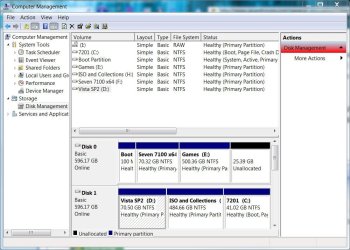
Open disk management (right-click computer>manage) and delete the Vista partition by selecting delete volume.

disk.JPG
 

My Computer My Computer

At a glance

8 Pro x64i7 3770K 4.6GHz16GB G.Skill Trident X 2666mhzx2 EVGA 780 Ti Superclocked SLI
Computer type
PC/Desktop
Computer Manufacturer/Model Number
Systems by SmartEyeball
OS
8 Pro x64
CPU
i7 3770K 4.6GHz
Motherboard
ASUS P8Z77 WS
Memory
16GB G.Skill Trident X 2666mhz
Graphics Card(s)
x2 EVGA 780 Ti Superclocked SLI
Sound Card
SB X-FI Surround 5.1 PRO USB / ATH-AD900 Headphones
Monitor(s) Displays
x3 Dell U2410 / 58" Samsung
Screen Resolution
5760*1200/ 1920*1200
Hard Drives
2x Intel 520 240GB (RAID 0) * 2x WD Caviar Blacks 2TB (RAID 0) * 2TB WD Caviar Black * Sony Optirac DVD
PSU
Silverstone Strider Evolution 1200W
Case
Thermaltake Level 10 GT Snow Edition
Cooling
Noctua NH-D14
Keyboard
Topre Realforce // Ducky Shine MX Black // Filco Ninja TKL
Mouse
Thermaltake Theron (Highly Recommended) + Razer Imperator
Antivirus
MSE
Browser
IE, FF, WaterFox
Other Info
GT Extreme V2 Sim Racing Cockpit + 40" LCD and K/B Mouse stand ▼
Fanatec CSR Elite Wheel + Clubsport V1 Pedals + CSR shifter/7G-H ▼Saitek X52 Pro ▼ TrackIR 5 Pro
Buttkicker v2 Seat Rumbler with Dedicated 5.1 and Sub Woofer attached to frame ▼
=
Bloody Big Grin
Have you tried popping in your Windows 7 Install DVD during boot, and click threw the setup screen until it asks 'Upgrade or Custom'

Then click 'custom' and click on the Vista partition then at the bottom hit 'delete' (and/or format).

Sorry if that didn't make sense, I just woke up. :P
 

My Computer My Computer

At a glance

Windows 7 Ultimate, OS X 10.7, Ubuntu 11.04Intel E6750 @ 3.80GHz2x2GB & 2x1GB (6GB) OCZ Reaper 1066MHz @ 1080MHzEVGA nVidia GTX 260 896mb (216 Core) FTW Edition
Computer Manufacturer/Model Number
Custom | Whitebox
OS
Windows 7 Ultimate, OS X 10.7, Ubuntu 11.04
CPU
Intel E6750 @ 3.80GHz
Motherboard
Gigabyte GA-EP45-UD3L (Revision 1.1)
Memory
2x2GB & 2x1GB (6GB) OCZ Reaper 1066MHz @ 1080MHz
Graphics Card(s)
EVGA nVidia GTX 260 896mb (216 Core) FTW Edition
Sound Card
Realtek ALC888
Monitor(s) Displays
21" VIZIO TV
Screen Resolution
1680x1050 @ 60Hz
Hard Drives
Western Digital WD6401AALS - 640GB
Hitachi HDP725016GLA380 - 160GB
PSU
Corsair 750W
Case
NZXT Nemesis Elite
Cooling
Thermaltake SpinQ
Keyboard
Logitech Wireless S520
Mouse
Logitech Wireless S520 - Microsoft Wireless Arc Mouse
Internet Speed
Download: 20mbps, Upload: 3mbps
You need to move your boot files from the Vista partition before you can format or delete the Vista partition.

While booted into 7:

Make sure your computer is set to see hidden and system files first.

Then copy bootmgr file from Vista partition root to 7 partiton root. Then copy the boot folder from Vista to 7, telling it to skip copying bcd and bcd.log when it asks.

Then do this command from an elevated command prompt:

bcdedit /export C:\boot\bcd

Now set the 7 partition as active.

Now you can reboot and the 7 partition will be controlling that. You can also now remove Vista from the bootmgr using either easybcd or typing msconfig in the start menu search box, then boot tab.

Vista partition can now be formatted or deleted. Good luck.
 

My Computer My Computer

At a glance

7600.20510 x86P4 550 3.4 GHz HT running at 3.5 GHzOCZ 2 GB(2x1GB) DDR400mHz running @ 414 mHzHIS Radeon HD 3850 IceQ 3 Turbo HDMI Dual DL-...
Computer Manufacturer/Model Number
self built
OS
7600.20510 x86
CPU
P4 550 3.4 GHz HT running at 3.5 GHz
Motherboard
MSI PM8M3-V (MS-7211 v1.x) Micro-ATX mainboard
Memory
OCZ 2 GB(2x1GB) DDR400mHz running @ 414 mHz
Graphics Card(s)
HIS Radeon HD 3850 IceQ 3 Turbo HDMI Dual DL-DVI AGP
Sound Card
MOTU Traveler firewire studio interface 192 kHz 24 bit
Monitor(s) Displays
22" widescreen Acer X223W LCD, 17" Compaq P75 CRT
Screen Resolution
1680x1050 and 1280x1024
Hard Drives
SATA I x2 WD, 400 GB and 120 GB, SATA 2 WD Caviar Black 1 TB
PSU
350W generic
Case
Cybertronpc, it glows blue
Cooling
stock cpu fan, Ice-Q 3 gpu and system, many case fans
Keyboard
Logitch Classical Keyboard 200
Mouse
Logitech Mediaplay cordless
Internet Speed
1792/448 kbits/sec
Other Info
SATA II PCI fake RAID adapter, 1 GB Readyboost, original ATI Remote Wonder (even works with WMC perfectly), Logitech Rumblepad 2 game controller x2
Suggest you use a good 3rd party BACKUP or Win7's.
1. Made a FULL CLONE partition of Win 7. I use Acronis v.12
2. Make a BOOT CD with all required to use BACKUP files.
3. FORMAT C:\ from boot CD.
4. RESTORE Full Clone/Backup on to C:\
5. Replace Bootable CD with Win7 DVD.
6. Reboot - if it fails -
7. Boot from Win 7 DVD and REPAIR C:\Win7
Your ready to go.
 
You need to move your boot files from the Vista partition before you can format or delete the Vista partition.

oops, forgot that little gem :o Good catch.
 

My Computer My Computer

At a glance

8 Pro x64i7 3770K 4.6GHz16GB G.Skill Trident X 2666mhzx2 EVGA 780 Ti Superclocked SLI
Computer type
PC/Desktop
Computer Manufacturer/Model Number
Systems by SmartEyeball
OS
8 Pro x64
CPU
i7 3770K 4.6GHz
Motherboard
ASUS P8Z77 WS
Memory
16GB G.Skill Trident X 2666mhz
Graphics Card(s)
x2 EVGA 780 Ti Superclocked SLI
Sound Card
SB X-FI Surround 5.1 PRO USB / ATH-AD900 Headphones
Monitor(s) Displays
x3 Dell U2410 / 58" Samsung
Screen Resolution
5760*1200/ 1920*1200
Hard Drives
2x Intel 520 240GB (RAID 0) * 2x WD Caviar Blacks 2TB (RAID 0) * 2TB WD Caviar Black * Sony Optirac DVD
PSU
Silverstone Strider Evolution 1200W
Case
Thermaltake Level 10 GT Snow Edition
Cooling
Noctua NH-D14
Keyboard
Topre Realforce // Ducky Shine MX Black // Filco Ninja TKL
Mouse
Thermaltake Theron (Highly Recommended) + Razer Imperator
Antivirus
MSE
Browser
IE, FF, WaterFox
Other Info
GT Extreme V2 Sim Racing Cockpit + 40" LCD and K/B Mouse stand ▼
Fanatec CSR Elite Wheel + Clubsport V1 Pedals + CSR shifter/7G-H ▼Saitek X52 Pro ▼ TrackIR 5 Pro
Buttkicker v2 Seat Rumbler with Dedicated 5.1 and Sub Woofer attached to frame ▼
=
Bloody Big Grin
My thanks to you all - I'll try torrentg's suggestion first though.

"Then copy bootmgr file from Vista partition root to 7 partiton root".
Do you mean the bootmgr file here: D/Windows/Boot/PCAT/bootmgr
Where exactly is it to be copied - to the same place in C (i.e. REPLACING the Win7 bootmgr file)?

"Then copy the boot folder from Vista to 7, telling it to skip copying bcd and bcd.log when it asks."
Do you mean REPLACE the Win7 Boot folder with the Vista one?

"Then do this command from an elevated command prompt:"
Is that a 'Start/Run' command or a DOS command?

"Now set the 7 partition as active."
How exactly is that done?

Many thanks.
 

My Computer My Computer

At a glance

Microsoft Windows 7 Ultimate 64-bit 7601 Mult...Intel(R) Core(TM) i3-4150 CPU @ 3.50GHz8.00 GBIntel(R) HD Graphics 4400
Computer type
PC/Desktop
Computer Manufacturer/Model Number
self build
OS
Microsoft Windows 7 Ultimate 64-bit 7601 Multiprocessor Free Service Pack 1
CPU
Intel(R) Core(TM) i3-4150 CPU @ 3.50GHz
Motherboard
ASUSTeK COMPUTER INC. H97M-PLUS
Memory
8.00 GB
Graphics Card(s)
Intel(R) HD Graphics 4400
Sound Card
(1) High Definition Audio Device (2) USB Audio Device
Screen Resolution
1024 x 768 x 32 bits (4294967296 colors) @ 75 Hz
Hard Drives
(1) SAMSUNG HD103SI ATA Device (2) Samsung SSD 840 EVO 120GB ATA Device (3) ST31000528AS ATA Device (4) GENERIC USB Storage-CFC USB Device (5) GENERIC USB Storage-MSC USB Device (6) GENERIC USB Storage-SDC USB Device (7) GENERIC USB Stora
PSU
Corsair CXM 430W Modular 80 PLUS Bronze
Antivirus
Panda Free
Browser
Firefox+NoScript, AdBlockPlus, Disconnect
Right on torrentg ;)

Hi pooksahib,


First, Post a screenshot of Disk Management window - like the one Smarteye posted so we can see what your setup is - and which steps below you need to follow.


If you already have bootmgr and Boot folder on 7 partition , all you need to do is Step 4,5,6.

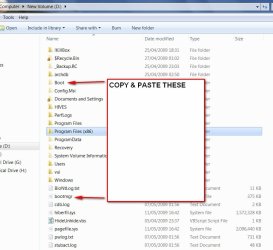
1. Go to folder options and make sure Hidden files are showing. Also untick "Hide protected operating sytem files", Apply, OK.

2. Look at the root of the partition and you will see bootmgr and a yellow folder called Boot.

BOOTMGR2009-05-11_182540.jpg


3. Copy and paste those, skip copying bcd as it won't let you, then use the bcdedit command to export a copy of bcd from the current System partition to the Boot folder you have just copied across, like this:

4. type cmd in Start search box - when it pops up, rt clcik and run as admin, then type :

bcdedit /export C:\boot\bcd {enter}

Close cmd prompt.

5. Go to Disk Management , rt click C and Mark as Active.

6. Restart to hand System status to C.
 

My Computers My Computers

  • At a glance

    7 X64i5 84002x8gb 3200mhz
    Computer type
    PC/Desktop
    OS
    7 X64
    CPU
    i5 8400
    Motherboard
    gigabyte b365m ds3h
    Memory
    2x8gb 3200mhz
    Hard Drives
    various
    PSU
    pure power 11 400w cm
    Case
    Coolermaster
    Cooling
    cryorig m9i
  • At a glance

    7x64g54008gb ddr4 2400
    Computer type
    PC/Desktop
    OS
    7x64
    CPU
    g5400
    Motherboard
    ga b365m ds3h
    Memory
    8gb ddr4 2400
    PSU
    xfx pro 450w
SIW2, that was superb. I now have a spotlessly clean D drive with Windows7 safely housed on C. Many, many thanks to you.

But... on startup I'm still getting that black and white screen asking me to select which O/S I want to use. I'd've thought that would have gone automatically. How do I get rid of it so that the first thing I see after power-on is the Win7 password screen?**

Thanks again for the beautifully clear instructions.

**It's OK - I worked it out myself!
 
Last edited:

My Computer My Computer

At a glance

Microsoft Windows 7 Ultimate 64-bit 7601 Mult...Intel(R) Core(TM) i3-4150 CPU @ 3.50GHz8.00 GBIntel(R) HD Graphics 4400
Computer type
PC/Desktop
Computer Manufacturer/Model Number
self build
OS
Microsoft Windows 7 Ultimate 64-bit 7601 Multiprocessor Free Service Pack 1
CPU
Intel(R) Core(TM) i3-4150 CPU @ 3.50GHz
Motherboard
ASUSTeK COMPUTER INC. H97M-PLUS
Memory
8.00 GB
Graphics Card(s)
Intel(R) HD Graphics 4400
Sound Card
(1) High Definition Audio Device (2) USB Audio Device
Screen Resolution
1024 x 768 x 32 bits (4294967296 colors) @ 75 Hz
Hard Drives
(1) SAMSUNG HD103SI ATA Device (2) Samsung SSD 840 EVO 120GB ATA Device (3) ST31000528AS ATA Device (4) GENERIC USB Storage-CFC USB Device (5) GENERIC USB Storage-MSC USB Device (6) GENERIC USB Storage-SDC USB Device (7) GENERIC USB Stora
PSU
Corsair CXM 430W Modular 80 PLUS Bronze
Antivirus
Panda Free
Browser
Firefox+NoScript, AdBlockPlus, Disconnect
Hey, glad you got it sorted out. :)

Haha SIW2, if it wasn't for one of your posts a few months ago when I learned, I'd still be telling people to use VistaBootPro to copy the bcd. :)
 

My Computer My Computer

At a glance

7600.20510 x86P4 550 3.4 GHz HT running at 3.5 GHzOCZ 2 GB(2x1GB) DDR400mHz running @ 414 mHzHIS Radeon HD 3850 IceQ 3 Turbo HDMI Dual DL-...
Computer Manufacturer/Model Number
self built
OS
7600.20510 x86
CPU
P4 550 3.4 GHz HT running at 3.5 GHz
Motherboard
MSI PM8M3-V (MS-7211 v1.x) Micro-ATX mainboard
Memory
OCZ 2 GB(2x1GB) DDR400mHz running @ 414 mHz
Graphics Card(s)
HIS Radeon HD 3850 IceQ 3 Turbo HDMI Dual DL-DVI AGP
Sound Card
MOTU Traveler firewire studio interface 192 kHz 24 bit
Monitor(s) Displays
22" widescreen Acer X223W LCD, 17" Compaq P75 CRT
Screen Resolution
1680x1050 and 1280x1024
Hard Drives
SATA I x2 WD, 400 GB and 120 GB, SATA 2 WD Caviar Black 1 TB
PSU
350W generic
Case
Cybertronpc, it glows blue
Cooling
stock cpu fan, Ice-Q 3 gpu and system, many case fans
Keyboard
Logitch Classical Keyboard 200
Mouse
Logitech Mediaplay cordless
Internet Speed
1792/448 kbits/sec
Other Info
SATA II PCI fake RAID adapter, 1 GB Readyboost, original ATI Remote Wonder (even works with WMC perfectly), Logitech Rumblepad 2 game controller x2
Hi pooksahib,

GLad it worked out for you.:D

Torrentg - well done for spotting it and suggesting the correct remedy.

Nothing wrong with Easybcd or VistaBootPro - I just think it's better to know how to do these things manually - so you can get out of trouble if needed. - seems you know how to do that now.:)
 

My Computers My Computers

  • At a glance

    7 X64i5 84002x8gb 3200mhz
    Computer type
    PC/Desktop
    OS
    7 X64
    CPU
    i5 8400
    Motherboard
    gigabyte b365m ds3h
    Memory
    2x8gb 3200mhz
    Hard Drives
    various
    PSU
    pure power 11 400w cm
    Case
    Coolermaster
    Cooling
    cryorig m9i
  • At a glance

    7x64g54008gb ddr4 2400
    Computer type
    PC/Desktop
    OS
    7x64
    CPU
    g5400
    Motherboard
    ga b365m ds3h
    Memory
    8gb ddr4 2400
    PSU
    xfx pro 450w
Right on torrentg ;)

Hi pooksahib,


First, Post a screenshot of Disk Management window - like the one Smarteye posted so we can see what your setup is - and which steps below you need to follow.


If you already have bootmgr and Boot folder on 7 partition , all you need to do is Step 4,5,6.

1. Go to folder options and make sure Hidden files are showing. Also untick "Hide protected operating sytem files", Apply, OK.

2. Look at the root of the partition and you will see bootmgr and a yellow folder called Boot.

View attachment 13555


3. Copy and paste those, skip copying bcd as it won't let you, then use the bcdedit command to export a copy of bcd from the current System partition to the Boot folder you have just copied across, like this:

4. type cmd in Start search box - when it pops up, rt clcik and run as admin, then type :

bcdedit /export C:\boot\bcd {enter}

Close cmd prompt.

5. Go to Disk Management , rt click C and Mark as Active.

6. Restart to hand System status to C.

I did what's written here except for step 5,6 my windows 7 was installed on E so i left E as active and i didn't understand the step 6 so i did in a different way but now when i try to open my computer there is an error:
"Windows failed to start. A recent hardware or software change might be the cause. To fix the problem :
1. Insert your windows installation disc and restart your computer.
2. Choose your language settings,and then click "Next" .
3. Click "Repair your computer."

File : /boot/bcd
so i put my windows 7 dvd but the language settings window won't come up so i can't click on next because of this i can't get to the step where i can "repair your computer".
 

My Computer My Computer

At a glance

Windows 7 build 7201 x86Intel (R) Core(TM)2 Duo4 GB DDR3 1066 MhzNVIDIA® GeForce® 9800M GTS supporting TurboCa...
Computer Manufacturer/Model Number
Toshiba/Qosmio x300
OS
Windows 7 build 7201 x86
CPU
Intel (R) Core(TM)2 Duo
Motherboard
Mobile Intel® PM45
Memory
4 GB DDR3 1066 Mhz
Graphics Card(s)
NVIDIA® GeForce® 9800M GTS supporting TurboCache™ technology
Sound Card
Harman Kardon® stere
Monitor(s) Displays
Lcd 17"
Screen Resolution
1440x990
Hi,

I am not sure what your original setup was and what you are trying to do.

Are you trying to delete a partition , but you can't as it is the System partition ?

What did you have installed and where?

Step 6 is restart the computer.

Did you boot from the 7 dvd - the message doesn't explain that - but you need to boot the dvd.

First you get windows loading files, then select Language and keyboard.

Next you see a screen saying Install Now - don't click that , click at the bottom where it says Repair my Computer - see this tutorial:

http://www.sevenforums.com/tutorials/668-system-recovery-options.html
 

My Computers My Computers

  • At a glance

    7 X64i5 84002x8gb 3200mhz
    Computer type
    PC/Desktop
    OS
    7 X64
    CPU
    i5 8400
    Motherboard
    gigabyte b365m ds3h
    Memory
    2x8gb 3200mhz
    Hard Drives
    various
    PSU
    pure power 11 400w cm
    Case
    Coolermaster
    Cooling
    cryorig m9i
  • At a glance

    7x64g54008gb ddr4 2400
    Computer type
    PC/Desktop
    OS
    7x64
    CPU
    g5400
    Motherboard
    ga b365m ds3h
    Memory
    8gb ddr4 2400
    PSU
    xfx pro 450w
Now i started windows 7 installation from the beginning i chosed to i install it on C where vista is already installed but because i tried dual boot before now i have files of Windows 7 on E and vista.old files on C i just wanna get rid all of them what should i do
 

My Computer My Computer

At a glance

Windows 7 build 7201 x86Intel (R) Core(TM)2 Duo4 GB DDR3 1066 MhzNVIDIA® GeForce® 9800M GTS supporting TurboCa...
Computer Manufacturer/Model Number
Toshiba/Qosmio x300
OS
Windows 7 build 7201 x86
CPU
Intel (R) Core(TM)2 Duo
Motherboard
Mobile Intel® PM45
Memory
4 GB DDR3 1066 Mhz
Graphics Card(s)
NVIDIA® GeForce® 9800M GTS supporting TurboCache™ technology
Sound Card
Harman Kardon® stere
Monitor(s) Displays
Lcd 17"
Screen Resolution
1440x990
Hi,

So you now have Win 7 installed on C - and Windows .old on C.

You have the previous install of 7 still on E.

You want to keep the 7 installed on c.

You also want to get rid of E and the Windows.old folder?

Look in Disk Management and see which partition is marked as "System".
 

My Computers My Computers

  • At a glance

    7 X64i5 84002x8gb 3200mhz
    Computer type
    PC/Desktop
    OS
    7 X64
    CPU
    i5 8400
    Motherboard
    gigabyte b365m ds3h
    Memory
    2x8gb 3200mhz
    Hard Drives
    various
    PSU
    pure power 11 400w cm
    Case
    Coolermaster
    Cooling
    cryorig m9i
  • At a glance

    7x64g54008gb ddr4 2400
    Computer type
    PC/Desktop
    OS
    7x64
    CPU
    g5400
    Motherboard
    ga b365m ds3h
    Memory
    8gb ddr4 2400
    PSU
    xfx pro 450w
yes those are the things that i want
C is marked as System
 

My Computer My Computer

At a glance

Windows 7 build 7201 x86Intel (R) Core(TM)2 Duo4 GB DDR3 1066 MhzNVIDIA® GeForce® 9800M GTS supporting TurboCa...
Computer Manufacturer/Model Number
Toshiba/Qosmio x300
OS
Windows 7 build 7201 x86
CPU
Intel (R) Core(TM)2 Duo
Motherboard
Mobile Intel® PM45
Memory
4 GB DDR3 1066 Mhz
Graphics Card(s)
NVIDIA® GeForce® 9800M GTS supporting TurboCache™ technology
Sound Card
Harman Kardon® stere
Monitor(s) Displays
Lcd 17"
Screen Resolution
1440x990
If C is system , you can just rt click E in Disk Managment and delete it.

If you need any data from the old Vista installation - it will be in the Windows.old folder - just copy it from there somewhere safe.

You can get rid of the Windows.old folder, by running Disk Cleanup.

You may have two 7 entries in the boot menu when you start up.

Type msconfig in Start search box - click it when it pops up - click the boot tab, highlight the 7 entry not marked as default and delete it.
 

My Computers My Computers

  • At a glance

    7 X64i5 84002x8gb 3200mhz
    Computer type
    PC/Desktop
    OS
    7 X64
    CPU
    i5 8400
    Motherboard
    gigabyte b365m ds3h
    Memory
    2x8gb 3200mhz
    Hard Drives
    various
    PSU
    pure power 11 400w cm
    Case
    Coolermaster
    Cooling
    cryorig m9i
  • At a glance

    7x64g54008gb ddr4 2400
    Computer type
    PC/Desktop
    OS
    7x64
    CPU
    g5400
    Motherboard
    ga b365m ds3h
    Memory
    8gb ddr4 2400
    PSU
    xfx pro 450w
i went to disk management and right clicked on e and selected delete volume but now it's disappeared i cannot find it how can i get it back
 

My Computer My Computer

At a glance

Windows 7 build 7201 x86Intel (R) Core(TM)2 Duo4 GB DDR3 1066 MhzNVIDIA® GeForce® 9800M GTS supporting TurboCa...
Computer Manufacturer/Model Number
Toshiba/Qosmio x300
OS
Windows 7 build 7201 x86
CPU
Intel (R) Core(TM)2 Duo
Motherboard
Mobile Intel® PM45
Memory
4 GB DDR3 1066 Mhz
Graphics Card(s)
NVIDIA® GeForce® 9800M GTS supporting TurboCache™ technology
Sound Card
Harman Kardon® stere
Monitor(s) Displays
Lcd 17"
Screen Resolution
1440x990
i got it back on my own thank you anyways but after deleting E and re formatting it now i cannot find disc cleanup sorry for causing so much trouble
 

My Computer My Computer

At a glance

Windows 7 build 7201 x86Intel (R) Core(TM)2 Duo4 GB DDR3 1066 MhzNVIDIA® GeForce® 9800M GTS supporting TurboCa...
Computer Manufacturer/Model Number
Toshiba/Qosmio x300
OS
Windows 7 build 7201 x86
CPU
Intel (R) Core(TM)2 Duo
Motherboard
Mobile Intel® PM45
Memory
4 GB DDR3 1066 Mhz
Graphics Card(s)
NVIDIA® GeForce® 9800M GTS supporting TurboCache™ technology
Sound Card
Harman Kardon® stere
Monitor(s) Displays
Lcd 17"
Screen Resolution
1440x990
Heh heh, no trouble.
Start menu, all programs, accessories, system tools, disk cleanup

or in start menu search box, type "disk" and you'll see it there.
 

My Computer My Computer

At a glance

7600.20510 x86P4 550 3.4 GHz HT running at 3.5 GHzOCZ 2 GB(2x1GB) DDR400mHz running @ 414 mHzHIS Radeon HD 3850 IceQ 3 Turbo HDMI Dual DL-...
Computer Manufacturer/Model Number
self built
OS
7600.20510 x86
CPU
P4 550 3.4 GHz HT running at 3.5 GHz
Motherboard
MSI PM8M3-V (MS-7211 v1.x) Micro-ATX mainboard
Memory
OCZ 2 GB(2x1GB) DDR400mHz running @ 414 mHz
Graphics Card(s)
HIS Radeon HD 3850 IceQ 3 Turbo HDMI Dual DL-DVI AGP
Sound Card
MOTU Traveler firewire studio interface 192 kHz 24 bit
Monitor(s) Displays
22" widescreen Acer X223W LCD, 17" Compaq P75 CRT
Screen Resolution
1680x1050 and 1280x1024
Hard Drives
SATA I x2 WD, 400 GB and 120 GB, SATA 2 WD Caviar Black 1 TB
PSU
350W generic
Case
Cybertronpc, it glows blue
Cooling
stock cpu fan, Ice-Q 3 gpu and system, many case fans
Keyboard
Logitch Classical Keyboard 200
Mouse
Logitech Mediaplay cordless
Internet Speed
1792/448 kbits/sec
Other Info
SATA II PCI fake RAID adapter, 1 GB Readyboost, original ATI Remote Wonder (even works with WMC perfectly), Logitech Rumblepad 2 game controller x2
Back
Top