my ram (1600 mhz) is showing as 1066mhz

janno

New member
Local time
4:50 PM
Messages
47
i just finished putting my rig together, and to my surprise my ram is telling me something i dont understand...

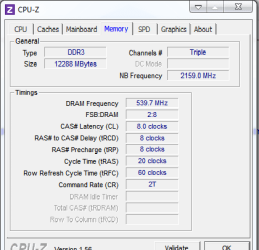
here are my cpu-z stats:

Intel Core i7 930
Windows 7 Ultimate Edition (Build 7600)
CPU Arch : 1 CPU - 4 Cores - 8 Threads
CPU PSN : Intel Core i7 CPU 930 @ 2.80GHz
CPU EXT : MMX, SSE (1, 2, 3, 3S, 4.1, 4.2), EM64T, VT-x
CPUID : 6.A.5 / Extended : 6.1A
CPU Cache : L1 : 4 x 32 / 4 x 32 KB - L2 : 4 x 256 KB
CPU Cache : L3 : 8192 KB
Core : Bloomfield (45 nm) / Stepping : D0
Freq : 1619.22 MHz (134.93 * 12)

MB Brand : Gigabyte
MB Model : X58A-UD5
NB : Intel X58 rev 13
SB : Intel 82801JR (ICH10R) rev 00

GPU Type : Radeon HD 5750
GPU Clocks : Core 156 MHz / RAM 1000 MHz
DirectX Version : 11.0

RAM : 12288 MB DDR3 Triple Channel
RAM Speed : 539.7 MHz (2:8) @ 8-8-8-20
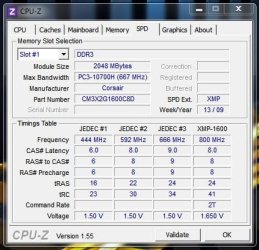
Slot 1 : 2048MB (10700)
Slot 1 Manufacturer : Corsair
Slot 2 : 2048MB (10700)
Slot 2 Manufacturer : Corsair
Slot 3 : 2048MB (10700)
Slot 3 Manufacturer : Corsair
Slot 4 : 2048MB (10700)
Slot 4 Manufacturer : Corsair
Slot 5 : 2048MB (10700)
Slot 5 Manufacturer : Corsair
Slot 6 : 2048MB (10700)
Slot 6 Manufacturer : Corsair

also i think my cpu is not giving all it should...

does this mean i am forced to OC?

please someone tell me waht i have to do...

Thanx!
 

My Computer My Computer

At a glance

windows 7 Ultimate 64-bitIntel Core I7 930 2.80 GHzCorsair Dominator GT 12 GB, PC3-14900, 1866 MHzAsus Radeon HD 5750 Formula 1024 MB
Computer Manufacturer/Model Number
me, myself and i
OS
windows 7 Ultimate 64-bit
CPU
Intel Core I7 930 2.80 GHz
Motherboard
GigaByte GA-X58A-UD5
Memory
Corsair Dominator GT 12 GB, PC3-14900, 1866 MHz
Graphics Card(s)
Asus Radeon HD 5750 Formula 1024 MB
Sound Card
integrated
Monitor(s) Displays
samsung 82cm lcd 1080p
Screen Resolution
1920 x 1080
Hard Drives
1 x Crucial RealSSD C300 64 GB, S-ATA 600, 70 Mb's, 355 MB/s
1 x WD Caviar Black 1 TB, 7200 Rpm, 64 MB, Sata III/600
4 x WD Caviar Green 1 TB, 5400 Rpm, 64 MB, S-ATA II/300
PSU
Zalman ZM1000
Case
Thermaltake Element V
Cooling
Noctua NH-C12P SE14
Keyboard
Logitech G19
Mouse
Logitech MX Revolution
Internet Speed
Cable
Is the BIOS automatically configuring the values of the RAM Modules??

And the Frequency of the CPU could be Intel SpeedStep, check on the bios if it's enabled, you could turn it off and check if now you're running with 100% frequency..

Somebody correct me if i'm wrong please
 

My Computer My Computer

At a glance

Windows
Computer type
PC/Desktop
OS
Windows
Check your bios settings:

Memory
XMP profile
auto voltage at
SPD auto showing =
 

My Computer My Computer

At a glance

Systems 1 and 2: Windows 7 Enterprise x64, Wi...System 1: i7 [email protected], System 2: AMD FX-41...System 1: 8GB System 2: 8GBSystem 1: ATI FirePro V4800 System 2: Radeon ...
Computer Manufacturer/Model Number
Dell and Custom
OS
Systems 1 and 2: Windows 7 Enterprise x64, Win 8 Developer
CPU
System 1: i7 [email protected], System 2: AMD FX-4100 Zambezi 3.6G
Motherboard
System 1:Dell 06NWYK System 2: ASUS M5A97 AM3+
Memory
System 1: 8GB System 2: 8GB
Graphics Card(s)
System 1: ATI FirePro V4800 System 2: Radeon HD 6850
Sound Card
System 1: onboard System 2: onboard
Monitor(s) Displays
System1: Viewsonic HDMI 24"
Screen Resolution
System 1: 1920x1080 System 2: 1920x1080
Hard Drives
System 1: Mirrored .5B drives System 2: Seagate Barracuda ST1000DM003 1TB 7200 RPM 64MB Cache SATA 6.0Gb/s
Case
System 1: Dell System 2: Cooler Master
Internet Speed
10 MBPS
I actually have that board along with Corsair's Dominator RAM - Corsair TR3X6G1600C8D Dominator 6 GB 3 x 2 GB PC3-12800 1600MHz. See system specs.

Anyway If you don't have XMP enabled you could try enabling it.... or, you could set the parimeters manually, which is what I do. I have my memory running at 1600MHz and it shows in both the BIOS and CPU-Z.

One thing though, since your running with 12gig of RAM, I not sure you'll get all the modules to run at 1600. You might want to ask about that here.... GIGABYTE and here.... Memory - The Corsair Support Forums

BTW I'm running my i7-930 @ 3.52GHz (with turbo enabled) My settings are.....

CPU Clock ratio.... x21 (22 Turbo mode)

Base Clock... 160

QPI Clock... 36
Uncore Freq... 3360
Uncore clock... x21

RAM....

Performance Enhance.... Turbo
Extreme Memory Profile (XMP)..... Disabled
System Memory Multiplier.... x10
DRAM Timings.... 8-8-8-20-1

Memory voltage is 1.640v

Hope this helps :)
 

My Computer My Computer

At a glance

Windows 10 ProIntel Core i7-4770K (3.5Ghz)32 gig Corsair Dominator Platinum (4x8Gig)Sapphire Tri-X R9 Fury
Computer type
PC/Desktop
Computer Manufacturer/Model Number
Custom built by me.
OS
Windows 10 Pro
CPU
Intel Core i7-4770K (3.5Ghz)
Motherboard
Gigabyte G1 Sniper 5 (F10 Bios)
Memory
32 gig Corsair Dominator Platinum (4x8Gig)
Graphics Card(s)
Sapphire Tri-X R9 Fury
Sound Card
Soundblaster ZXR
Monitor(s) Displays
NEC PA242W 24" LCD Monitor
Screen Resolution
1920 x 1200
Hard Drives
Primary - Samsung 850 Pro (512gig), Samsung 840 Pro (256gig), 2TB WD Caviar Black.
PSU
EVGA Supernova 1000 G2
Case
Cooler Master HAF X
Cooling
Corsair H100i with Corsair Air Series SP120 Quiet Fans
Keyboard
Logitech Wireless Wave
Mouse
Logitech Performance MX
Internet Speed
High Speed Cable
Antivirus
Norton Security
Browser
IE11
Other Info
Memory Timings - 1866MHz @ 9-9-9-27-1T @ 1.5 volts
OK, re-reading your post....

here are my cpu-z stats:

Intel Core i7 930
Windows 7 Ultimate Edition (Build 7600)
CPU Arch : 1 CPU - 4 Cores - 8 Threads
CPU PSN : Intel Core i7 CPU 930 @ 2.80GHz
CPU EXT : MMX, SSE (1, 2, 3, 3S, 4.1, 4.2), EM64T, VT-x
CPUID : 6.A.5 / Extended : 6.1A
CPU Cache : L1 : 4 x 32 / 4 x 32 KB - L2 : 4 x 256 KB
CPU Cache : L3 : 8192 KB
Core : Bloomfield (45 nm) / Stepping : D0
Freq : 1619.22 MHz (134.93 * 12)

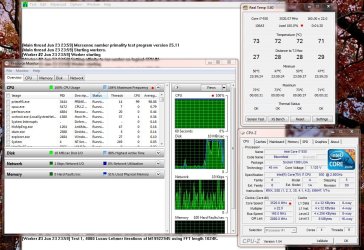
That's basically saying your system is running in power down mode. That's nothing to worry about. If you had a load, and it stayed like that, than you'd have to worry.

If you look at these two images, you'll see the CPU working with a full load aond one resting without a load. Notice the CPU speeds....

With load...
CPU Load use.JPG

Without load...
CPU readings without load.JPG

Also see this post - http://www.sevenforums.com/hardware-devices/87564-wrong-clock-speed-3.html#post756696
 

My Computer My Computer

At a glance

Windows 10 ProIntel Core i7-4770K (3.5Ghz)32 gig Corsair Dominator Platinum (4x8Gig)Sapphire Tri-X R9 Fury
Computer type
PC/Desktop
Computer Manufacturer/Model Number
Custom built by me.
OS
Windows 10 Pro
CPU
Intel Core i7-4770K (3.5Ghz)
Motherboard
Gigabyte G1 Sniper 5 (F10 Bios)
Memory
32 gig Corsair Dominator Platinum (4x8Gig)
Graphics Card(s)
Sapphire Tri-X R9 Fury
Sound Card
Soundblaster ZXR
Monitor(s) Displays
NEC PA242W 24" LCD Monitor
Screen Resolution
1920 x 1200
Hard Drives
Primary - Samsung 850 Pro (512gig), Samsung 840 Pro (256gig), 2TB WD Caviar Black.
PSU
EVGA Supernova 1000 G2
Case
Cooler Master HAF X
Cooling
Corsair H100i with Corsair Air Series SP120 Quiet Fans
Keyboard
Logitech Wireless Wave
Mouse
Logitech Performance MX
Internet Speed
High Speed Cable
Antivirus
Norton Security
Browser
IE11
Other Info
Memory Timings - 1866MHz @ 9-9-9-27-1T @ 1.5 volts
I don't understand. 539.7 x 3 = 1619 MHz for triple channel. Where are you getting it is 1066?

- Gene
 

My Computer My Computer

At a glance

Windows 10 Pro. EFI boot partition, full EFI ...i7 4770k 4.4GHz (44-44-43-43 turbo) @ 1.248V16GB (8GBx2) @2200 MHz G.skill Sniper 10-11-1...MSI GTX 970 Gaming 4G
Computer type
PC/Desktop
Computer Manufacturer/Model Number
Home built (GeneO industries)/Model 4
OS
Windows 10 Pro. EFI boot partition, full EFI boot
CPU
i7 4770k 4.4GHz (44-44-43-43 turbo) @ 1.248V
Motherboard
ASUS Maximus VI Hero
Memory
16GB (8GBx2) @2200 MHz G.skill Sniper 10-11-10-30-1, 1.6V
Graphics Card(s)
MSI GTX 970 Gaming 4G
Sound Card
Onboard SupremeFX Audio
Monitor(s) Displays
NEC Spectraview 2490WUXi-SV
Screen Resolution
1920 x 1200
Hard Drives
Samsung 850 Pro 256GB (OS), Samsung 2x 128GB 840 Pro SSD in RAID0, 3x WD Blue 6Gb/s 1TB RAID0, WD 2TB Black external USB 3.0, 2TB WD20EARS Green external USB 3.0, 2x 500GB Seagate and 1 750 GB external USB, 1x 350GB external USB3
PSU
Seasonic X-850 (2012 KM3 model)
Case
Fractal Design Define R4
Cooling
NH-D14, NF-F12, NF-A15; NF-P14, NF-P12,NF-A14, S12A PWM
Keyboard
Cooler Master Storm Quickfire Rapid - Brown
Mouse
Logitech G602
Internet Speed
126.4 Mb/s down, 24.3 Mb/s up
Other Info
USB 3.0 x8 , SATA III x8, eSATA, USB 2.0 x6. Samsung DVD R/W drive.

WEI: CPU 7.8, Memory 7.9, Graphics 7.9, Disk 7.9
what software do you use to test with and without load?

OK, re-reading your post....

here are my cpu-z stats:

Intel Core i7 930
Windows 7 Ultimate Edition (Build 7600)
CPU Arch : 1 CPU - 4 Cores - 8 Threads
CPU PSN : Intel Core i7 CPU 930 @ 2.80GHz
CPU EXT : MMX, SSE (1, 2, 3, 3S, 4.1, 4.2), EM64T, VT-x
CPUID : 6.A.5 / Extended : 6.1A
CPU Cache : L1 : 4 x 32 / 4 x 32 KB - L2 : 4 x 256 KB
CPU Cache : L3 : 8192 KB
Core : Bloomfield (45 nm) / Stepping : D0
Freq : 1619.22 MHz (134.93 * 12)

That's basically saying your system is running in power down mode. That's nothing to worry about. If you had a load, and it stayed like that, than you'd have to worry.

If you look at these two images, you'll see the CPU working with a full load aond one resting without a load. Notice the CPU speeds....

With load...
View attachment 115288

Without load...
View attachment 115289

Also see this post - http://www.sevenforums.com/hardware-devices/87564-wrong-clock-speed-3.html#post756696
 

My Computer My Computer

At a glance

windows 7 Ultimate 64-bitIntel Core I7 930 2.80 GHzCorsair Dominator GT 12 GB, PC3-14900, 1866 MHzAsus Radeon HD 5750 Formula 1024 MB
Computer Manufacturer/Model Number
me, myself and i
OS
windows 7 Ultimate 64-bit
CPU
Intel Core I7 930 2.80 GHz
Motherboard
GigaByte GA-X58A-UD5
Memory
Corsair Dominator GT 12 GB, PC3-14900, 1866 MHz
Graphics Card(s)
Asus Radeon HD 5750 Formula 1024 MB
Sound Card
integrated
Monitor(s) Displays
samsung 82cm lcd 1080p
Screen Resolution
1920 x 1080
Hard Drives
1 x Crucial RealSSD C300 64 GB, S-ATA 600, 70 Mb's, 355 MB/s
1 x WD Caviar Black 1 TB, 7200 Rpm, 64 MB, Sata III/600
4 x WD Caviar Green 1 TB, 5400 Rpm, 64 MB, S-ATA II/300
PSU
Zalman ZM1000
Case
Thermaltake Element V
Cooling
Noctua NH-C12P SE14
Keyboard
Logitech G19
Mouse
Logitech MX Revolution
Internet Speed
Cable
I don't understand. 539.7 x 3 = 1619 MHz for triple channel. Where are you getting it is 1066?

- Gene

when it boots, it says thats its running at 1066mhz...

in the bios it says its running at 1066mhz...

so i was thinking that would be the case:confused:
 

My Computer My Computer

At a glance

windows 7 Ultimate 64-bitIntel Core I7 930 2.80 GHzCorsair Dominator GT 12 GB, PC3-14900, 1866 MHzAsus Radeon HD 5750 Formula 1024 MB
Computer Manufacturer/Model Number
me, myself and i
OS
windows 7 Ultimate 64-bit
CPU
Intel Core I7 930 2.80 GHz
Motherboard
GigaByte GA-X58A-UD5
Memory
Corsair Dominator GT 12 GB, PC3-14900, 1866 MHz
Graphics Card(s)
Asus Radeon HD 5750 Formula 1024 MB
Sound Card
integrated
Monitor(s) Displays
samsung 82cm lcd 1080p
Screen Resolution
1920 x 1080
Hard Drives
1 x Crucial RealSSD C300 64 GB, S-ATA 600, 70 Mb's, 355 MB/s
1 x WD Caviar Black 1 TB, 7200 Rpm, 64 MB, Sata III/600
4 x WD Caviar Green 1 TB, 5400 Rpm, 64 MB, S-ATA II/300
PSU
Zalman ZM1000
Case
Thermaltake Element V
Cooling
Noctua NH-C12P SE14
Keyboard
Logitech G19
Mouse
Logitech MX Revolution
Internet Speed
Cable
I don't understand. 539.7 x 3 = 1619 MHz for triple channel. Where are you getting it is 1066?

- Gene

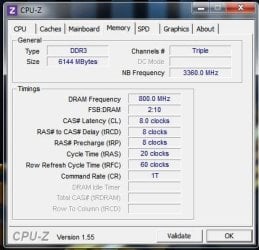
It doesn't work like that. Tripple channel is for the fact that the system is designed to run the memory in tripple channel. aka.... 3 memory sticks (X58 boards).

Quite a few people have a misunderstanding of "tripple" channel. The memory is still dual channel memory, it's just run in a tripple configuration.

P55 chipsets use the same memory.... dual channel, they just don't run them in tripple configuration.

Anyways it would be 800 x 2= 1600 as seen here.....

Capture.JPG
 

My Computer My Computer

At a glance

Windows 10 ProIntel Core i7-4770K (3.5Ghz)32 gig Corsair Dominator Platinum (4x8Gig)Sapphire Tri-X R9 Fury
Computer type
PC/Desktop
Computer Manufacturer/Model Number
Custom built by me.
OS
Windows 10 Pro
CPU
Intel Core i7-4770K (3.5Ghz)
Motherboard
Gigabyte G1 Sniper 5 (F10 Bios)
Memory
32 gig Corsair Dominator Platinum (4x8Gig)
Graphics Card(s)
Sapphire Tri-X R9 Fury
Sound Card
Soundblaster ZXR
Monitor(s) Displays
NEC PA242W 24" LCD Monitor
Screen Resolution
1920 x 1200
Hard Drives
Primary - Samsung 850 Pro (512gig), Samsung 840 Pro (256gig), 2TB WD Caviar Black.
PSU
EVGA Supernova 1000 G2
Case
Cooler Master HAF X
Cooling
Corsair H100i with Corsair Air Series SP120 Quiet Fans
Keyboard
Logitech Wireless Wave
Mouse
Logitech Performance MX
Internet Speed
High Speed Cable
Antivirus
Norton Security
Browser
IE11
Other Info
Memory Timings - 1866MHz @ 9-9-9-27-1T @ 1.5 volts
Some people are starting to confuse CPU freq with memory buss freq.

The 1066 is your memory buss freq, that is the default for the processor/MB you have, it will only go over that if you specifically overclock your system. People buy 1600 mhz ram in order to be able to overclock but you don't have to and may not even want to run it that fast (excessive heat, premature ram death and system instability may result). It's pretty rare to get a stable memory buss speed of 1600.

On the other hand your CPU speed will go up and down from about 1600 (just a coincidence) to 2800 to 3400Mhz depending on the CPU model. (Again without overclocking)

Most ram sold today is 1600 or even higher, but that doesn't mean that you can even attain those speeds, just think of it as generous overhead. Ram speed in itself really doesn't get you much anyway. Better overclocking often results in OCing the CPU but keeping the ram set to a lower speed for improved stability and the difference in anything other than a pure memory benchmark is virtually nothing with the speed at 1066 or 1600.
 

My Computer My Computer

At a glance

Windows 7 x64 Ultimatei7 96012 Gig Corsair DominatorNvidia 480
Computer Manufacturer/Model Number
Scratch built
OS
Windows 7 x64 Ultimate
CPU
i7 960
Motherboard
Asus P6X58D
Memory
12 Gig Corsair Dominator
Graphics Card(s)
Nvidia 480
Sound Card
Maudio Delta 44 + breakout box
Monitor(s) Displays
Dell UltraSharp U2410 24in and Samsung 21 dual monitors
Screen Resolution
1920x1200 and 1280x1024
Hard Drives
Primary: Intel X-25M G2 160G SSD
Secondary: Segate baracuda 1.0 TB
HDs in AHCI mode.
PSU
Corasair TX850
Case
Cooler Master HAF
Cooling
Corsair H50
Keyboard
Logitech G15 + N52 game pad
Mouse
Logitech MX518
Internet Speed
15kbs down 4.5kbps up
Other Info
WEI 7.6
CPU & RAM 7.6
Graphics 7.9
Hard disk 7.7
mine is now:

Naamloos.png
 

My Computer My Computer

At a glance

windows 7 Ultimate 64-bitIntel Core I7 930 2.80 GHzCorsair Dominator GT 12 GB, PC3-14900, 1866 MHzAsus Radeon HD 5750 Formula 1024 MB
Computer Manufacturer/Model Number
me, myself and i
OS
windows 7 Ultimate 64-bit
CPU
Intel Core I7 930 2.80 GHz
Motherboard
GigaByte GA-X58A-UD5
Memory
Corsair Dominator GT 12 GB, PC3-14900, 1866 MHz
Graphics Card(s)
Asus Radeon HD 5750 Formula 1024 MB
Sound Card
integrated
Monitor(s) Displays
samsung 82cm lcd 1080p
Screen Resolution
1920 x 1080
Hard Drives
1 x Crucial RealSSD C300 64 GB, S-ATA 600, 70 Mb's, 355 MB/s
1 x WD Caviar Black 1 TB, 7200 Rpm, 64 MB, Sata III/600
4 x WD Caviar Green 1 TB, 5400 Rpm, 64 MB, S-ATA II/300
PSU
Zalman ZM1000
Case
Thermaltake Element V
Cooling
Noctua NH-C12P SE14
Keyboard
Logitech G19
Mouse
Logitech MX Revolution
Internet Speed
Cable
Some people are starting to confuse CPU freq with memory buss freq.

The 1066 is your memory buss freq, that is the default for the processor/MB you have, it will only go over that if you specifically overclock your system. People buy 1600 mhz ram in order to be able to overclock but you don't have to and may not even want to run it that fast (excessive heat, premature ram death and system instability may result). It's pretty rare to get a stable memory buss speed of 1600.

On the other hand your CPU speed will go up and down from about 1600 (just a coincidence) to 2800 to 3400Mhz depending on the CPU model. (Again without overclocking)

Most ram sold today is 1600 or even higher, but that doesn't mean that you can even attain those speeds, just think of it as generous overhead. Ram speed in itself really doesn't get you much anyway. Better overclocking often results in OCing the CPU but keeping the ram set to a lower speed for improved stability and the difference in anything other than a pure memory benchmark is virtually nothing with the speed at 1066 or 1600.

Actually you can run @1600MHz with the click of a BIOS setting without even having to overclock the CPU just by enabling XMP.

So, if the RAM is 1600 and the memory and motherboard support XMP, choosing the XMP mode WILL run the memory at 1600. Or.... you can set it manually and still not touch settings that overclock the CPU.

Yes, even though my system IS overclocked, it's not because of memory! If I was running at stock CPU speeds, I could still run the memory at 1600MHz

My two cents.
 

My Computer My Computer

At a glance

Windows 10 ProIntel Core i7-4770K (3.5Ghz)32 gig Corsair Dominator Platinum (4x8Gig)Sapphire Tri-X R9 Fury
Computer type
PC/Desktop
Computer Manufacturer/Model Number
Custom built by me.
OS
Windows 10 Pro
CPU
Intel Core i7-4770K (3.5Ghz)
Motherboard
Gigabyte G1 Sniper 5 (F10 Bios)
Memory
32 gig Corsair Dominator Platinum (4x8Gig)
Graphics Card(s)
Sapphire Tri-X R9 Fury
Sound Card
Soundblaster ZXR
Monitor(s) Displays
NEC PA242W 24" LCD Monitor
Screen Resolution
1920 x 1200
Hard Drives
Primary - Samsung 850 Pro (512gig), Samsung 840 Pro (256gig), 2TB WD Caviar Black.
PSU
EVGA Supernova 1000 G2
Case
Cooler Master HAF X
Cooling
Corsair H100i with Corsair Air Series SP120 Quiet Fans
Keyboard
Logitech Wireless Wave
Mouse
Logitech Performance MX
Internet Speed
High Speed Cable
Antivirus
Norton Security
Browser
IE11
Other Info
Memory Timings - 1866MHz @ 9-9-9-27-1T @ 1.5 volts
i tried this just now, and my rig was making a high pitched noise, and woulndt boot...

my BIOS should be able to handle it, but somehow its getting thevoltage wrong (my guess), and i`m not qualified to be messing around with voltage`s and stuff, not for the money i put in this rig.

so i guess i`m leaving it this way...

Some people are starting to confuse CPU freq with memory buss freq.

The 1066 is your memory buss freq, that is the default for the processor/MB you have, it will only go over that if you specifically overclock your system. People buy 1600 mhz ram in order to be able to overclock but you don't have to and may not even want to run it that fast (excessive heat, premature ram death and system instability may result). It's pretty rare to get a stable memory buss speed of 1600.

On the other hand your CPU speed will go up and down from about 1600 (just a coincidence) to 2800 to 3400Mhz depending on the CPU model. (Again without overclocking)

Most ram sold today is 1600 or even higher, but that doesn't mean that you can even attain those speeds, just think of it as generous overhead. Ram speed in itself really doesn't get you much anyway. Better overclocking often results in OCing the CPU but keeping the ram set to a lower speed for improved stability and the difference in anything other than a pure memory benchmark is virtually nothing with the speed at 1066 or 1600.

Actually you can run @1600MHz with the click of a BIOS setting without even having to overclock the CPU just by enabling XMP.

So, if the RAM is 1600 and the memory and motherboard support XMP, choosing the XMP mode WILL run the memory at 1600. Or.... you can set it manually and still not touch settings that overclock the CPU.

Yes, even though my system IS overclocked, it's not because of memory! If I was running at stock CPU speeds, I could still run the memory at 1600MHz

My two cents.
 

My Computer My Computer

At a glance

windows 7 Ultimate 64-bitIntel Core I7 930 2.80 GHzCorsair Dominator GT 12 GB, PC3-14900, 1866 MHzAsus Radeon HD 5750 Formula 1024 MB
Computer Manufacturer/Model Number
me, myself and i
OS
windows 7 Ultimate 64-bit
CPU
Intel Core I7 930 2.80 GHz
Motherboard
GigaByte GA-X58A-UD5
Memory
Corsair Dominator GT 12 GB, PC3-14900, 1866 MHz
Graphics Card(s)
Asus Radeon HD 5750 Formula 1024 MB
Sound Card
integrated
Monitor(s) Displays
samsung 82cm lcd 1080p
Screen Resolution
1920 x 1080
Hard Drives
1 x Crucial RealSSD C300 64 GB, S-ATA 600, 70 Mb's, 355 MB/s
1 x WD Caviar Black 1 TB, 7200 Rpm, 64 MB, Sata III/600
4 x WD Caviar Green 1 TB, 5400 Rpm, 64 MB, S-ATA II/300
PSU
Zalman ZM1000
Case
Thermaltake Element V
Cooling
Noctua NH-C12P SE14
Keyboard
Logitech G19
Mouse
Logitech MX Revolution
Internet Speed
Cable

My Computer My Computer

At a glance

Windows 10 ProIntel Core i7-4770K (3.5Ghz)32 gig Corsair Dominator Platinum (4x8Gig)Sapphire Tri-X R9 Fury
Computer type
PC/Desktop
Computer Manufacturer/Model Number
Custom built by me.
OS
Windows 10 Pro
CPU
Intel Core i7-4770K (3.5Ghz)
Motherboard
Gigabyte G1 Sniper 5 (F10 Bios)
Memory
32 gig Corsair Dominator Platinum (4x8Gig)
Graphics Card(s)
Sapphire Tri-X R9 Fury
Sound Card
Soundblaster ZXR
Monitor(s) Displays
NEC PA242W 24" LCD Monitor
Screen Resolution
1920 x 1200
Hard Drives
Primary - Samsung 850 Pro (512gig), Samsung 840 Pro (256gig), 2TB WD Caviar Black.
PSU
EVGA Supernova 1000 G2
Case
Cooler Master HAF X
Cooling
Corsair H100i with Corsair Air Series SP120 Quiet Fans
Keyboard
Logitech Wireless Wave
Mouse
Logitech Performance MX
Internet Speed
High Speed Cable
Antivirus
Norton Security
Browser
IE11
Other Info
Memory Timings - 1866MHz @ 9-9-9-27-1T @ 1.5 volts
Actually you can run @1600MHz with the click of a BIOS setting without even having to overclock the CPU just by enabling XMP.

So, if the RAM is 1600 and the memory and motherboard support XMP, choosing the XMP mode WILL run the memory at 1600. Or.... you can set it manually and still not touch settings that overclock the CPU.

Yes, even though my system IS overclocked, it's not because of memory! If I was running at stock CPU speeds, I could still run the memory at 1600MHz

My two cents.

Hmm, I haven't tried looking at that, I'm running at 1333 myself. THough in the past I've generally found that maxing the ram speed isn;t all it's cracked up to be, the temp on the modules tends to skyrocket for virtually no gain in app benchmarks so I personally just let it slide with the BIOSes safe and sane settings WRT memory... But It might be interesting to give it shot, I've to temp probes on my modules already :)
 

My Computer My Computer

At a glance

Windows 7 x64 Ultimatei7 96012 Gig Corsair DominatorNvidia 480
Computer Manufacturer/Model Number
Scratch built
OS
Windows 7 x64 Ultimate
CPU
i7 960
Motherboard
Asus P6X58D
Memory
12 Gig Corsair Dominator
Graphics Card(s)
Nvidia 480
Sound Card
Maudio Delta 44 + breakout box
Monitor(s) Displays
Dell UltraSharp U2410 24in and Samsung 21 dual monitors
Screen Resolution
1920x1200 and 1280x1024
Hard Drives
Primary: Intel X-25M G2 160G SSD
Secondary: Segate baracuda 1.0 TB
HDs in AHCI mode.
PSU
Corasair TX850
Case
Cooler Master HAF
Cooling
Corsair H50
Keyboard
Logitech G15 + N52 game pad
Mouse
Logitech MX518
Internet Speed
15kbs down 4.5kbps up
Other Info
WEI 7.6
CPU & RAM 7.6
Graphics 7.9
Hard disk 7.7
I've actually never ever had high temps with my memory because I don't push them byond their specs!

I use Corsair and they guarantee their memory to run at the specs they set. This includes no excessive heat.

Now, if you push beyond limits.... well :(

Anyway the modules I have also feature an XMP profile that automatically sets volts, timings and speed. Of course the motherboard's BIOS also has to support XMP as well.

However, I like to set my memory manually as I find the XMP settings on my board tends to slighty overvolt certain settings. This ensures I have the memory running at it's optimum speed without overvolting.

Also, as a side note.... some memory will give errors if not set correctly. Example, most X58 boards will set the memory voltage to 1.5volts instead of the recommended 1.6volt some memory need.

So for example, you buy "performance" memory that's rated at 1.6volts, but the board sets them at 1.5, the memory "may" produce errors unless the voltage is raised to the recommended specs.

This is why some people have "issues" with "performance" memory. This is why I always recommend people set their memory manually.

My two cents.
 

My Computer My Computer

At a glance

Windows 10 ProIntel Core i7-4770K (3.5Ghz)32 gig Corsair Dominator Platinum (4x8Gig)Sapphire Tri-X R9 Fury
Computer type
PC/Desktop
Computer Manufacturer/Model Number
Custom built by me.
OS
Windows 10 Pro
CPU
Intel Core i7-4770K (3.5Ghz)
Motherboard
Gigabyte G1 Sniper 5 (F10 Bios)
Memory
32 gig Corsair Dominator Platinum (4x8Gig)
Graphics Card(s)
Sapphire Tri-X R9 Fury
Sound Card
Soundblaster ZXR
Monitor(s) Displays
NEC PA242W 24" LCD Monitor
Screen Resolution
1920 x 1200
Hard Drives
Primary - Samsung 850 Pro (512gig), Samsung 840 Pro (256gig), 2TB WD Caviar Black.
PSU
EVGA Supernova 1000 G2
Case
Cooler Master HAF X
Cooling
Corsair H100i with Corsair Air Series SP120 Quiet Fans
Keyboard
Logitech Wireless Wave
Mouse
Logitech Performance MX
Internet Speed
High Speed Cable
Antivirus
Norton Security
Browser
IE11
Other Info
Memory Timings - 1866MHz @ 9-9-9-27-1T @ 1.5 volts
Unless I am wrong your cpu's integrated memory controller only supports ddr3 800/1066
Intel® Core
 

My Computer My Computer

At a glance

Windows 7 Ultimate 64bitIntel i5 650G.SKILL 8GB DDR3 1333Radeon HD 5770
Computer Manufacturer/Model Number
Custom
OS
Windows 7 Ultimate 64bit
CPU
Intel i5 650
Motherboard
Intel DQ57TM
Memory
G.SKILL 8GB DDR3 1333
Graphics Card(s)
Radeon HD 5770
Sound Card
Realtek
Monitor(s) Displays
2 - LG W2061TQ
Hard Drives
OCZ Vertex 2 60GB
Seagate Barracuda 320GB
PSU
Antec EarthWatts 650W
It may say that, but the support is actually higher for the memory. And let's not forget, the BIOS's will determine that as well.

Intel may not "officially" support it, but the support is there. Sort of like they don't officially support overclocking..... but their i7-920's/930's are flying off the shelf with this specifically in mind ;)

I can't find it right now, but there was some controversay about Intel's board (DX58SO) failure to support 1600MHz RAM and Intel released a BIOS supporting it.
 
Last edited:

My Computer My Computer

At a glance

Windows 10 ProIntel Core i7-4770K (3.5Ghz)32 gig Corsair Dominator Platinum (4x8Gig)Sapphire Tri-X R9 Fury
Computer type
PC/Desktop
Computer Manufacturer/Model Number
Custom built by me.
OS
Windows 10 Pro
CPU
Intel Core i7-4770K (3.5Ghz)
Motherboard
Gigabyte G1 Sniper 5 (F10 Bios)
Memory
32 gig Corsair Dominator Platinum (4x8Gig)
Graphics Card(s)
Sapphire Tri-X R9 Fury
Sound Card
Soundblaster ZXR
Monitor(s) Displays
NEC PA242W 24" LCD Monitor
Screen Resolution
1920 x 1200
Hard Drives
Primary - Samsung 850 Pro (512gig), Samsung 840 Pro (256gig), 2TB WD Caviar Black.
PSU
EVGA Supernova 1000 G2
Case
Cooler Master HAF X
Cooling
Corsair H100i with Corsair Air Series SP120 Quiet Fans
Keyboard
Logitech Wireless Wave
Mouse
Logitech Performance MX
Internet Speed
High Speed Cable
Antivirus
Norton Security
Browser
IE11
Other Info
Memory Timings - 1866MHz @ 9-9-9-27-1T @ 1.5 volts
Back
Top