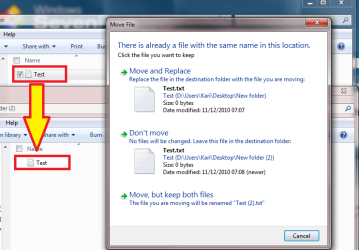
When I drag and drop a file from one folder to another and it tells me there is already a file there and do I want to replace it, I click "Yes" and it blinks and I have to click it again. Argh! Consistently across several drives this is the case.
I tried to reproduce this issue, but could not. When dragging a single file with left mouse button, one click is always enough:
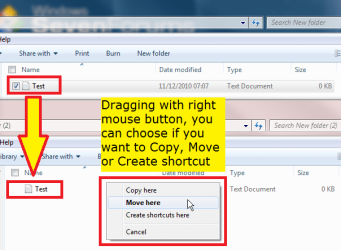
There are two ways to drag and drop that do in fact need two (or more) clicks. First, if you drag a file with right mouse button, Windows asks first you to confirm with one click if you want to copy, move or create shortcut, after what you get a dialog as in screenshot above, with second click to confirm if you want to replace the old one or keep both.
Also, dragging several files at once, you have to choose the action for every file, if the option Do this for the next X conflicts is not chosen:
Kari
My Computer
Computer type
Laptop
Computer Manufacturer/Model Number
HP ENVY 17-1150eg
OS
Windows 10 Pro x64 EN-GB
CPU
1.6 GHz Intel Core i7-720QM Processor
Memory
6 GB
Graphics Card(s)
ATI Mobility Radeon HD 5850 Graphics
Sound Card
Beats sound system with integrated subwoofer
Monitor(s) Displays
17" laptop display, 22" LED and 32" Full HD TV through HDMI
Screen Resolution
1600*900 (1), 1920*1080 (2&3)
Hard Drives
Internal: 2 x 500 GB SATA Hard Disk Drive 7200 rpm
External: 2TB for backups, 3TB USB3 network drive for media
Cooling
As Envy runs a bit warm, I have it on a Cooler Master pad
Thank you. It must be permissions or something on my end. I am trying to give the three PC's on a wired network full access and I'm having trouble there too. I am in a home group and want full sharing but keep hitting snags. Any help there would be good. I want access to be wide open across the network
I'm sure you'll get valid advice by posting your sharing issue to Network & Sharing section. Don't forget to tell what OS's you comuters have, and how they are connected to network, which router and so on.