
Only 300gb of hdd space is shown instead of 500gb.

corei3pradeep

New member
Local time
5:33 AM
Messages
7
I BOUGHT A NEW CPU CONSISTING OF 500GB OF HARDDISK.WHILE PARTITIONING THE DRIVES I FISTLY MADE A DRIVE TO AROUND 97.7gb SO I WANTED IT BE ROUND TO 100GB,BUT NO CHANGES WAS EFFECTIVE AND INSTEAD THAT 100GB CHANGED INTO UNALLOCATED SPACE AND THERE WAS NO OPTIONS TO REALLOCATE.I TRIED PARTITON MAGIC SOFTWRE TO RECOVER THAT 100GB OF SPACE AND I DONT KNOW HOW TO USE IT UNKNOWINGLY I DID SOMETHING AND AFTER THAT ONLY C DRIVE WAS THERE IN MY COMPUTER NO OTHER DRIVES ARE DISPLAYED.
SO I WANTED TO FORMAT MY SYSTEM AND I STARTED FORMATTING I WAS ASKED TO PARTITION ONLY 300GB OF SPACE.EVEN IN BIOS SETUP ONLY 300GB OF SPACE WAS SHOWN.WHEN I PURCHASED IT WAS CORRECTLY SHOWING 500GB OF HDD.

PLEASE ANYONE HELP ME OUT OF THIS PROBLEM.

PLEASE TELL ME THE SOLUTION FOR THIS PROBLEM.

THANK YOU IN ADVANCE
 

My Computer My Computer

At a glance

WINDOWS 7 HOME PREMIUM 32 bit4gb
OS
WINDOWS 7 HOME PREMIUM 32 bit
Memory
4gb
Hard Drives
actually 500gb but only 300gb is allocated tottaly even i checked in bios setup it was 300gb only
Go into Disk Management and post a screen shot of what it shows about your disks and partitions.
 

My Computer My Computer

At a glance

Windows 7 Home Premium SP1, 64-bitIntel Skylake i5-6600K, not overclocked8 GB HyperX DDR4-2666 (2 x 4 GB)none; graphics are integrated on CPU
Computer type
PC/Desktop
Computer Manufacturer/Model Number
Ignatz Special; 4 speed manual gearbox; factory air conditioning; one of one
OS
Windows 7 Home Premium SP1, 64-bit
CPU
Intel Skylake i5-6600K, not overclocked
Motherboard
AsRock Z170M Extreme 4, micro ATX
Memory
8 GB HyperX DDR4-2666 (2 x 4 GB)
Graphics Card(s)
none; graphics are integrated on CPU
Sound Card
onboard: Realtek ALC1150; external: USB Behringer UF0-202
Monitor(s) Displays
Dell S2340M 23 inch IPS
Screen Resolution
1600 x 900
Hard Drives
System: Crucial MX100 series SSD, 128 GB;
Data: Samsung Spinpoint 103SJ, 1 TB;
Backup: WD Caviar Green WD30EZRX-00D8PB0, 3 TB
PSU
Rosewill SilentNight 500 watt fanless, semi-modular
Case
Antec Solo II
Cooling
Noctua NH-U12S; Noctua F12 intake, Noctua S12A exhaust
Keyboard
Microsoft 200 6JH-00001 USB
Mouse
Dell or Microsoft optical wired; USB
Antivirus
Microsoft Security Essentials and Malwarebytes Premium
Browser
Pale Moon
Other Info
All fans PWM; speeds at idle: CPU circa 500 rpm; intake circa 600 rpm; exhaust circa 600 rpm; CPU temps 27 idle and 47 C load in a warm room (27 C/81 F) when running Intel Extreme Tuning Utility stress test.
Screen01.JPG

Screen02.JPG
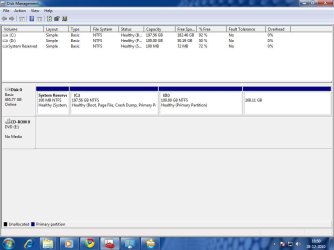
THOSE ARE SCREENSHOTS OF DISK MANGAMENT and VOLUMES
 

My Computer My Computer

At a glance

WINDOWS 7 HOME PREMIUM 32 bit4gb
OS
WINDOWS 7 HOME PREMIUM 32 bit
Memory
4gb
Hard Drives
actually 500gb but only 300gb is allocated tottaly even i checked in bios setup it was 300gb only
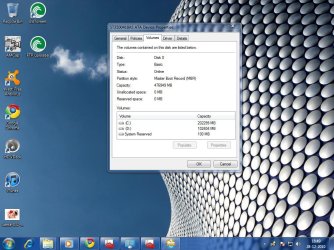
While you were "partitioning" you must have clicked shrink partition, and it shaved 100gigs of your c drive.... if what you are saying is you want your 100 gb back to your other space, in the disk managemnt screen you have showing, you should be able to right click the 100gb (D) one, than click delete volume, than you should be able to right click on (C) and click extend volume. it will ask how much you want to extend it, and just do all available. But it looks like you have 50 gigs of stuff on your D drive, im not sure what this is but, whatever it is you hsould put it all on an external hard drive to get it back to your C drive.
 

My Computer My Computer

At a glance

Windows 7 pro 64 bitIntel Core i7-870 Lynnfield 2.93GHzGskill 8 gig, 4x2gigASUS EAH5850
OS
Windows 7 pro 64 bit
CPU
Intel Core i7-870 Lynnfield 2.93GHz
Motherboard
MSI P55-GD80 LGA 1156
Memory
Gskill 8 gig, 4x2gig
Graphics Card(s)
ASUS EAH5850
Sound Card
built in HD
Monitor(s) Displays
HP 23 inch
Hard Drives
1tbHDD,500HDD,500HDD,30SSD no RAID...
Case
Cooler master HAF 932
Cooling
4 case fans, v6 cpu cooler
Keyboard
Logitech G110
Mouse
Razer Death Adder
Internet Speed
never fast enough
@bmcdevitt
are u sure that this would do?because i am totally amateur in this field.
 

My Computer My Computer

At a glance

WINDOWS 7 HOME PREMIUM 32 bit4gb
OS
WINDOWS 7 HOME PREMIUM 32 bit
Memory
4gb
Hard Drives
actually 500gb but only 300gb is allocated tottaly even i checked in bios setup it was 300gb only
i will not be offeneded if you wait for someone else to verrify my posting ; ) , but either way, backup backup backup!

to get all of your 500gb back on the same drive you will have to do that along with deleting the 168 gb partiton and extending it, to test this out before you do it to your D drive on it with stuff on it, right click the 168 and delete it, than extend your C drive with that, and this should work, than you are going to have to do the same with the D drive, but like i said you have stuff on it that will need to be saved and moved over before you delete it or you will loose it.

http://www.sevenforums.com/tutorials/2668-partition-volume-delete.html

http://www.sevenforums.com/tutorials/2670-partition-volume-extend.html
 
Last edited by a moderator:

My Computer My Computer

At a glance

Windows 7 pro 64 bitIntel Core i7-870 Lynnfield 2.93GHzGskill 8 gig, 4x2gigASUS EAH5850
OS
Windows 7 pro 64 bit
CPU
Intel Core i7-870 Lynnfield 2.93GHz
Motherboard
MSI P55-GD80 LGA 1156
Memory
Gskill 8 gig, 4x2gig
Graphics Card(s)
ASUS EAH5850
Sound Card
built in HD
Monitor(s) Displays
HP 23 inch
Hard Drives
1tbHDD,500HDD,500HDD,30SSD no RAID...
Case
Cooler master HAF 932
Cooling
4 case fans, v6 cpu cooler
Keyboard
Logitech G110
Mouse
Razer Death Adder
Internet Speed
never fast enough
Ya i tried and it worked. thank you very very much.
 

My Computer My Computer

At a glance

WINDOWS 7 HOME PREMIUM 32 bit4gb
OS
WINDOWS 7 HOME PREMIUM 32 bit
Memory
4gb
Hard Drives
actually 500gb but only 300gb is allocated tottaly even i checked in bios setup it was 300gb only
no problem, glad it worked out for you.
 

My Computer My Computer

At a glance

Windows 7 pro 64 bitIntel Core i7-870 Lynnfield 2.93GHzGskill 8 gig, 4x2gigASUS EAH5850
OS
Windows 7 pro 64 bit
CPU
Intel Core i7-870 Lynnfield 2.93GHz
Motherboard
MSI P55-GD80 LGA 1156
Memory
Gskill 8 gig, 4x2gig
Graphics Card(s)
ASUS EAH5850
Sound Card
built in HD
Monitor(s) Displays
HP 23 inch
Hard Drives
1tbHDD,500HDD,500HDD,30SSD no RAID...
Case
Cooler master HAF 932
Cooling
4 case fans, v6 cpu cooler
Keyboard
Logitech G110
Mouse
Razer Death Adder
Internet Speed
never fast enough
Back
Top