
Solved Put 2 Partitions Together?

gouthrox

New member
Hello i just need to do this...

Any help is appreciated :)
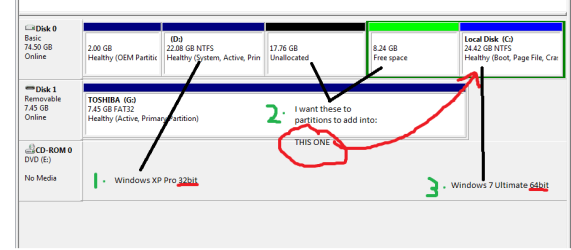
Untitled.png

hope it is easy to understand ;)

I tried to to right click and goto extend volume but didn't work. (That option was faded out)
 

My Computer

Computer Manufacturer/Model Number
Dell
OS
Windows 7 Ultimate x64
CPU
3.2 Ghz
Motherboard
Dell 0F8098
Memory
2GB
Graphics Card(s)
Intel GMA 950 224MB Integrated
Sound Card
Sound MAX
Monitor(s) Displays
?
Screen Resolution
?
Hard Drives
WDC 80 GB
PSU
?
Case
?
Cooling
Fan
Keyboard
Dell HID Keyboard
Mouse
Microsoft Wireless Optical Mouse 4000
Internet Speed
DSL-768k (Give or Take)
Other Info
Dell Optiplex GX 620 Desktop
Hello i just need to do this...

Any help is appreciated :)
View attachment 126968

hope it is easy to understand ;)

I tried to to right click and goto extend volume but didn't work. (That option was faded out)

Ok I think I got it :D

1. You want to put XP on drive D
2. mesh the unallocated and free space into C
3. and install Windows 7 on C.

Easier said than done in your case. The fact that you have an extended partition like that makes it impossible to put unallocated space inside it. In my opinion, the easiest way to do this would be to backup and wipe it clean, use a Boot CD (Hiren's or UBCD) to create your partitions (say 20gb for XP, the rest for 7), install XP on a partition, then Install Windows 7 on another. I say XP THEN 7 because 7's bootloader is backwards compatible while XPs is not. If you do 7 then XP, you'll have to redo your bootloaders. It's much easier to install in order of release.

Good luck! Any more questions... come holler!
 

My Computer

OS
Windows 7 Ultimate 64-bit
CPU
AMD Phenom II X6 1090T 3.2GHZ
Motherboard
MSI 890FXA-GD70
Memory
G.SKILL RipJaw 3x2GB DDR3-1066
Graphics Card(s)
2x HIS Radeon HD 6850 1 GB
Sound Card
VIA 8-channel
Monitor(s) Displays
2x 20 inch Acer LCDs, 1x 32" Sony LCD TV
Screen Resolution
4480x900
Hard Drives
1x Crucial 64GB SSD
3x 1TB HDDs (WD, Seagate, Hitatchi)
1x 500GB Seagate External
PSU
Kingwin 1000W Modular
Case
Coolermaster HAF 932
Cooling
1x 120mm, 3x 200mm, CoolerMaster Hyper 212+
Keyboard
Microsoft Wireless Keyboard 1000
Mouse
Microsoft Wiresless Mouse 5000
Internet Speed
20mbps
Other Info
Samsung BD-ROM/DVD-RW
  • Like
Reactions: Lee
Delete the extended partition and create a new partition for W7. Install XP on the second hard drive, while the first hard drive is disconnected. In this fashion, both OSs are independent of each other, and you would use the F8 Boot Menu to select which to boot to.

EDIT: I looked cross-eyed at your screenshot, and didn't realize that there is only one hard drive. It is smaller than I would like to use for dual booting, because my W7 partition is larger than the entire drive. However, if you persist in your plan, I would wipe the entire drive and start over with 2 partitions.
 

My Computer

Computer Manufacturer/Model Number
DIY
OS
W7x64 Pro, SuSe 12.1/** W7 x64 Pro, XP MCE
CPU
Phenom II 1090T w/Noctua NH-D14 /**4400+ X2 w/CM Hyper TX 3
Motherboard
ASRock 890FX Deluxe 4/**A8N-SLI
Memory
2 x 2GB Patriot PGS34g1600LLKA/**4x1GB Corsair VS
Graphics Card(s)
EVGA GTX460 SC/**EVGA 8800GTS
Sound Card
Asus Xonar D2X/**Xonar D1
Monitor(s) Displays
Acer X233H, Dell E152FPc /**LG M237-WD
Screen Resolution
1920x1080 & 1024x768/**1980x1080
Hard Drives
WDC 2TB, 1.5TB, 1TB, 500GB,Seagate 500GB , Maxtor 80GB /**500GB Seagate & WDC 1TB Black
PSU
CM RS600 w/ APC BX1000G/**Antec 500 TP w/ APC BX1000
Case
HAF922/**Antec 1040IIB
Cooling
3x200mm, 1x140 and 1x120mm/**5x80mm fans
Keyboard
Logitech Media USB/**Saitek Eclipse
Mouse
Cordless Trackman Wheel/**Ditto
Internet Speed
3.3Mbps
Other Info
SB 560 5.1 w/ Sennheiser RS140/**Creative T20 speakers, Dvico FusionHDTV7 Gold RT, Cisco E3000, HP 5510V AIO, Linksys E3000, Belkin F5U237 hub and **F5D8055 adapter
(** = 2nd rig)
First and foremost let me "Welcome you to the Seven Forums." It is always nice to see new members. . .:thumbsup:
Now as to your problem; just follow Jelyman's post and you should be spot on (that is assuming that is what you are attempting). Good Luck
 

My Computer

Computer Manufacturer/Model Number
HP Pavilion a4302f
OS
Win 7 Pro x64, VM Win XP, Win7 Pro Sandbox, Kubuntu 11
CPU
AMD Athlon(tm) II X4 640 @ 3.0 Gbz
Memory
12GB 1066MHz DDR3 SDRAM - 2x4GB, 2x2GB
Graphics Card(s)
ATI Radeon HD 4350 HD Graphics/Audio with 512MB
Sound Card
Realtek High Definition Audio
Monitor(s) Displays
1. Dell 23" SP2307, 2. Mitsublishi 40" HDTV, Hannspree 25"
Screen Resolution
1. 2048x1152, 2. 1920-1080, 3. 1920x1200
Hard Drives
Int: 1 120 Gig SSD i
1 - 2.5" 500 USB External HDD
1 -1 Tb USB External HDD
Case
Mid Tower
Cooling
Standard Fans - 5 fans (very quiet)
Keyboard
Microsoft Wireless 2000
Mouse
Microsoft Wireless Mouse 5000
Internet Speed
10 Mbit (realistically 500 Kbit - 1.2 Mbit)
Other Info
Speakers - Bose Desktop (Excellent Sound)
1 external CD|DVD\Blue-ray Recorders/Players (Sony)
D/L PW free boot disc. Partition Wizard Bootable CD allows user to boot computer directly to manage partition.

Boot it up.

Rt click and delete the extended partition ( that's the 8.24gb one). Click Apply.

Then rt click the windows 7 partition , select move /resize.

In the next window, drag the LEFT edge of 7 partition all the way LEFT to incorporate all the unallocated space.

Click Apply.

It will take a few mins.

You should make a backup image first before any operation of this kind.
 

My Computers

System One System Two

  • Computer type
    PC/Desktop
    OS
    7 X64
    CPU
    i5 8400
    Motherboard
    gigabyte b365m ds3h
    Memory
    2x8gb 3200mhz
    Hard Drives
    various
    PSU
    pure power 11 400w cm
    Case
    Coolermaster
    Cooling
    cryorig m9i
  • Computer type
    PC/Desktop
    OS
    7x64
    CPU
    g5400
    Motherboard
    ga b365m ds3h
    Memory
    8gb ddr4 2400
    PSU
    xfx pro 450w
I wouldn't be tempted to use the desktop mini PW for this. Use the boot CD as advised.
 

My Computer

Computer type
PC/Desktop
Computer Manufacturer/Model Number
Own build
OS
Windows 7x64 Home Premium SP1
CPU
Intel i7 2600k
Motherboard
ASUS P8Z68 Deluxe
Memory
G.Skill Ripjaws (DDR3-1600) 2x4GB
Graphics Card(s)
Nvidia GeForce GTS 450; Intel HD Graphics 3000(GT2+)
Monitor(s) Displays
Dell Ultrasharp IPS panel U2311H, Samsung SyncMaster P2350
Screen Resolution
1920x1080
Hard Drives
Samsung 850 Pro SSD 256GB, Samsung SSD 840 120GB, Seagates 1TB Barracuda ST31000528AS x2
PSU
Seasonic M12II 520W
Case
Lian Li Lancool PC-K60
Cooling
Case: 1x120mm, 3x140mm CPU: Hyper 212+
Keyboard
Logitech MK520 (wireless)
Mouse
Logitech MK520
Internet Speed
6-7 Mbps
Antivirus
Norton Security Premium, Malwarebytes on 2 (MSE on 3rd PC)
Browser
FireFox
Other Info
Audio: Logitech Z523 2.1
Thank You Very Much! It Works

Thank Everyone For all the replies! i tried all the solutions and all of them worked!:D
 

My Computer

Computer Manufacturer/Model Number
Dell
OS
Windows 7 Ultimate x64
CPU
3.2 Ghz
Motherboard
Dell 0F8098
Memory
2GB
Graphics Card(s)
Intel GMA 950 224MB Integrated
Sound Card
Sound MAX
Monitor(s) Displays
?
Screen Resolution
?
Hard Drives
WDC 80 GB
PSU
?
Case
?
Cooling
Fan
Keyboard
Dell HID Keyboard
Mouse
Microsoft Wireless Optical Mouse 4000
Internet Speed
DSL-768k (Give or Take)
Other Info
Dell Optiplex GX 620 Desktop
Thanks for letting us know that your problem is solved, and again "Welcome to the Forums.":)
 

My Computer

Computer Manufacturer/Model Number
HP Pavilion a4302f
OS
Win 7 Pro x64, VM Win XP, Win7 Pro Sandbox, Kubuntu 11
CPU
AMD Athlon(tm) II X4 640 @ 3.0 Gbz
Memory
12GB 1066MHz DDR3 SDRAM - 2x4GB, 2x2GB
Graphics Card(s)
ATI Radeon HD 4350 HD Graphics/Audio with 512MB
Sound Card
Realtek High Definition Audio
Monitor(s) Displays
1. Dell 23" SP2307, 2. Mitsublishi 40" HDTV, Hannspree 25"
Screen Resolution
1. 2048x1152, 2. 1920-1080, 3. 1920x1200
Hard Drives
Int: 1 120 Gig SSD i
1 - 2.5" 500 USB External HDD
1 -1 Tb USB External HDD
Case
Mid Tower
Cooling
Standard Fans - 5 fans (very quiet)
Keyboard
Microsoft Wireless 2000
Mouse
Microsoft Wireless Mouse 5000
Internet Speed
10 Mbit (realistically 500 Kbit - 1.2 Mbit)
Other Info
Speakers - Bose Desktop (Excellent Sound)
1 external CD|DVD\Blue-ray Recorders/Players (Sony)
First post here from a retired computer tech:) After ordering a 3 PC license of Home Premimum from New Egg last week I read all I could here to make my life easier:geek:

The first update/install was yesterday on a 32 bit XP to a 64 bit 7. I can not believe how smooth it went. I read and printed several tips I read here and that helped a lot. My son and I were in line at midnight at Comp-USA on the release day of Win 95 so I've been doing this for a while :o

I had a very similiar situation as the OP and downloaded Partition wizard that SIW2 recommended. First I used my BART pe DVD and imaged the C drive to my NAS. Deleting the second partition and expanding the first went like clock work:D

But in my situation I drug the RIGHT side of C partition to the extreme RIGHT to use the full drive:cool:

Thanks for the usefull sight!
Joe
 

My Computer

Computer Manufacturer/Model Number
Home built
OS
Moving from 32 bit XP to 32 and 64 7
CPU
Intel P5
Motherboard
Asus P5KPL-CM
Memory
2 gb
Graphics Card(s)
Intrigated Intel GMA3100
Sound Card
intrigated VIA VT1708B
Monitor(s) Displays
21" Emachines LCD
Hard Drives
sanyo and & WD.
Hi Jobo,

Thanks for the update.

Glad it went well for you.:)
 

My Computers

System One System Two

  • Computer type
    PC/Desktop
    OS
    7 X64
    CPU
    i5 8400
    Motherboard
    gigabyte b365m ds3h
    Memory
    2x8gb 3200mhz
    Hard Drives
    various
    PSU
    pure power 11 400w cm
    Case
    Coolermaster
    Cooling
    cryorig m9i
  • Computer type
    PC/Desktop
    OS
    7x64
    CPU
    g5400
    Motherboard
    ga b365m ds3h
    Memory
    8gb ddr4 2400
    PSU
    xfx pro 450w
Back
Top