
FF freezes up after 2-3 hours of browsing???

Sunimar

New member
Power User
Local time
12:24 PM
Messages
206
Location
Mumbai
Hey Guys!!! :)

Here's some information:
FF v 3.5.11
Add-Ons/Extensions:
Download Statusbar 0.9.7.2, Flagfox 4.0.12, Free Download Manager Plugin 1.4.2, MS.Net Framework Assistant 1.2.1, PC Sync 2 Synchronisation Extension 1.0.0.733 (for my Nokia handset), RealPlayer Browser Record Plugin 14.0.1 (all enabled)
NEW Glasser by SzymekPL 2.2.0.3.7, Stylish 1.0.11 (both disabled)

Issue/Problem:

FF freezes up after every 2-3 hours of continuous browsing. I can't close or minimize the only way to close it is thorugh Task Manager & to minimize i have to click "show desktop" but if minimize then it won't come-up on the screen even though its open & running. So, have to close the current session & start a new session & FF doesn't recover my opened websites all the time, some time it does & while other time it choose not to.
Even there are no dialog box with an error saying that FF has crashed & have to send the report to FF support team. Also tried running with minimum Add-ons/extensions still same issue. If using FF for 10 hours in day it crashes/freezes up atleast 4-5 times.
So, need some help on this. Attaching a screenshot of this problem:
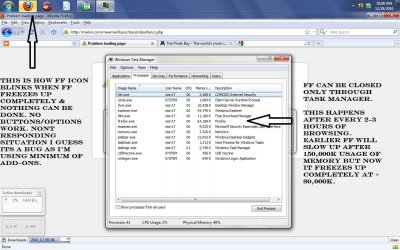
Untitled.jpg


My Computer My Computer

At a glance

Windows 7 Ultimate
Computer type
Laptop
OS
Windows 7 Ultimate
I would recommend using CCleaner.
 

My Computer My Computer

At a glance

Windows 7 Home Premium 64 bitIntel Core i7-4790G.SKILL 8GB (2 x 4GB) DDR3 F3-10666CL9D-8GBNTAMD Radeon R7 250
Computer type
PC/Desktop
Computer Manufacturer/Model Number
Custom Build
OS
Windows 7 Home Premium 64 bit
CPU
Intel Core i7-4790
Motherboard
GA-Z87X-D3H
Memory
G.SKILL 8GB (2 x 4GB) DDR3 F3-10666CL9D-8GBNT
Graphics Card(s)
AMD Radeon R7 250
Sound Card
Realtek ALC892
Monitor(s) Displays
Samsung UN32EH5000, Dell 1703FPT
Screen Resolution
1920 x 1080, 1280 x 1024
Hard Drives
WD5003AZEX
WD10EZEX
Samsung HD103SJ
Samsung 128 GB 840 PRO
PSU
SeaSonic M12II SS-500GM
Case
Fractal Design Define R4
Cooling
Zalman CNPS9900ALED
Keyboard
Logitech K800
Mouse
Logitech M705
Internet Speed
16 Mbps
Antivirus
Avast
Browser
Firefox
Other Info
Bose Companion 2 Multimedia Speakers
I would recommend using CCleaner.


Sorry but i lost you there mate, CCleaner for what??? As i keep the option ON to delete Cookies & Caches when i close FF & also "Accept Cookies" option is Turned-off.

But i do use CCleaner at the end of every session. But that no way resolve this issue.
:mad:...:confused:
 

My Computer My Computer

At a glance

Windows 7 Ultimate
Computer type
Laptop
OS
Windows 7 Ultimate
I fought with mozilla FF for a while with V3.5. I had no end of trouble with it, and when I upgraded to 3.6, all of the problems went away.
 

My Computer My Computer

At a glance

W7 Professional x64AMD Athlon II X3 445 Rana 3.10 GHzPNY XLR DDR3 1600 4x2GBNVIDIA GeForce GTS 450 (fermi) 1GB GDDR5
Computer Manufacturer/Model Number
Pugh Technologies
OS
W7 Professional x64
CPU
AMD Athlon II X3 445 Rana 3.10 GHz
Motherboard
MSI 870A-G54
Memory
PNY XLR DDR3 1600 4x2GB
Graphics Card(s)
NVIDIA GeForce GTS 450 (fermi) 1GB GDDR5
Sound Card
Realtek ALC892 onboard
Monitor(s) Displays
ASUS VE205t, Viewsonic VX2035WM
Screen Resolution
1600x900, 1600x1050
Hard Drives
977GB Hitachi Hitachi HDS721010CLA332
244GB Western Digital WDC WD2500AAJS-65B4A0
488GB Western Digital WDC WD5000AAJS-00A8B0
488GB Western Digital WDC WD5000AAKS-00UU3A0
PSU
Antec EarthWatts EA650 650W
Case
ThermalTake Armor A90 Mid Tower
Cooling
3x 120mm in, 1x 120mm & 200mm out, self built hydro-cooler
Keyboard
Logitec 55
Mouse
Razer Deathadder
Internet Speed
20 Mbps D/L, 9 Mbps U/L
I started having a similar problem since the last upgrade to FF 3.6.13

I'm usually able to run FF for a few hours before it gets noticeably sluggish.

I've resorted to simply re-starting the App.

I don't have a solution, but just so you know you're not alone...
 

My Computer My Computer

At a glance

Windows 7 Home Premium x64AMD Phenom II X6 1600T16GB PC3-10700 (1342MHz)ATI Radeon 5770 HD (x2) CrossFire
Computer Manufacturer/Model Number
OEM - Me
OS
Windows 7 Home Premium x64
CPU
AMD Phenom II X6 1600T
Motherboard
GigaByte GZ-990FXA-UD3
Memory
16GB PC3-10700 (1342MHz)
Graphics Card(s)
ATI Radeon 5770 HD (x2) CrossFire
Sound Card
On-board RealTek chipset
Monitor(s) Displays
3x Hanns-G 1920x1080 Monitors
Screen Resolution
3x Hanns-G 1920x1080 Monitors
Hard Drives
Intel 25-V SSD 40GB: 218 MB/s AT: 0.1ms
Intel X-25M SSD 80GB: 230MB/s AT: 0.1ms
Seagate 750GB: 133 MB/s AT: 13ms (perpendicular storage)
Buffalo HD-PCTU3 1TB External drive
PSU
OCZ Stealth X Stream 750W
Case
Cheap (unknown)
Cooling
Stock
Keyboard
HP USB
Mouse
LogiTech USB
Internet Speed
1.5 Mbps - Slow - At the tail-end of a rural network
Other Info
Printer: Epson Stylus C-84
Scanner: HP 3500C Flatbed
DVD-RW: Plextor
DVD-ROM: Unknown
WEI: 7.4
I started having a similar problem since the last upgrade to FF 3.6.13

I'm usually able to run FF for a few hours before it gets noticeably sluggish.

I've resorted to simply re-starting the App.

I don't have a solution, but just so you know you're not alone...

Yeah i know Richard...:( But can any1 confirm as upgrading resolve "this" issue as i had this issue with 3.6.13, 4.0 Beta 2...:mad:

So, it seems to be a Bug causing the issue but i couldn't find it...so can't be 100% sure about it.
 

My Computer My Computer

At a glance

Windows 7 Ultimate
Computer type
Laptop
OS
Windows 7 Ultimate
Back
Top