CPU-Z and Core Temp "Core Multiplier" readings different under load

thehappyman

New member
Pro User
Local time
9:17 AM
Messages
258
Location
Central Florida
CPU-Z and Core Temp "Core Multiplier" readings different under load

CPU-Z and "Core Temp" both agree that my bus speed is 133 mhz
But they greatly disagree about the core speed multiplier depending on loading
This is really cool

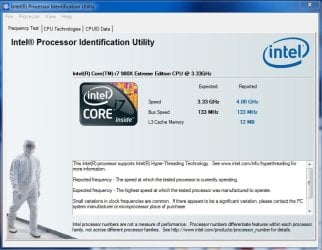
I use a free utility called "Intel Processor Identification Utility" to generate Full Load
When run, it Loads all the Processor Cores to 100% and reports Processor Speed and other details
As shown here (click to enlarge)
Intel.JPG

Using CPU-Z ver 1.56 and Core Temp Ver .998
Both say they are 64 bit versions

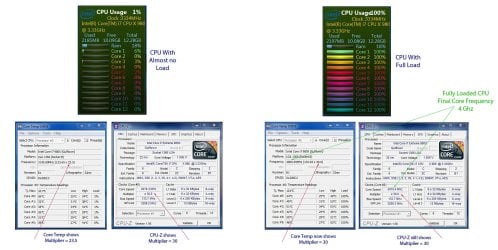
"CORE MULTIPLIER" VALUES WHILE CPU IS IDLING
-------------------------------------------------------
"Core Temp" values "bounces around" 19 thru 26
CPU-Z values "bounces around" 28 thru 30

"CORE MULTIPLIER" VALUES WHILE CPU IS 100% FULLY LOADED (all 6 cores)
--------------------------------------------------------------------------------------------
"Core Temp" values 29.5 to 30
CPU-Z value at 30

Bios "core multipliers" set to 29
So Multiplier increases under load !!!! I guess thats the turbo - boost ?????

But neither CPU-Z nor Core Temp "Loads" Processor at all

So How can CPU-Z correctly calculate the "loaded" multiplier and "Core Temp" cannot ??
Also wondering how Intel Proc ID Utility can load all cores to 100% ??? (heavy duty software loop)

See Diagram Below (click to enlarge) The CPU usage Gadget calls my 12 "threads" cores
but there are just 6 cores with 2 threads apiece
Clock.jpg
 

My Computer My Computer

At a glance

Win 7 Ultimate x64Core I7 980X O.C. to 4.0 Ghz12GB 1600 mhz triple channel DDR3 - KingstonATI Radeon HD 5970 2GB Video Card
Computer Manufacturer/Model Number
Alienware Aurora
OS
Win 7 Ultimate x64
CPU
Core I7 980X O.C. to 4.0 Ghz
Motherboard
Custom Intel mATX (Bios ver A10)
Memory
12GB 1600 mhz triple channel DDR3 - Kingston
Graphics Card(s)
ATI Radeon HD 5970 2GB Video Card
Sound Card
Creative Labs Titanium sound blaster
Monitor(s) Displays
30" Dell LCD
Screen Resolution
2560 x 1600
Hard Drives
240 GB OCZ Vertex 2 SSD
256 GB Samsung V2 SSD
2TB WD Black Caviar 7200 rpm SATA3
600GB WD Velociraptor 10,000 rpm SATA3
3TB WD MyBook Essential USB 3.0 7200 rpm External
PSU
850 Watt
Case
Alienware Aurora
Cooling
Water
Keyboard
Logitech G15 (original version)
Mouse
Logitech MX1000 Laser - Wireless
Internet Speed
Cable 22 Mb/sec download
Other Info
USB 3.0,
Blue Ray DVD Read/Writer
Bose Companion 3 Speakers
WRT54G Wireless Router
Hmm since it doesn't appear that you have an off the shelf motherboard, I can't really look in the manual. I would suggest you try turning off Turbo Boost in the BIOS and see what happens with your multiplier. I would also shut off the energy saving features on your board to see what happens as well.
 

My Computer My Computer

At a glance

Windows 7 Ultimate x64Intel Q6600 Quad Core at 3.0 Ghz8GB (4x2GB) Corsair CM2X2048-6400C5XFX Radeon HD 5770
Computer Manufacturer/Model Number
Custom Built
OS
Windows 7 Ultimate x64
CPU
Intel Q6600 Quad Core at 3.0 Ghz
Motherboard
XFX Nforce 680i SLI
Memory
8GB (4x2GB) Corsair CM2X2048-6400C5
Graphics Card(s)
XFX Radeon HD 5770
Sound Card
Onboard Realtek HD Audio
Monitor(s) Displays
22" Samsung
Screen Resolution
1680x1050
Hard Drives
2x1TB Seagate ST31000340AS in RAID 0
PSU
580W Mushikn HP-580
Case
Antec Nine Hundred
Cooling
Noctua CPU Cooling + 5 Case Fans
Keyboard
Logitech G15
Mouse
Logitech Optical Mouse
Internet Speed
Cable
Uh yes, you multi will increase to the highest set in the BIOS under load, and decrease when not under load. This is normal if you have speedstep enabled. The reason you see them jumping around in the images you present is because you are running at different frequencies (speeds). BTW this is not a function of Turbo mode but speedstep.

Bios "core multipliers" set to 29
So Multiplier increases under load !!!! I guess thats the turbo - boost ?????View attachment 131253

In this instance, yes, when it increases from 29-30, that's turbo kicking in.

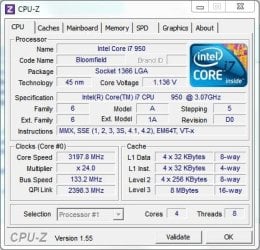
Here's my CPU-Z reading....

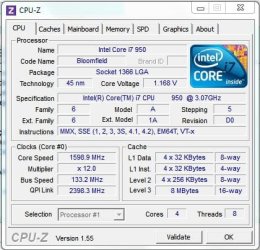
My i7-950 resting.....
Rest.JPG

Under load.....
Load.JPG

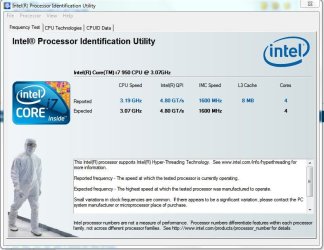
Notice the multipliers.... at rest its 12, at load its 24. Incidentally the max for this CPU is 24, however the rated default speed is 3.06 (23 x 133), (when kicked in to "turbo" in moves to 24 - 24 x 133 = 3.192.

IPIU.JPG

BTW there's also another way turbo kicks in as well, but I don't have a full grasp of it.
 

My Computer My Computer

At a glance

Windows 10 ProIntel Core i7-4770K (3.5Ghz)32 gig Corsair Dominator Platinum (4x8Gig)Sapphire Tri-X R9 Fury
Computer type
PC/Desktop
Computer Manufacturer/Model Number
Custom built by me.
OS
Windows 10 Pro
CPU
Intel Core i7-4770K (3.5Ghz)
Motherboard
Gigabyte G1 Sniper 5 (F10 Bios)
Memory
32 gig Corsair Dominator Platinum (4x8Gig)
Graphics Card(s)
Sapphire Tri-X R9 Fury
Sound Card
Soundblaster ZXR
Monitor(s) Displays
NEC PA242W 24" LCD Monitor
Screen Resolution
1920 x 1200
Hard Drives
Primary - Samsung 850 Pro (512gig), Samsung 840 Pro (256gig), 2TB WD Caviar Black.
PSU
EVGA Supernova 1000 G2
Case
Cooler Master HAF X
Cooling
Corsair H100i with Corsair Air Series SP120 Quiet Fans
Keyboard
Logitech Wireless Wave
Mouse
Logitech Performance MX
Internet Speed
High Speed Cable
Antivirus
Norton Security
Browser
IE11
Other Info
Memory Timings - 1866MHz @ 9-9-9-27-1T @ 1.5 volts
Hmm since it doesn't appear that you have an off the shelf motherboard, I can't really look in the manual. I would suggest you try turning off Turbo Boost in the BIOS and see what happens with your multiplier. I would also shut off the energy saving features on your board to see what happens as well.

The energy saving features are all shut off - I think it may be the "Speedstep". And you're right Ryan, it definitely is a "custom" MB and not one available "off the shelf". I have read (and been told) that Alienware's MB is made by Intel but who knows ??? :):):)
 

My Computer My Computer

At a glance

Win 7 Ultimate x64Core I7 980X O.C. to 4.0 Ghz12GB 1600 mhz triple channel DDR3 - KingstonATI Radeon HD 5970 2GB Video Card
Computer Manufacturer/Model Number
Alienware Aurora
OS
Win 7 Ultimate x64
CPU
Core I7 980X O.C. to 4.0 Ghz
Motherboard
Custom Intel mATX (Bios ver A10)
Memory
12GB 1600 mhz triple channel DDR3 - Kingston
Graphics Card(s)
ATI Radeon HD 5970 2GB Video Card
Sound Card
Creative Labs Titanium sound blaster
Monitor(s) Displays
30" Dell LCD
Screen Resolution
2560 x 1600
Hard Drives
240 GB OCZ Vertex 2 SSD
256 GB Samsung V2 SSD
2TB WD Black Caviar 7200 rpm SATA3
600GB WD Velociraptor 10,000 rpm SATA3
3TB WD MyBook Essential USB 3.0 7200 rpm External
PSU
850 Watt
Case
Alienware Aurora
Cooling
Water
Keyboard
Logitech G15 (original version)
Mouse
Logitech MX1000 Laser - Wireless
Internet Speed
Cable 22 Mb/sec download
Other Info
USB 3.0,
Blue Ray DVD Read/Writer
Bose Companion 3 Speakers
WRT54G Wireless Router
Uh yes, you multi will increase to the highest set in the BIOS under load, and decrease when not under load. This is normal if you have speedstep enabled. The reason you see them jumping around in the images you present is because you are running at different frequencies (speeds). BTW this is not a function of Turbo mode but speedstep.

Bios "core multipliers" set to 29
So Multiplier increases under load !!!! I guess thats the turbo - boost ?????View attachment 131253

In this instance, yes, when it increases from 29-30, that's turbo kicking in.

Here's my CPU-Z reading....

My i7-950 resting.....
View attachment 131821

Under load.....
View attachment 131822

Notice the multipliers.... at rest its 12, at load its 24. Incidentally the max for this CPU is 24, however the rated default speed is 3.06 (23 x 133), (when kicked in to "turbo" in moves to 24 - 24 x 133 = 3.192.

View attachment 131825

BTW there's also another way turbo kicks in as well, but I don't have a full grasp of it.

I see the truth of it Sygnus1 - it's the "SpeedStep" - And not the Turbo Boost. And I see your multipliers literally doubled under load. Wow - amazing. :):):)
 

My Computer My Computer

At a glance

Win 7 Ultimate x64Core I7 980X O.C. to 4.0 Ghz12GB 1600 mhz triple channel DDR3 - KingstonATI Radeon HD 5970 2GB Video Card
Computer Manufacturer/Model Number
Alienware Aurora
OS
Win 7 Ultimate x64
CPU
Core I7 980X O.C. to 4.0 Ghz
Motherboard
Custom Intel mATX (Bios ver A10)
Memory
12GB 1600 mhz triple channel DDR3 - Kingston
Graphics Card(s)
ATI Radeon HD 5970 2GB Video Card
Sound Card
Creative Labs Titanium sound blaster
Monitor(s) Displays
30" Dell LCD
Screen Resolution
2560 x 1600
Hard Drives
240 GB OCZ Vertex 2 SSD
256 GB Samsung V2 SSD
2TB WD Black Caviar 7200 rpm SATA3
600GB WD Velociraptor 10,000 rpm SATA3
3TB WD MyBook Essential USB 3.0 7200 rpm External
PSU
850 Watt
Case
Alienware Aurora
Cooling
Water
Keyboard
Logitech G15 (original version)
Mouse
Logitech MX1000 Laser - Wireless
Internet Speed
Cable 22 Mb/sec download
Other Info
USB 3.0,
Blue Ray DVD Read/Writer
Bose Companion 3 Speakers
WRT54G Wireless Router
Back
Top