Revert back to Home Premium from Professional

Hopsteiner

New member
Local time
6:44 AM
Messages
6
I performed an Anytime Upgrade to Professional from Home Premium because I wanted to use XP Mode. But the XP Mode, which was the only reason I wanted the Upgrade, won't work on my computer as it doesn't support virtualization.

Am I stuck with having to activate Professional or can I revert back to Home Premium?

My Home Premium is a full retail version which I had activated prior to the Anytime Upgrade to Professional.
 

My Computer My Computer

At a glance

Windows 7 professional 32bitIntel Pentium dual-core processor T2060 (1.60...2 GB DDR2Intel Graphics Media Accelerator 950
Computer Manufacturer/Model Number
Acer Aspire 5610-2328
OS
Windows 7 professional 32bit
CPU
Intel Pentium dual-core processor T2060 (1.60 GHz, 1 MB L2 )
Memory
2 GB DDR2
Graphics Card(s)
Intel Graphics Media Accelerator 950
Monitor(s) Displays
15.4" WXGA Acer CrystalBrite LCD (16ms)
Hard Drives
Internal: 120GB HDD
External: Seagate 750GB Expnsion USB 2.0
Hello Hopsteiner, welcome to Seven Forums!


If you entered the 'upgrade' key when you ran the upgrade to Pro I believe that nullifies the previous key making it no longer possible to use to activate Windows.
 

My Computer My Computer

At a glance

W 7 64-bit UltimateIntel Q9550 Yorkfield8GB Dominator 8500C5DATI : XFX 5870
Computer Manufacturer/Model Number
* BFK Customs *
OS
W 7 64-bit Ultimate
CPU
Intel Q9550 Yorkfield
Motherboard
ASUS P5Q Pro
Memory
8GB Dominator 8500C5D
Graphics Card(s)
ATI : XFX 5870
Sound Card
Realtek HD Audio 7-1
Monitor(s) Displays
1x 47" LCD HDMI & 3x 26" LCD HDMI
Screen Resolution
1920x1080P & 1920x1200
Hard Drives
1x 80GB Intel X25-M G2 SSD : 1x 500GB & 1x 640GB WD Caviar Black(s)
PSU
Corsair 620HX
Case
Cooler Master RC-690
Cooling
Tuniq Tower 120, 2x 140mm and 3x 120mm case fans
Keyboard
Microsoft 500
Mouse
Razer Diamondback 3G
Internet Speed
14 Mb/s
Other Info
1x Koutech 3Gb/s SATA HDD Hot Swap Rack
There is an update that Enables Windows XP Mode for PCs without Hardware Assisted Virtualization Technology. Download Windows XP Mode
 

My Computer My Computer

At a glance

Windows 10 Education 64 bitAMD Phenom II X4 980 Black Edition Deneb 3.7GHz8GB 4GBx2 Kingston PC10600 DDR3 1333 MemoryZotac NVIDIA Geforce GT640 2 Gig DDR3 PCIe
Computer type
PC/Desktop
Computer Manufacturer/Model Number
Home Built
OS
Windows 10 Education 64 bit
CPU
AMD Phenom II X4 980 Black Edition Deneb 3.7GHz
Motherboard
Asus M4N68T-M V2 µATX Motherboard
Memory
8GB 4GBx2 Kingston PC10600 DDR3 1333 Memory
Graphics Card(s)
Zotac NVIDIA Geforce GT640 2 Gig DDR3 PCIe
Sound Card
VIA VT1708s High Definition Audio 8-channel Onboard
Monitor(s) Displays
22" LG E2242 1080p and 2 19" I-INC AG191D
Screen Resolution
1280x1024 - 1920x1080 - 1280x1024
Hard Drives
Crucial M100 256 GB SSD and 500 GB WD Blue SATA
PSU
Thermaltake TR 620
Case
Power Up Black ATX Mid-Tower Case
Cooling
Stock heatsink and fan
Keyboard
Logitech Wireless K350 Wave
Mouse
Logitech Wireless M570 Trackman Wheel
Internet Speed
80 Mbps Down 30 Mbps Up
Antivirus
Windows Defender
Browser
Internet Explorer 11
Other Info
HP DVD1040e Lightscribe - External USB2
There is a way to go back to Home Premium without reinstalling.
UNAWAVE - Downgrade Ultimate to Home Premium or Professional
I used this method to go back to Home Premium from Ultimate. I think there is a tutorial on this, on this site, but I couldn't find it. If you have already activated with your anytime upgrade key it may be tied to that PC. If you can't reuse it on another PC I wouldn't bother trying to go back to Home Premium.
 

My Computer My Computer

At a glance

Windows 10 Education 64 bitAMD Phenom II X4 980 Black Edition Deneb 3.7GHz8GB 4GBx2 Kingston PC10600 DDR3 1333 MemoryZotac NVIDIA Geforce GT640 2 Gig DDR3 PCIe
Computer type
PC/Desktop
Computer Manufacturer/Model Number
Home Built
OS
Windows 10 Education 64 bit
CPU
AMD Phenom II X4 980 Black Edition Deneb 3.7GHz
Motherboard
Asus M4N68T-M V2 µATX Motherboard
Memory
8GB 4GBx2 Kingston PC10600 DDR3 1333 Memory
Graphics Card(s)
Zotac NVIDIA Geforce GT640 2 Gig DDR3 PCIe
Sound Card
VIA VT1708s High Definition Audio 8-channel Onboard
Monitor(s) Displays
22" LG E2242 1080p and 2 19" I-INC AG191D
Screen Resolution
1280x1024 - 1920x1080 - 1280x1024
Hard Drives
Crucial M100 256 GB SSD and 500 GB WD Blue SATA
PSU
Thermaltake TR 620
Case
Power Up Black ATX Mid-Tower Case
Cooling
Stock heatsink and fan
Keyboard
Logitech Wireless K350 Wave
Mouse
Logitech Wireless M570 Trackman Wheel
Internet Speed
80 Mbps Down 30 Mbps Up
Antivirus
Windows Defender
Browser
Internet Explorer 11
Other Info
HP DVD1040e Lightscribe - External USB2
Why do you need to downgrade anyways? Professional has everything Home Premium does and more. You paid for the upgrade you might as well keep and use it.
 

My Computer My Computer

At a glance

Windows 10 Pro (x64)Intel Core i7-3930K (3.2GHz - 4.5GHz)4x Samsung 4GB PC3-12800 DDR3 (16GB 1600MHz)Nvidia Geforce GTX 690
Computer type
PC/Desktop
Computer Manufacturer/Model Number
Alienware Aurora ALX R4
OS
Windows 10 Pro (x64)
CPU
Intel Core i7-3930K (3.2GHz - 4.5GHz)
Motherboard
Alienware Aurora-R4 x79
Memory
4x Samsung 4GB PC3-12800 DDR3 (16GB 1600MHz)
Graphics Card(s)
Nvidia Geforce GTX 690
Sound Card
SteelSeries Siberia Elite
Monitor(s) Displays
Dell UltraSharp U3011
Screen Resolution
2560x1600
Hard Drives
Samsung 850 Pro 256 GB, Seagate 1TB Desktop Hybrid HDD, 2x Western Digital 4TB Green HDD
PSU
875W Some Dell PSU <.<
Case
Alienware Aurora ALX
Cooling
Custom Liquid Cooling (EK CPU & GPU blocks) dual EK 480RAD
Keyboard
Logitech G710+ Mechanical
Mouse
Logitech G700s
Internet Speed
Verizon Fios (50 mbps average)
Other Info
Server: Intel NUC D54250WYK: i5-4250U, 16GB, 256 GB mSATA, Windows Server 2012 R2
Why revert back to Home Premium?

Because it does everything I need except for the XP issue and I would like to save the upgrade for a new computer that is virtualization capable. Some may call me cheap but I prefer the term frugal.:o Why waste the upgrade on a computer that can't utilize all of the features of the Professional version? As I said I'm not cheap, but?????


EDIT: My computer is becoming very insistent about the need to activate Professional. If I don't and the OS would default automatically back to the last activated OS I would be as happy as a tornado in a mobile home park. Gotta run. County Superior Court jury duty won't wait.
 
Last edited:

My Computer My Computer

At a glance

Windows 7 professional 32bitIntel Pentium dual-core processor T2060 (1.60...2 GB DDR2Intel Graphics Media Accelerator 950
Computer Manufacturer/Model Number
Acer Aspire 5610-2328
OS
Windows 7 professional 32bit
CPU
Intel Pentium dual-core processor T2060 (1.60 GHz, 1 MB L2 )
Memory
2 GB DDR2
Graphics Card(s)
Intel Graphics Media Accelerator 950
Monitor(s) Displays
15.4" WXGA Acer CrystalBrite LCD (16ms)
Hard Drives
Internal: 120GB HDD
External: Seagate 750GB Expnsion USB 2.0
These are retail keys which can migrate for life. No key is invalidated when an Upgrade is done over it's installation - it is only made unavailable for use under the EULA while it is acting as qualifier for Upgrade version.

To revert from Pro back to HP, use the workaround suggested by Alphnumeric by which many beta testers migrated to their paid version of Win7.

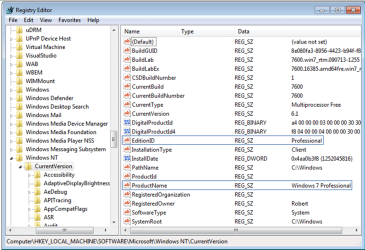
By changing the two Registry Keys show below to exactly HOMEPREMIUM for the EditionID, and Windows 7 HOMEPREMIUM for the ProductName, it tricks the installer into doing an always-allowed http://www.sevenforums.com/tutorials/3413-repair-install.html?ltr=R which is an in-place Upgrade:
regkeys.PNG

Then run the HomePremium DVD from the desktop, agree to remain connected to internet to get latest drivers and Updates into installer, resolve any issues given, select Upgrade install.

Afterwards you'll need to reactivate using Home Premium key at Computer>Properties which may require a robocall to update the hardware profile. Your Pro Anytime Upgrade key is then free to migrate.
 
Why revert back to Home Premium?

Because it does everything I need except for the XP issue and I would like to save the upgrade for a new computer that is virtualization capable. Some may call me cheap but I prefer the term frugal.:o Why waste the upgrade on a computer that can't utilize all of the features of the Professional version? As I said I'm not cheap, but?????


EDIT: My computer is becoming very insistent about the need to activate Professional. If I don't and the OS would default automatically back to the last activated OS I would be as happy as a tornado in a mobile home park. Gotta run. County Superior Court jury duty won't wait.

If you haven't activated yet you shouldn't have any problem using that any time upgrade product code on another PC. I wouldn't think it would be so easy once activated. The work around works well, I didn't have to reinstall any of my previously installed programs. All I had to do was hit windows update again to reapply all the updates.
 

My Computer My Computer

At a glance

Windows 10 Education 64 bitAMD Phenom II X4 980 Black Edition Deneb 3.7GHz8GB 4GBx2 Kingston PC10600 DDR3 1333 MemoryZotac NVIDIA Geforce GT640 2 Gig DDR3 PCIe
Computer type
PC/Desktop
Computer Manufacturer/Model Number
Home Built
OS
Windows 10 Education 64 bit
CPU
AMD Phenom II X4 980 Black Edition Deneb 3.7GHz
Motherboard
Asus M4N68T-M V2 µATX Motherboard
Memory
8GB 4GBx2 Kingston PC10600 DDR3 1333 Memory
Graphics Card(s)
Zotac NVIDIA Geforce GT640 2 Gig DDR3 PCIe
Sound Card
VIA VT1708s High Definition Audio 8-channel Onboard
Monitor(s) Displays
22" LG E2242 1080p and 2 19" I-INC AG191D
Screen Resolution
1280x1024 - 1920x1080 - 1280x1024
Hard Drives
Crucial M100 256 GB SSD and 500 GB WD Blue SATA
PSU
Thermaltake TR 620
Case
Power Up Black ATX Mid-Tower Case
Cooling
Stock heatsink and fan
Keyboard
Logitech Wireless K350 Wave
Mouse
Logitech Wireless M570 Trackman Wheel
Internet Speed
80 Mbps Down 30 Mbps Up
Antivirus
Windows Defender
Browser
Internet Explorer 11
Other Info
HP DVD1040e Lightscribe - External USB2
Playing in and with the registry, if you don't know what you are doing, is not a good thing.
It is not a good place to experiment. As a result I don't and haven't so I am a complete
novice at this project. I opened Registry Edit and couldn't get a display anything like
shown on UNAWAVE or as shown by gregrocker's screen shot.

I opened regedit and clicked on Computer which produced these drop down options:
CaptureRegEdit2-1.jpg


Next I clicked on HKEY_LOCAL_MACHINE which produced these options:
CaptureRegEdit3.jpg


From these I selected SOFTWARE which gave a list of all software on the machine:
CaptureRegEdit4.jpg


As there was only one Windows type option I clicked on it then the options that followed
(CurrentVersion, then Explorer, then Browser Helper Objects). The right side of the page
remained blank unless I clicked on the words directly. It made no difference which of the
words (other than Computer which had no effect). They all produced the same response
on the screen's right side. And when I clicked on Default nothing happened.

CaptureRegEdit62.jpg


So here are my next questions:
“Where is Windows NT hiding?” or most importantly
“How do I get to a place where I can edit the registry keys?”


HELP! Further guidance is needed.


After a few hours sleep my brain is starting to function a bit more. It dawned on me,
I should be looking for hidden files. So did a search of the Help files and followed that advice.
I went to Folder Options>View and under Advanced Settings:
clicked Show hidden files, folders, and drives.
I also deselected the Hide extensions for known file types and the
Hide protected operating system files buttons.
Pressed the Apply button then the OK button. I even restarted the computer.
Then back into RegEdit.... No Change, still no Windows NT.
Everything just the same as before. Things are getting desperate.
I don't have very much hair on my head to pull out.


Is the fact that the computer is now operating with reduced functionality
having an effect on all this?
 

My Computer My Computer

At a glance

Windows 7 professional 32bitIntel Pentium dual-core processor T2060 (1.60...2 GB DDR2Intel Graphics Media Accelerator 950
Computer Manufacturer/Model Number
Acer Aspire 5610-2328
OS
Windows 7 professional 32bit
CPU
Intel Pentium dual-core processor T2060 (1.60 GHz, 1 MB L2 )
Memory
2 GB DDR2
Graphics Card(s)
Intel Graphics Media Accelerator 950
Monitor(s) Displays
15.4" WXGA Acer CrystalBrite LCD (16ms)
Hard Drives
Internal: 120GB HDD
External: Seagate 750GB Expnsion USB 2.0
You can still run XP Mode on systems that don't support hardware virtualization.....

Download and run the Hardware-Assisted Virtualization Detection Tool
  • If you receive the message “This computer does not have hardware-assisted virtualization,” your computer does not meet the hardware requirement for Windows Virtual PC, but you can still use Windows 7 XP Mode by running this hotfix. Be aware that XP Mode will run much better if hardware-assisted virtualization can be enabled.
More info here - Windows Virtual PC: Configure BIOS

How well it works??? I can't say.
 

My Computer My Computer

At a glance

Windows 10 ProIntel Core i7-4770K (3.5Ghz)32 gig Corsair Dominator Platinum (4x8Gig)Sapphire Tri-X R9 Fury
Computer type
PC/Desktop
Computer Manufacturer/Model Number
Custom built by me.
OS
Windows 10 Pro
CPU
Intel Core i7-4770K (3.5Ghz)
Motherboard
Gigabyte G1 Sniper 5 (F10 Bios)
Memory
32 gig Corsair Dominator Platinum (4x8Gig)
Graphics Card(s)
Sapphire Tri-X R9 Fury
Sound Card
Soundblaster ZXR
Monitor(s) Displays
NEC PA242W 24" LCD Monitor
Screen Resolution
1920 x 1200
Hard Drives
Primary - Samsung 850 Pro (512gig), Samsung 840 Pro (256gig), 2TB WD Caviar Black.
PSU
EVGA Supernova 1000 G2
Case
Cooler Master HAF X
Cooling
Corsair H100i with Corsair Air Series SP120 Quiet Fans
Keyboard
Logitech Wireless Wave
Mouse
Logitech Performance MX
Internet Speed
High Speed Cable
Antivirus
Norton Security
Browser
IE11
Other Info
Memory Timings - 1866MHz @ 9-9-9-27-1T @ 1.5 volts
Hello again.


If you're going to fool with the Windows registry and you don't know how; please do yourself a favor and export a back-up of the registry in conjunction with (also) creating a system restore point; you may just be glad you did.

Editing the registry is not something that should be suggested to casual users in the first place.

How to Backup and Restore the Windows 7 Registry
 

My Computer My Computer

At a glance

W 7 64-bit UltimateIntel Q9550 Yorkfield8GB Dominator 8500C5DATI : XFX 5870
Computer Manufacturer/Model Number
* BFK Customs *
OS
W 7 64-bit Ultimate
CPU
Intel Q9550 Yorkfield
Motherboard
ASUS P5Q Pro
Memory
8GB Dominator 8500C5D
Graphics Card(s)
ATI : XFX 5870
Sound Card
Realtek HD Audio 7-1
Monitor(s) Displays
1x 47" LCD HDMI & 3x 26" LCD HDMI
Screen Resolution
1920x1080P & 1920x1200
Hard Drives
1x 80GB Intel X25-M G2 SSD : 1x 500GB & 1x 640GB WD Caviar Black(s)
PSU
Corsair 620HX
Case
Cooler Master RC-690
Cooling
Tuniq Tower 120, 2x 140mm and 3x 120mm case fans
Keyboard
Microsoft 500
Mouse
Razer Diamondback 3G
Internet Speed
14 Mb/s
Other Info
1x Koutech 3Gb/s SATA HDD Hot Swap Rack
OP is attempting to change versions as a last resort before clean reinstalling.

As long as files are backed up he has nothing to lose.
 
Honestly you should just leave it alone....Do you even have a second computer to put Professional on at this time? If not maybe you should just leave things as they are. Less trouble and less chance of screwing your only computer.
 

My Computer My Computer

At a glance

Windows 10 Pro (x64)Intel Core i7-3930K (3.2GHz - 4.5GHz)4x Samsung 4GB PC3-12800 DDR3 (16GB 1600MHz)Nvidia Geforce GTX 690
Computer type
PC/Desktop
Computer Manufacturer/Model Number
Alienware Aurora ALX R4
OS
Windows 10 Pro (x64)
CPU
Intel Core i7-3930K (3.2GHz - 4.5GHz)
Motherboard
Alienware Aurora-R4 x79
Memory
4x Samsung 4GB PC3-12800 DDR3 (16GB 1600MHz)
Graphics Card(s)
Nvidia Geforce GTX 690
Sound Card
SteelSeries Siberia Elite
Monitor(s) Displays
Dell UltraSharp U3011
Screen Resolution
2560x1600
Hard Drives
Samsung 850 Pro 256 GB, Seagate 1TB Desktop Hybrid HDD, 2x Western Digital 4TB Green HDD
PSU
875W Some Dell PSU <.<
Case
Alienware Aurora ALX
Cooling
Custom Liquid Cooling (EK CPU & GPU blocks) dual EK 480RAD
Keyboard
Logitech G710+ Mechanical
Mouse
Logitech G700s
Internet Speed
Verizon Fios (50 mbps average)
Other Info
Server: Intel NUC D54250WYK: i5-4250U, 16GB, 256 GB mSATA, Windows Server 2012 R2
First the good news. Many thanks for the patient and helpful advice from Alphanumeric and Gregrocker in telling me that there is a way to do what I desired... and further thanks to Gregrocker for pointing out where I deviated from the trail that was shown in his screen shot but I was too impatient to follow to the finish. The registry has been successfully modified.

Now for the bad news. The repair install to do the upgrade to Home Premium from Professional freezes at a point when the end is in sight. It is so close I can almost taste it and feel it in my hand. The freeze occurs during the Transferring Files, Settings, and Programs portion. The display is at 72% of completion. But that figure is misleading. It is actually at 99.9729+%! There are only 77 items left to transfer. This first pass at the install was with all the recommended settings for the install in place including the internet. Then I tried a second time. Everything the same except no internet for this attempt. Except for the total number of items to be transfered being a few less the result was the same. Another freeze with only 77 items to go.

Now I am off to do more studying and research on the forum for ideas for the cure to this problem.
 

My Computer My Computer

At a glance

Windows 7 professional 32bitIntel Pentium dual-core processor T2060 (1.60...2 GB DDR2Intel Graphics Media Accelerator 950
Computer Manufacturer/Model Number
Acer Aspire 5610-2328
OS
Windows 7 professional 32bit
CPU
Intel Pentium dual-core processor T2060 (1.60 GHz, 1 MB L2 )
Memory
2 GB DDR2
Graphics Card(s)
Intel Graphics Media Accelerator 950
Monitor(s) Displays
15.4" WXGA Acer CrystalBrite LCD (16ms)
Hard Drives
Internal: 120GB HDD
External: Seagate 750GB Expnsion USB 2.0
Hopefully it rolled back. The last entry in any of the following logs should give you a clue as to what is hanging:
C:\$WINDOWS.~BT\Sources\Panther\setuperr.log
C:\$WINDOWS.~BT\Sources\Panther\setupact.log
C:\$WINDOWS.~BT\Sources\Panther\miglog.xml
C:\$WINDOWS.~BT\Sources\Panther\setupapi\setupapi.dev.log
C:\$WINDOWS.~BT\Sources\Panther\setupapi\setupapi.app.log
C:\$WINDOWS.~BT\Sources\Panther\PreGatherPnPList.log
C:\$WINDOWS.~BT\Sources\Panther\PostGatherPnPList.log

None of this is a good omen for a perfect in-place Upgrade. Best to wipe the HD and start fresh.

Are you ready to clean reinstall? http://www.sevenforums.com/installation-setup/125874-re-install-windows-7-a.html#post1086729
 

My Computer My Computer

At a glance

Windows 7 professional 32bitIntel Pentium dual-core processor T2060 (1.60...2 GB DDR2Intel Graphics Media Accelerator 950
Computer Manufacturer/Model Number
Acer Aspire 5610-2328
OS
Windows 7 professional 32bit
CPU
Intel Pentium dual-core processor T2060 (1.60 GHz, 1 MB L2 )
Memory
2 GB DDR2
Graphics Card(s)
Intel Graphics Media Accelerator 950
Monitor(s) Displays
15.4" WXGA Acer CrystalBrite LCD (16ms)
Hard Drives
Internal: 120GB HDD
External: Seagate 750GB Expnsion USB 2.0

My Computer My Computer

At a glance

Windows 7 Ultimate x64Intel Q9550 2.83Ghz OC'd to 3.40Ghz8GB G.Skill PI DDR2-800, 4-4-4-12 timingsEVGA 1280MB Nvidia GeForce GTX570
Computer Manufacturer/Model Number
Self-Built in July 2009
OS
Windows 7 Ultimate x64
CPU
Intel Q9550 2.83Ghz OC'd to 3.40Ghz
Motherboard
Gigabyte GA-EP45-UD3R rev. 1.1, F12 BIOS
Memory
8GB G.Skill PI DDR2-800, 4-4-4-12 timings
Graphics Card(s)
EVGA 1280MB Nvidia GeForce GTX570
Sound Card
Realtek ALC899A 8 channel onboard audio
Monitor(s) Displays
23" Acer x233H
Screen Resolution
1920x1080
Hard Drives
Intel X25-M 80GB Gen 2 SSD
Western Digital 1TB Caviar Black, 32MB cache. WD1001FALS
PSU
Corsair 620HX modular
Case
Antec P182
Cooling
stock
Keyboard
ABS M1 Mechanical
Mouse
Logitech G9 Laser Mouse
Internet Speed
15/2 cable modem
Other Info
Windows and Linux enthusiast. Logitech G35 Headset.
Back
Top