
'Could not find this item'

JoeBob

New member
Local time
4:23 PM
Messages
3
Driving me crazy having to rename and move folders to do basic work in Win 7. Right-Click / copy pops up -'Item Not Found' dialog.
Well - I just right clicked it - it IS there...

Older posts in this forum were work-arounds.
Is this fixed, yet?
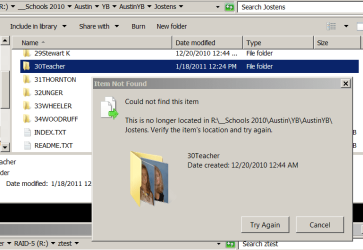
Capture.PNG


Many thanks from a very frustrated old guy.
 

My Computer My Computer

At a glance

Win 7 Pro 64Intel Core i7 960 @3.20RAM = 6GB
Computer Manufacturer/Model Number
Custom
OS
Win 7 Pro 64
CPU
Intel Core i7 960 @3.20
Memory
RAM = 6GB
Do you have the right extentions on the items?
 

My Computer My Computer

At a glance

Windows 7 Ultimate 32bit SP1Intel(R) Core(TM)2 Quad CPU @ 2.40GHz, 2400 MHz4 GBATI Radeon HD 2600 Pro
Computer type
PC/Desktop
Computer Manufacturer/Model Number
Bruce ... somewhere in his 40's
OS
Windows 7 Ultimate 32bit SP1
CPU
Intel(R) Core(TM)2 Quad CPU @ 2.40GHz, 2400 MHz
Motherboard
INTEL/D975XBX2
Memory
4 GB
Graphics Card(s)
ATI Radeon HD 2600 Pro
Monitor(s) Displays
Samsung SyncMaster 914v
Screen Resolution
1280 x 1024
Hard Drives
2/500GB each ... ST3500630AS ATA Device.
One is not connected
PSU
Rocketfish 700 W
Case
G.Skill Gigabyte Chassis
Keyboard
Standard PS/2 Keyboard
Mouse
Microsoft PS/2 Mouse
Internet Speed
DSL
Antivirus
Avira Internet Security
Browser
IE 11
Other Info
ATI HDMI Audio
It's not a questions of extensions.
I right click a folder. There it is. Folders above and below it copy fine.
But random folders with the same name format as the others generate 'Item Not Found.'
My work-around is to make a new folder at the intended destination, and copy the files into it.
(The new folder name has to be the same as the old folder name for export/import purposes.)
I then export this data to a flash drive and take it to an XP machine to burn a CD to deliver to clients.
Pain...

Thanks for asking -
JoeBob
 

My Computer My Computer

At a glance

Win 7 Pro 64Intel Core i7 960 @3.20RAM = 6GB
Computer Manufacturer/Model Number
Custom
OS
Win 7 Pro 64
CPU
Intel Core i7 960 @3.20
Memory
RAM = 6GB
More Info: I can't edit these folder names, either. I've included a view of what is in the folder in details mode - all the extensions look good to me.
 

Attachments

  • Capture2.PNG
    Capture2.PNG
    30.8 KB · Views: 27

My Computer My Computer

At a glance

Win 7 Pro 64Intel Core i7 960 @3.20RAM = 6GB
Computer Manufacturer/Model Number
Custom
OS
Win 7 Pro 64
CPU
Intel Core i7 960 @3.20
Memory
RAM = 6GB
Back
Top