wrong primary monitor in dual monitor setup

susanrachel

New member
Local time
7:07 AM
Messages
4
Have a large screen tv on wall connected with HDMI to computer. Have a Samsung monitor on my desktop. Cannot make the desktop my primary monitor no matter what I do. (although have had this working before). We had a break-in and monitor was stolen. So replaced with new but cannot make it primary.....always defaults to samsung tv on wall. I have tried all normal solutions.... unplugged all....began with desktop monitor....added tv, etc. Have spent way too many hours and am sure answer is simple. HELP PLEASE!:geek:
 

My Computer My Computer

At a glance

win 7 Ultimate X64
OS
win 7 Ultimate X64
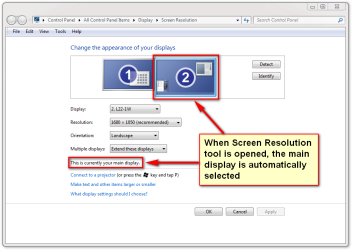
Right click on your desktop, select Screen Resolution, then click on the screen you want to make primary. Select Multiple Displays, and it should be there!
 

My Computer My Computer

At a glance

7 untimate
OS
7 untimate
If only it were that simple. Have done that a thousand times..... as said in my post...have tried all normal techniques....always the same....the desktop ends on wall tv not on monitor that I want it on.:cry:
 

My Computer My Computer

At a glance

win 7 Ultimate X64
OS
win 7 Ultimate X64
In the Screen Resolution window, by where it says Display there should be a drop down box. Does it show the model of both your TV and your monitor? if not, you may need the driver for the monitor. Also What interface are you connecting the monitor with? You can try switching that to DVI or VGA to see if it makes a difference.
 

My Computer My Computer

At a glance

Vista Business x64AMD Phenom II x3 720be @3.15ghz2x2GB A-Data DDR2 pc6400Nvidia EVGA 8800gts (640MB,320bit)
Computer Manufacturer/Model Number
Self Build
OS
Vista Business x64
CPU
AMD Phenom II x3 720be @3.15ghz
Motherboard
Asus M4A77D
Memory
2x2GB A-Data DDR2 pc6400
Graphics Card(s)
Nvidia EVGA 8800gts (640MB,320bit)
Sound Card
Creative Sound Blaster
Monitor(s) Displays
Samsung 226bw
Screen Resolution
1680x1050
Hard Drives
Seagate 320gig, WD 80gig
PSU
Rosewill 500watt
Case
Dynex
Cooling
Thermaltake V1
Keyboard
G15
Mouse
Razor DeathAdder
Internet Speed
10.0Mb/896Kb
Will try that and report back
 

My Computer My Computer

At a glance

win 7 Ultimate X64
OS
win 7 Ultimate X64
According to an old saying, a picture is worth thousand words, so here's 2,000 words ;)

Screen_Resolution_1.png

Screen_Resolution_2.png

Kari
 

My Computer My Computer

At a glance

Windows 10 Pro x64 EN-GB1.6 GHz Intel Core i7-720QM Processor6 GBATI Mobility Radeon HD 5850 Graphics
Computer type
Laptop
Computer Manufacturer/Model Number
HP ENVY 17-1150eg
OS
Windows 10 Pro x64 EN-GB
CPU
1.6 GHz Intel Core i7-720QM Processor
Memory
6 GB
Graphics Card(s)
ATI Mobility Radeon HD 5850 Graphics
Sound Card
Beats sound system with integrated subwoofer
Monitor(s) Displays
17" laptop display, 22" LED and 32" Full HD TV through HDMI
Screen Resolution
1600*900 (1), 1920*1080 (2&3)
Hard Drives
Internal: 2 x 500 GB SATA Hard Disk Drive 7200 rpm
External: 2TB for backups, 3TB USB3 network drive for media
Cooling
As Envy runs a bit warm, I have it on a Cooler Master pad
Keyboard
Logitech diNovo Media Desktop Laser (bluetooth)
Mouse
Logitech Performance Mouse MX
Internet Speed
50/10 Mbps VDSL
Antivirus
Windows Defender 4.3.9431.0
Browser
Maxthon 3.5.2., IE11
That fixed it Bootz! Thank you! Thank you! Thank you!:party:
 

My Computer My Computer

At a glance

win 7 Ultimate X64
OS
win 7 Ultimate X64
Back
Top