New MOBO, Which OS to use? Win7 32Bit or 64 Bit?

Raz888

New member
Local time
7:02 AM
Messages
1
(first time posting here)

Hello!
Just picked up an Asus M4A89GTD Pro/USB3 Mobo, 4 Gigs of RAM and using a bunch of old stuff to Upgrade my old 1.8Ghz AMD dinosaur! :-)

My question is regarding Which OS should I use?
1. At present I have specialized software (32 bit) for my specific industry. The sofware mfgrs tell me they are not in any rush to do a 64bit rewrite anytime soon! <arg> I am considering a dual boot system, although I have never done that before.

2. I am also going to need to update my MS OFFICE software and my Adobe Master Suite software, and Im told that the 64 bit version is much cleaner and faster than the 32 bit. Is that true?

and finally ...
3. Do they make (or is there a way) to maybe purchase a 64 bit version and to somehow make it run in 32bit mode? (if there is such a thing???)

There, Ive managed to make a total fool of myself with these questions, so after you wiz kids finish laughing, hehe, lemme know what you think!

Thank You very Much!!!
-raz888-
 

My Computer My Computer

At a glance

Ultimate x64 & Ultimate x32AMD Phenom II 1055T 6Core 2.8~3.2GHz 6MB Cach...DDR 10333onboard
Computer Manufacturer/Model Number
Custom Buillt
OS
Ultimate x64 & Ultimate x32
CPU
AMD Phenom II 1055T 6Core 2.8~3.2GHz 6MB Cache HDT55TFBRBOX
Motherboard
Asus M4A89 GTD Pro/USB3
Memory
DDR 10333
Graphics Card(s)
onboard
Sound Card
onboard
Monitor(s) Displays
1) 23" Acer LCD; 1) 19" SVGA CRT
Hard Drives
4 Seagate 250GB SATA 3.0 7200
PSU
500W
Case
Midtower
Cooling
Stock Fan
My question is regarding Which OS should I use?
1. At present I have specialized software (32 bit) for my specific industry. The sofware mfgrs tell me they are not in any rush to do a 64bit rewrite anytime soon! <arg> I am considering a dual boot system, although I have never done that before.
Almost all 32-bit apps work in 64-bit

2. I am also going to need to update my MS OFFICE software and my Adobe Master Suite software, and Im told that the 64 bit version is much cleaner and faster than the 32 bit. Is that true?
There is no noticeable difference with the x64 version

and finally ...
3. Do they make (or is there a way) to maybe purchase a 64 bit version and to somehow make it run in 32bit mode? (if there is such a thing???)
32-bit programs will run under 64-bit. The OS will automatically run them in WOW64 mode
http://en.wikipedia.org/wiki/WoW64

Go with 64-bit if you have more than 3GB of RAM
 

My Computer My Computer

At a glance

Windows 10 Pro x64, Arch LinuxIntel Core 2 Quad Q8200 OC'd 3.08GHz8GB DDR2 900MhzMSI GT730 2GB GDDR5 (Kepler)
Computer type
PC/Desktop
Computer Manufacturer/Model Number
Custom Build
OS
Windows 10 Pro x64, Arch Linux
CPU
Intel Core 2 Quad Q8200 OC'd 3.08GHz
Motherboard
Asus Rampage formula LGA775
Memory
8GB DDR2 900Mhz
Graphics Card(s)
MSI GT730 2GB GDDR5 (Kepler)
Sound Card
Supreme FX2
Monitor(s) Displays
Samsung LS22F350 LED
Screen Resolution
1080P
Hard Drives
Kingston SSDNow UV400 120GB, 500GB Hitachi, 2TB Samsung, 500GB Seagate FreeAgent, 640GB Samsung, 160GB Toshiba (Arch)
PSU
AeroCool 500W Bronze
Cooling
Cooler Master V6 + 3X fans
Keyboard
Prolink keyboard
Mouse
Logitech M705
Internet Speed
1MiB/s
Browser
Chrome Beta
Hi there
Adobe Photoshop CS4/5 DEFINITELY 64 bit version.
In general I'd recommend 64 bit since that's "the flow".

For some legacy hardware you will need 64 bit device drivers that will be non existant so these will HAVE to run on a 32 bit machine. Some of these might not even work on W7 32 bit even in "compatability" mode.

Most 32 bit SOFTWARE that doesn't require specific hardware should run OK.

What you need to decide is what CANNOT run on 64 bit windows and how often do you run it.

If it's a small number and you are not running it all the time then create an XP Virtual Machine (or use XP mode) for these applications and hardware.

Otherwise stick to 32 bit Windows or even dual boot -- although with hardware these days much more powerful I would go the Virtual Machine route rather than use Dual Booting.


Cheers
jimbo
 

My Computer My Computer

At a glance

Linux CENTOS 7 / various Windows OS'es and se...Intel i7 Intel i58GB, 16GBOn Motherboard
Computer type
PC/Desktop
Computer Manufacturer/Model Number
Custom built, several laptops HP/ASUS
OS
Linux CENTOS 7 / various Windows OS'es and servers
CPU
Intel i7 Intel i5
Memory
8GB, 16GB
Graphics Card(s)
On Motherboard
Sound Card
Realtek HD audio
Monitor(s) Displays
Apple Cinema display, Samsung LCD
Screen Resolution
1920 X 1080
Hard Drives
4 X 1TB SATA
Mouse
Toshiba wireless laser
Internet Speed
> 20MB up
Hello Raz888, welcome to Seven Forums!


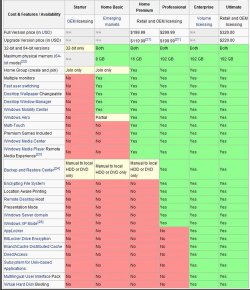
Just be sure to get (at least) Windows 7 Professional so you can run XP mode if need be; a full retail version comes with both 32-bit and 64-bit installation DVDs to make life easier and be sure to post back with any further questions you may have and to keep us informed.

click to enlarge
Capture11.JPG
 

My Computer My Computer

At a glance

W 7 64-bit UltimateIntel Q9550 Yorkfield8GB Dominator 8500C5DATI : XFX 5870
Computer Manufacturer/Model Number
* BFK Customs *
OS
W 7 64-bit Ultimate
CPU
Intel Q9550 Yorkfield
Motherboard
ASUS P5Q Pro
Memory
8GB Dominator 8500C5D
Graphics Card(s)
ATI : XFX 5870
Sound Card
Realtek HD Audio 7-1
Monitor(s) Displays
1x 47" LCD HDMI & 3x 26" LCD HDMI
Screen Resolution
1920x1080P & 1920x1200
Hard Drives
1x 80GB Intel X25-M G2 SSD : 1x 500GB & 1x 640GB WD Caviar Black(s)
PSU
Corsair 620HX
Case
Cooler Master RC-690
Cooling
Tuniq Tower 120, 2x 140mm and 3x 120mm case fans
Keyboard
Microsoft 500
Mouse
Razer Diamondback 3G
Internet Speed
14 Mb/s
Other Info
1x Koutech 3Gb/s SATA HDD Hot Swap Rack
If you plan on using Premiere CS5 and After Effects CS5 in your updated Master Suite, you WILL need Windows 7 64bit.
 

My Computer My Computer

At a glance

Windows 7 Ultimate 64bitIntel i7 3770K16GB DDR3 1333 Corsair XMS3XFX HD6950 2GB EyeFinity
Computer Manufacturer/Model Number
HAL-9000
OS
Windows 7 Ultimate 64bit
CPU
Intel i7 3770K
Motherboard
Asus Sabertooth Z77
Memory
16GB DDR3 1333 Corsair XMS3
Graphics Card(s)
XFX HD6950 2GB EyeFinity
Sound Card
Logitech G35 & Sennheiser PC135 & VIA HD
Monitor(s) Displays
23" HP 2310e, 23" Samsung B2230, 21.5" Viewsonic
Screen Resolution
5760x1080
Hard Drives
16TB of Storage
128GB & 256GB Crucial M4 SSD's, 2X 1TB WD Black, 3x 2TB WD, 3x 2TB Samsung F4, 1.5TB Seagate, WD 500GB,
PSU
Antec True Power New 650watt
Case
Cooler Master HAF-932
Cooling
Corsair H60 Hydro Cooler, 3x 230mm Fans, 2x120mm Fan
Keyboard
Logitech G15 and G13
Mouse
Logitech G700 Gaming Mouse
Internet Speed
50/10 Mbit
Other Info
Speakers : Alesis M1 Active Mk2 Studio Monitors , APC RS 1200 UPS, HP 4500DN Color Laser, HP P1006 mono Laser, Kodak 8500 Dye-Sub, Epson 1280 inkjet, Epson Worforce 610 MFC
Given the memory you plan to use, there's no reason to avoid running x64. That being said, run XP Mode or virtualize an older license of XP to handle the older apps that won't run...assuming they definitely will not work with an x64 OS. This way, it runs when you need it, and keep the system simple and running efficient.
 

My Computer My Computer

At a glance

Windows 7 Ultimate x64 SP1Intel Core i7-260012 GB Patriot Extreme DDR3-1333Nvidia GTX 470
OS
Windows 7 Ultimate x64 SP1
CPU
Intel Core i7-2600
Motherboard
Gigabyte GA-P67A-UD3P-B3
Memory
12 GB Patriot Extreme DDR3-1333
Graphics Card(s)
Nvidia GTX 470
Monitor(s) Displays
Dell UltraSharp 2209WA
Hard Drives
OCZ Agility3 240 GB, WD5001AALS, WD7501AALS
PSU
OCZ ModStream 700W
Case
CoolerMaster HAF 912 Advanced
Cooling
CoolerMaster Hyper 212 Plus
Back
Top