DA:O and other games, black screens with sound

Thornton

New member
Power User
Local time
6:53 AM
Messages
597
Location
Orlando Florida
the games work but my problems is that for instince in DA:O i will create a new character or just get in and its just black, i hear the sound, but its just black, i cant controll the character, there is nothing there, in some cases i will get video for a few seconds but that is it really. my drivers and cc are up to date. i am using an ati hd5770 1gb. the version is not in steam but the only other game ive noticed problems with which are more extencive is in darksiders which i did get from steam, help is appreciated, ty
 

My Computer My Computer

At a glance

windows 7 ProfessionalIntel I7 4790k16gb DDR3 1600mhzDual GTX 780 ASUS
Computer type
PC/Desktop
Computer Manufacturer/Model Number
Custom Build
OS
windows 7 Professional
CPU
Intel I7 4790k
Motherboard
ASUS Hero VII
Memory
16gb DDR3 1600mhz
Graphics Card(s)
Dual GTX 780 ASUS
Monitor(s) Displays
2x HP 2331
Screen Resolution
1080p
Hard Drives
750gb Hitachi 7200rpm
500gb Crucial SSD
PSU
Corsair 800g
Case
NZXT Phantom
Cooling
fan
Keyboard
Razer Deathstalker
Mouse
Razer Ouroboros
Internet Speed
70mbps
Antivirus
MSE + M-Bam
Browser
Chrome
I had same problem with DAO. I uninstalled Physx that was installed with game and downloaded newer version and that fixed my problem.
 

My Computer My Computer

At a glance

Windows7 Ultimate 64 bitI7-26008GBXFX 6870
Computer Manufacturer/Model Number
Dell 8300
OS
Windows7 Ultimate 64 bit
CPU
I7-2600
Motherboard
Dell
Memory
8GB
Graphics Card(s)
XFX 6870
Sound Card
Onboard
Monitor(s) Displays
Dell ST2410
Screen Resolution
1920x1080
Hard Drives
Seagate 1TB
PSU
Corsair 650TX
Case
Dell 8300
Cooling
Stock
Keyboard
G15
Mouse
G500
Internet Speed
6000/768
I had same problem with DAO. I uninstalled Physx that was installed with game and downloaded newer version and that fixed my problem.

i cant for some reason un install it, it is not in my add remove progs list and there are some exes in the file location but i dont know which one would be un install or how to get riddof it. anny suggestions on how i can get riddof it?
 

My Computer My Computer

At a glance

windows 7 ProfessionalIntel I7 4790k16gb DDR3 1600mhzDual GTX 780 ASUS
Computer type
PC/Desktop
Computer Manufacturer/Model Number
Custom Build
OS
windows 7 Professional
CPU
Intel I7 4790k
Motherboard
ASUS Hero VII
Memory
16gb DDR3 1600mhz
Graphics Card(s)
Dual GTX 780 ASUS
Monitor(s) Displays
2x HP 2331
Screen Resolution
1080p
Hard Drives
750gb Hitachi 7200rpm
500gb Crucial SSD
PSU
Corsair 800g
Case
NZXT Phantom
Cooling
fan
Keyboard
Razer Deathstalker
Mouse
Razer Ouroboros
Internet Speed
70mbps
Antivirus
MSE + M-Bam
Browser
Chrome
Because it's under "A" for AGEIA PhysX under Programs and Features (Add/Remove). Anyways it's not used since you have an ATI card - it's an Nvidia thing and usually gets installed with a lot of EA games in case you did have an Nvidia card.

Anyhow you shouldn't have to remove it to get the game to run. I played Dragon Age: Origins just fine with it installed and never had an issue. Again, you don't need it, and it can be removed but I left it installed and had no issues.

Two things you might want to do it update your video card drivers, and also update your DirectX files - Download details: DirectX End-User Runtimes (June 2010)

If you continue to have issues, have a look here - Tips on Troubleshooting Game Issues

Good luck.
 

My Computer My Computer

At a glance

Windows 10 ProIntel Core i7-4770K (3.5Ghz)32 gig Corsair Dominator Platinum (4x8Gig)Sapphire Tri-X R9 Fury
Computer type
PC/Desktop
Computer Manufacturer/Model Number
Custom built by me.
OS
Windows 10 Pro
CPU
Intel Core i7-4770K (3.5Ghz)
Motherboard
Gigabyte G1 Sniper 5 (F10 Bios)
Memory
32 gig Corsair Dominator Platinum (4x8Gig)
Graphics Card(s)
Sapphire Tri-X R9 Fury
Sound Card
Soundblaster ZXR
Monitor(s) Displays
NEC PA242W 24" LCD Monitor
Screen Resolution
1920 x 1200
Hard Drives
Primary - Samsung 850 Pro (512gig), Samsung 840 Pro (256gig), 2TB WD Caviar Black.
PSU
EVGA Supernova 1000 G2
Case
Cooler Master HAF X
Cooling
Corsair H100i with Corsair Air Series SP120 Quiet Fans
Keyboard
Logitech Wireless Wave
Mouse
Logitech Performance MX
Internet Speed
High Speed Cable
Antivirus
Norton Security
Browser
IE11
Other Info
Memory Timings - 1866MHz @ 9-9-9-27-1T @ 1.5 volts
Because it's under "A" for AGEIA PhysX under Programs and Features (Add/Remove). Anyways it's not used since you have an ATI card - it's an Nvidia thing and usually gets installed with a lot of EA games in case you did have an Nvidia card.

Anyhow you shouldn't have to remove it to get the game to run. I played Dragon Age: Origins just fine with it installed and never had an issue. Again, you don't need it, and it can be removed but I left it installed and had no issues.

Two things you might want to do it update your video card drivers, and also update your DirectX files - Download details: DirectX End-User Runtimes (June 2010)

If you continue to have issues, have a look here - Tips on Troubleshooting Game Issues

Good luck.
since i do not need it can i completely get ridof it or is it better to just update?
 

My Computer My Computer

At a glance

windows 7 ProfessionalIntel I7 4790k16gb DDR3 1600mhzDual GTX 780 ASUS
Computer type
PC/Desktop
Computer Manufacturer/Model Number
Custom Build
OS
windows 7 Professional
CPU
Intel I7 4790k
Motherboard
ASUS Hero VII
Memory
16gb DDR3 1600mhz
Graphics Card(s)
Dual GTX 780 ASUS
Monitor(s) Displays
2x HP 2331
Screen Resolution
1080p
Hard Drives
750gb Hitachi 7200rpm
500gb Crucial SSD
PSU
Corsair 800g
Case
NZXT Phantom
Cooling
fan
Keyboard
Razer Deathstalker
Mouse
Razer Ouroboros
Internet Speed
70mbps
Antivirus
MSE + M-Bam
Browser
Chrome
You can get rid of it if you want since you have no Nvidia card.

I just did a reinstall of my OS, installed Dead Space 2 and it installed PhysX as well. I just left it as it's not taking up much space. I too only have an ATI card.

Again, it won't hurt to uninstall it.
 

My Computer My Computer

At a glance

Windows 10 ProIntel Core i7-4770K (3.5Ghz)32 gig Corsair Dominator Platinum (4x8Gig)Sapphire Tri-X R9 Fury
Computer type
PC/Desktop
Computer Manufacturer/Model Number
Custom built by me.
OS
Windows 10 Pro
CPU
Intel Core i7-4770K (3.5Ghz)
Motherboard
Gigabyte G1 Sniper 5 (F10 Bios)
Memory
32 gig Corsair Dominator Platinum (4x8Gig)
Graphics Card(s)
Sapphire Tri-X R9 Fury
Sound Card
Soundblaster ZXR
Monitor(s) Displays
NEC PA242W 24" LCD Monitor
Screen Resolution
1920 x 1200
Hard Drives
Primary - Samsung 850 Pro (512gig), Samsung 840 Pro (256gig), 2TB WD Caviar Black.
PSU
EVGA Supernova 1000 G2
Case
Cooler Master HAF X
Cooling
Corsair H100i with Corsair Air Series SP120 Quiet Fans
Keyboard
Logitech Wireless Wave
Mouse
Logitech Performance MX
Internet Speed
High Speed Cable
Antivirus
Norton Security
Browser
IE11
Other Info
Memory Timings - 1866MHz @ 9-9-9-27-1T @ 1.5 volts
PhysX is required to be installed for Dragon Age to function. Even if you have an AMD/ATI graphics card. In this case PhysX works solely as a library like DirectX but is computed via the CPU instead of a dedicated processor like it woud if you had an Nvidia graphics card with PhysX support. Mass Effect 2 requires it as well.
 

My Computer My Computer

At a glance

Windows 10 Pro (x64)Intel Core i7-3930K (3.2GHz - 4.5GHz)4x Samsung 4GB PC3-12800 DDR3 (16GB 1600MHz)Nvidia Geforce GTX 690
Computer type
PC/Desktop
Computer Manufacturer/Model Number
Alienware Aurora ALX R4
OS
Windows 10 Pro (x64)
CPU
Intel Core i7-3930K (3.2GHz - 4.5GHz)
Motherboard
Alienware Aurora-R4 x79
Memory
4x Samsung 4GB PC3-12800 DDR3 (16GB 1600MHz)
Graphics Card(s)
Nvidia Geforce GTX 690
Sound Card
SteelSeries Siberia Elite
Monitor(s) Displays
Dell UltraSharp U3011
Screen Resolution
2560x1600
Hard Drives
Samsung 850 Pro 256 GB, Seagate 1TB Desktop Hybrid HDD, 2x Western Digital 4TB Green HDD
PSU
875W Some Dell PSU <.<
Case
Alienware Aurora ALX
Cooling
Custom Liquid Cooling (EK CPU & GPU blocks) dual EK 480RAD
Keyboard
Logitech G710+ Mechanical
Mouse
Logitech G700s
Internet Speed
Verizon Fios (50 mbps average)
Other Info
Server: Intel NUC D54250WYK: i5-4250U, 16GB, 256 GB mSATA, Windows Server 2012 R2
PhysX is required to be installed for Dragon Age to function. Even if you have an AMD/ATI graphics card. In this case PhysX works solely as a library like DirectX but is computed via the CPU instead of a dedicated processor like it woud if you had an Nvidia graphics card with PhysX support. Mass Effect 2 requires it as well.

why do they require PhysX, i thought direct x was requierd. thats why when you put the disc in they have a button that sais install DirectX
 

My Computer My Computer

At a glance

windows 7 ProfessionalIntel I7 4790k16gb DDR3 1600mhzDual GTX 780 ASUS
Computer type
PC/Desktop
Computer Manufacturer/Model Number
Custom Build
OS
windows 7 Professional
CPU
Intel I7 4790k
Motherboard
ASUS Hero VII
Memory
16gb DDR3 1600mhz
Graphics Card(s)
Dual GTX 780 ASUS
Monitor(s) Displays
2x HP 2331
Screen Resolution
1080p
Hard Drives
750gb Hitachi 7200rpm
500gb Crucial SSD
PSU
Corsair 800g
Case
NZXT Phantom
Cooling
fan
Keyboard
Razer Deathstalker
Mouse
Razer Ouroboros
Internet Speed
70mbps
Antivirus
MSE + M-Bam
Browser
Chrome
PhysX is required to be installed for Dragon Age to function. Even if you have an AMD/ATI graphics card. In this case PhysX works solely as a library like DirectX but is computed via the CPU instead of a dedicated processor like it woud if you had an Nvidia graphics card with PhysX support. Mass Effect 2 requires it as well.

Are you sure? You have a link to this. I ask not as a challenge but to learn something. I really didn't know this and assumed it was strictly for Nvidia cards. Also, you are given the option to not install it. At least I got that with Dead Space 2.

I'll reinstall Dragon Age again since I reinstalled my OS and see If I get the option to decline installing PhysX and post back.

PS I can see it being needed for Nvidia cards, but ATI cards don't use it.

Thanks.
 

My Computer My Computer

At a glance

Windows 10 ProIntel Core i7-4770K (3.5Ghz)32 gig Corsair Dominator Platinum (4x8Gig)Sapphire Tri-X R9 Fury
Computer type
PC/Desktop
Computer Manufacturer/Model Number
Custom built by me.
OS
Windows 10 Pro
CPU
Intel Core i7-4770K (3.5Ghz)
Motherboard
Gigabyte G1 Sniper 5 (F10 Bios)
Memory
32 gig Corsair Dominator Platinum (4x8Gig)
Graphics Card(s)
Sapphire Tri-X R9 Fury
Sound Card
Soundblaster ZXR
Monitor(s) Displays
NEC PA242W 24" LCD Monitor
Screen Resolution
1920 x 1200
Hard Drives
Primary - Samsung 850 Pro (512gig), Samsung 840 Pro (256gig), 2TB WD Caviar Black.
PSU
EVGA Supernova 1000 G2
Case
Cooler Master HAF X
Cooling
Corsair H100i with Corsair Air Series SP120 Quiet Fans
Keyboard
Logitech Wireless Wave
Mouse
Logitech Performance MX
Internet Speed
High Speed Cable
Antivirus
Norton Security
Browser
IE11
Other Info
Memory Timings - 1866MHz @ 9-9-9-27-1T @ 1.5 volts
Not sure about DA, but my Mirrors Edge game would not run when I uninstalled Phys-X.

Got an error about the physx dll missing.

I re-installed it, and never bothered with it again.


I would assume that its the same with other games that install it as well.
Im not sure about this either, but I do remember trying to remove it and Mirrors Edge complaining about it.
 

My Computer My Computer

At a glance

Windows 7 Home Premium 64bitIntel Core i7 2700k8GB Mushkin Redline Ridgebacks @1866EVGA GTX570 SC
Computer Manufacturer/Model Number
Custom (Self Build)
OS
Windows 7 Home Premium 64bit
CPU
Intel Core i7 2700k
Motherboard
eVGA P67 SLI
Memory
8GB Mushkin Redline Ridgebacks @1866
Graphics Card(s)
EVGA GTX570 SC
Sound Card
XiFi Titanium HD
Monitor(s) Displays
LG W2453V
Screen Resolution
1920x1080
Hard Drives
Intel 320 80GB -- Intel X25-V 40GB --WD Black 1TB x2 -- WD Blue 640GB
PSU
Seasonic x750
Case
Corsair 600T SE White
Cooling
eVGA Superclocked CPU Cooler
Keyboard
Saitek Cyborg
Antivirus
Kaspersky
Browser
IE
Other Info
LG BD/DVD
Not sure about DA, but my Mirrors Edge game would not run when I uninstalled Phys-X.

Did you have an Nvidia card at the time?


Anyway not sure why it's needed for ATI cards users - PhysX - Wikipedia, the free encyclopedia

Anyway If a game complains it's needed than I would leave it installed, even if your ATI card doesn't use it. It may have some files that's tied into DX which may get screwed if removed. Just a guess.

BTW I just reinstalled Dragon Age and didn't get the option to not install it. So....

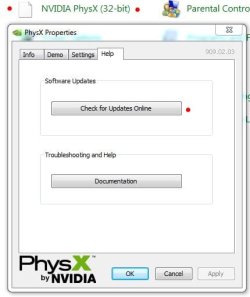
With that said, to the OP..... try updating/reinstalling the darn thing. If you still have the AEGIA control panel......

PhysX.JPG

Click update and see what happens.

If you attempted to remove the files and messed things up, reinstall DA.

Let us know.
 

My Computer My Computer

At a glance

Windows 10 ProIntel Core i7-4770K (3.5Ghz)32 gig Corsair Dominator Platinum (4x8Gig)Sapphire Tri-X R9 Fury
Computer type
PC/Desktop
Computer Manufacturer/Model Number
Custom built by me.
OS
Windows 10 Pro
CPU
Intel Core i7-4770K (3.5Ghz)
Motherboard
Gigabyte G1 Sniper 5 (F10 Bios)
Memory
32 gig Corsair Dominator Platinum (4x8Gig)
Graphics Card(s)
Sapphire Tri-X R9 Fury
Sound Card
Soundblaster ZXR
Monitor(s) Displays
NEC PA242W 24" LCD Monitor
Screen Resolution
1920 x 1200
Hard Drives
Primary - Samsung 850 Pro (512gig), Samsung 840 Pro (256gig), 2TB WD Caviar Black.
PSU
EVGA Supernova 1000 G2
Case
Cooler Master HAF X
Cooling
Corsair H100i with Corsair Air Series SP120 Quiet Fans
Keyboard
Logitech Wireless Wave
Mouse
Logitech Performance MX
Internet Speed
High Speed Cable
Antivirus
Norton Security
Browser
IE11
Other Info
Memory Timings - 1866MHz @ 9-9-9-27-1T @ 1.5 volts
Anyway If a game complains it's needed than I would leave it installed, even if your ATI card doesn't use it. It may have some files that's tied into DX which may get screwed if removed. Just a guess.


I would agree this would seem to be the case.
And no, I had a ATI card.
 

My Computer My Computer

At a glance

Windows 7 Home Premium 64bitIntel Core i7 2700k8GB Mushkin Redline Ridgebacks @1866EVGA GTX570 SC
Computer Manufacturer/Model Number
Custom (Self Build)
OS
Windows 7 Home Premium 64bit
CPU
Intel Core i7 2700k
Motherboard
eVGA P67 SLI
Memory
8GB Mushkin Redline Ridgebacks @1866
Graphics Card(s)
EVGA GTX570 SC
Sound Card
XiFi Titanium HD
Monitor(s) Displays
LG W2453V
Screen Resolution
1920x1080
Hard Drives
Intel 320 80GB -- Intel X25-V 40GB --WD Black 1TB x2 -- WD Blue 640GB
PSU
Seasonic x750
Case
Corsair 600T SE White
Cooling
eVGA Superclocked CPU Cooler
Keyboard
Saitek Cyborg
Antivirus
Kaspersky
Browser
IE
Other Info
LG BD/DVD
Not sure about DA, but my Mirrors Edge game would not run when I uninstalled Phys-X.

Did you have an Nvidia card at the time?


Anyway not sure why it's needed for ATI cards users - PhysX - Wikipedia, the free encyclopedia

Anyway If a game complains it's needed than I would leave it installed, even if your ATI card doesn't use it. It may have some files that's tied into DX which may get screwed if removed. Just a guess.

BTW I just reinstalled Dragon Age and didn't get the option to not install it. So....

With that said, to the OP..... try updating/reinstalling the darn thing. If you still have the AEGIA control panel......

View attachment 136054

Click update and see what happens.

If you attempted to remove the files and messed things up, reinstall DA.

Let us know.

ive always used ati cards, i have re installed DA:O 5 times today and PhysX twice, i will just remove Physx and see if that fixes it, but i have to say that its weerd cuz awakening works just fine, infact its awsome with IZ3D but still, why origins wont work the world may never know
 

My Computer My Computer

At a glance

windows 7 ProfessionalIntel I7 4790k16gb DDR3 1600mhzDual GTX 780 ASUS
Computer type
PC/Desktop
Computer Manufacturer/Model Number
Custom Build
OS
windows 7 Professional
CPU
Intel I7 4790k
Motherboard
ASUS Hero VII
Memory
16gb DDR3 1600mhz
Graphics Card(s)
Dual GTX 780 ASUS
Monitor(s) Displays
2x HP 2331
Screen Resolution
1080p
Hard Drives
750gb Hitachi 7200rpm
500gb Crucial SSD
PSU
Corsair 800g
Case
NZXT Phantom
Cooling
fan
Keyboard
Razer Deathstalker
Mouse
Razer Ouroboros
Internet Speed
70mbps
Antivirus
MSE + M-Bam
Browser
Chrome
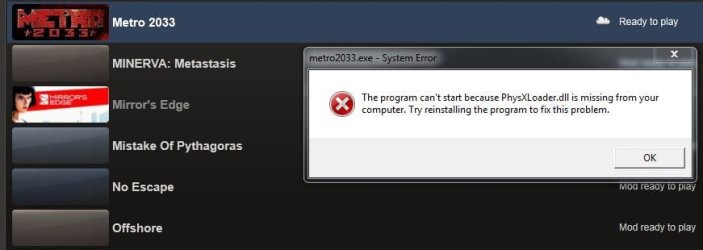
OK, so I remember having the conversation here where I said PhysX wasn't needed for ATI cards. Some of you said certain games would complain if it was removed.... well....

physx loader missing.JPG

Seems Metro 2033 won't play with it missing. BTW I don't ever remember removing it, yet it somehow isn't installed on my system so I'm in the process of reinstalling it.... even though I don't have Nvidia cards.

Just FYI
 

My Computer My Computer

At a glance

Windows 10 ProIntel Core i7-4770K (3.5Ghz)32 gig Corsair Dominator Platinum (4x8Gig)Sapphire Tri-X R9 Fury
Computer type
PC/Desktop
Computer Manufacturer/Model Number
Custom built by me.
OS
Windows 10 Pro
CPU
Intel Core i7-4770K (3.5Ghz)
Motherboard
Gigabyte G1 Sniper 5 (F10 Bios)
Memory
32 gig Corsair Dominator Platinum (4x8Gig)
Graphics Card(s)
Sapphire Tri-X R9 Fury
Sound Card
Soundblaster ZXR
Monitor(s) Displays
NEC PA242W 24" LCD Monitor
Screen Resolution
1920 x 1200
Hard Drives
Primary - Samsung 850 Pro (512gig), Samsung 840 Pro (256gig), 2TB WD Caviar Black.
PSU
EVGA Supernova 1000 G2
Case
Cooler Master HAF X
Cooling
Corsair H100i with Corsair Air Series SP120 Quiet Fans
Keyboard
Logitech Wireless Wave
Mouse
Logitech Performance MX
Internet Speed
High Speed Cable
Antivirus
Norton Security
Browser
IE11
Other Info
Memory Timings - 1866MHz @ 9-9-9-27-1T @ 1.5 volts
Back
Top