Solved How to disable Grouping of Folders On Taskbar

smarty3010

New member
Local time
9:29 AM
Messages
16
How can I disable grouping of folders on the taskbar?
 

My Computer My Computer

At a glance

Windows 7 Ultimate x86i5 7602.0 GBNVIDIA GeForce 8400 GS
Computer Manufacturer/Model Number
Gigabyte Technology
OS
Windows 7 Ultimate x86
CPU
i5 760
Motherboard
Gigabyte H55M-S2
Memory
2.0 GB
Graphics Card(s)
NVIDIA GeForce 8400 GS
Sound Card
Realtek
Monitor(s) Displays
SAMTRON 56E/57E/56V
Hard Drives
Western Digital
SATA 500GB
Case
CIRCLE
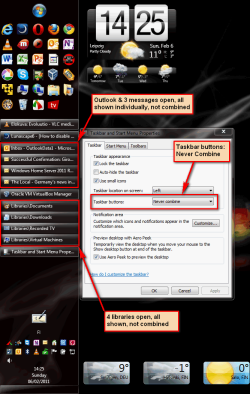
Select Never combine in Taskbar properties:

Taskbar_never_combine.png

Kari
 

My Computer My Computer

At a glance

Windows 10 Pro x64 EN-GB1.6 GHz Intel Core i7-720QM Processor6 GBATI Mobility Radeon HD 5850 Graphics
Computer type
Laptop
Computer Manufacturer/Model Number
HP ENVY 17-1150eg
OS
Windows 10 Pro x64 EN-GB
CPU
1.6 GHz Intel Core i7-720QM Processor
Memory
6 GB
Graphics Card(s)
ATI Mobility Radeon HD 5850 Graphics
Sound Card
Beats sound system with integrated subwoofer
Monitor(s) Displays
17" laptop display, 22" LED and 32" Full HD TV through HDMI
Screen Resolution
1600*900 (1), 1920*1080 (2&3)
Hard Drives
Internal: 2 x 500 GB SATA Hard Disk Drive 7200 rpm
External: 2TB for backups, 3TB USB3 network drive for media
Cooling
As Envy runs a bit warm, I have it on a Cooler Master pad
Keyboard
Logitech diNovo Media Desktop Laser (bluetooth)
Mouse
Logitech Performance Mouse MX
Internet Speed
50/10 Mbps VDSL
Antivirus
Windows Defender 4.3.9431.0
Browser
Maxthon 3.5.2., IE11
Thanks a lot Kari....was looking for a solution since a long time... :)
 

My Computer My Computer

At a glance

Windows 7 Ultimate x86i5 7602.0 GBNVIDIA GeForce 8400 GS
Computer Manufacturer/Model Number
Gigabyte Technology
OS
Windows 7 Ultimate x86
CPU
i5 760
Motherboard
Gigabyte H55M-S2
Memory
2.0 GB
Graphics Card(s)
NVIDIA GeForce 8400 GS
Sound Card
Realtek
Monitor(s) Displays
SAMTRON 56E/57E/56V
Hard Drives
Western Digital
SATA 500GB
Case
CIRCLE
You are welcome :)

Kari
 

My Computer My Computer

At a glance

Windows 10 Pro x64 EN-GB1.6 GHz Intel Core i7-720QM Processor6 GBATI Mobility Radeon HD 5850 Graphics
Computer type
Laptop
Computer Manufacturer/Model Number
HP ENVY 17-1150eg
OS
Windows 10 Pro x64 EN-GB
CPU
1.6 GHz Intel Core i7-720QM Processor
Memory
6 GB
Graphics Card(s)
ATI Mobility Radeon HD 5850 Graphics
Sound Card
Beats sound system with integrated subwoofer
Monitor(s) Displays
17" laptop display, 22" LED and 32" Full HD TV through HDMI
Screen Resolution
1600*900 (1), 1920*1080 (2&3)
Hard Drives
Internal: 2 x 500 GB SATA Hard Disk Drive 7200 rpm
External: 2TB for backups, 3TB USB3 network drive for media
Cooling
As Envy runs a bit warm, I have it on a Cooler Master pad
Keyboard
Logitech diNovo Media Desktop Laser (bluetooth)
Mouse
Logitech Performance Mouse MX
Internet Speed
50/10 Mbps VDSL
Antivirus
Windows Defender 4.3.9431.0
Browser
Maxthon 3.5.2., IE11
There is still grouping when I start a programm a second time when I use 'Never Combine' Option of 'Taskbar buttons'. So what I'm doing wrong?

For example:
(1) I open Internet Explorer first
(2) I open Notepad second
(3) I open another Internet Explorer third

both Internet Explorer applications will be grouped.

How can I disable this combining ???


Kind regards,
Schnacke
 

My Computer My Computer

At a glance

XP, VISTA, WIN7
OS
XP, VISTA, WIN7
Back
Top