Accidentally removed permission for authenticated users

isitibdi

New member
Hi,

I recently installed windows 7 32 bit and was browsing thru security settings for my drive D (partition). i accidentally removed permission for 'authenticated users', and now getting error "access is denied" for this drive, and I'm using the enabled admin account in windows 7.

All my important files are stored on this drive and need your help accessing them badly.

Your assistance will be appreciated.
 

My Computer

Computer Manufacturer/Model Number
MSI cr400
OS
Windiws 7 32 bit
CPU
intel core 2 duo
Memory
2gb
Graphics Card(s)
nvidia

My Computer

Computer type
PC/Desktop
Computer Manufacturer/Model Number
Custom Build
OS
Windows 10 Pro x64
CPU
Intel Core i5 4440 @Stock
Motherboard
Gigabyte Z97 D3H
Memory
4 x 4GB HyperX Fury DDR3
Graphics Card(s)
Gigabyte GTX 1050Ti O4G
Sound Card
Integrated
Monitor(s) Displays
Dell P2417H
Screen Resolution
1920 x 1080
Hard Drives
Samsung EVO 850 120GB / Toshiba DT01ACA050 1TB 7200prm 32MB
PSU
Riotoro Onyx 750W
Case
NZXT H500 Black-Red
Cooling
Stock CPU + NZXT 120mm + 2x120mm red fans
Keyboard
Modecom Volcano Lanparty
Mouse
Asus ROG Gladius / DeepCool E-Pad Plus
Internet Speed
DOCSIS 50/3 Mbit
Browser
Google Chrome
Other Info
Asus K55VJ(i5 3210M, GT635M / 2GB, 8GB DDR3, 500GB HDD)
Hi,

Log into your Administrator account:

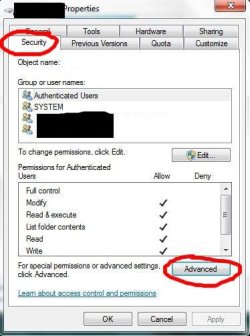
  1. Right click your "D" drive and go to Properties.
    Choose "security" tab
    Click on "Advanced"
    Capture.JPG
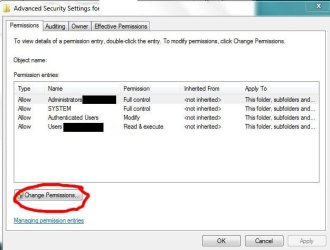
  2. Click "Change Permissions"
    1.JPG
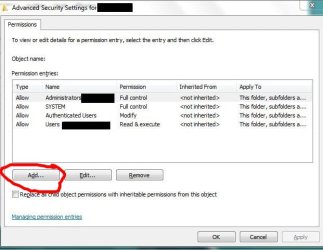
  3. Click "Add"
    2.JPG
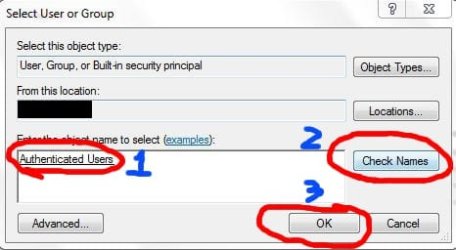
  4. Write " Authenticated " and press Check names ( It should find right group)
    Click OK
    3.JPG
  5. Tick needed permissions for allow:
    • Traverse folder / execute file
    • List folders / read data
    • Read attributes
    • Read extended attributes
    • Create file / write data
    • Create folders / append data
    • Write attributes
    • Write extended attributes
    • Delete
    • Read permissions
    4.JPG
    Click OK

Continued on next post:
 

My Computer

OS
Windows 7 Ultimate x86 SP1
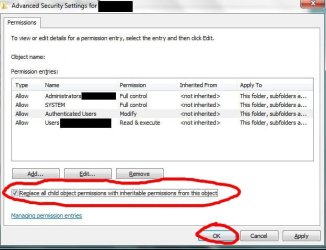
6. Tick option "Replace all child object permissions"
Click OK
It should now go through and replace all permission and give appropriate permission to Authenticated users
5.JPG
 

My Computer

OS
Windows 7 Ultimate x86 SP1
Back
Top