USB2.0 to USB 3.0 ExpressCard help needed for new external HDD

DianaD 74

New member
Hi all, I hope I'm posting in the correct forum.
I also tried a search within this forum with no luck.

I'm looking to purchase a larger 3.5" external HDD for Imaging and storage. My current EXT HDD is 120GB which has become much too small for my current needs.
I've done some reading about usb 3.0 transfer rates and some articles say that the rate is much slower when using an Express card adapter.

I'd would really like to hear some advice on the performance of a 2.0 to 3.0 upgrade VIA an Express/54 laptop card or if there is another way to upgrade to USB 3.0... Possibly using an existing USB 2.0 port???

I'd also love to hear from members that have purchased 1TB or larger USB 3.0 EXT HDD's (I'm leaning towards a 1TB drive because of the cost) and how the transfer rate is with the 2.0 to 3.0 adapter card.

I have an HP DV6885SE laptop/Win7 Pro with the Express/54 card slot and 3 USB 2.0 slots.

I'll be using Acronis True Image for the backups.
Thanks to all for any help and hardware suggestions.
D. :)
 
Last edited:

My Computer

Computer Manufacturer/Model Number
HP dv6885SE THRIVE (Special Edition) Notebook
OS
Windows 7 Ultimate -32 bit
CPU
Intel T8100 Duo 2.01 GB
Memory
3gb
Graphics Card(s)
nVidia GeForce 8400M GS
Monitor(s) Displays
Widescreen 15.4 in TFT active matrix
Screen Resolution
Max Resolution 1280 x 800 ( WXGA )
Hard Drives
250GB SATA- 5400.0 rpm
Case
Notebook
Internet Speed
35MB down/6MB up
Other Info
CD-RW/DVD-RW/Light Scribe
Since you have a laptop, you'll only get USB 3.0 one of two ways. Either by a built-in USB 3.0 port, or an Express Card add-in. I would say that an Express Card add-in would still be quite a bit faster than a USB 2.0 port, so I wouldn't have any worries about it.

You definitely won't find an adapter for a USB 2.0 port, because the data still has to flow through the USB 2.0 port. I don't know iff hand the performance capabilities of Express Card, but you could easily compare the throughput of a USB 2.0 port to the stated throughput of the USB 3.0 Express Card.
 

My Computer

OS
Windows 7 Ultimate x64 SP1
CPU
Intel Core i7-2600
Motherboard
Gigabyte GA-P67A-UD3P-B3
Memory
12 GB Patriot Extreme DDR3-1333
Graphics Card(s)
Nvidia GTX 470
Monitor(s) Displays
Dell UltraSharp 2209WA
Hard Drives
OCZ Agility3 240 GB, WD5001AALS, WD7501AALS
PSU
OCZ ModStream 700W
Case
CoolerMaster HAF 912 Advanced
Cooling
CoolerMaster Hyper 212 Plus
Unless you are going to to use a SSD inside the case, there really is not much point.

At the moment, there are no HDD's on the market that can fill all the bandwidth of USB 3.0.

IMO, i would stick with USB 2.0 unless you are going to purchase a big SSD (Which by the way, bigger than 250GB, is getting on about (In your money) probably $4 -500)

I have asked a similar question before - http://www.sevenforums.com/hardware-devices/140273-transfer-speed-test-esata-vs-usb-3-0-a.html

Sorry to burst your bubble -best go for something like this - My Passport Essential SE 1 TB External hard drive - 5.0 Gbps (SuperSpeed USB) that is my opinion.

Lucky
 

My Computer

Computer Manufacturer/Model Number
The HAFmeister (Custom)
OS
Windows 7 Ultimate x64 RTM + SP1
CPU
Intel Core i7 950 3.06GHZ (OC'd to 3.99Ghz)
Motherboard
Asus Rampage III Extreme x58 SATA 6GB & USB 3.0
Memory
6GB OCZ Reaper HPC Edition PC3-16000 (set 1606Mhz 8-8-8-26)
Graphics Card(s)
EVGA Nvidia Geforce GTX 570
Sound Card
Creative SB X-Fi Titanium Fatal1ty Professional Series
Monitor(s) Displays
Samsung SM2433BW 24" Widescreen Monitor
Screen Resolution
1920x1200
Hard Drives
Western Digital Caviar Black 500GB 32Mb Buffer SATA II
Western Digital Caviar Black 750GB 32Mb Buffer SATA II
Western Digital Caviar Blue 500GB 16Mb Buffer SATA II
Western Digital My Book Essential Edition 750GB USB
Samsung Spinpoint 2TB SATA II
PSU
Thermaltake Toughpower 1200w (Modular)
Case
CoolerMaster HAF-932
Cooling
Zalman Reserator XT and ZM-WB5 Plus - GPU uses Stock coolers
Keyboard
Logitech G510
Mouse
Logitech G9 Gaming Mouse
Internet Speed
3MB Profile - 350-400kbs (Real-Speed)
Other Info
IcyBox Hot-Swap Bay,
Logitech G27 Steering Wheel,
Xbox 360 Wirless Elite Controller with Microsoft Reciever and
Play & Charge Kit,
Belkin USB Wireless Adaptor,
GAME Generic Controller (Playstation Looky-Likey),
Epson SX125 All-in-One.
Since you have a laptop, you'll only get USB 3.0 one of two ways. Either by a built-in USB 3.0 port, or an Express Card add-in. I would say that an Express Card add-in would still be quite a bit faster than a USB 2.0 port, so I wouldn't have any worries about it.

You definitely won't find an adapter for a USB 2.0 port, because the data still has to flow through the USB 2.0 port. I don't know iff hand the performance capabilities of Express Card, but you could easily compare the throughput of a USB 2.0 port to the stated throughput of the USB 3.0 Express Card.

Unless you are going to to use a SSD inside the case, there really is not much point.

At the moment, there are no HDD's on the market that can fill all the bandwidth of USB 3.0.

IMO, i would stick with USB 2.0 unless you are going to purchase a big SSD (Which by the way, bigger than 250GB, is getting on about (In your money) probably $4 -500)

I have asked a similar question before - http://www.sevenforums.com/hardware-devices/140273-transfer-speed-test-esata-vs-usb-3-0-a.html

Sorry to burst your bubble -best go for something like this - My Passport Essential SE 1 TB External hard drive - 5.0 Gbps (SuperSpeed USB) that is my opinion.

Lucky
Thanks you both very much. The few 2.0 to 3.0 cards I've researched in general seem to be junk according to the reviews. Either they need an additional 5Volt supply to operate or they don't even work at all.

Can anybody recommend a reliable, inexpensive 1 or 2 TB USB 2.0 or USB 3.0 since 3.0 would still be a good idea in case the technology changes (or if I ever catch up with it) for use down the road.
I'd like to keep the price under $150.... is this unreasonable for a 1TB or possibly a 2TB drive?

Thanks again
Diana.
 

My Computer

Computer Manufacturer/Model Number
HP dv6885SE THRIVE (Special Edition) Notebook
OS
Windows 7 Ultimate -32 bit
CPU
Intel T8100 Duo 2.01 GB
Memory
3gb
Graphics Card(s)
nVidia GeForce 8400M GS
Monitor(s) Displays
Widescreen 15.4 in TFT active matrix
Screen Resolution
Max Resolution 1280 x 800 ( WXGA )
Hard Drives
250GB SATA- 5400.0 rpm
Case
Notebook
Internet Speed
35MB down/6MB up
Other Info
CD-RW/DVD-RW/Light Scribe
........Can anybody recommend a reliable, inexpensive 1 or 2 TB USB 2.0 or USB 3.0 since 3.0 would still be a good idea in case the technology changes (or if I ever catch up with it) for use down the road.
I'd like to keep the price under $150.... is this unreasonable for a 1TB or possibly a 2TB drive?

Thanks again
Diana.

You may just have a look at my post here . I have a Seagate GoFlex 1.5TB Ultraportable USB external drive that comes with a GoFlex USB3 adapter/cable with which the trial was done. Western Digital also have a large USB3 external drive. I went in for Seagate GoFlex since interchangeable adapter/cables are available for esata,firewire, USB2 etc.,

Note: Since I have a desktop, I used a PCIe USB3 expansion card plugged into PCIe slot in the motherboard.
 

My Computer

Computer Manufacturer/Model Number
self-assembled
OS
Windows 7 Ultimate 32bit
CPU
AMD Phenom II X3 720 Processor
Motherboard
Gigabyte GA-MA78GM-S2H Revision 1.0
Memory
Transcend DDR2 (PC2 6400) 4 X 1GB
Graphics Card(s)
Integrated + ATI Radeon 4550
Sound Card
Integrated Realtek ALC 889A
Monitor(s) Displays
DELL 1704 FPT
Screen Resolution
1280 x 1024
Hard Drives
Western Digital Caviar SE16 250 GB x2 in RAID 0
PSU
Coolermaster 400 W
Case
Zebronics Cube
Cooling
stock
Keyboard
Microsoft - wired
Mouse
Microsoft - wired
Internet Speed
ADSL 256-512Kbps
You may just have a look at my post here .
I'm no guru by any means but from what I read in your link it seems the express cards don't perform all that well.

Maybe I'll just buy a 1 or 2 TB USB 2.0 external HDD and live with it.
Thanks for the help all!
D.
 

My Computer

Computer Manufacturer/Model Number
HP dv6885SE THRIVE (Special Edition) Notebook
OS
Windows 7 Ultimate -32 bit
CPU
Intel T8100 Duo 2.01 GB
Memory
3gb
Graphics Card(s)
nVidia GeForce 8400M GS
Monitor(s) Displays
Widescreen 15.4 in TFT active matrix
Screen Resolution
Max Resolution 1280 x 800 ( WXGA )
Hard Drives
250GB SATA- 5400.0 rpm
Case
Notebook
Internet Speed
35MB down/6MB up
Other Info
CD-RW/DVD-RW/Light Scribe
Unless you are going to to use a SSD inside the case, there really is not much point.

At the moment, there are no HDD's on the market that can fill all the bandwidth of USB 3.0.

Huh....A standard mechanical hard drive might be able to provide 80MB-120MB/sec throughput. However, in a USB 2.0 port, it might get 30MB/sec at best. If USB 3.0 is available, that might become 60-90MB/sec. Thus going at least 2x-3X as fast as it was previously.

You don't need an SSD to take advantage of USB 3.0.


Have you considered adding a eSATA card to your laptop and then buying an eSATA external hard drive? These eSATA cards might perform better or be more stable as they have been around longer.
 

My Computer

Computer Manufacturer/Model Number
Self-Built in July 2009
OS
Windows 7 Ultimate x64
CPU
Intel Q9550 2.83Ghz OC'd to 3.40Ghz
Motherboard
Gigabyte GA-EP45-UD3R rev. 1.1, F12 BIOS
Memory
8GB G.Skill PI DDR2-800, 4-4-4-12 timings
Graphics Card(s)
EVGA 1280MB Nvidia GeForce GTX570
Sound Card
Realtek ALC899A 8 channel onboard audio
Monitor(s) Displays
23" Acer x233H
Screen Resolution
1920x1080
Hard Drives
Intel X25-M 80GB Gen 2 SSD
Western Digital 1TB Caviar Black, 32MB cache. WD1001FALS
PSU
Corsair 620HX modular
Case
Antec P182
Cooling
stock
Keyboard
ABS M1 Mechanical
Mouse
Logitech G9 Laser Mouse
Internet Speed
15/2 cable modem
Other Info
Windows and Linux enthusiast. Logitech G35 Headset.
I would advise to stay with USB2. My comparisons making images with free Macrium showed only a 30% speed increase of USB3 over USB2 - and my USB3 ports came with the Viao laptop.

But then you run into another problem. The Linux recovery program that you run to recover from the image does not recognize USB3. So you are back to USB2 for the recovery. It's really not worth it.
 

My Computer

Computer Manufacturer/Model Number
HP, Dell, Gateway, Toshiba - 4 laptops and 2 desktops
OS
Vista, Windows7, Mint Mate, Zorin, Windows 8
CPU
from 1.6GHz Duo to i7
Monitor(s) Displays
2x HP w2207
Hard Drives
5x HDD, 7x SSD, 12x Externals
Keyboard
with trackball - no mices
Mouse
Trackball mice
Internet Speed
DSL 6000
I just ran a test, as I needed to grab an image anyway. I did the testing on a Dell Latitude E6400 with onboard USB 2.0 and eSATA connections to a ThermalTake BlacX dock that does both USB 2.0 and eSATA. And I just so happen to use Acronis True Image 2010 on my boxes. The hard drive I am using is a 2TB Samsung SpinPoint F4 at 5,400RPM.

My C drive on my computer has approx 70GB worth of stuff on it, and the System Reserved partition was included as well (100MB).

The following tests were performed with default settings, which include Normal Compression Level and a Backup Priority of Low.

Time to image using Acronis TIH with USB 2.0 connection: 40:16, file size of 47,098,308KB
Time to image using Acronis TIH with eSATA connection: 17:23, file size of 47,105,308KB

So, as you can see, the eSATA connection was 2.3x faster using USB 2.
 

My Computer

Computer Manufacturer/Model Number
Self-Built in July 2009
OS
Windows 7 Ultimate x64
CPU
Intel Q9550 2.83Ghz OC'd to 3.40Ghz
Motherboard
Gigabyte GA-EP45-UD3R rev. 1.1, F12 BIOS
Memory
8GB G.Skill PI DDR2-800, 4-4-4-12 timings
Graphics Card(s)
EVGA 1280MB Nvidia GeForce GTX570
Sound Card
Realtek ALC899A 8 channel onboard audio
Monitor(s) Displays
23" Acer x233H
Screen Resolution
1920x1080
Hard Drives
Intel X25-M 80GB Gen 2 SSD
Western Digital 1TB Caviar Black, 32MB cache. WD1001FALS
PSU
Corsair 620HX modular
Case
Antec P182
Cooling
stock
Keyboard
ABS M1 Mechanical
Mouse
Logitech G9 Laser Mouse
Internet Speed
15/2 cable modem
Other Info
Windows and Linux enthusiast. Logitech G35 Headset.
whs,
with imaging you have a mix of processing and link speed (ie. USB2/3) factors. If it was straight link speed then given ext HDD are typically sata drives I'd expect x2-3 speed increase. Your 30% figure suggests processing is a big factor.

If you're buying another usb ext hdd what would the general feeling be - only buy usb3 from now on?
 

My Computer

Computer type
PC/Desktop
Computer Manufacturer/Model Number
Own build
OS
Windows 7x64 Home Premium SP1
CPU
Intel i7 2600k
Motherboard
ASUS P8Z68 Deluxe
Memory
G.Skill Ripjaws (DDR3-1600) 2x4GB
Graphics Card(s)
Nvidia GeForce GTS 450; Intel HD Graphics 3000(GT2+)
Monitor(s) Displays
Dell Ultrasharp IPS panel U2311H, Samsung SyncMaster P2350
Screen Resolution
1920x1080
Hard Drives
Samsung 850 Pro SSD 256GB, Samsung SSD 840 120GB, Seagates 1TB Barracuda ST31000528AS x2
PSU
Seasonic M12II 520W
Case
Lian Li Lancool PC-K60
Cooling
Case: 1x120mm, 3x140mm CPU: Hyper 212+
Keyboard
Logitech MK520 (wireless)
Mouse
Logitech MK520
Internet Speed
6-7 Mbps
Antivirus
Norton Security Premium, Malwarebytes on 2 (MSE on 3rd PC)
Browser
FireFox
Other Info
Audio: Logitech Z523 2.1
whs,
with imaging you have a mix of processing and link speed (ie. USB2/3) factors. If it was straight link speed then given ext HDD are typically sata drives I'd expect x2-3 speed increase. Your 30% figure suggests processing is a big factor.

If you're buying another usb ext hdd what would the general feeling be - only buy usb3 from now on?
Not sure the CPU played a negative role. It is an i7. But I used a 5400RPM disk in an enclosure (both for the USB2 and USB3). Maybe my USB3 enclosure is not that swift and the disk is kind of the slowest you can have. Plus Macrium is pretty fast to start with. My compressed image was appr. 20GBs.

I was kind of disappointed too. If i had the results that ppparks shows, I would be happy. I think I will buy an eSata enclosure and try that. Some people say that is faster than USB3.

Plus there was another problem with USB3 - the Macrium recovery program would not recognize the disk. I had to move it to the USB2 enclosure to work.
 

My Computer

Computer Manufacturer/Model Number
HP, Dell, Gateway, Toshiba - 4 laptops and 2 desktops
OS
Vista, Windows7, Mint Mate, Zorin, Windows 8
CPU
from 1.6GHz Duo to i7
Monitor(s) Displays
2x HP w2207
Hard Drives
5x HDD, 7x SSD, 12x Externals
Keyboard
with trackball - no mices
Mouse
Trackball mice
Internet Speed
DSL 6000
eSata is faster than USB 3.0 in everything that I have ever seen or read. I'm very pleased with my eSATA enclosures, by far the fastest external devices that I have used. But as we all know, not that many machines natively have eSata.

However, as I have been looking at new mobos lately, it seems they are putting eSATA on them by default. That makes me pretty happy.
 

My Computer

Computer Manufacturer/Model Number
Self-Built in July 2009
OS
Windows 7 Ultimate x64
CPU
Intel Q9550 2.83Ghz OC'd to 3.40Ghz
Motherboard
Gigabyte GA-EP45-UD3R rev. 1.1, F12 BIOS
Memory
8GB G.Skill PI DDR2-800, 4-4-4-12 timings
Graphics Card(s)
EVGA 1280MB Nvidia GeForce GTX570
Sound Card
Realtek ALC899A 8 channel onboard audio
Monitor(s) Displays
23" Acer x233H
Screen Resolution
1920x1080
Hard Drives
Intel X25-M 80GB Gen 2 SSD
Western Digital 1TB Caviar Black, 32MB cache. WD1001FALS
PSU
Corsair 620HX modular
Case
Antec P182
Cooling
stock
Keyboard
ABS M1 Mechanical
Mouse
Logitech G9 Laser Mouse
Internet Speed
15/2 cable modem
Other Info
Windows and Linux enthusiast. Logitech G35 Headset.
There is nothing that prevents one plugging in a USB3 device into a USB2 port. My trial results posted here clearly indicates that the Seagate HDD with a USB3 adapter/cable plugged into USB2 port shows a 50% increase in transfer speeds while plugging it into an USB3 port results in a 300% increase in transfer speeds. I do not think its gonna be any different on a laptop, since most use the same NEC upd720200 chip. Also sooner or later it will all be only USB3 on all machines. The Seagate GoFlex ultraportable is flexible in that there are adapter/cables for USB3, USB2, firewire and esata. However if one wants to use the esata adapter/cable with the Ultraportable HDD, the esata ports on the machine has to be powered. Such ports I understand are now designated eSatap.
 

My Computer

Computer Manufacturer/Model Number
self-assembled
OS
Windows 7 Ultimate 32bit
CPU
AMD Phenom II X3 720 Processor
Motherboard
Gigabyte GA-MA78GM-S2H Revision 1.0
Memory
Transcend DDR2 (PC2 6400) 4 X 1GB
Graphics Card(s)
Integrated + ATI Radeon 4550
Sound Card
Integrated Realtek ALC 889A
Monitor(s) Displays
DELL 1704 FPT
Screen Resolution
1280 x 1024
Hard Drives
Western Digital Caviar SE16 250 GB x2 in RAID 0
PSU
Coolermaster 400 W
Case
Zebronics Cube
Cooling
stock
Keyboard
Microsoft - wired
Mouse
Microsoft - wired
Internet Speed
ADSL 256-512Kbps
Also sooner or later it will all be only USB3 on all machines.
And what about the Intel Thunderbolt that Apple starts putting on it's systems. That is supposed to be twice as fast as USB3. And midterm we will see wireless USB. The standards group is working since 2004 and there are some modest implementations. It just needs someone to push the implementation. But there is too much politics preventing that right now.
 

My Computer

Computer Manufacturer/Model Number
HP, Dell, Gateway, Toshiba - 4 laptops and 2 desktops
OS
Vista, Windows7, Mint Mate, Zorin, Windows 8
CPU
from 1.6GHz Duo to i7
Monitor(s) Displays
2x HP w2207
Hard Drives
5x HDD, 7x SSD, 12x Externals
Keyboard
with trackball - no mices
Mouse
Trackball mice
Internet Speed
DSL 6000
Welcome,
Have question concern how to install USB 3.0 in my PC.
1. My motherboard (Asus 4 yrs old) has not USB 3.0 connection; only USB 2.0
2. My external hard drive SATA has USB 2.0 technology not USB 3.0
3. Buy USB 3.0 express card and install into my PC
4. Buy USB 3.0 hub, and connected it:
4a) To USB 3.0 in my PC and
4b) From USB 2.0 in SATA hard drive to USB 3.0 hubs.
I am not sure about this installation, special about USB 3.0 hub, and will appreciate of any comments.
Best regards
stasioau
 

My Computer

OS
Windows 7
On my system I used SIIG USB 3.0 express card. It has 2 ports. I have 2 SIIG USB 3.0 docking stations on my desktop. On my quad core machine WD caviar black 6 Gb/s drives will run at full speed. On my dual core they run a bit slower since the relevant hardware is slower than the quad. But in both cases the drives in the docks are faster than my internal system drives(3 Gb/s Sata)

I'm very happy with the setup. Especially since now backup imaging programs are coming out with USB 3.0 support. See my specs for details.

Another advantage of this setup is I have a USB 2.0 docking station connected to my WD set top box on the TV. I just slide the WD drive into the docking station to watch videos. Also it's good for swapping the HDs out as backups etc..
 

My Computer

Computer Manufacturer/Model Number
HP Media Center
OS
Windows 7 32 bit
CPU
AMD 5200+ dual core
Memory
2 GB
Graphics Card(s)
NVidia GeForce 6150SE 128 MB
Monitor(s) Displays
CRT
Screen Resolution
1280x1024
Hard Drives
500 GB Sata internal :

SIIG USB 3.0 docking stations w/WD Caviar Black 6 Gb/s drives
Keyboard
PS/2
Mouse
PS/2 Wheel Mouse
Other Info
SIIG USB 3.0 PCIexpress card.
Welcome,
Have question concern how to install USB 3.0 in my PC.
1. My motherboard (Asus 4 yrs old) has not USB 3.0 connection; only USB 2.0
2. My external hard drive SATA has USB 2.0 technology not USB 3.0
3. Buy USB 3.0 express card and install into my PC
4. Buy USB 3.0 hub, and connected it:
4a) To USB 3.0 in my PC and
4b) From USB 2.0 in SATA hard drive to USB 3.0 hubs.
I am not sure about this installation, special about USB 3.0 hub, and will appreciate of any comments.
Best regards
stasioau
You probably should have started your own thread on this subject, so maybe a mod could move it

Anyway, you can install USB 3.0 in your computer with an appropriate card, but if your external drive is rated for USB 2.0, it will not run faster when connected to a USB 3.0 device. In fact, a mechanical drive doesn't even run up to USB 2.0 speeds, so you aren't even maxing out the USB 2.0 connection. I wouldn't bother unless you plan to buy an ultra-expensive external SSD.
 

My Computer

OS
Windows 7 Ultimate x64 SP1
CPU
Intel Core i7-2600
Motherboard
Gigabyte GA-P67A-UD3P-B3
Memory
12 GB Patriot Extreme DDR3-1333
Graphics Card(s)
Nvidia GTX 470
Monitor(s) Displays
Dell UltraSharp 2209WA
Hard Drives
OCZ Agility3 240 GB, WD5001AALS, WD7501AALS
PSU
OCZ ModStream 700W
Case
CoolerMaster HAF 912 Advanced
Cooling
CoolerMaster Hyper 212 Plus
That's the one I have. Crystal Disk Mark measured transfer speed about 2X that of a WD Elements on the same computer through a 2.0 port. In fact, the speed was the same as the internal WD 7200 rpm notebook drive. Don't expect 10X the speed, 2X is was most others measure. Also, it doesn't require any power adapter to function properly & is small enough to fit in a shirt pocket.
 

Attachments

  • WD My Passport Essential SE 1TB USB3.0.png
    WD My Passport Essential SE 1TB USB3.0.png
    25.1 KB · Views: 1
  • WD Elements 320GB.png
    WD Elements 320GB.png
    29.7 KB · Views: 0
  • HP ProBook C-Drive.png
    HP ProBook C-Drive.png
    25.1 KB · Views: 0
Last edited:

My Computer

Computer type
PC/Desktop
Computer Manufacturer/Model Number
Dell Inspiron 660
OS
Windows 7 Home Premium 64bit
CPU
Intel Core i3-3240
Motherboard
Dell 084J0R
Memory
8GB DDR3 SDRAM
Graphics Card(s)
EVGA GeForce GT 620
Sound Card
Intel Panther Point PCH High Definition Audio
Monitor(s) Displays
Acer G205HV
Screen Resolution
1600 x 900
Hard Drives
Sandisk SSD 64GB SDSSDP064G
Seagate HDD 1TB ST1000DM003-1CH162
PSU
Dell 300W
Case
Dell Inspiron
Keyboard
Logitech Wireless K320/B350
Mouse
Microsoft
Internet Speed
25Mbps/4Mbps
Antivirus
Avast
Browser
Mozilla Firefox
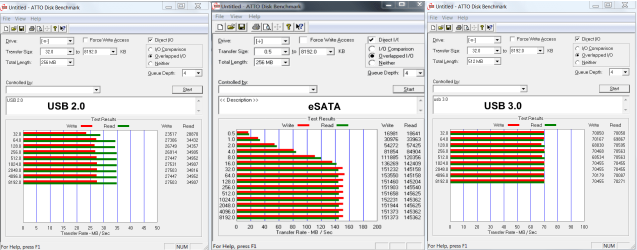
Maybe this will help. They are not the same hard drives, but all 3 are 7200RPM drives
esata-usb 3-2.png
 

My Computers

System One System Two

  • Computer type
    PC/Desktop
    Computer Manufacturer/Model Number
    ALWAYS UNDER CONSTRUCTION
    OS
    Windows 11 Pro
    CPU
    Ryzen 9 5900X
    Motherboard
    Asus X570 Crosshair Viii Hero
    Memory
    32GB G Skill DDR4-3600
    Graphics Card(s)
    EVGA RTX 3080 FTW 3 Ultra
    Sound Card
    On Board/Sennheiser PC37X Headset
    Monitor(s) Displays
    3 X Asus 27"
    Screen Resolution
    2560x1440
    Hard Drives
    2 X 1 TB NVME drives
    PSU
    EVGA 850
    Case
    Phanteks Eclipse P400A
    Cooling
    EVGA 280 AIO
    Keyboard
    Logitech G510s/ Logitech G13
    Mouse
    Logitech G502
    Internet Speed
    24/1
    Antivirus
    ESET/MBAM Pro/SAS Pro
    Browser
    Chrome/ Firefox/ Edge
  • Computer type
    Laptop
    System Manufacturer/Model Number
    Dell 16 Plus
    OS
    Windows 11 Pro
    CPU
    Intel Ultra 9 288V
    Memory
    32 GB LPDDR5X 8533
    Monitor(s) Displays
    16" Mini-LED HDR600 Touch 90 Hz
    Screen Resolution
    2560X1600
    Hard Drives
    1 TB NVME
Back
Top