Solved (C) Full After W7 Reinstall

toriu

New member
I have recently had to do a reinstall of Windows 7 Ultimate with the DVD. After the install it's working OK but has completely filled the (C) drive, which is a 64GB SSD. Consequently I'm unable to use any virus protection programs etc. When I try to install them a message reads, "not enough disk space" The ones I have tried need space on (C). Should I have emptied the (C) drive, before the Windows 7 reinstall? I have checked all the files in (C) but am very hesitant to remove anything.
Any help will be most welcome.
 

My Computer

Computer Manufacturer/Model Number
HAF 932/95168
OS
Windows 7 Ultimate x64
CPU
i7-920
Motherboard
X58 CHIPSET
Memory
12GB DDR3-1600MHz
Graphics Card(s)
RADEON 5850-1GB x2
Sound Card
7.1
Monitor(s) Displays
Avidav 1440x900@75Hz
Hard Drives
64GB SSD 1.5TB SATA11
PSU
850W
Case
HAF932
Cooling
Gladiator Max
Hello.


Before we make any specific recommendations will you please post a snip/screen-shot of the entire disk management drive map with a full description as to which drive/partition is which, so we can see what you have going on as there may be a fairly simple way to resolve the situation.

In the Windows start menu right click computer and click manage, in the left pane of the "Computer Management" window that opens click disk management and post a maximized snip of that.


How to Upload and Post a Screenshot and File in Seven Forums
 

My Computer

Computer Manufacturer/Model Number
* BFK Customs *
OS
W 7 64-bit Ultimate
CPU
Intel Q9550 Yorkfield
Motherboard
ASUS P5Q Pro
Memory
8GB Dominator 8500C5D
Graphics Card(s)
ATI : XFX 5870
Sound Card
Realtek HD Audio 7-1
Monitor(s) Displays
1x 47" LCD HDMI & 3x 26" LCD HDMI
Screen Resolution
1920x1080P & 1920x1200
Hard Drives
1x 80GB Intel X25-M G2 SSD : 1x 500GB & 1x 640GB WD Caviar Black(s)
PSU
Corsair 620HX
Case
Cooler Master RC-690
Cooling
Tuniq Tower 120, 2x 140mm and 3x 120mm case fans
Keyboard
Microsoft 500
Mouse
Razer Diamondback 3G
Internet Speed
14 Mb/s
Other Info
1x Koutech 3Gb/s SATA HDD Hot Swap Rack
Here it is,( I hope)
 

Attachments

  • Disk management.jpg
    Disk management.jpg
    222.1 KB · Views: 54

My Computer

Computer Manufacturer/Model Number
HAF 932/95168
OS
Windows 7 Ultimate x64
CPU
i7-920
Motherboard
X58 CHIPSET
Memory
12GB DDR3-1600MHz
Graphics Card(s)
RADEON 5850-1GB x2
Sound Card
7.1
Monitor(s) Displays
Avidav 1440x900@75Hz
Hard Drives
64GB SSD 1.5TB SATA11
PSU
850W
Case
HAF932
Cooling
Gladiator Max
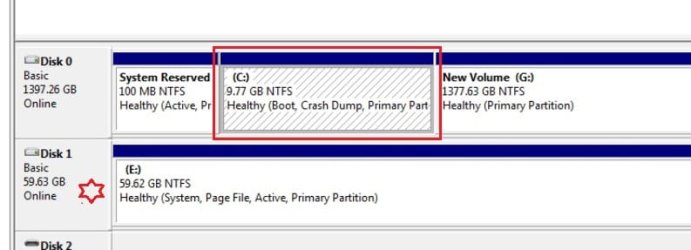
According to the snip you posted only the "System" boot files are on the SSD, where the star is.

Windows 7 is on the C: partition with the red rectangle around it, that is shown as "Boot" that shows the Operating System that is running.

You will have to reinstall to get Windows 7 on the SSD, we can discuss that also if you like.

Do you have a dual boot screen to choose which OS to start when the PC is first started?

Is it a desktop or a lappy?
click to enlarge
star.jpg
 

My Computer

Computer Manufacturer/Model Number
* BFK Customs *
OS
W 7 64-bit Ultimate
CPU
Intel Q9550 Yorkfield
Motherboard
ASUS P5Q Pro
Memory
8GB Dominator 8500C5D
Graphics Card(s)
ATI : XFX 5870
Sound Card
Realtek HD Audio 7-1
Monitor(s) Displays
1x 47" LCD HDMI & 3x 26" LCD HDMI
Screen Resolution
1920x1080P & 1920x1200
Hard Drives
1x 80GB Intel X25-M G2 SSD : 1x 500GB & 1x 640GB WD Caviar Black(s)
PSU
Corsair 620HX
Case
Cooler Master RC-690
Cooling
Tuniq Tower 120, 2x 140mm and 3x 120mm case fans
Keyboard
Microsoft 500
Mouse
Razer Diamondback 3G
Internet Speed
14 Mb/s
Other Info
1x Koutech 3Gb/s SATA HDD Hot Swap Rack
Thanks BFK, It is a desk top.... 850W PSU/X58 CHIPSET/I7-920([email protected])/12GB DDR3-1600MHz/ 2x Radeon 5850-1gb. I may have screwed things up when I went into the BIOS pre reinstall. I get Two options at start up. Both read boot with Windows 7.


(C) is the 64GB SSD drive. (Don't know what happened to the rest of the GB, maybe in (E)?).
(G) is the main drive a 1.5 TB SATAII.
(E) is possibly an extension of (C), it wasn't there before the W7 reinstall and seems to contain many Windows files.
 

My Computer

Computer Manufacturer/Model Number
HAF 932/95168
OS
Windows 7 Ultimate x64
CPU
i7-920
Motherboard
X58 CHIPSET
Memory
12GB DDR3-1600MHz
Graphics Card(s)
RADEON 5850-1GB x2
Sound Card
7.1
Monitor(s) Displays
Avidav 1440x900@75Hz
Hard Drives
64GB SSD 1.5TB SATA11
PSU
850W
Case
HAF932
Cooling
Gladiator Max
Here's what I would do, power down the PC and disconnect the Hard Disk Drive data cable from the motherboard and leave it disconnected.

Connect the data cable of the SSD to the #1 SATA port of the motherboard and set the SSD as second boot device in the PC main BIOS, after the CD/DVD drive.

Then boot the Windows 7 installation DVD and clean install Windows 7 to the SSD, it should be the only drive detected during the installation process.

If you really want the best possible space to do the reinstall to, wipe the SSD first; have a thorough look at the information presented below before you decide what to do and be sure to post back with any further questions you may have and to keep us informed.


After you have copied out or made back-ups of the data you need to save to external media, use Step One of this tutorial at the first link below to do a wipe (secure erase) to the entire Hard Disk Drive / Solid State Drive.
  • Then if you do not want to create the new Windows 7 "System Reserved" partition use the outline in Step Two #2 to create, format and mark Active a single 100GB partition to do the installation to.
  • If you do want to create the "System Reserved" partition use the outline in Step Two #3 to create, format and mark Active the System Reserved partition and then create and format the 100GB partition to do the installation to.
Either way, running the "clean all" then creating and formatting the partition(s) using diskpart will get you the best possible space to do a clean install of Windows 7 to; you can always extend the Windows partition to include the remaining unallocated space on the HDD / SSD or create additional Primary partitions or an Extended partition after the installation completes if you choose.

SSD / HDD : Optimize for Windows Reinstallation

DISKPART : At PC Startup

Do a Clean Install with a Upgrade Windows 7 Version

 

My Computer

Computer Manufacturer/Model Number
* BFK Customs *
OS
W 7 64-bit Ultimate
CPU
Intel Q9550 Yorkfield
Motherboard
ASUS P5Q Pro
Memory
8GB Dominator 8500C5D
Graphics Card(s)
ATI : XFX 5870
Sound Card
Realtek HD Audio 7-1
Monitor(s) Displays
1x 47" LCD HDMI & 3x 26" LCD HDMI
Screen Resolution
1920x1080P & 1920x1200
Hard Drives
1x 80GB Intel X25-M G2 SSD : 1x 500GB & 1x 640GB WD Caviar Black(s)
PSU
Corsair 620HX
Case
Cooler Master RC-690
Cooling
Tuniq Tower 120, 2x 140mm and 3x 120mm case fans
Keyboard
Microsoft 500
Mouse
Razer Diamondback 3G
Internet Speed
14 Mb/s
Other Info
1x Koutech 3Gb/s SATA HDD Hot Swap Rack
  • Like
Reactions: whs
Thanks BFK, all OK now.
 

My Computer

Computer Manufacturer/Model Number
HAF 932/95168
OS
Windows 7 Ultimate x64
CPU
i7-920
Motherboard
X58 CHIPSET
Memory
12GB DDR3-1600MHz
Graphics Card(s)
RADEON 5850-1GB x2
Sound Card
7.1
Monitor(s) Displays
Avidav 1440x900@75Hz
Hard Drives
64GB SSD 1.5TB SATA11
PSU
850W
Case
HAF932
Cooling
Gladiator Max
Good to see you got it sorted and thanks for the update.
 

My Computer

Computer Manufacturer/Model Number
* BFK Customs *
OS
W 7 64-bit Ultimate
CPU
Intel Q9550 Yorkfield
Motherboard
ASUS P5Q Pro
Memory
8GB Dominator 8500C5D
Graphics Card(s)
ATI : XFX 5870
Sound Card
Realtek HD Audio 7-1
Monitor(s) Displays
1x 47" LCD HDMI & 3x 26" LCD HDMI
Screen Resolution
1920x1080P & 1920x1200
Hard Drives
1x 80GB Intel X25-M G2 SSD : 1x 500GB & 1x 640GB WD Caviar Black(s)
PSU
Corsair 620HX
Case
Cooler Master RC-690
Cooling
Tuniq Tower 120, 2x 140mm and 3x 120mm case fans
Keyboard
Microsoft 500
Mouse
Razer Diamondback 3G
Internet Speed
14 Mb/s
Other Info
1x Koutech 3Gb/s SATA HDD Hot Swap Rack
Back
Top