How can i place folders on top of the lists in all start menu areas

monographix

New member
Local time
2:31 PM
Messages
28
have been trying to place the folders first and the application shortcuts on the end of the lists of start menu manually, but when i reboot, the order is bing reversed again. Its more than a year now that i am using 7 and i still haven't been able to get used to that order and i just want to be able to set the order like i could in XP, for some reason this order annoys, and i know other people feel the same. Is that somehow possible ? Do i need maybe to save the Theme everytime i make such changes ?
 

My Computer My Computer

At a glance

7 Ultimate x64i7 8608 GB DDR3 1600 (4x2GB G.Skill Ripjaws)Radeon HD 5850
Computer Manufacturer/Model Number
DIY
OS
7 Ultimate x64
CPU
i7 860
Motherboard
ECS P55H-A Black
Memory
8 GB DDR3 1600 (4x2GB G.Skill Ripjaws)
Graphics Card(s)
Radeon HD 5850
Monitor(s) Displays
HP ZR24w
Screen Resolution
1920x1200
Hard Drives
G.Skill Falcon 64 SSD | WD 320 AAKS | WD 500 AAKS | WD 20EARS | WD20EARX | WD10EALX | OCZ Vertex II 180
PSU
Enermax Liberty Eco 620 modular
Case
Xigmatek Midgard
Cooling
Xigmatek HDT S963
Keyboard
X6 Sidewinder
Mouse
MS Comfort Optical 3000
Have you tried Start Menu Properties - Start Menu tab - Customize - Uncheck "Sort All Programs menu by name"?
 

My Computer My Computer

At a glance

Windows 8.1 ; Windows 7 x86 (Dec2008-Jan2013)
Computer type
PC/Desktop
OS
Windows 8.1 ; Windows 7 x86 (Dec2008-Jan2013)
Other Info
"The scale icon at the top right of a post or tutorial is how you can give rep to the member."
I've looked and looked and looked and have not found a solution to getting manual sort order of "All Programs" to persist after a reboot. Upon each reboot, the programs are alphabetized again. Actually what I'm trying to do specifically is alphabetize the programs irregardless of whether it is a shortcut/file or folder as opposed to two separate alphabetized lists. Is there really no way to do this? Right now the only workaround I can think of is to put each shortcut/file into a folder or download some kind of software to fix this such as Classic Shell. Is there really no answer to this? Not famliar with themes but I'm guessing they don't encompass environment variables such as customized Start Menu options? What about Group Policy?
 

My Computer My Computer

At a glance

Windows 7 Professional x64Intel Core i7 970 3.2 GHz6GB DDR3 1600 MHz1x NVIDIA GeForce GTX 570 1.2GB
Computer Manufacturer/Model Number
Digital Storm Desktop 286251
OS
Windows 7 Professional x64
CPU
Intel Core i7 970 3.2 GHz
Motherboard
ASUS Rampage III Extreme (Intel X58 Chipset)
Memory
6GB DDR3 1600 MHz
Graphics Card(s)
1x NVIDIA GeForce GTX 570 1.2GB
Sound Card
Creative Labs X-Fi Titanium Fatal1ty Professional
Monitor(s) Displays
Dell 2001FP
Screen Resolution
1152x864
Hard Drives
250 GB Solid State Intel (Model: 510 Series)
PSU
1200W Corsair Pro Gold Series
Case
Black OPS HailStorm Edition
Cooling
Extreme Cooling H2O Stage 6
Keyboard
Dell Multimedia Keyboard
Mouse
Logitech MX 1000
Internet Speed
Cable
I've looked and looked and looked and have not found a solution to getting manual sort order of "All Programs" to persist after a reboot. Upon each reboot, the programs are alphabetized again. Actually what I'm trying to do specifically is alphabetize the programs irregardless of whether it is a shortcut/file or folder as opposed to two separate alphabetized lists. Is there really no way to do this? Right now the only workaround I can think of is to put each shortcut/file into a folder or download some kind of software to fix this such as Classic Shell. Is there really no answer to this? Not famliar with themes but I'm guessing they don't encompass environment variables such as customized Start Menu options? What about Group Policy?
Welcome to the Seven Forums
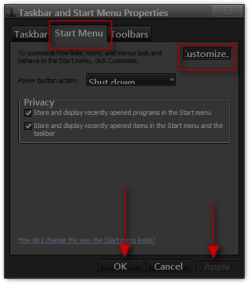
Right Click on your taskbar go to Properties
go to the Start Menu tab then click on the Customize button.
Taskbar and Start Menu Properties.png

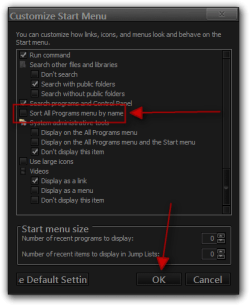
Then uncheck Sort All Programs menu by name then click OK. Then click Apply and OK on the first Properties window.
Customize Start Menu.png

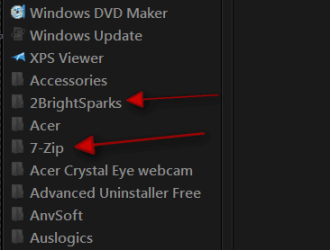
I just tried it restarted and it still in the position I put them give it a try.
Region.png
Jerry
 

My Computer My Computer

At a glance

Win 7 Pro x64 / Win 10 ProIntel(R) Core(TM) i7-3630QM CPU @ 2.40GHz12 GB(1) Intel(R) HD Graphics 4000 (2) NVIDIA GeFo...
Computer type
Laptop
Computer Manufacturer/Model Number
Sager NP9170
OS
Win 7 Pro x64 / Win 10 Pro
CPU
Intel(R) Core(TM) i7-3630QM CPU @ 2.40GHz
Motherboard
CLEVO P170EM
Memory
12 GB
Graphics Card(s)
(1) Intel(R) HD Graphics 4000 (2) NVIDIA GeForce GTX 675M
Sound Card
(1) Realtek High Definition Audio (2) Intel(R) Display Aud
Monitor(s) Displays
17.3
Screen Resolution
1920x1080
Hard Drives
(1) Samsung 860 EVO 500GB(OS) (1) Samsung 860 EVO 500GB(Data)
Keyboard
Backlite
Antivirus
MSE, Malwarebytes Pro
Browser
Firefox
Other Info
DESKTOP: Custom-built.
OS: Win 10 Pro x64.
CASE: Rosewill R5.
CPU: Intel I5 4670K CPU @ 3.40GHz.
CPU COOLER: Cool Master Hyper 212 EVO.
MOTHERBOARD: Asus Z87-A.
MEMORY: Kingston HyperX 2x4 GB.
GPU: Nvidia Geforce 650 TI.
PSU: Corsair TX750.
DRIVES: (1) Samsung 840 120 GB SSD (2) Western Digital blue 500 GB 7200 RPM.
Yes, THAT works, but try doing the same thing but this time try moving a shortcut (or program file) amongst the list of folders. Upon reboot you should see that Windows 7 has forced the shortcut (or program file) to be shown with the other shortcuts and program files before the list of folders. In Windows Explorer I can see the sense in forcing folders to be shown before files, but in the All Programs list, it would seem more logical to alphabetize the entire list irregardless of whether the item is a shortcut (or program file) or a folder. I assume you are able to replicate this issue?
 

My Computer My Computer

At a glance

Windows 7 Professional x64Intel Core i7 970 3.2 GHz6GB DDR3 1600 MHz1x NVIDIA GeForce GTX 570 1.2GB
Computer Manufacturer/Model Number
Digital Storm Desktop 286251
OS
Windows 7 Professional x64
CPU
Intel Core i7 970 3.2 GHz
Motherboard
ASUS Rampage III Extreme (Intel X58 Chipset)
Memory
6GB DDR3 1600 MHz
Graphics Card(s)
1x NVIDIA GeForce GTX 570 1.2GB
Sound Card
Creative Labs X-Fi Titanium Fatal1ty Professional
Monitor(s) Displays
Dell 2001FP
Screen Resolution
1152x864
Hard Drives
250 GB Solid State Intel (Model: 510 Series)
PSU
1200W Corsair Pro Gold Series
Case
Black OPS HailStorm Edition
Cooling
Extreme Cooling H2O Stage 6
Keyboard
Dell Multimedia Keyboard
Mouse
Logitech MX 1000
Internet Speed
Cable
yes the situation is well and truely replicated!
 

My Computer My Computer

At a glance

Windows 7 Ultimate x64Intel Core2 Quad Q8300 2.5GhzKingston HyperX 4x1GB DDR2 1066MhzAsus/Nvidia 9500GT 1GB
Computer type
PC/Desktop
Computer Manufacturer/Model Number
Self Build
OS
Windows 7 Ultimate x64
CPU
Intel Core2 Quad Q8300 2.5Ghz
Motherboard
Asus P5QD Turbo
Memory
Kingston HyperX 4x1GB DDR2 1066Mhz
Graphics Card(s)
Asus/Nvidia 9500GT 1GB
Sound Card
On-Board HD
Monitor(s) Displays
22" Widescreen TFT
Screen Resolution
1920x1080
Hard Drives
2x 320Gb Seagate SATAII RAID 0
2x 80Gb Seagate SATAII RAID 0
1x 1tb hybrid (8gb ssd)
PSU
650w
Case
ATX
Cooling
140mm front, 120mm Rear, 80mm Chipset + stock CPU and GPU
Keyboard
Plastic one
Mouse
Plastic one
Internet Speed
4Mbps
Other Info
Laptop: HP Elitebook 2560p
i5 @2.7Ghz 4GB DDR3
Someone maybe happen to know smth more about this ?
 

My Computer My Computer

At a glance

7 Ultimate x64i7 8608 GB DDR3 1600 (4x2GB G.Skill Ripjaws)Radeon HD 5850
Computer Manufacturer/Model Number
DIY
OS
7 Ultimate x64
CPU
i7 860
Motherboard
ECS P55H-A Black
Memory
8 GB DDR3 1600 (4x2GB G.Skill Ripjaws)
Graphics Card(s)
Radeon HD 5850
Monitor(s) Displays
HP ZR24w
Screen Resolution
1920x1200
Hard Drives
G.Skill Falcon 64 SSD | WD 320 AAKS | WD 500 AAKS | WD 20EARS | WD20EARX | WD10EALX | OCZ Vertex II 180
PSU
Enermax Liberty Eco 620 modular
Case
Xigmatek Midgard
Cooling
Xigmatek HDT S963
Keyboard
X6 Sidewinder
Mouse
MS Comfort Optical 3000
Any developments / news on this ? its really annoying
 

My Computer My Computer

At a glance

7 Ultimate x64i7 8608 GB DDR3 1600 (4x2GB G.Skill Ripjaws)Radeon HD 5850
Computer Manufacturer/Model Number
DIY
OS
7 Ultimate x64
CPU
i7 860
Motherboard
ECS P55H-A Black
Memory
8 GB DDR3 1600 (4x2GB G.Skill Ripjaws)
Graphics Card(s)
Radeon HD 5850
Monitor(s) Displays
HP ZR24w
Screen Resolution
1920x1200
Hard Drives
G.Skill Falcon 64 SSD | WD 320 AAKS | WD 500 AAKS | WD 20EARS | WD20EARX | WD10EALX | OCZ Vertex II 180
PSU
Enermax Liberty Eco 620 modular
Case
Xigmatek Midgard
Cooling
Xigmatek HDT S963
Keyboard
X6 Sidewinder
Mouse
MS Comfort Optical 3000
You can go to
C:\Users\YOUR USER NAME\AppData\Roaming\Microsoft\Windows\Start Menu\Programs

C:\ProgramData\Microsoft\Windows\Start Menu\Programs
and make a folder and put in folders that would move them.
Jerry
 

My Computer My Computer

At a glance

Win 7 Pro x64 / Win 10 ProIntel(R) Core(TM) i7-3630QM CPU @ 2.40GHz12 GB(1) Intel(R) HD Graphics 4000 (2) NVIDIA GeFo...
Computer type
Laptop
Computer Manufacturer/Model Number
Sager NP9170
OS
Win 7 Pro x64 / Win 10 Pro
CPU
Intel(R) Core(TM) i7-3630QM CPU @ 2.40GHz
Motherboard
CLEVO P170EM
Memory
12 GB
Graphics Card(s)
(1) Intel(R) HD Graphics 4000 (2) NVIDIA GeForce GTX 675M
Sound Card
(1) Realtek High Definition Audio (2) Intel(R) Display Aud
Monitor(s) Displays
17.3
Screen Resolution
1920x1080
Hard Drives
(1) Samsung 860 EVO 500GB(OS) (1) Samsung 860 EVO 500GB(Data)
Keyboard
Backlite
Antivirus
MSE, Malwarebytes Pro
Browser
Firefox
Other Info
DESKTOP: Custom-built.
OS: Win 10 Pro x64.
CASE: Rosewill R5.
CPU: Intel I5 4670K CPU @ 3.40GHz.
CPU COOLER: Cool Master Hyper 212 EVO.
MOTHERBOARD: Asus Z87-A.
MEMORY: Kingston HyperX 2x4 GB.
GPU: Nvidia Geforce 650 TI.
PSU: Corsair TX750.
DRIVES: (1) Samsung 840 120 GB SSD (2) Western Digital blue 500 GB 7200 RPM.
Back
Top