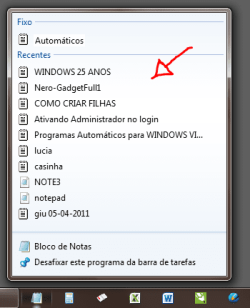
What command line I use to add a shortcut to the list of recent files?

Suriname

New member
Local time
3:27 PM
Messages
22
I'd like to add files to list of recent files opened using line command to make an bat file. Can you relp me? I'd like to add in the list below.

Capture.PNG
 

My Computer My Computer

At a glance

Win 7
OS
Win 7
You can not do that simply by using a command line. Recent items are added automatically when you open and close them.

The data is contained in :

C:\Users\yourname\AppData\Roaming\Microsoft\Windows\Recent


Regards....Mike Connor
 

My Computer My Computer

At a glance

Several, including Windows 7 x64 Ultimate
OS
Several, including Windows 7 x64 Ultimate
I don't know what you are asking, but here is a shorcut and the path if it's any use:

View attachment Recent.zip

%USERPROFILE%\AppData\Roaming\Microsoft\Windows\Recent
 

My Computers My Computers

  • At a glance

    7 X64i5 84002x8gb 3200mhz
    Computer type
    PC/Desktop
    OS
    7 X64
    CPU
    i5 8400
    Motherboard
    gigabyte b365m ds3h
    Memory
    2x8gb 3200mhz
    Hard Drives
    various
    PSU
    pure power 11 400w cm
    Case
    Coolermaster
    Cooling
    cryorig m9i
  • At a glance

    7x64g54008gb ddr4 2400
    Computer type
    PC/Desktop
    OS
    7x64
    CPU
    g5400
    Motherboard
    ga b365m ds3h
    Memory
    8gb ddr4 2400
    PSU
    xfx pro 450w
It's possible, but what are you trying to accomplish by adding it from the command line?
 

My Computer My Computer

At a glance

XP / Win7 x64 ProIntel Quad-Core Q9450 @ 3.2GHz2x2GB GSkill DDR2NVIDIA GeForce 8600 GTS (EVGA)
OS
XP / Win7 x64 Pro
CPU
Intel Quad-Core Q9450 @ 3.2GHz
Motherboard
Asus P5-E
Memory
2x2GB GSkill DDR2
Graphics Card(s)
NVIDIA GeForce 8600 GTS (EVGA)
Monitor(s) Displays
Dell 2408WFP
Screen Resolution
1920x1200
I assume he wants certain entries be present in the list at all times
even if they haven't been opened for some time
I would just use an alternative editor like Uedit (or so) that have a longer list of recent items but even then those entries disappear over time.

 

My Computer My Computer

At a glance

Windows 7 Ultimate x86DualCore AMD Athlon 64 X2, 2600 MHz 5200+Samsung 2GB DDR2Onboard NVIDIA GeForce 6150SE nForce 430
Computer Manufacturer/Model Number
HP m8000n
OS
Windows 7 Ultimate x86
CPU
DualCore AMD Athlon 64 X2, 2600 MHz 5200+
Motherboard
Asus M2N68-LA (Narra)
Memory
Samsung 2GB DDR2
Graphics Card(s)
Onboard NVIDIA GeForce 6150SE nForce 430
Sound Card
Onboard nVIDIA nForce 6100-430 (MCP61P)
Monitor(s) Displays
Westinghouse 19" LED
Screen Resolution
1280x1024
Hard Drives
SATA II Seagate Barracuda 500GB
USB II WD Elements 500GB
USB II WD My Book 1TB
USB II WD My Book 2TB
PSU
Stock (HP)
Case
Stock (HP)
Cooling
Stock
Keyboard
Logitech Classic KB 200
Mouse
Standard HP opticle USB mouse
You can open the program and then close-it.
In the start menu locate the shortcut and right-click then select PIN TO START Menu.
That way you have your program at the top list forever.
Good Luck
 

My Computer My Computer

At a glance

win7 home premium-64bit-SP1-IE9RTMIntel core2 duo - T6600 2.2GHZ4.00GbATI Mobility Radeon HD 4530
Computer Manufacturer/Model Number
HP pavilion DV6-Laptop
OS
win7 home premium-64bit-SP1-IE9RTM
CPU
Intel core2 duo - T6600 2.2GHZ
Memory
4.00Gb
Graphics Card(s)
ATI Mobility Radeon HD 4530
Sound Card
IDT audio Monitor
Screen Resolution
32Bpp,1366x768
Hard Drives
Western Digital 500Gb
Internet Speed
Fast DSL
It's possible, but what are you trying to accomplish by adding it from the command line?

I thank everyone for the responses. But the problem is that I use a software called "Directory Opus" which replaces the Windows Explorer with more functions. Every time I open a text file through it this file is not added in the recent list. So I asked if he could do this through a command line so I add this command line in the "double click" event of Directory Opus to add the txt file that I open to recent files.
 

My Computer My Computer

At a glance

Win 7
OS
Win 7
It might be a longshot, but if you use that software on a regular base, you could try and send them a feature request (since Directory Opus doesn't add opened files to the jump list)

GPSoft.com.au/Support
 

My Computer My Computer

At a glance

Windows 7 Ultimate x86DualCore AMD Athlon 64 X2, 2600 MHz 5200+Samsung 2GB DDR2Onboard NVIDIA GeForce 6150SE nForce 430
Computer Manufacturer/Model Number
HP m8000n
OS
Windows 7 Ultimate x86
CPU
DualCore AMD Athlon 64 X2, 2600 MHz 5200+
Motherboard
Asus M2N68-LA (Narra)
Memory
Samsung 2GB DDR2
Graphics Card(s)
Onboard NVIDIA GeForce 6150SE nForce 430
Sound Card
Onboard nVIDIA nForce 6100-430 (MCP61P)
Monitor(s) Displays
Westinghouse 19" LED
Screen Resolution
1280x1024
Hard Drives
SATA II Seagate Barracuda 500GB
USB II WD Elements 500GB
USB II WD My Book 1TB
USB II WD My Book 2TB
PSU
Stock (HP)
Case
Stock (HP)
Cooling
Stock
Keyboard
Logitech Classic KB 200
Mouse
Standard HP opticle USB mouse
Back
Top