
You are using an out of date browser. It may not display this or other websites correctly.
You should upgrade or use an alternative browser.
You should upgrade or use an alternative browser.
Get Emsisoft Mamutu for free
- Thread starter malexous
- Start date

A Guy
Righteous Dude
Get Emsisoft Mamutu for free until Sunday, May 1, 11:59 p.m. PDT
Source
A Guy
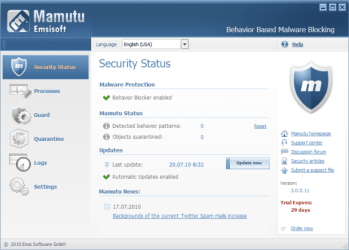
Today, we bring you this special offer on Emsisoft Mamutu. From now until Sunday, we are giving away a free copy of Mamutu. Not only does it monitor all active programs for dangerous behavior, but it also blocks malicious activities in real time. Its Behavior Blocking and Zero-Day-Attacks technology recognizes new and unknown Trojans, backdoors, keyloggers, worms, viruses, spyware, adware, and rootkits without the need of daily signature updates, protecting you long before the signature databases have been updated.
Source
A Guy
My Computer
- Computer type
- PC/Desktop
- OS
- Windows 10 Home x64
- CPU
- INTEL Core i5-750 Quad-Core 3.37GHz
- Motherboard
- ASUS P7P55D
- Memory
- HyperX Fury Black Series 8GB (2 x 4GB) 1866Mhz
- Graphics Card(s)
- EVGA GeForce GTX 750 Superclocked 1GB 128-Bit GDDR5
- Monitor(s) Displays
- LG 32MA68HY 32" IPS
- Screen Resolution
- 1920 x 1080
- Hard Drives
- Samsung 840 Evo 120GB, SEAGATE 500GB Barracuda® 7200.12, SATA 3 Gb/s, 7200 RPM, 16MB cache
- PSU
- ANTEC TruePower New TP-550, 80 PLUS, 550W
- Case
- ANTEC Three Hundred Illusion
- Cooling
- COOLER MASTER Hyper 212 Plus, 4 x 120mm 1 x 140mm Noctua's
- Internet Speed
- 85 + Mbps
- Antivirus
- Avast
- Browser
- Vivaldi
A Guy
Righteous Dude
Ooops, malexous was too quick for me, I did not look in Security section 
A Guy
A Guy
My Computer
- Computer type
- PC/Desktop
- OS
- Windows 10 Home x64
- CPU
- INTEL Core i5-750 Quad-Core 3.37GHz
- Motherboard
- ASUS P7P55D
- Memory
- HyperX Fury Black Series 8GB (2 x 4GB) 1866Mhz
- Graphics Card(s)
- EVGA GeForce GTX 750 Superclocked 1GB 128-Bit GDDR5
- Monitor(s) Displays
- LG 32MA68HY 32" IPS
- Screen Resolution
- 1920 x 1080
- Hard Drives
- Samsung 840 Evo 120GB, SEAGATE 500GB Barracuda® 7200.12, SATA 3 Gb/s, 7200 RPM, 16MB cache
- PSU
- ANTEC TruePower New TP-550, 80 PLUS, 550W
- Case
- ANTEC Three Hundred Illusion
- Cooling
- COOLER MASTER Hyper 212 Plus, 4 x 120mm 1 x 140mm Noctua's
- Internet Speed
- 85 + Mbps
- Antivirus
- Avast
- Browser
- Vivaldi

seekermeister
Old School
I just installed this, but was confronted with several obstacles. First, when I went to the url on the license page to download, it came up with this:
So I went to the primary website and downloaded version five. When I ran it, instead of asking for the license code, it wanted me to register for something that sounded like a forum, or ?. When I skipped that, it said that I only had a 3 day trial period, and I found no means to enter the license manually. I decide to proceed doing a scan, and only moments after it began, it listed tvunetworks.com as malware. I clicked on it, and it produce a page having links to search engines with returns on it.
i only scanned a few of them, but none of them gave any conclusive information about this. One was merely a rant about false positives of the program. From the comparison chart on Emisisoft, this had the highest detection rate of all of the programs in the list, including Malwarebytes, but often higher detection rates include higher false positives, and to someone such as myself that isn't all that versed on the subject, that only creates confusion, not protection.
The questions that remain are how to enter the license key, and how to deal with the TVU traces? I suspect that if those reg keys were deleted, that TVU Player would no longer work, and I don't care much for that idea.
The resource you are looking for has been removed, had its name changed, or is temporarily unavailable.
So I went to the primary website and downloaded version five. When I ran it, instead of asking for the license code, it wanted me to register for something that sounded like a forum, or ?. When I skipped that, it said that I only had a 3 day trial period, and I found no means to enter the license manually. I decide to proceed doing a scan, and only moments after it began, it listed tvunetworks.com as malware. I clicked on it, and it produce a page having links to search engines with returns on it.
i only scanned a few of them, but none of them gave any conclusive information about this. One was merely a rant about false positives of the program. From the comparison chart on Emisisoft, this had the highest detection rate of all of the programs in the list, including Malwarebytes, but often higher detection rates include higher false positives, and to someone such as myself that isn't all that versed on the subject, that only creates confusion, not protection.
The questions that remain are how to enter the license key, and how to deal with the TVU traces? I suspect that if those reg keys were deleted, that TVU Player would no longer work, and I don't care much for that idea.
Attachments

My Computer
- Computer Manufacturer/Model Number
- DIY
- OS
- W7x64 Pro, SuSe 12.1/** W7 x64 Pro, XP MCE
- CPU
- Phenom II 1090T w/Noctua NH-D14 /**4400+ X2 w/CM Hyper TX 3
- Motherboard
- ASRock 890FX Deluxe 4/**A8N-SLI
- Memory
- 2 x 2GB Patriot PGS34g1600LLKA/**4x1GB Corsair VS
- Graphics Card(s)
- EVGA GTX460 SC/**EVGA 8800GTS
- Sound Card
- Asus Xonar D2X/**Xonar D1
- Monitor(s) Displays
- Acer X233H, Dell E152FPc /**LG M237-WD
- Screen Resolution
- 1920x1080 & 1024x768/**1980x1080
- Hard Drives
- WDC 2TB, 1.5TB, 1TB, 500GB,Seagate 500GB , Maxtor 80GB /**500GB Seagate & WDC 1TB Black
- PSU
- CM RS600 w/ APC BX1000G/**Antec 500 TP w/ APC BX1000
- Case
- HAF922/**Antec 1040IIB
- Cooling
- 3x200mm, 1x140 and 1x120mm/**5x80mm fans
- Keyboard
- Logitech Media USB/**Saitek Eclipse
- Mouse
- Cordless Trackman Wheel/**Ditto
- Internet Speed
- 3.3Mbps
- Other Info
- SB 560 5.1 w/ Sennheiser RS140/**Creative T20 speakers, Dvico FusionHDTV7 Gold RT, Cisco E3000, HP 5510V AIO, Linksys E3000, Belkin F5U237 hub and **F5D8055 adapter
(** = 2nd rig)
A Guy
Righteous Dude
I have yet to install it. I made new images last night, and will try it today. But here is what was emailed to me when I signed up. You do need to create a Emsisoft account.
A Guy
A) If you have not yet installed the Trial Version of Emsisoft Mamutu already:
Please download and install Emsisoft Mamutu at Free Anti-Malware Download | Emsisoft Anti-Malware, Online Armor Firewall, Mamutu Behavior Blocker now.
When the Security Setup Wizard appears, you will be asked to login at the update server using your user account information. Click "Create new account" to set up an Emsisoft user account. Wait for the account password emailed to you. Proceed with the login using the received data.
Next to the login, you will see a list of all licenses that are attached with your user account. Click the "Convert coupon code" link at the bottom and enter the code written above. Click "OK" and select the newly created license from the list. Follow the wizard instructions to the end to finish the installation.
B) If you have already installed the Trial Version of Emsisoft Mamutu:
Start the Emsisoft Security Center, select the "Settings" menu item and go to the "License" section. Click the "Convert coupon code" link at the bottom and enter the code written above. Click "OK" and select the newly created license from the list. Run an online update to finish the unlocking.
You can use the account login information also to log in at the Emsisoft Customer Center to manage your account. The Emsisoft Customer Center is your direct interface to the Emsisoft Team for questions and suggestions.
Emsisoft Customer Center: http://cc.emsisoft.com/en
A Guy
My Computer
- Computer type
- PC/Desktop
- OS
- Windows 10 Home x64
- CPU
- INTEL Core i5-750 Quad-Core 3.37GHz
- Motherboard
- ASUS P7P55D
- Memory
- HyperX Fury Black Series 8GB (2 x 4GB) 1866Mhz
- Graphics Card(s)
- EVGA GeForce GTX 750 Superclocked 1GB 128-Bit GDDR5
- Monitor(s) Displays
- LG 32MA68HY 32" IPS
- Screen Resolution
- 1920 x 1080
- Hard Drives
- Samsung 840 Evo 120GB, SEAGATE 500GB Barracuda® 7200.12, SATA 3 Gb/s, 7200 RPM, 16MB cache
- PSU
- ANTEC TruePower New TP-550, 80 PLUS, 550W
- Case
- ANTEC Three Hundred Illusion
- Cooling
- COOLER MASTER Hyper 212 Plus, 4 x 120mm 1 x 140mm Noctua's
- Internet Speed
- 85 + Mbps
- Antivirus
- Avast
- Browser
- Vivaldi
seekermeister
Old School
Thanks, I got the license entered, all that's left now is the question regarding TVU Player.
My Computer
- Computer Manufacturer/Model Number
- DIY
- OS
- W7x64 Pro, SuSe 12.1/** W7 x64 Pro, XP MCE
- CPU
- Phenom II 1090T w/Noctua NH-D14 /**4400+ X2 w/CM Hyper TX 3
- Motherboard
- ASRock 890FX Deluxe 4/**A8N-SLI
- Memory
- 2 x 2GB Patriot PGS34g1600LLKA/**4x1GB Corsair VS
- Graphics Card(s)
- EVGA GTX460 SC/**EVGA 8800GTS
- Sound Card
- Asus Xonar D2X/**Xonar D1
- Monitor(s) Displays
- Acer X233H, Dell E152FPc /**LG M237-WD
- Screen Resolution
- 1920x1080 & 1024x768/**1980x1080
- Hard Drives
- WDC 2TB, 1.5TB, 1TB, 500GB,Seagate 500GB , Maxtor 80GB /**500GB Seagate & WDC 1TB Black
- PSU
- CM RS600 w/ APC BX1000G/**Antec 500 TP w/ APC BX1000
- Case
- HAF922/**Antec 1040IIB
- Cooling
- 3x200mm, 1x140 and 1x120mm/**5x80mm fans
- Keyboard
- Logitech Media USB/**Saitek Eclipse
- Mouse
- Cordless Trackman Wheel/**Ditto
- Internet Speed
- 3.3Mbps
- Other Info
- SB 560 5.1 w/ Sennheiser RS140/**Creative T20 speakers, Dvico FusionHDTV7 Gold RT, Cisco E3000, HP 5510V AIO, Linksys E3000, Belkin F5U237 hub and **F5D8055 adapter
(** = 2nd rig)