Solved My HP3050 is refusing to print emails from Outlook 2007 - What's going

Barneyboy48

New member
Local time
6:46 AM
Messages
22
My HP3050 printer is refusing to print email messages from Outlook 2007. It won't even allow me to preview them.

However, I seem to be able to print of Word documents.

The printer will not print the emails using either USB or wireless but Word documents are printed successfully.

My computer has had recent updates, notably the installation of IE9. I am not saying that this could be the root of the problem but the problems I am experiencing were not evident before this installation.

Can anyone shed any light on this please.

I have contacted HP, but I am not hopeful.
 

My Computer My Computer

At a glance

Windows 7 Home Premium OEMIntel i54GBATI Mobility Radion HD 4330
Computer Manufacturer/Model Number
Dell Inspiron 1564
OS
Windows 7 Home Premium OEM
CPU
Intel i5
Memory
4GB
Graphics Card(s)
ATI Mobility Radion HD 4330
Hard Drives
500GB
You could try a repair by clicking office in programs & Features - alternately reinstall office - could be antivirus program, but im only guessing try MICROSOFT SECURITY ESSENTIALS if you think its worth a shot - uninstall previous anti V firstly - just i had some problem a way back with outlook and antivirus programs - http://www.microsoft.com/security_essentials/default.aspx

You might find something here beside w7 drivers : http://h20000.www2.hp.com/bizsuppor...peId=18972&prodSeriesId=1140783&lang=en&cc=au
 

My Computer My Computer

At a glance

XP, Vista, W7 64bit Home PremiumIntel Core Duo 6850 3.0 ghz @ 3.7 ghz4GB Corsair DDR 2 PC-6400Ati 4870 1ghz
OS
XP, Vista, W7 64bit Home Premium
CPU
Intel Core Duo 6850 3.0 ghz @ 3.7 ghz
Motherboard
Asus P5E
Memory
4GB Corsair DDR 2 PC-6400
Graphics Card(s)
Ati 4870 1ghz
Sound Card
Supreme FX 11
Monitor(s) Displays
View Sonic VX1962wm
Screen Resolution
1680 X1050
Hard Drives
3 Seagate Sata Drives 160gb 250gb 500gb
PSU
Thermaltake 600 watt
Case
NZXT Alpha
Cooling
3X120cm Fans
Keyboard
Microsoft Digital Media Pro Keyboard
Mouse
Microsoft Wheel Mouse Optical
Internet Speed
1.5Mb to 8Mb/384k

My Computer My Computer

At a glance

Windows 7 x64Intel i7 2600kG.skill Ripjaw 16gigs @ 1866Nvidia gtx580 (evga)
Computer Manufacturer/Model Number
Insane hobo technologies. ;-)
OS
Windows 7 x64
CPU
Intel i7 2600k
Motherboard
Asrock z68 extreme 4 gen 3
Memory
G.skill Ripjaw 16gigs @ 1866
Graphics Card(s)
Nvidia gtx580 (evga)
Sound Card
Integrated HD audio + hdmi
Monitor(s) Displays
24" ASUS widescreen + 42" insignia
Screen Resolution
1080p (1920x1080)
Hard Drives
128 Samsung 830
256 Samsung 840
3 x 1tb storage drive (various)
1 western digital 1tb (eSATA)
1 Seagate 1tb (eSATA)
PSU
1 kilowatt SLI/Crossfire rated Silverstone modular
Case
NZXT Phantom + additional 220 fan
Cooling
Zalmann
Keyboard
Microsoft wireless 3000 (v2)
Mouse
MS - wireless 5000 (bluetrack)
Internet Speed
depends on if you ask me or my provider.
Other Info
The above information is provided as is, and the author assumes no responsibility for issues it may cause with your sanity or fanboyism.
Manuscreed,

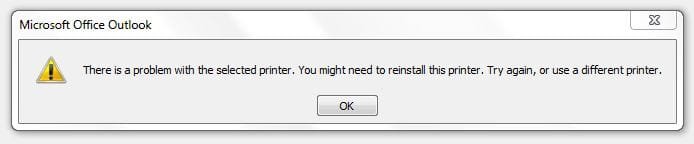
Here is the screen shot of the error message I am getting. I'm not sure if I have followed the instructions correctly - please let me know.

Printer problem1.JPG

I have reinstalled the printer again, but the problem persists.
 

My Computer My Computer

At a glance

Windows 7 Home Premium OEMIntel i54GBATI Mobility Radion HD 4330
Computer Manufacturer/Model Number
Dell Inspiron 1564
OS
Windows 7 Home Premium OEM
CPU
Intel i5
Memory
4GB
Graphics Card(s)
ATI Mobility Radion HD 4330
Hard Drives
500GB
If you go to devices and printers and run a test page (right click properties on the printer) does it complete properly? Also is it set as the default printing device?
 

My Computer My Computer

At a glance

Windows 7 x64Intel i7 2600kG.skill Ripjaw 16gigs @ 1866Nvidia gtx580 (evga)
Computer Manufacturer/Model Number
Insane hobo technologies. ;-)
OS
Windows 7 x64
CPU
Intel i7 2600k
Motherboard
Asrock z68 extreme 4 gen 3
Memory
G.skill Ripjaw 16gigs @ 1866
Graphics Card(s)
Nvidia gtx580 (evga)
Sound Card
Integrated HD audio + hdmi
Monitor(s) Displays
24" ASUS widescreen + 42" insignia
Screen Resolution
1080p (1920x1080)
Hard Drives
128 Samsung 830
256 Samsung 840
3 x 1tb storage drive (various)
1 western digital 1tb (eSATA)
1 Seagate 1tb (eSATA)
PSU
1 kilowatt SLI/Crossfire rated Silverstone modular
Case
NZXT Phantom + additional 220 fan
Cooling
Zalmann
Keyboard
Microsoft wireless 3000 (v2)
Mouse
MS - wireless 5000 (bluetrack)
Internet Speed
depends on if you ask me or my provider.
Other Info
The above information is provided as is, and the author assumes no responsibility for issues it may cause with your sanity or fanboyism.
I have printed off a test page and it appears to be OK, although I don't really understand the information that is printed out.
 

My Computer My Computer

At a glance

Windows 7 Home Premium OEMIntel i54GBATI Mobility Radion HD 4330
Computer Manufacturer/Model Number
Dell Inspiron 1564
OS
Windows 7 Home Premium OEM
CPU
Intel i5
Memory
4GB
Graphics Card(s)
ATI Mobility Radion HD 4330
Hard Drives
500GB
Why dont you do a system restore around IE9 and see if that will fix it - then if it does and you feel lucky try another install of IE9 or just settle for IE8 or FIREFOX 4 which has improved heaps.

You could run this scan for corrupted system files firstly if you like - put your w7 install dvd in the drive first - so it can copy the files from it if need be.
Next click start - type CMD in the search press enter - right click and select run as administrator - type this in the window SFC /scannow and press enter.
 

My Computer My Computer

At a glance

XP, Vista, W7 64bit Home PremiumIntel Core Duo 6850 3.0 ghz @ 3.7 ghz4GB Corsair DDR 2 PC-6400Ati 4870 1ghz
OS
XP, Vista, W7 64bit Home Premium
CPU
Intel Core Duo 6850 3.0 ghz @ 3.7 ghz
Motherboard
Asus P5E
Memory
4GB Corsair DDR 2 PC-6400
Graphics Card(s)
Ati 4870 1ghz
Sound Card
Supreme FX 11
Monitor(s) Displays
View Sonic VX1962wm
Screen Resolution
1680 X1050
Hard Drives
3 Seagate Sata Drives 160gb 250gb 500gb
PSU
Thermaltake 600 watt
Case
NZXT Alpha
Cooling
3X120cm Fans
Keyboard
Microsoft Digital Media Pro Keyboard
Mouse
Microsoft Wheel Mouse Optical
Internet Speed
1.5Mb to 8Mb/384k
I have just finished a telephone conversation with a support guy from HP.


He has been very helpful.


The issue is definitely not anything to do with my printer settings but he did not leave me in limbo. With my permission he checked out my computer and detected the root cause of the problem.


It is actually Microsoft's fault.


They have sent me an update recently which prevented me sending to my printer from Outlook 2007.


I normally have my computer set to receive updates automatically and of course this one was included. I have now set my computer so that I can at least check to see and block this particular update from reentering my system.


The update is a Security Update (KB2509470) for Outlook 2007.


We merely uninstalled it and everything appears to be running hunky dory now!
 

My Computer My Computer

At a glance

Windows 7 Home Premium OEMIntel i54GBATI Mobility Radion HD 4330
Computer Manufacturer/Model Number
Dell Inspiron 1564
OS
Windows 7 Home Premium OEM
CPU
Intel i5
Memory
4GB
Graphics Card(s)
ATI Mobility Radion HD 4330
Hard Drives
500GB
Good to see u got it fixed.
 

My Computer My Computer

At a glance

XP, Vista, W7 64bit Home PremiumIntel Core Duo 6850 3.0 ghz @ 3.7 ghz4GB Corsair DDR 2 PC-6400Ati 4870 1ghz
OS
XP, Vista, W7 64bit Home Premium
CPU
Intel Core Duo 6850 3.0 ghz @ 3.7 ghz
Motherboard
Asus P5E
Memory
4GB Corsair DDR 2 PC-6400
Graphics Card(s)
Ati 4870 1ghz
Sound Card
Supreme FX 11
Monitor(s) Displays
View Sonic VX1962wm
Screen Resolution
1680 X1050
Hard Drives
3 Seagate Sata Drives 160gb 250gb 500gb
PSU
Thermaltake 600 watt
Case
NZXT Alpha
Cooling
3X120cm Fans
Keyboard
Microsoft Digital Media Pro Keyboard
Mouse
Microsoft Wheel Mouse Optical
Internet Speed
1.5Mb to 8Mb/384k
Back
Top