Hey Guys,
First post here, seems like this forum will be a great resource. I am very computer savy and do a lot of IT work for friends and family but I have been using a Macbook for the last few years. Prior to that I was a Dell guy with a Dell Inspiron 700m but I recently purchased an AWESOME Lenovo x201t laptop/tablet from a friend of mine.
Core i7 640L, 8GB of DDR3 Ram, 500GB HDD (although I wish a TB would fit!), monitor flips around to be a tablet, full touch screen for when I'm lazy... etc.
Anyway I skipped M$ Vista on all my personal computers but I did use it a fair amount doing work for friends/family. My Lenovo x201t came with M$ W7 Ultimate x64 and so far I really love it. I never thought I'd like Windows again after using my Macbook for so long I must say I am enjoying using W7. I don't have any pictures on my laptop and don't plan on putting many, if any as I don't even have a digital camera anymore. I do however open my 'Downloads' folder all the time.
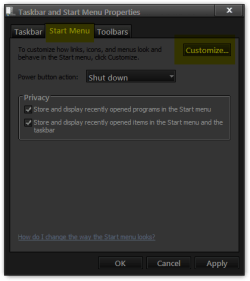
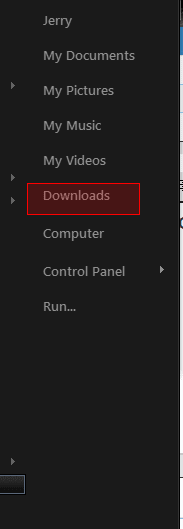
~~ Is there anyway I could change the 'Pictures' shortcut to be a 'Downloads' shortcut? ~~
Lastly - my buddy who owned this computer before me was the admin and I changed the name of the account from his name to mine but the folder is still under his name. I did a bit of research and saw a few registry tweaks to change it but I was a bit wary because I don't want to corrupt my W7 install as this laptop doesn't have an optical drive nor do I have the media. Is there anyway to change the file path to my name in a safer fashion? It really isn't that big of a deal but I figured I'd check.
Oh and that reminds me! Is there anyway I can make W7 more tablet friendly? The browser buttons are too small to use with the pen as are most of the icons. Would there be a way to write a script to put it in 'Tablet Mode' and make all the icons a tad bigger?
Sorry I went off on a bit of a tangent but hey it is my first post, so please forgive me!
Thanks in advance and if you forgot my actual question and reason for my post, it is in Italics above
Thx,
Mike
First post here, seems like this forum will be a great resource. I am very computer savy and do a lot of IT work for friends and family but I have been using a Macbook for the last few years. Prior to that I was a Dell guy with a Dell Inspiron 700m but I recently purchased an AWESOME Lenovo x201t laptop/tablet from a friend of mine.
Core i7 640L, 8GB of DDR3 Ram, 500GB HDD (although I wish a TB would fit!), monitor flips around to be a tablet, full touch screen for when I'm lazy... etc.
Anyway I skipped M$ Vista on all my personal computers but I did use it a fair amount doing work for friends/family. My Lenovo x201t came with M$ W7 Ultimate x64 and so far I really love it. I never thought I'd like Windows again after using my Macbook for so long I must say I am enjoying using W7. I don't have any pictures on my laptop and don't plan on putting many, if any as I don't even have a digital camera anymore. I do however open my 'Downloads' folder all the time.
~~ Is there anyway I could change the 'Pictures' shortcut to be a 'Downloads' shortcut? ~~
Lastly - my buddy who owned this computer before me was the admin and I changed the name of the account from his name to mine but the folder is still under his name. I did a bit of research and saw a few registry tweaks to change it but I was a bit wary because I don't want to corrupt my W7 install as this laptop doesn't have an optical drive nor do I have the media. Is there anyway to change the file path to my name in a safer fashion? It really isn't that big of a deal but I figured I'd check.
Oh and that reminds me! Is there anyway I can make W7 more tablet friendly? The browser buttons are too small to use with the pen as are most of the icons. Would there be a way to write a script to put it in 'Tablet Mode' and make all the icons a tad bigger?
Sorry I went off on a bit of a tangent but hey it is my first post, so please forgive me!
Thanks in advance and if you forgot my actual question and reason for my post, it is in Italics above
Thx,
Mike
My Computer
At a glance
W7 x64
- Computer Manufacturer/Model Number
- Lenovo X201t Tablet
- OS
- W7 x64