Memory has only 2Gb usable

Ravenhalllow

New member
Hi everyone I just transported my rig back from collage and when i set it back up i noticed that i only had 2 Gb of ram being used. I have flashed bios and that didn't fix the problem. I have also tried to run a system repair for windows 7 and that came up with a Error code = 0x490 but couldn't find a repair on it for windows 7. I don't know if this is the problem or if there are other issues going on. I did find that my 4 Gbs are saved for Hardware reserved resource Monitor. Any help will be greatly appreciated.

Raven
 

My Computer

OS
windows 7 ultimate x64
CPU
Itnel I7 930 2.8Ghz
Motherboard
EVGA X58 SLI LE
Memory
Corsair Dominator DDR3 1600Mhz Tri Channel
Graphics Card(s)
EVGA GTX 275 Co-op
Sound Card
none
Monitor(s) Displays
Samsung 25.5" LCD
Hard Drives
Hitachi 1 TB
PSU
Ultra X4 1050W
Case
Thremaltake Armor
Cooling
stock fans
Not sure what you're getting at here but

have your tried uninstalling and reinstalling the Ram..it may have been jarred during the shift and not be seated properly.
 

My Computer

Computer Manufacturer/Model Number
home built
OS
Windows 7 Professional 64 bit
CPU
930 i7 quad O/C 4ghz
Motherboard
Asus P6X58D premium
Memory
G Skill 3x2gb O/C to 1603mhz 1T timing
Graphics Card(s)
EVGA 570
Sound Card
creative titanium
Monitor(s) Displays
samsung s23a950d..120hz 3D
Screen Resolution
1920x1080
Hard Drives
Western Digital 3X150 Velocoraptors in Raid 5
PSU
Antec Quattro 1000 watt
Case
Xigmatek Elysium
Cooling
Custom Loop..Kryos block.360rad..BP comp fittings etc
Keyboard
Razor arcosa
Mouse
Razer Diamondback
Internet Speed
Wireless so w/e I get at the time

My Computer

OS
7 Ultimate x64
CPU
i5-2500k
Motherboard
Asus P8P67 Pro
Memory
8GB G.Skill Ripjaws X F3-12800CL7D-8GBXH 1866MHz 8-9-8-24
Graphics Card(s)
EVGA GTX 570 SC
Sound Card
X-Fi Titanium Fatality
Monitor(s) Displays
Samsung S27A550H 27" LED
Screen Resolution
1920x1080
Hard Drives
OCZ Vertex 3 120GB.
1TB Samsung F3.
2TB Samsung F4.
PSU
PC Power & Cooling Silencer 760
Case
Lian Li Lancool K62
Cooling
Thermalright Venomous X Black/Scythe S-Flex/Shin-Etsu X23
Keyboard
MS Natural Elite 4000 Ergonomic
Mouse
Logitech G500
Internet Speed
6MB/768
Other Info
Logitech Z-5500 505 watts.
D-Link DGL-4500.
Tripp-Lite Smart Pro 1500.
hi there:)
there are a few settings to look at that may establish your problem

OPEN SYSTEM CONFIGURATION

1> press windows key + R
2> type msconfig
3> click OK
4> on the top tabs in system configuration click BOOT
5> in boot advanced options check the MAXIMUM MEMORY BOX IS UN-TICKED (as in the snapshot below)
6> click ok. if windows asks for you to restart, restart pc.
 

Attachments

  • Brys snap ?27 ?May ?2011 06h51m22s 01.png
    Brys snap ?27 ?May ?2011 06h51m22s 01.png
    105.4 KB · Views: 447

My Computer

Computer Manufacturer/Model Number
packard bell IXTREME M5722
OS
Operating System : Windows 7 Home Premium Edition 6.01.7600 SP1 (x64)
CPU
Processor : Intel Core 2 Quad Q8300 @ 2500 MHz
Motherboard
Mainboard : Packard Bell (Acer EG43M )
Memory
Physical Memory :8GB Corsair4x 2GB 800MHz C5 DDR2
Graphics Card(s)
Video Card : XFX 6700 AMD
Monitor(s) Displays
Maestro 234DL - BenQ V2220 - BenQ VW2420H
Screen Resolution
Current Display :1920x1080p pixels at 60 Hz in HD LED
Hard Drives
Hard Disks : WDC (1000 GB)
Drive C: (Hard Disk) : 428 GB available on 491 GB
Drive D: (Hard Disk) : 426 GB available on 492 GB
SAMSUNG spinpoint HD103SJ 1000.2 GB
(X 2) KINGSTON SSD NOW V 30GB
PSU
XFX ProSeries 550W PSU
Case
PACKARD BELL IXTREME
Cooling
System Blower Current: 150mA Air Flow16CFM ;Akasa 90mm rear
Keyboard
Gigabyte Aivia K8100
Mouse
TRUST-Wireless Laser Mouse - Carbon edition MI-7770C
Internet Speed
TP-LINK > TL-WN951N / AV500 Gigabit Powerline Adapters
Browser
chrome dev
Other Info
EXTRA COOLING>(FAN CONTROLLER) PC Bay Cooler 3 x 40mm fans; Akasa AK-HD-BL Blue hard drive cooler 2 x 40 mm fan 4500 rpm 29.7 dBA
Bios> American Megatrends Inc.
Version : P01-A1
Date : 08/31/2009
Welcome RavenHalllow :D

Can you give us a screen snip of your memory with CPU-Z of the Memory tab & SPD tab for each memory slot ? ;)

CPU-Z_Memory_n_Slots_Snip.JPG
 

My Computer

Computer type
PC/Desktop
Computer Manufacturer/Model Number
Built them myself, Science Experiments !
OS
Win7 Enterprise, Win7 x86 (Ult 7600), Win7 x64 Ult 7600, TechNet RTM on AMD x64 (2.8Ghz)
CPU
AMD fx8350 4ghz, AMD-32 2400mhz, AMD-64 3200mhz, AMDx64 2.8G
Motherboard
SIS 755, ECS-K8M890M-M (Ult 7600), GigaByte & others
Memory
2gb, 4gb on the Ult 7600, 4gb on Technet RTM, 32gb on FX8350
Graphics Card(s)
Draw my own Graphics, several nVidia cards
Sound Card
on motherboard
Monitor(s) Displays
19" flat scr, 28" I-Inc widescr,22" Emprex Widescr, 23" Acer
Screen Resolution
1280 x 1024, 1440 x 900, 1920 x 1080
Hard Drives
6 pata Ide HD's & 2 Sata HD's
added 80gb external on Ult 7600 computer,
numerous extra 1tb, 2TB, 3Tb SATA HD's
A collection of ext HD Docks w/ HDs
PSU
430w, 550w, 600w, 700, 800, etc
Case
All Generic Full Towers
Cooling
Open Air & a few fans, some w/ colored LEDs
Keyboard
Compaq & Dell recycled from GoodWill
Mouse
Made in China Optical Wired Mouse
Internet Speed
Fast Cable InterNet
Antivirus
AVG Free on 24 different Desktops, NO Problems!
Browser
IE 8 is preferred, but use FireFox sometimes
Other Info
Linksys Routers, switches, & Hubs
Too Many USB Flash Drives to count, Biggest is 64GB !
Eight computers in my home network.
Sixteen computers at my business network.
Linked via TeamViewer !
Lots of old used spare computer parts everywhere!
also you can have a look at what windows has allocated to your ram using RESOURCE MONITOR (as in pic below) if you could post back the results this will help :)

1> windows key + r
2> copy and paste (or type) %windir%\system32\perfmon.exe -res
3> click MEMORY in the top tabs
4> when you mouse over the figure's you get a explanation if you are unsure
 

Attachments

  • Brys snap ?27 ?May ?2011 07h09m22s 02.png
    Brys snap ?27 ?May ?2011 07h09m22s 02.png
    155.1 KB · Views: 208
  • Brys snap ?27 ?May ?2011 07h17m20s 03.png
    Brys snap ?27 ?May ?2011 07h17m20s 03.png
    33.5 KB · Views: 57

My Computer

Computer Manufacturer/Model Number
packard bell IXTREME M5722
OS
Operating System : Windows 7 Home Premium Edition 6.01.7600 SP1 (x64)
CPU
Processor : Intel Core 2 Quad Q8300 @ 2500 MHz
Motherboard
Mainboard : Packard Bell (Acer EG43M )
Memory
Physical Memory :8GB Corsair4x 2GB 800MHz C5 DDR2
Graphics Card(s)
Video Card : XFX 6700 AMD
Monitor(s) Displays
Maestro 234DL - BenQ V2220 - BenQ VW2420H
Screen Resolution
Current Display :1920x1080p pixels at 60 Hz in HD LED
Hard Drives
Hard Disks : WDC (1000 GB)
Drive C: (Hard Disk) : 428 GB available on 491 GB
Drive D: (Hard Disk) : 426 GB available on 492 GB
SAMSUNG spinpoint HD103SJ 1000.2 GB
(X 2) KINGSTON SSD NOW V 30GB
PSU
XFX ProSeries 550W PSU
Case
PACKARD BELL IXTREME
Cooling
System Blower Current: 150mA Air Flow16CFM ;Akasa 90mm rear
Keyboard
Gigabyte Aivia K8100
Mouse
TRUST-Wireless Laser Mouse - Carbon edition MI-7770C
Internet Speed
TP-LINK > TL-WN951N / AV500 Gigabit Powerline Adapters
Browser
chrome dev
Other Info
EXTRA COOLING>(FAN CONTROLLER) PC Bay Cooler 3 x 40mm fans; Akasa AK-HD-BL Blue hard drive cooler 2 x 40 mm fan 4500 rpm 29.7 dBA
Bios> American Megatrends Inc.
Version : P01-A1
Date : 08/31/2009

My Computer

Computer Manufacturer/Model Number
packard bell IXTREME M5722
OS
Operating System : Windows 7 Home Premium Edition 6.01.7600 SP1 (x64)
CPU
Processor : Intel Core 2 Quad Q8300 @ 2500 MHz
Motherboard
Mainboard : Packard Bell (Acer EG43M )
Memory
Physical Memory :8GB Corsair4x 2GB 800MHz C5 DDR2
Graphics Card(s)
Video Card : XFX 6700 AMD
Monitor(s) Displays
Maestro 234DL - BenQ V2220 - BenQ VW2420H
Screen Resolution
Current Display :1920x1080p pixels at 60 Hz in HD LED
Hard Drives
Hard Disks : WDC (1000 GB)
Drive C: (Hard Disk) : 428 GB available on 491 GB
Drive D: (Hard Disk) : 426 GB available on 492 GB
SAMSUNG spinpoint HD103SJ 1000.2 GB
(X 2) KINGSTON SSD NOW V 30GB
PSU
XFX ProSeries 550W PSU
Case
PACKARD BELL IXTREME
Cooling
System Blower Current: 150mA Air Flow16CFM ;Akasa 90mm rear
Keyboard
Gigabyte Aivia K8100
Mouse
TRUST-Wireless Laser Mouse - Carbon edition MI-7770C
Internet Speed
TP-LINK > TL-WN951N / AV500 Gigabit Powerline Adapters
Browser
chrome dev
Other Info
EXTRA COOLING>(FAN CONTROLLER) PC Bay Cooler 3 x 40mm fans; Akasa AK-HD-BL Blue hard drive cooler 2 x 40 mm fan 4500 rpm 29.7 dBA
Bios> American Megatrends Inc.
Version : P01-A1
Date : 08/31/2009

My Computer

Computer type
PC/Desktop
Computer Manufacturer/Model Number
Me
OS
Win 7 Ultimate x64
CPU
FX-8350 @ 4.6 GHz so far
Motherboard
Asus M5A97 EVO
Memory
ADATA XPG V1 Series Black 8GB DDR3 1600
Graphics Card(s)
Sapphire R9 270x Dual-X
Sound Card
Xonar DGX w/ Corsair Vengence 1300
Monitor(s) Displays
Acer S232HL Abid
Screen Resolution
1920x1080
Hard Drives
120 GB OCZ Vertex 3
500 GB Seagate 7200.12
PSU
Antec Earthwatts 650W Green
Case
Antec Three Hundred
Cooling
Cooler Master 212 EVO
Keyboard
Logitech G510
Mouse
Logitech G500s
Internet Speed
35000/3000
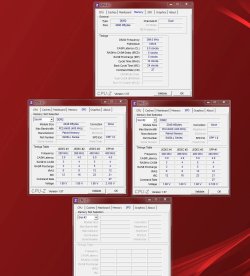
here are the screenshots for cpu-z
 

Attachments

  • cpu-z.png
    cpu-z.png
    365.1 KB · Views: 137

My Computer

OS
windows 7 ultimate x64
CPU
Itnel I7 930 2.8Ghz
Motherboard
EVGA X58 SLI LE
Memory
Corsair Dominator DDR3 1600Mhz Tri Channel
Graphics Card(s)
EVGA GTX 275 Co-op
Sound Card
none
Monitor(s) Displays
Samsung 25.5" LCD
Hard Drives
Hitachi 1 TB
PSU
Ultra X4 1050W
Case
Thremaltake Armor
Cooling
stock fans
Thanks for the snips of CPU-Z. I am wondering why the first snip shows it is recognizing the memory as single channel ? Did your MB manual tell which slots to place triple channel memory in ? One of my Gigabyte MBs uses 1,2,3 for 6GB triple channel.
 

My Computer

Computer type
PC/Desktop
Computer Manufacturer/Model Number
Built them myself, Science Experiments !
OS
Win7 Enterprise, Win7 x86 (Ult 7600), Win7 x64 Ult 7600, TechNet RTM on AMD x64 (2.8Ghz)
CPU
AMD fx8350 4ghz, AMD-32 2400mhz, AMD-64 3200mhz, AMDx64 2.8G
Motherboard
SIS 755, ECS-K8M890M-M (Ult 7600), GigaByte & others
Memory
2gb, 4gb on the Ult 7600, 4gb on Technet RTM, 32gb on FX8350
Graphics Card(s)
Draw my own Graphics, several nVidia cards
Sound Card
on motherboard
Monitor(s) Displays
19" flat scr, 28" I-Inc widescr,22" Emprex Widescr, 23" Acer
Screen Resolution
1280 x 1024, 1440 x 900, 1920 x 1080
Hard Drives
6 pata Ide HD's & 2 Sata HD's
added 80gb external on Ult 7600 computer,
numerous extra 1tb, 2TB, 3Tb SATA HD's
A collection of ext HD Docks w/ HDs
PSU
430w, 550w, 600w, 700, 800, etc
Case
All Generic Full Towers
Cooling
Open Air & a few fans, some w/ colored LEDs
Keyboard
Compaq & Dell recycled from GoodWill
Mouse
Made in China Optical Wired Mouse
Internet Speed
Fast Cable InterNet
Antivirus
AVG Free on 24 different Desktops, NO Problems!
Browser
IE 8 is preferred, but use FireFox sometimes
Other Info
Linksys Routers, switches, & Hubs
Too Many USB Flash Drives to count, Biggest is 64GB !
Eight computers in my home network.
Sixteen computers at my business network.
Linked via TeamViewer !
Lots of old used spare computer parts everywhere!
Then manual says the the first banks for using three dimms are the usual 2, 4 and 6 which on this board they are 1, 3, and 5. doens't start up if the dimms are not placed in this manner.
 

My Computer

OS
windows 7 ultimate x64
CPU
Itnel I7 930 2.8Ghz
Motherboard
EVGA X58 SLI LE
Memory
Corsair Dominator DDR3 1600Mhz Tri Channel
Graphics Card(s)
EVGA GTX 275 Co-op
Sound Card
none
Monitor(s) Displays
Samsung 25.5" LCD
Hard Drives
Hitachi 1 TB
PSU
Ultra X4 1050W
Case
Thremaltake Armor
Cooling
stock fans
that is true tho i don't know why it says it there in the bios it says 6 channel.
 

My Computer

OS
windows 7 ultimate x64
CPU
Itnel I7 930 2.8Ghz
Motherboard
EVGA X58 SLI LE
Memory
Corsair Dominator DDR3 1600Mhz Tri Channel
Graphics Card(s)
EVGA GTX 275 Co-op
Sound Card
none
Monitor(s) Displays
Samsung 25.5" LCD
Hard Drives
Hitachi 1 TB
PSU
Ultra X4 1050W
Case
Thremaltake Armor
Cooling
stock fans
Yeah i don't know why it says that. In the bios just to write down what i have it set to.

6-way channel
I don't remember if i posed it already, but I have flashed the bios for this mother board a couple weeks ago. I am backing up the system on a separate Hard drive that just came in.
 

My Computer

OS
windows 7 ultimate x64
CPU
Itnel I7 930 2.8Ghz
Motherboard
EVGA X58 SLI LE
Memory
Corsair Dominator DDR3 1600Mhz Tri Channel
Graphics Card(s)
EVGA GTX 275 Co-op
Sound Card
none
Monitor(s) Displays
Samsung 25.5" LCD
Hard Drives
Hitachi 1 TB
PSU
Ultra X4 1050W
Case
Thremaltake Armor
Cooling
stock fans
System scan just finished and it says that windows resource protection didn't find any integrity Violations.
 

My Computer

OS
windows 7 ultimate x64
CPU
Itnel I7 930 2.8Ghz
Motherboard
EVGA X58 SLI LE
Memory
Corsair Dominator DDR3 1600Mhz Tri Channel
Graphics Card(s)
EVGA GTX 275 Co-op
Sound Card
none
Monitor(s) Displays
Samsung 25.5" LCD
Hard Drives
Hitachi 1 TB
PSU
Ultra X4 1050W
Case
Thremaltake Armor
Cooling
stock fans
Then manual says the the first banks for using three dimms are the usual 2, 4 and 6 which on this board they are 1, 3, and 5. doens't start up if the dimms are not placed in this manner.
?It says to use 2,4, and 6?
 

My Computer

Computer type
PC/Desktop
Computer Manufacturer/Model Number
Home Built Desktop By DataTech
OS
Windows 7 Ultimate X64 SP1
CPU
Intel i5-2550K, Differing ~4.4-4.8GHz No built in GPU
Motherboard
ASUS P8Z68-V PRO/GEN3
Memory
16GB G.Skill Sniper 1866MHz @ 2133MHz 2x8GB
Graphics Card(s)
ASUS GTX650TIB-DC2OC-2GD5, (650TI Boost)
Sound Card
Onboard Realtek 5-1
Monitor(s) Displays
Samsung P2570HD
Screen Resolution
1920x1080
Hard Drives
Samsung 840 Pro 256GB SSD for OS, 500GB Seagate Constellation (Enterprise drive) for Data
PSU
Corsair HX650W
Case
Inwin Dragon Rider
Cooling
Hyper 212 EVO w/two Noctua fans, push-pull, @1300 RPM
Keyboard
E-Z Eyes, bright yellow keys with large characters
Mouse
steelseries SENSEI Laser Pro Gaming
Internet Speed
48-51Mbs Mbs down, 11 Mbs up Xfinity Cable
Antivirus
Norton Internet Security 2013
Browser
IE 10, Opera, Pale Moon if needed
Other Info
4 case fans, LG BluRay-RE, ASUS DVD-RW, Mr. Fusion power supply, 1.21 gigawatts.
No, we are using slots 1, 3, and 5 on this mobo. We have just put in another 3 banks of ram for a grand total of 12Gbs, but now its using only 4Gbs and 8Gbs are now reserved for Hardware. So now we have to dimm banks that are running and having windows use it. :(
 

My Computer

OS
windows 7 ultimate x64
CPU
Itnel I7 930 2.8Ghz
Motherboard
EVGA X58 SLI LE
Memory
Corsair Dominator DDR3 1600Mhz Tri Channel
Graphics Card(s)
EVGA GTX 275 Co-op
Sound Card
none
Monitor(s) Displays
Samsung 25.5" LCD
Hard Drives
Hitachi 1 TB
PSU
Ultra X4 1050W
Case
Thremaltake Armor
Cooling
stock fans
Go to start and type msconfig, click the Boot tab and Advanced Options. Make sure the Maximum Memory is UNchecked. Click OK, OK, if you had to change anything, a restart will be needed.
msconfig.PNG
 

My Computer

Computer type
PC/Desktop
Computer Manufacturer/Model Number
Home Built Desktop By DataTech
OS
Windows 7 Ultimate X64 SP1
CPU
Intel i5-2550K, Differing ~4.4-4.8GHz No built in GPU
Motherboard
ASUS P8Z68-V PRO/GEN3
Memory
16GB G.Skill Sniper 1866MHz @ 2133MHz 2x8GB
Graphics Card(s)
ASUS GTX650TIB-DC2OC-2GD5, (650TI Boost)
Sound Card
Onboard Realtek 5-1
Monitor(s) Displays
Samsung P2570HD
Screen Resolution
1920x1080
Hard Drives
Samsung 840 Pro 256GB SSD for OS, 500GB Seagate Constellation (Enterprise drive) for Data
PSU
Corsair HX650W
Case
Inwin Dragon Rider
Cooling
Hyper 212 EVO w/two Noctua fans, push-pull, @1300 RPM
Keyboard
E-Z Eyes, bright yellow keys with large characters
Mouse
steelseries SENSEI Laser Pro Gaming
Internet Speed
48-51Mbs Mbs down, 11 Mbs up Xfinity Cable
Antivirus
Norton Internet Security 2013
Browser
IE 10, Opera, Pale Moon if needed
Other Info
4 case fans, LG BluRay-RE, ASUS DVD-RW, Mr. Fusion power supply, 1.21 gigawatts.
Did it show all available memory before you transported the system? If so, then we're wasting your time with software suggestions. One of two things happened. Either some of the memory came loose and needs to be reseated, or your system was damaged somehow, possibly through a static shock or something of that nature.
 

My Computer

OS
Windows 7 Ultimate x64 SP1
CPU
Intel Core i7-2600
Motherboard
Gigabyte GA-P67A-UD3P-B3
Memory
12 GB Patriot Extreme DDR3-1333
Graphics Card(s)
Nvidia GTX 470
Monitor(s) Displays
Dell UltraSharp 2209WA
Hard Drives
OCZ Agility3 240 GB, WD5001AALS, WD7501AALS
PSU
OCZ ModStream 700W
Case
CoolerMaster HAF 912 Advanced
Cooling
CoolerMaster Hyper 212 Plus
That is the weirdest part and most extreme opt. we are just trying all options before i order another mobo. I have transported rigs all over for lan parties i can't believe that this happened from transporting it home from collage. I will check out the MSconfig shortly on the rig and get back to u afterwards. thanks far all your inputs on this matter.
 

My Computer

OS
windows 7 ultimate x64
CPU
Itnel I7 930 2.8Ghz
Motherboard
EVGA X58 SLI LE
Memory
Corsair Dominator DDR3 1600Mhz Tri Channel
Graphics Card(s)
EVGA GTX 275 Co-op
Sound Card
none
Monitor(s) Displays
Samsung 25.5" LCD
Hard Drives
Hitachi 1 TB
PSU
Ultra X4 1050W
Case
Thremaltake Armor
Cooling
stock fans
No, we are using slots 1, 3, and 5 on this mobo. We have just put in another 3 banks of ram for a grand total of 12Gbs, but now its using only 4Gbs and 8Gbs are now reserved for Hardware. So now we have to dimm banks that are running and having windows use it. :(

Then your computer is recognizing all the RAM, but is diverting it elsewhere. Make sure that the proper boxes are unchecked and checked, and it should solve your problem.
 

My Computer

Computer Manufacturer/Model Number
Pugh Technologies
OS
W7 Professional x64
CPU
AMD Athlon II X3 445 Rana 3.10 GHz
Motherboard
MSI 870A-G54
Memory
PNY XLR DDR3 1600 4x2GB
Graphics Card(s)
NVIDIA GeForce GTS 450 (fermi) 1GB GDDR5
Sound Card
Realtek ALC892 onboard
Monitor(s) Displays
ASUS VE205t, Viewsonic VX2035WM
Screen Resolution
1600x900, 1600x1050
Hard Drives
977GB Hitachi Hitachi HDS721010CLA332
244GB Western Digital WDC WD2500AAJS-65B4A0
488GB Western Digital WDC WD5000AAJS-00A8B0
488GB Western Digital WDC WD5000AAKS-00UU3A0
PSU
Antec EarthWatts EA650 650W
Case
ThermalTake Armor A90 Mid Tower
Cooling
3x 120mm in, 1x 120mm & 200mm out, self built hydro-cooler
Keyboard
Logitec 55
Mouse
Razer Deathadder
Internet Speed
20 Mbps D/L, 9 Mbps U/L
Back
Top