Recent Places and "All Programs" Are Empty

dirkla

New member
I had a virus last week. I managed to remove it, but since then I have 2 problems:

1) "Recent Places" in Windows Explorer is empty and stays empty.
2) The folders in "All Programs" in the start menu are empty.

Does anyone know how to fix these issues?
 

My Computer

OS
Windows 7 Ultimate x64
Hi there.... Try Unhide

Download unhide by grinler.
Double click on the program to start the unhide process.
Once done a window will pop and let you know the tool has completed its job.
See if cures your problems
 

My Computer

Computer Manufacturer/Model Number
Custom - PC Specialist
OS
Windows 7/Linux
CPU
Athlon 64 x2 6000+
Motherboard
ASUS M3N78 PRO
Memory
4Gb Dual Channel
Graphics Card(s)
Geforce 8400
Sound Card
On Board
Monitor(s) Displays
BenQ G2222HDL
Screen Resolution
1920x1080
Hard Drives
1Gb Spinpoint F3/740Gb Western Digital
640Gb Western Digital
PSU
National Grid
Case
Yes
Cooling
Stock Cooler
Keyboard
Saitek Eclipse II
Mouse
Microsoft Laser Mouse
Internet Speed
50Mb
Thanks Cookieman, I tried unhide before, it brought back the shortcuts on my desktop, they were gone too.
It doesn't help the other issues unfortunately...
 

My Computer

OS
Windows 7 Ultimate x64

My Computer

Computer type
PC/Desktop
Computer Manufacturer/Model Number
Self built custom
OS
64-bit Windows 11 Pro for Workstations
CPU
Intel i7-8700K OC'd to 5 GHz
Motherboard
ASUS ROG Maximus XI Formula Z390
Memory
64 GB (4x16GB) G.SKILL TridentZ RGB DDR4 3600 MHz
Graphics Card(s)
ASUS ROG-STRIX-GTX1080TI-O11G-GAMING
Sound Card
Integrated
Monitor(s) Displays
2 x Samsung Odyssey G7 27"
Screen Resolution
2560x1440
Hard Drives
1TB Samsung 990 PRO M.2,
4TB Samsung 990 PRO PRO M.2,
TerraMaster F8 SSD Plus NAS
PSU
Seasonic Prime Titanium 850W
Case
Thermaltake Core P3
Cooling
Corsair Hydro H115i
Keyboard
Logitech wireless K800
Mouse
Logitech MX Master 4
Internet Speed
2 Gb/s Download and 100 Mb/s Upload
Antivirus
Malwarebyte Anti-Malware Premium
Browser
Google Chrome
Other Info
Logitech Z625 speaker system,
Logitech BRIO 4K Pro webcam,
HP Color LaserJet Pro MFP M477fdn,
APC SMART-UPS RT 1000 XL - SURT1000XLI,
Galaxy S23 Plus phone
Thanks for the suggestions Brink, restoring the start up menu worked.
The recent locations are still stuck though...
 

My Computer

OS
Windows 7 Ultimate x64
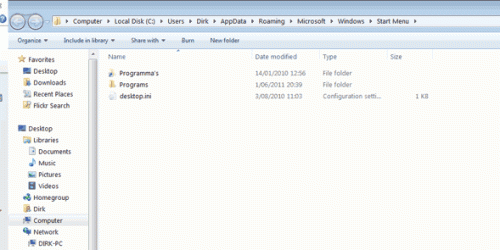
There's something strange: when I right click and select open "All Programs" in the Start Menu I see 2 folders:

1) A (greyed out) shortcut to "Programma's" (this is Dutch, my Windows version is Dutch originally, but I changed the language to English): I can't access this folder (Access denied).
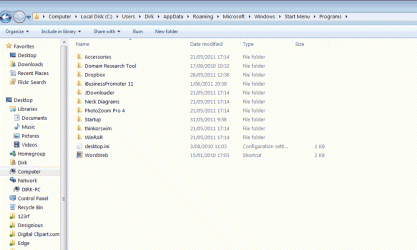
2) Programs: only 10 program shortcut folders are here, but about 50 show up in the "All Programs" in the Start Menu

Strange, it seems unhide changed something language-related...
 
Last edited:

My Computer

OS
Windows 7 Ultimate x64
Dirkla,

Could you post some screenshots of this to help see what it may be? :)
 

My Computer

Computer type
PC/Desktop
Computer Manufacturer/Model Number
Self built custom
OS
64-bit Windows 11 Pro for Workstations
CPU
Intel i7-8700K OC'd to 5 GHz
Motherboard
ASUS ROG Maximus XI Formula Z390
Memory
64 GB (4x16GB) G.SKILL TridentZ RGB DDR4 3600 MHz
Graphics Card(s)
ASUS ROG-STRIX-GTX1080TI-O11G-GAMING
Sound Card
Integrated
Monitor(s) Displays
2 x Samsung Odyssey G7 27"
Screen Resolution
2560x1440
Hard Drives
1TB Samsung 990 PRO M.2,
4TB Samsung 990 PRO PRO M.2,
TerraMaster F8 SSD Plus NAS
PSU
Seasonic Prime Titanium 850W
Case
Thermaltake Core P3
Cooling
Corsair Hydro H115i
Keyboard
Logitech wireless K800
Mouse
Logitech MX Master 4
Internet Speed
2 Gb/s Download and 100 Mb/s Upload
Antivirus
Malwarebyte Anti-Malware Premium
Browser
Google Chrome
Other Info
Logitech Z625 speaker system,
Logitech BRIO 4K Pro webcam,
HP Color LaserJet Pro MFP M477fdn,
APC SMART-UPS RT 1000 XL - SURT1000XLI,
Galaxy S23 Plus phone
So, when I right-click "all programs" in the start menu and select "open", I get this window:

screenshot1.gif

Programma's (the Dutch folder) I can't open.
This is the "Programs" directory:

screenshot2.gif

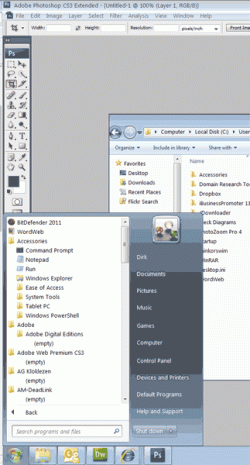
But as you can see, lot's of other (empty) folders are in the start menu:

screenshot3.gif
 

My Computer

OS
Windows 7 Ultimate x64
Since those empty folders in the Start Menu are for programs, you would need to manually create new shortcuts in the Start Menu from the exe files of those programs to place in the folders. Another option, would to reinstall the programs to have them added back again as well.
 
Last edited:

My Computer

Computer type
PC/Desktop
Computer Manufacturer/Model Number
Self built custom
OS
64-bit Windows 11 Pro for Workstations
CPU
Intel i7-8700K OC'd to 5 GHz
Motherboard
ASUS ROG Maximus XI Formula Z390
Memory
64 GB (4x16GB) G.SKILL TridentZ RGB DDR4 3600 MHz
Graphics Card(s)
ASUS ROG-STRIX-GTX1080TI-O11G-GAMING
Sound Card
Integrated
Monitor(s) Displays
2 x Samsung Odyssey G7 27"
Screen Resolution
2560x1440
Hard Drives
1TB Samsung 990 PRO M.2,
4TB Samsung 990 PRO PRO M.2,
TerraMaster F8 SSD Plus NAS
PSU
Seasonic Prime Titanium 850W
Case
Thermaltake Core P3
Cooling
Corsair Hydro H115i
Keyboard
Logitech wireless K800
Mouse
Logitech MX Master 4
Internet Speed
2 Gb/s Download and 100 Mb/s Upload
Antivirus
Malwarebyte Anti-Malware Premium
Browser
Google Chrome
Other Info
Logitech Z625 speaker system,
Logitech BRIO 4K Pro webcam,
HP Color LaserJet Pro MFP M477fdn,
APC SMART-UPS RT 1000 XL - SURT1000XLI,
Galaxy S23 Plus phone
Thanks Brink, but where are all the folders that are in the programs start menu? In the 3rd screenshot you see folders for Adobe and such, but they are not in screenshot 1 or 2. It seems Windows is getting them from another location.

I wonder if the "Recent Locations"-problem has the same cause, is Windows storing recent locations in a wrong folder?
 

My Computer

OS
Windows 7 Ultimate x64
Thanks Brink, but where are all the folders that are in the programs start menu? In the 3rd screenshot you see folders for Adobe and such, but they are not in screenshot 1 or 2. It seems Windows is getting them from another location.

I wonder if the "Recent Locations"-problem has the same cause, is Windows storing recent locations in a wrong folder?

You might check to see if the other folders are at the hidden location below.

C:\ProgramData\Microsoft\Windows\Start Menu\Programs

As a test, you might create a new administrator account to see how everything works while in it. If it's doing the same thing, then you might consider biting the bullet and reinstall Windows 7. Especially since this was all do to a virus.
 

My Computer

Computer type
PC/Desktop
Computer Manufacturer/Model Number
Self built custom
OS
64-bit Windows 11 Pro for Workstations
CPU
Intel i7-8700K OC'd to 5 GHz
Motherboard
ASUS ROG Maximus XI Formula Z390
Memory
64 GB (4x16GB) G.SKILL TridentZ RGB DDR4 3600 MHz
Graphics Card(s)
ASUS ROG-STRIX-GTX1080TI-O11G-GAMING
Sound Card
Integrated
Monitor(s) Displays
2 x Samsung Odyssey G7 27"
Screen Resolution
2560x1440
Hard Drives
1TB Samsung 990 PRO M.2,
4TB Samsung 990 PRO PRO M.2,
TerraMaster F8 SSD Plus NAS
PSU
Seasonic Prime Titanium 850W
Case
Thermaltake Core P3
Cooling
Corsair Hydro H115i
Keyboard
Logitech wireless K800
Mouse
Logitech MX Master 4
Internet Speed
2 Gb/s Download and 100 Mb/s Upload
Antivirus
Malwarebyte Anti-Malware Premium
Browser
Google Chrome
Other Info
Logitech Z625 speaker system,
Logitech BRIO 4K Pro webcam,
HP Color LaserJet Pro MFP M477fdn,
APC SMART-UPS RT 1000 XL - SURT1000XLI,
Galaxy S23 Plus phone
You might check to see if the other folders are at the hidden location below.

C:\ProgramData\Microsoft\Windows\Start Menu\Programs

Yes, you are right, all the empty folders are there.


As a test, you might create a new administrator account to see how everything works while in it. If it's doing the same thing, then you might consider biting the bullet and reinstall Windows 7. Especially since this was all do to a virus.

I created a new administrator account in which the recent locations worked fine...
 

My Computer

OS
Windows 7 Ultimate x64
HIdden? System?

You might want to check the attributes in the Properties window.
It may have set the folders to Hidden or System.

My friend got hit by one of those phony AV malware programs.
It kept changing settings like Hide extensions for known file types.
That's how we discovered that there were more files to delete. ;)
 

My Computer

Computer type
PC/Desktop
Computer Manufacturer/Model Number
n/a
OS
W7 Ultimate SP1, LM19.2 MATE, W10 Home 1703, W10 Pro 1703 VM, #All 64 bit
CPU
AMD Phenom II x6 1100T, 3.3 GHz
Motherboard
ASUS M4A88T-M/USB3 (AM3)
Memory
12GB DDR3 1333 G-Skill (4GB x 2), G-Skill (2GB x 2)
Graphics Card(s)
NVIDIA GeForce GTX 660
Sound Card
Realtek?
Monitor(s) Displays
Samsung S23B350
Screen Resolution
1920x1080
Hard Drives
WD Green 2TB (SATA), WD Green 3TB (SATA), WD Blue 4TB (SATA), WD Blue 6TB (SATA)
PSU
Cooler Master
Case
Antec GX300 Tower
Cooling
3x Antec TRICOOL 120mm Fans
Mouse
Wired Optical
Internet Speed
DSL
Antivirus
Avast
Browser
Pale Moon (64 bit)
Other Info
2018-12-27 Upgraded HDDs
2015-12-10 Upgraded case, graphics card, storage
2015-08-15 Upgraded motherboard & RAM
2015-07-15 Upgraded LM17.1 to LM17.2
Back
Top