icons in navigation pane,breadcrumb and start menu color

linkysys

New member
Local time
2:17 AM
Messages
19
hi im here again to ask for help, how can i remove the icons in the navigation pane(not the items but the icons), and the also I notice the start menu is colored diffrently from the taskbar, how can i make it equal with the taskbar? there is a blackish color, i want it to match with my taskbar. please help!...jpg below.
 

Attachments

  • Capture.JPG
    Capture.JPG
    114.4 KB · Views: 98

My Computer My Computer

At a glance

Windows 7 SP1 x86
OS
Windows 7 SP1 x86
hi im here again to ask for help, how can i remove the icons in the navigation pane(not the items but the icons), and the also I notice the start menu is colored diffrently from the taskbar, how can i make it equal with the taskbar? there is a blackish color, i want it to match with my taskbar. please help!...jpg below.
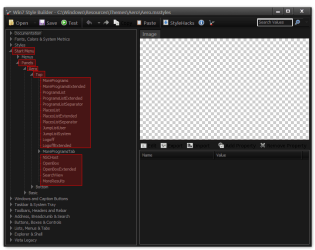
The start menu color will need to be edited at
Start Menu > Panels > Aero > Top (Highlighted in red)
Win7 Style Builder - CWindowsResourcesThemesAeroAero.msstyles.png
The icon in the breadcrumbs I was able to change it to a transparent .ico, I made a 256x256 transparent .ico & place it in My Doc folder.
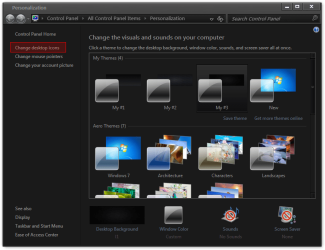
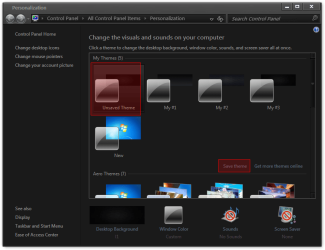
Go to Personalization>Change desktop icon
Personalization.png
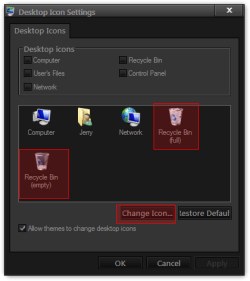
Change the Recycle bin Icons (full/empty)
Desktop Icon Settings.png
Browse to the transparent .ico & click Open then OK
Change Icon.png
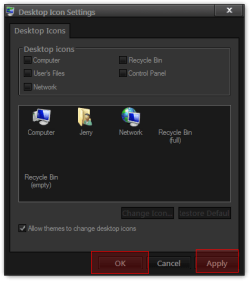
Then click Apply & OK
Desktop Icon Settings2.png
Then I had to Save theme for it to stay after a logoff/logon
save.png
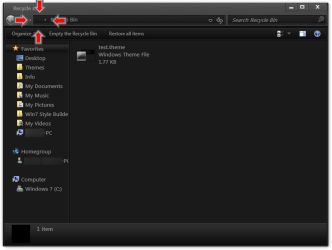
Now Recycle bin Icons is gone.
Recycle Bin.png
For the navigation pane icons I do not know sorry.
Jerry
 

My Computer My Computer

At a glance

Win 7 Pro x64 / Win 10 ProIntel(R) Core(TM) i7-3630QM CPU @ 2.40GHz12 GB(1) Intel(R) HD Graphics 4000 (2) NVIDIA GeFo...
Computer type
Laptop
Computer Manufacturer/Model Number
Sager NP9170
OS
Win 7 Pro x64 / Win 10 Pro
CPU
Intel(R) Core(TM) i7-3630QM CPU @ 2.40GHz
Motherboard
CLEVO P170EM
Memory
12 GB
Graphics Card(s)
(1) Intel(R) HD Graphics 4000 (2) NVIDIA GeForce GTX 675M
Sound Card
(1) Realtek High Definition Audio (2) Intel(R) Display Aud
Monitor(s) Displays
17.3
Screen Resolution
1920x1080
Hard Drives
(1) Samsung 860 EVO 500GB(OS) (1) Samsung 860 EVO 500GB(Data)
Keyboard
Backlite
Antivirus
MSE, Malwarebytes Pro
Browser
Firefox
Other Info
DESKTOP: Custom-built.
OS: Win 10 Pro x64.
CASE: Rosewill R5.
CPU: Intel I5 4670K CPU @ 3.40GHz.
CPU COOLER: Cool Master Hyper 212 EVO.
MOTHERBOARD: Asus Z87-A.
MEMORY: Kingston HyperX 2x4 GB.
GPU: Nvidia Geforce 650 TI.
PSU: Corsair TX750.
DRIVES: (1) Samsung 840 120 GB SSD (2) Western Digital blue 500 GB 7200 RPM.
thank you jerry i was actually referring to the breadcrumb icons that appear in any folder, i wanted to disable all the icons that appear in the breadcrumb, not only with the recycle bin. but anyway thanks. i dont know with the start menu but there is discoloration, dont know how to edit it. thank you jerry.
 

My Computer My Computer

At a glance

Windows 7 SP1 x86
OS
Windows 7 SP1 x86
thank you jerry i was actually referring to the breadcrumb icons that appear in any folder, i wanted to disable all the icons that appear in the breadcrumb, not only with the recycle bin. but anyway thanks. i dont know with the start menu but there is discoloration, dont know how to edit it. thank you jerry.
You will need to find all the icons in the .dll in System32 that's something I do not know about.

For editing the start menu you will need a image editor like Photoshop, Gimp, Paint.
Jerry
 

My Computer My Computer

At a glance

Win 7 Pro x64 / Win 10 ProIntel(R) Core(TM) i7-3630QM CPU @ 2.40GHz12 GB(1) Intel(R) HD Graphics 4000 (2) NVIDIA GeFo...
Computer type
Laptop
Computer Manufacturer/Model Number
Sager NP9170
OS
Win 7 Pro x64 / Win 10 Pro
CPU
Intel(R) Core(TM) i7-3630QM CPU @ 2.40GHz
Motherboard
CLEVO P170EM
Memory
12 GB
Graphics Card(s)
(1) Intel(R) HD Graphics 4000 (2) NVIDIA GeForce GTX 675M
Sound Card
(1) Realtek High Definition Audio (2) Intel(R) Display Aud
Monitor(s) Displays
17.3
Screen Resolution
1920x1080
Hard Drives
(1) Samsung 860 EVO 500GB(OS) (1) Samsung 860 EVO 500GB(Data)
Keyboard
Backlite
Antivirus
MSE, Malwarebytes Pro
Browser
Firefox
Other Info
DESKTOP: Custom-built.
OS: Win 10 Pro x64.
CASE: Rosewill R5.
CPU: Intel I5 4670K CPU @ 3.40GHz.
CPU COOLER: Cool Master Hyper 212 EVO.
MOTHERBOARD: Asus Z87-A.
MEMORY: Kingston HyperX 2x4 GB.
GPU: Nvidia Geforce 650 TI.
PSU: Corsair TX750.
DRIVES: (1) Samsung 840 120 GB SSD (2) Western Digital blue 500 GB 7200 RPM.
thank you for the response Jerry, now my final experiment is to make the taskbar squared, you can see what i mean by the screenshot below. is it possible in VSb?
 

Attachments

  • Capture.JPG
    Capture.JPG
    20.3 KB · Views: 32

My Computer My Computer

At a glance

Windows 7 SP1 x86
OS
Windows 7 SP1 x86
thank you for the response Jerry, now my final experiment is to make the taskbar squared, you can see what i mean by the screenshot below. is it possible in VSb?
You're Welcome
I have never seen a taskbar like that.
Sorry Jerry
 

My Computer My Computer

At a glance

Win 7 Pro x64 / Win 10 ProIntel(R) Core(TM) i7-3630QM CPU @ 2.40GHz12 GB(1) Intel(R) HD Graphics 4000 (2) NVIDIA GeFo...
Computer type
Laptop
Computer Manufacturer/Model Number
Sager NP9170
OS
Win 7 Pro x64 / Win 10 Pro
CPU
Intel(R) Core(TM) i7-3630QM CPU @ 2.40GHz
Motherboard
CLEVO P170EM
Memory
12 GB
Graphics Card(s)
(1) Intel(R) HD Graphics 4000 (2) NVIDIA GeForce GTX 675M
Sound Card
(1) Realtek High Definition Audio (2) Intel(R) Display Aud
Monitor(s) Displays
17.3
Screen Resolution
1920x1080
Hard Drives
(1) Samsung 860 EVO 500GB(OS) (1) Samsung 860 EVO 500GB(Data)
Keyboard
Backlite
Antivirus
MSE, Malwarebytes Pro
Browser
Firefox
Other Info
DESKTOP: Custom-built.
OS: Win 10 Pro x64.
CASE: Rosewill R5.
CPU: Intel I5 4670K CPU @ 3.40GHz.
CPU COOLER: Cool Master Hyper 212 EVO.
MOTHERBOARD: Asus Z87-A.
MEMORY: Kingston HyperX 2x4 GB.
GPU: Nvidia Geforce 650 TI.
PSU: Corsair TX750.
DRIVES: (1) Samsung 840 120 GB SSD (2) Western Digital blue 500 GB 7200 RPM.
Back
Top