
Solved Wipe/delete partition with PWBCD

pare

New member
Hi guys,

I would like to get rid of the "program" partition with this third party program "partition wizard home edition 5.2"
What option do I choose in this case? By choosing e.g wipe partition, which wiping method do I choose?
Fill sections with zero? this one is dotted. There is also quick/slow/verry slow. What will happen to that partition?
Will it become unallocated? Can I add it to the Data partition right to it(I am sorry, new to this)
Is it O.K. that Disk 1 become Disk 2 while at this program?

This unallocated 750GB disk that I have can I do something with it while I am at this program and if I make half of it as
logical partition to use it for backups can I rearrange what is left of it that I assume will stay unallocated, on a later stadium?
Or should I make the whole thing primary partition that is, if I will be able to shrink it on a later stadium if necessary?
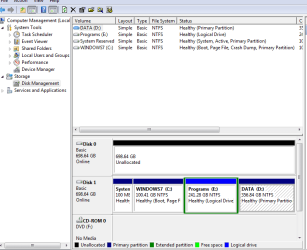

Capture 7.PNG

Thanks guys.
 

My Computer

OS
windows 7 home premium 64bit
CPU
Intel (R) Pentium (R) 4 CPU 3.06 GHz
Motherboard
Gigabyte GA-81865 GME-775
Memory
Ultra 1024 MB PC2700 DDR 333 MHz (2 RAM)
Graphics Card(s)
Nvidia Geforce 6200 256 Mbytes
Sound Card
Realtek AC'97 Audio
Monitor(s) Displays
Generic PnP monitor
Screen Resolution
1024*768 @ 75 Hz
Hard Drives
Seagate ST3320620AS 320 GB Serial ATA
Case
PC312 Lyra Super Case
Internet Speed
100 Mbps
Theog, I am glad you reply to my thread but I don't understand what you try to tell me!
Please be a little more specific.
Thank you!
 

My Computer

OS
windows 7 home premium 64bit
CPU
Intel (R) Pentium (R) 4 CPU 3.06 GHz
Motherboard
Gigabyte GA-81865 GME-775
Memory
Ultra 1024 MB PC2700 DDR 333 MHz (2 RAM)
Graphics Card(s)
Nvidia Geforce 6200 256 Mbytes
Sound Card
Realtek AC'97 Audio
Monitor(s) Displays
Generic PnP monitor
Screen Resolution
1024*768 @ 75 Hz
Hard Drives
Seagate ST3320620AS 320 GB Serial ATA
Case
PC312 Lyra Super Case
Internet Speed
100 Mbps
The hard disk which has Windows on it should be labeled Disk 0 in Disk management. This means you need to swap where they are connected on the motherboard. Try this tutorial:
Partition or Volume-Extend
 

My Computer

Computer type
PC/Desktop
Computer Manufacturer/Model Number
Home Built Desktop By DataTech
OS
Windows 7 Ultimate X64 SP1
CPU
Intel i5-2550K, Differing ~4.4-4.8GHz No built in GPU
Motherboard
ASUS P8Z68-V PRO/GEN3
Memory
16GB G.Skill Sniper 1866MHz @ 2133MHz 2x8GB
Graphics Card(s)
ASUS GTX650TIB-DC2OC-2GD5, (650TI Boost)
Sound Card
Onboard Realtek 5-1
Monitor(s) Displays
Samsung P2570HD
Screen Resolution
1920x1080
Hard Drives
Samsung 840 Pro 256GB SSD for OS, 500GB Seagate Constellation (Enterprise drive) for Data
PSU
Corsair HX650W
Case
Inwin Dragon Rider
Cooling
Hyper 212 EVO w/two Noctua fans, push-pull, @1300 RPM
Keyboard
E-Z Eyes, bright yellow keys with large characters
Mouse
steelseries SENSEI Laser Pro Gaming
Internet Speed
48-51Mbs Mbs down, 11 Mbs up Xfinity Cable
Antivirus
Norton Internet Security 2013
Browser
IE 10, Opera, Pale Moon if needed
Other Info
4 case fans, LG BluRay-RE, ASUS DVD-RW, Mr. Fusion power supply, 1.21 gigawatts.
Hi guys,
Any one else who can assist me with this matter?
I will appreciate it!
 

My Computer

OS
windows 7 home premium 64bit
CPU
Intel (R) Pentium (R) 4 CPU 3.06 GHz
Motherboard
Gigabyte GA-81865 GME-775
Memory
Ultra 1024 MB PC2700 DDR 333 MHz (2 RAM)
Graphics Card(s)
Nvidia Geforce 6200 256 Mbytes
Sound Card
Realtek AC'97 Audio
Monitor(s) Displays
Generic PnP monitor
Screen Resolution
1024*768 @ 75 Hz
Hard Drives
Seagate ST3320620AS 320 GB Serial ATA
Case
PC312 Lyra Super Case
Internet Speed
100 Mbps
What have you tried so far? No one can help unless you tell us your progress and results.
 

My Computer

Computer type
PC/Desktop
Computer Manufacturer/Model Number
Home Built Desktop By DataTech
OS
Windows 7 Ultimate X64 SP1
CPU
Intel i5-2550K, Differing ~4.4-4.8GHz No built in GPU
Motherboard
ASUS P8Z68-V PRO/GEN3
Memory
16GB G.Skill Sniper 1866MHz @ 2133MHz 2x8GB
Graphics Card(s)
ASUS GTX650TIB-DC2OC-2GD5, (650TI Boost)
Sound Card
Onboard Realtek 5-1
Monitor(s) Displays
Samsung P2570HD
Screen Resolution
1920x1080
Hard Drives
Samsung 840 Pro 256GB SSD for OS, 500GB Seagate Constellation (Enterprise drive) for Data
PSU
Corsair HX650W
Case
Inwin Dragon Rider
Cooling
Hyper 212 EVO w/two Noctua fans, push-pull, @1300 RPM
Keyboard
E-Z Eyes, bright yellow keys with large characters
Mouse
steelseries SENSEI Laser Pro Gaming
Internet Speed
48-51Mbs Mbs down, 11 Mbs up Xfinity Cable
Antivirus
Norton Internet Security 2013
Browser
IE 10, Opera, Pale Moon if needed
Other Info
4 case fans, LG BluRay-RE, ASUS DVD-RW, Mr. Fusion power supply, 1.21 gigawatts.
Hi Britton,
It has been labeled disk 0 until I installed the new hdd that is still unallocated since I have'nt done anything with it jet.
That is why I am trying to partition and format it and maybe then things will get back to normal? I am not sure! So please help me out here.
Do you have any answers to the other questions?
 

My Computer

OS
windows 7 home premium 64bit
CPU
Intel (R) Pentium (R) 4 CPU 3.06 GHz
Motherboard
Gigabyte GA-81865 GME-775
Memory
Ultra 1024 MB PC2700 DDR 333 MHz (2 RAM)
Graphics Card(s)
Nvidia Geforce 6200 256 Mbytes
Sound Card
Realtek AC'97 Audio
Monitor(s) Displays
Generic PnP monitor
Screen Resolution
1024*768 @ 75 Hz
Hard Drives
Seagate ST3320620AS 320 GB Serial ATA
Case
PC312 Lyra Super Case
Internet Speed
100 Mbps
The hard disk which has Windows on it should be labeled Disk 0 in Disk management. This means you need to swap where they are connected on the motherboard. Try this tutorial:
Partition or Volume-Extend
Read and try the steps outlined here. Have you switched the drive connectors? You OS need to be disk 0 to procedd.
 

My Computer

Computer type
PC/Desktop
Computer Manufacturer/Model Number
Home Built Desktop By DataTech
OS
Windows 7 Ultimate X64 SP1
CPU
Intel i5-2550K, Differing ~4.4-4.8GHz No built in GPU
Motherboard
ASUS P8Z68-V PRO/GEN3
Memory
16GB G.Skill Sniper 1866MHz @ 2133MHz 2x8GB
Graphics Card(s)
ASUS GTX650TIB-DC2OC-2GD5, (650TI Boost)
Sound Card
Onboard Realtek 5-1
Monitor(s) Displays
Samsung P2570HD
Screen Resolution
1920x1080
Hard Drives
Samsung 840 Pro 256GB SSD for OS, 500GB Seagate Constellation (Enterprise drive) for Data
PSU
Corsair HX650W
Case
Inwin Dragon Rider
Cooling
Hyper 212 EVO w/two Noctua fans, push-pull, @1300 RPM
Keyboard
E-Z Eyes, bright yellow keys with large characters
Mouse
steelseries SENSEI Laser Pro Gaming
Internet Speed
48-51Mbs Mbs down, 11 Mbs up Xfinity Cable
Antivirus
Norton Internet Security 2013
Browser
IE 10, Opera, Pale Moon if needed
Other Info
4 case fans, LG BluRay-RE, ASUS DVD-RW, Mr. Fusion power supply, 1.21 gigawatts.
What I have tried so far is to delete this "program" partition, with partition wizard third party program. By right clicking at this partition I choose to wipe it and then I need to choose for a wiping method which can be fill section with zero etc. I don't know which one to choose. There is also a choice to delete this partition. What will happen if I choose to delete. If the space become unallocated I will have my 100 MB partition, my windows 7 partition, an empty unallocated space and next to it my data partition all the way to the right. Will I be able to add this unallocated space to the data partition?
 

My Computer

OS
windows 7 home premium 64bit
CPU
Intel (R) Pentium (R) 4 CPU 3.06 GHz
Motherboard
Gigabyte GA-81865 GME-775
Memory
Ultra 1024 MB PC2700 DDR 333 MHz (2 RAM)
Graphics Card(s)
Nvidia Geforce 6200 256 Mbytes
Sound Card
Realtek AC'97 Audio
Monitor(s) Displays
Generic PnP monitor
Screen Resolution
1024*768 @ 75 Hz
Hard Drives
Seagate ST3320620AS 320 GB Serial ATA
Case
PC312 Lyra Super Case
Internet Speed
100 Mbps
It is easier to delete the Programs partition you don't want in Disk Management: Partition or Volume - Delete

Then you can extend Win7 partition into the Unallocated space: Partition or Volume - Extend or create a new Partition there: Partition or Volume - Create New.

You could also use free Partition Wizard to Resize the data partition to the left into the space.

It would be best to have the Win7 hard drive be in the DISK0 slot, which can be achieved by swapping the data cables between your HD's. You will then need to enter BIOS setup to change the boot order so that the Win7 HD is set to boot first. If you are not confident enough to do this then I would leave it alone and make sure that no partitions on the 750gb drive get accidentally marked Active.
 
Hi guys,

I did swap the data cables on the motherboard and now my Windows 7 partition hdd shows disk 0 and the other hdd shows disk 1
Thanks guys!
Maybe now my windows experience index will function again!

Tomorrow I will go on and delete the programs partition etc.
Right now I am to tired!

Thank you all.
 

My Computer

OS
windows 7 home premium 64bit
CPU
Intel (R) Pentium (R) 4 CPU 3.06 GHz
Motherboard
Gigabyte GA-81865 GME-775
Memory
Ultra 1024 MB PC2700 DDR 333 MHz (2 RAM)
Graphics Card(s)
Nvidia Geforce 6200 256 Mbytes
Sound Card
Realtek AC'97 Audio
Monitor(s) Displays
Generic PnP monitor
Screen Resolution
1024*768 @ 75 Hz
Hard Drives
Seagate ST3320620AS 320 GB Serial ATA
Case
PC312 Lyra Super Case
Internet Speed
100 Mbps
You are welcome! Let us know the outcome.:)
 

My Computer

Computer type
PC/Desktop
Computer Manufacturer/Model Number
Home Built Desktop By DataTech
OS
Windows 7 Ultimate X64 SP1
CPU
Intel i5-2550K, Differing ~4.4-4.8GHz No built in GPU
Motherboard
ASUS P8Z68-V PRO/GEN3
Memory
16GB G.Skill Sniper 1866MHz @ 2133MHz 2x8GB
Graphics Card(s)
ASUS GTX650TIB-DC2OC-2GD5, (650TI Boost)
Sound Card
Onboard Realtek 5-1
Monitor(s) Displays
Samsung P2570HD
Screen Resolution
1920x1080
Hard Drives
Samsung 840 Pro 256GB SSD for OS, 500GB Seagate Constellation (Enterprise drive) for Data
PSU
Corsair HX650W
Case
Inwin Dragon Rider
Cooling
Hyper 212 EVO w/two Noctua fans, push-pull, @1300 RPM
Keyboard
E-Z Eyes, bright yellow keys with large characters
Mouse
steelseries SENSEI Laser Pro Gaming
Internet Speed
48-51Mbs Mbs down, 11 Mbs up Xfinity Cable
Antivirus
Norton Internet Security 2013
Browser
IE 10, Opera, Pale Moon if needed
Other Info
4 case fans, LG BluRay-RE, ASUS DVD-RW, Mr. Fusion power supply, 1.21 gigawatts.
Guys, I did manage to delete the "programs" partition within disk management and with partition wizard I did resize the "data" partition into the unallocated space to the left.
Now there is a little unallocated space of 9 MB.
I guess I did n't go far enough to the left with the slider??
This is how it looks like.

Capture 8.PNG
 

My Computer

OS
windows 7 home premium 64bit
CPU
Intel (R) Pentium (R) 4 CPU 3.06 GHz
Motherboard
Gigabyte GA-81865 GME-775
Memory
Ultra 1024 MB PC2700 DDR 333 MHz (2 RAM)
Graphics Card(s)
Nvidia Geforce 6200 256 Mbytes
Sound Card
Realtek AC'97 Audio
Monitor(s) Displays
Generic PnP monitor
Screen Resolution
1024*768 @ 75 Hz
Hard Drives
Seagate ST3320620AS 320 GB Serial ATA
Case
PC312 Lyra Super Case
Internet Speed
100 Mbps
This seems to be a glitch with PW 5.2 as it happened to me again today as well. If it bothers you, just boot into PWBD and Resize D all the way to the right.
 
This seems to be a glitch with PW 5.2 as it happened to me again today as well. If it bothers you, just boot into PWBD and Resize D all the way to the right.


Hello Greg.


I've had several different issues with that version also, that being one of them.
 

My Computer

Computer Manufacturer/Model Number
* BFK Customs *
OS
W 7 64-bit Ultimate
CPU
Intel Q9550 Yorkfield
Motherboard
ASUS P5Q Pro
Memory
8GB Dominator 8500C5D
Graphics Card(s)
ATI : XFX 5870
Sound Card
Realtek HD Audio 7-1
Monitor(s) Displays
1x 47" LCD HDMI & 3x 26" LCD HDMI
Screen Resolution
1920x1080P & 1920x1200
Hard Drives
1x 80GB Intel X25-M G2 SSD : 1x 500GB & 1x 640GB WD Caviar Black(s)
PSU
Corsair 620HX
Case
Cooler Master RC-690
Cooling
Tuniq Tower 120, 2x 140mm and 3x 120mm case fans
Keyboard
Microsoft 500
Mouse
Razer Diamondback 3G
Internet Speed
14 Mb/s
Other Info
1x Koutech 3Gb/s SATA HDD Hot Swap Rack
I wonder if Si included this in his bug report to MiniTool.

The issue seems to be in some cases you cannot zero out one side if you resize to the other side. You have to Apply Resize first then it will allow the other few mb's to be zeroed out in a second operation.

I don't remember this happening in 4.2 although leftover mb space is fairly common in general.
 
Hi Greg,

I did resize the data partition all the way to the right as you suggested and it worked. It looks good now. I am happy about it.
Now I am gonna work on the other HDD.
I need to figure out how I want to partition it.
I am still having issues with the Windows Experience Index.
It won't rate my computer. Maybe it has someting to do with this HDD still being unallocated???
You have been a great help.
Thank you!
 

My Computer

OS
windows 7 home premium 64bit
CPU
Intel (R) Pentium (R) 4 CPU 3.06 GHz
Motherboard
Gigabyte GA-81865 GME-775
Memory
Ultra 1024 MB PC2700 DDR 333 MHz (2 RAM)
Graphics Card(s)
Nvidia Geforce 6200 256 Mbytes
Sound Card
Realtek AC'97 Audio
Monitor(s) Displays
Generic PnP monitor
Screen Resolution
1024*768 @ 75 Hz
Hard Drives
Seagate ST3320620AS 320 GB Serial ATA
Case
PC312 Lyra Super Case
Internet Speed
100 Mbps

My Computer

Computer Manufacturer/Model Number
* BFK Customs *
OS
W 7 64-bit Ultimate
CPU
Intel Q9550 Yorkfield
Motherboard
ASUS P5Q Pro
Memory
8GB Dominator 8500C5D
Graphics Card(s)
ATI : XFX 5870
Sound Card
Realtek HD Audio 7-1
Monitor(s) Displays
1x 47" LCD HDMI & 3x 26" LCD HDMI
Screen Resolution
1920x1080P & 1920x1200
Hard Drives
1x 80GB Intel X25-M G2 SSD : 1x 500GB & 1x 640GB WD Caviar Black(s)
PSU
Corsair 620HX
Case
Cooler Master RC-690
Cooling
Tuniq Tower 120, 2x 140mm and 3x 120mm case fans
Keyboard
Microsoft 500
Mouse
Razer Diamondback 3G
Internet Speed
14 Mb/s
Other Info
1x Koutech 3Gb/s SATA HDD Hot Swap Rack
Back
Top