Changing Common Places/Favorites in Save Dialog?

copernicus

New member
Power User
VIP
Local time
2:26 AM
Messages
620
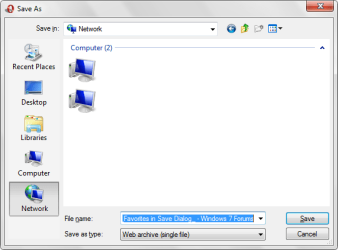
Where do you go to change the common places?

(common places being the five shortcuts that show up on most open/save/save as dialogs)

I looked for them where the XP ones are supposed to be. No go.

Did a quick search for Vista, said it should be under User/Favorites. Went there added one. No go.

So, does anyone know where ms has hidden them this time around?
 

My Computer My Computer

At a glance

7264x64/7260x86
OS
7264x64/7260x86
C:\Users\*your user name*\Links
 

My Computer My Computer

At a glance

Win 7
OS
Win 7
Do I have to modify the existing shortcuts?

I also don't see one for libraries, Network, Computer, etc.

Like I mentioned, that's the vista way to change them, but it doesn't seem to work on 7.
 

My Computer My Computer

At a glance

7264x64/7260x86
OS
7264x64/7260x86
Do I have to modify the existing shortcuts?

I also don't see one for libraries, Network, Computer, etc.

Like I mentioned, that's the vista way to change them, but it doesn't seem to work on 7.
Maybe we are thinking about 2 different things care to provide a screenshot.
 

My Computer My Computer

At a glance

Win 7
OS
Win 7
common.png

The five locations on the left side.
 

My Computer My Computer

At a glance

7264x64/7260x86
OS
7264x64/7260x86
That i am not sure of, is it a function of windows or application specific? i can't think of any software that i use that only show those 5 locations.
 

My Computer My Computer

At a glance

Win 7
OS
Win 7
Thats the save as dialog from opera.

Hmm, I just realized there's a different one in notepad. The adobe suite also shows the one I posted. Hmm.
 

My Computer My Computer

At a glance

7264x64/7260x86
OS
7264x64/7260x86
Seems it is the "File Save Dialog Legacy" used by programs that are either outdated or do not call the new dialog. Whether those locations can be changed is still uncertain.
 

My Computer My Computer

At a glance

Win 7
OS
Win 7
It's in Group Policy Editor... tried it with Photoshop's save and it works
(type 'gpedit.msc' in start menu's search...)

"Local Group Policy Editor\User Configuration\Administrative Templates\Windows Components\Windows Explorer\Common Open File Dialog\Items displayed in Places Bar"
 
Last edited:

My Computer My Computer

At a glance

XP Pro SP3 x86/Vista SP2 x64/Win7 x64 Triple-...AMD64 X2 AM2 5000+Corsair TWX 2Gb (2x1Gb) DDR2 800MhzPCI-X 2.0 Inno3D (NVidia) 9500GT 1Gb DDR2
Computer Manufacturer/Model Number
Self Built
OS
XP Pro SP3 x86/Vista SP2 x64/Win7 x64 Triple-boot
CPU
AMD64 X2 AM2 5000+
Motherboard
Asus MSN-X Plus
Memory
Corsair TWX 2Gb (2x1Gb) DDR2 800Mhz
Graphics Card(s)
PCI-X 2.0 Inno3D (NVidia) 9500GT 1Gb DDR2
Sound Card
Onboard Realtec ALC662-GR
Monitor(s) Displays
Relisys 17' CRT (model unknown)
Screen Resolution
1024x768
Hard Drives
750Gb Samsung 7200-3Gb/s 32Mb Cache SATA
PSU
500W
Cooling
Standard AMD CPU Fan, One side, front and rear case fan.
Keyboard
Microsoft Multimedia Keyboard
Mouse
Samsung Optical
Internet Speed
10M
Awesome, thanks.
 

My Computer My Computer

At a glance

7264x64/7260x86
OS
7264x64/7260x86
It's in Group Policy Editor... tried it with Photoshop's save and it works
(type 'gpedit.msc' in start menu's search...)

"Local Group Policy Editor\User Configuration\Administrative Templates\Windows Components\Windows Explorer\Common Open File Dialog\Items displayed in Places Bar"

Good to know if ever come across an application that will need it.
 

My Computer My Computer

At a glance

Win 7
OS
Win 7
could this be set as a tutorial

I checked all the tutorials for this information and didn't find it.

Perhaps it is worthy of a tutorial?

And I really appreciate this forum.
 

My Computer My Computer

At a glance

win 7 pro
OS
win 7 pro
it didn't like my names

I tried to put in some new folders and some of the standard ones.

It liked my network folder (\\name\folder) and Desktop, but it didn't show Computer, Libraries, or Documents

Woops, doesn't say Computer or Libraries are valid options (even though they are on the standard page). I think this option is broken?

Your mileage may vary, but I am getting nowhere (fast).
 

My Computer My Computer

At a glance

win 7 pro
OS
win 7 pro
Another work around is to create custom libraries for your desired folders/locations, so you can access them via the libraries link in that dialog box.

Granted, it requires an additional click to open the libraries locations, but it works pretty well for me.
 

My Computer My Computer

At a glance

Windows 7 Home Premium 64Core i7 870 2.93 GHz16 GB G-Skills DDR3 1333ASUS GTX 680 DirectCu-II Top
Computer Manufacturer/Model Number
Custom
OS
Windows 7 Home Premium 64
CPU
Core i7 870 2.93 GHz
Motherboard
Gigabyte P55A-UD3
Memory
16 GB G-Skills DDR3 1333
Graphics Card(s)
ASUS GTX 680 DirectCu-II Top
Sound Card
Realtek 5.1 audio
Monitor(s) Displays
Samsung 23" widescreen
Screen Resolution
2048x1152
Hard Drives
OCZ Vertex III 128 GB (primary)
OCZ Vertex II 128 GB (data)
PSU
Corsair 650W
Case
CoolerMaster HAF 920
Cooling
Arctic Cooling Freezer 7 Pro
Keyboard
DAS Model S Ultimate keyboard
Mouse
Logitech G5 gaming mouse
Internet Speed
Cable
Browser
Chrome
Other Info
Built in December 2010
Another work around is to create custom libraries for your desired folders/locations, so you can access them via the libraries link in that dialog box.

Granted, it requires an additional click to open the libraries locations, but it works pretty well for me.

That actually was my first thought. When I went to add my 15GB downloads folder (on a network drive) to the "download" library I created Win 7 said "sure I can do that, but first I must copy the folder to the local drive so that I may index it and make it available offline."

I said No thanks. That was the one folder I was actually able to get into the list. Maybe someday they will improve this.
 

My Computer My Computer

At a glance

win 7 pro
OS
win 7 pro
Yup, the places I needed to add to the places bar are all network locations.
 

My Computer My Computer

At a glance

7264x64/7260x86
OS
7264x64/7260x86
Perhaps in Windows 8, this could be a new feature.
 

My Computer My Computer

At a glance

Windows 7 Home Premium 64Core i7 870 2.93 GHz16 GB G-Skills DDR3 1333ASUS GTX 680 DirectCu-II Top
Computer Manufacturer/Model Number
Custom
OS
Windows 7 Home Premium 64
CPU
Core i7 870 2.93 GHz
Motherboard
Gigabyte P55A-UD3
Memory
16 GB G-Skills DDR3 1333
Graphics Card(s)
ASUS GTX 680 DirectCu-II Top
Sound Card
Realtek 5.1 audio
Monitor(s) Displays
Samsung 23" widescreen
Screen Resolution
2048x1152
Hard Drives
OCZ Vertex III 128 GB (primary)
OCZ Vertex II 128 GB (data)
PSU
Corsair 650W
Case
CoolerMaster HAF 920
Cooling
Arctic Cooling Freezer 7 Pro
Keyboard
DAS Model S Ultimate keyboard
Mouse
Logitech G5 gaming mouse
Internet Speed
Cable
Browser
Chrome
Other Info
Built in December 2010
gpedit.msc is not available on any of the W7 home editions, which is what I have.

Search as I might, I cannot find the registry entries for editing the places bar.

Does anyone know where I can find them?
 
Last edited:

My Computer My Computer

At a glance

Windows 7Core 2 Duo8GbNv 9550GT
Computer Manufacturer/Model Number
Homebuilt
OS
Windows 7
CPU
Core 2 Duo
Motherboard
Asus P5Q SE Plus
Memory
8Gb
Graphics Card(s)
Nv 9550GT
Sound Card
OnBoard
Monitor(s) Displays
Samsung SM930BF - Acer AL1916
Hard Drives
Samsung500Gb + others
PSU
650W
Case
Alienware
Cooling
Chassis fan set to Q-Fan
Keyboard
Microsoft wireless
Other Info
Wacom Intuos 3
gpedit.msc is not available on any of the W7 home editions, which is what I have.

Search as I might, I cannot find the registry entries for editing the places bar.

Does anyone know where I can find them?

Even better! I tested on Win 7 64x and it works. Places Utility
 

My Computer My Computer

At a glance

Windows 7 x64
OS
Windows 7 x64

My Computer My Computer

At a glance

7264x64/7260x86
OS
7264x64/7260x86
Back
Top