Moved boot manager, 7 drive still refuses to boot without old drive.

CabbageODiscord

New member
Local time
5:00 AM
Messages
17
I've been trying all day to get to a point where I can format my old hard drive (D). I found out today that, in its infinite wisdom, the Windows 7 installer put the boot manager on a completely separate drive from my new drive (C), the one I selected for installation.

Windows 7 is totally self-contained on C, save for the boot manager. I have tried:

1: Creating new boot files with "bcdboot C:\ /s C:" in an admin command line at the suggestion of another post, and then going into the BIOS, setting C as the default drive, and setting it as the primary boot device.

2: When that didn't work, I ran multiple startup repairs to C from the 7 install disk with D disconnected, until it no longer reported problems. This didn't work either. C still will not run the boot manager without D plugged in and set in the BIOS as the default drive.

I've found more things to try, such as this method, but I don't feel that the description is clear enough to attempt it.

I attached a screenshot of Disk Management. I notice that C still does not have "system" in its parameters. I assume it has something to do with this, but I don't know how to make that show up there.

Does anyone know what could be wrong?

Edit: Clearer description of what I did before posting:

Here is what I did before posting here, for clarity:
1. Marked Waffles as Active using DISKPART in an administrative command line (I'm refraining from referring to it as C, because the Win7 install DVD refers to it as D, while my Win7 installation refers to it as C, leaving things a bit ambiguous. For reference, it's the drive which I'm trying to boot from. "Pancakes" is the drive which currently contains the boot files and carries the "System" flag)
Edit: 1.5. Used an administrative command line to create boot files on C. Command may have been 'bcdboot C:\ /s C:', that's the best I can remember. This method was suggested on another forum.
2. Went into BIOS and set Waffles as the primary startup drive (It is interesting to note that running DISKPART within the Win7 install DVD environment still marks Pancakes as Disk 0, and Waffles as Disk 1, even with Waffles set as the primary boot drive)
Edit: 2.5. Attempted to boot. Failed.
3. Ran startup repair several times, each time letting it apply fixes until Startup Repair failed to detect errors in the boot files and would not let me run startup repair again
4. Attempted to boot the system with Waffles set as the primary boot drive, and Pancakes plugged in. System would not boot.
5. Ran the Win7 install DVD again, startup repair still failed to detect problems and would not run.
6. Gave up, set Pancakes as the primary boot drive. System booted, and I posted here.
 

Attachments

  • Capture.PNG
    Capture.PNG
    20.8 KB · Views: 169
Last edited:

My Computer My Computer

At a glance

Windows 7 Ultimate x64AMD Phenom II x34GB DDR2Nvidia GeForce GTX 470
Computer Manufacturer/Model Number
Self-built
OS
Windows 7 Ultimate x64
CPU
AMD Phenom II x3
Motherboard
Biostar TF 720
Memory
4GB DDR2
Graphics Card(s)
Nvidia GeForce GTX 470
Sound Card
Sound Blaster Audigy 2
Monitor(s) Displays
DVI, VGA secondary
Hard Drives
Western Digital Caviar Black 600gb
Seagate Barracuda 300gb
PSU
Rosewill 650w
1) unplug cable from Disk0 Pancakes.

2) Plug the cable from Pancakes to Waffles.

3) Check BIOS to make sure Waffles is the first HD to boot.

4) Do a startup Repair.
Press the F8 key repeatedly at boot up or use the Startup disk.
http://www.sevenforums.com/tutorials/681-startup-repair.html?ltr=S
Note: You may need to do startup repair 3 to 4 times.
http://www.sevenforums.com/tutorials/105541-startup-repair-run-3-separate-times.html
http://www.sevenforums.com/tutorials/139576-startup-repair-infinite-loop-recovery.html

5) When windows is booting OK, plug the cable from Waffles to Pancakes.

6) Mark Pancakes INACTIVE.
http://www.sevenforums.com/tutorials/71432-partition-mark-active.html?ltr=P
 

My Computer My Computer

At a glance

ME/XP/Vista/Win7
OS
ME/XP/Vista/Win7
I've done that already.

2: When that didn't work, I ran multiple startup repairs to C from the 7 install disk with D disconnected, until it no longer reported problems. This didn't work either. C still will not run the boot manager without D plugged in and set in the BIOS as the default drive.

Windows startup repair no longer detects problems with booting, so I can't even run it again. C will still not boot without D plugged in and set as default.
 

My Computer My Computer

At a glance

Windows 7 Ultimate x64AMD Phenom II x34GB DDR2Nvidia GeForce GTX 470
Computer Manufacturer/Model Number
Self-built
OS
Windows 7 Ultimate x64
CPU
AMD Phenom II x3
Motherboard
Biostar TF 720
Memory
4GB DDR2
Graphics Card(s)
Nvidia GeForce GTX 470
Sound Card
Sound Blaster Audigy 2
Monitor(s) Displays
DVI, VGA secondary
Hard Drives
Western Digital Caviar Black 600gb
Seagate Barracuda 300gb
PSU
Rosewill 650w
1) unplug cable from Disk0 Pancakes.

2) Plug the cable from Pancakes to Waffles.

3) Check BIOS to make sure Waffles is the first HD to boot.

4) Do a startup Repair.
Press the F8 key repeatedly at boot up or use the Startup disk.
http://www.sevenforums.com/tutorials/681-startup-repair.html?ltr=S
Note: You may need to do startup repair 3 to 4 times.
http://www.sevenforums.com/tutorials/105541-startup-repair-run-3-separate-times.html
http://www.sevenforums.com/tutorials/139576-startup-repair-infinite-loop-recovery.html

5) When windows is booting OK, plug the cable from Waffles to Pancakes.

6) Mark Pancakes INACTIVE.
http://www.sevenforums.com/tutorials/71432-partition-mark-active.html?ltr=P

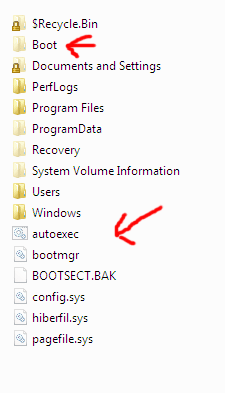
Do you have a folder called boot & a file called bootmgr on Waffles If no Copy & Paste over. Make sure Waffles is Disk 0 & first HD boot in BOOT in BIOS.

Capture.PNG Capture2.PNG

Capture22.PNG
 

My Computer My Computer

At a glance

ME/XP/Vista/Win7
OS
ME/XP/Vista/Win7
I don't have either of those on either drive. I have one file that says "Boot.BAK" on D, but not on C. Hidden files and folders are showing up but those don't show up at all. I also don't have $Recycle.Bin, Recovery, or System Volume Information.

I have an unhidden folder in C:\Windows named Boot, however. No bootmgr, though. The folder is not in D:\Windows, and there is still no bootmgr in there, either.

Edit: A quick search with Everything shows that there is indeed a file named bootmgr in the root of both drives. However, it seems that Windows is doing everything in its power to prevent me from seeing it through Explorer. I've tried registry edits to get it to show up, to no avail. A very few hidden files and folders show up when it's set to show hidden files, but no bootmgr, and no other system files. Windows isn't letting me see it.


Disregard that. Stupid mistake, forgot to uncheck "hide protected system files". yes, both the Boot folder and bootmgr are there. C still won't boot without D plugged in. I'll try copying D's boot files over.
 
Last edited:

My Computer My Computer

At a glance

Windows 7 Ultimate x64AMD Phenom II x34GB DDR2Nvidia GeForce GTX 470
Computer Manufacturer/Model Number
Self-built
OS
Windows 7 Ultimate x64
CPU
AMD Phenom II x3
Motherboard
Biostar TF 720
Memory
4GB DDR2
Graphics Card(s)
Nvidia GeForce GTX 470
Sound Card
Sound Blaster Audigy 2
Monitor(s) Displays
DVI, VGA secondary
Hard Drives
Western Digital Caviar Black 600gb
Seagate Barracuda 300gb
PSU
Rosewill 650w
You have far to many files in the root of C:

Do you have a linux bootloader?
 

My Computer My Computer

At a glance

ME/XP/Vista/Win7
OS
ME/XP/Vista/Win7
You have far to many files in the root of C:

Do you have a linux bootloader?

I don't have a Linux bootloader. Would getting one help? I can always boot to the Win7 DVD.

A lot of programs put things in C:\ for some reason. on D:\, when I used to use WinXP, I had a habit for a while of installing games to the root in an effort to make them load faster. It never did anything, aside from clutter the folder.

Anyhow, new update. I copied D's boot files to C, and booted into the BIOS to set C as the default drive. It still didn't boot, so I booted into the Win7 install disk again and repaired the boot files with D's partition set to Inactive. It still didn't boot, and once again the startup repair utility didn't detect any problems.

I did see one thing, though. In the list of current Windows installations at the computer repair screen, it showed Waffles as D. Waffles shows as C when booted into Win7, and D when booted into WinXP. The fact that the Win7 install disk recognizes Waffles as D, the way WinXP does concerns me. The drive letters are wrong when viewed from anywhere outside of my Win7 installation.
 

My Computer My Computer

At a glance

Windows 7 Ultimate x64AMD Phenom II x34GB DDR2Nvidia GeForce GTX 470
Computer Manufacturer/Model Number
Self-built
OS
Windows 7 Ultimate x64
CPU
AMD Phenom II x3
Motherboard
Biostar TF 720
Memory
4GB DDR2
Graphics Card(s)
Nvidia GeForce GTX 470
Sound Card
Sound Blaster Audigy 2
Monitor(s) Displays
DVI, VGA secondary
Hard Drives
Western Digital Caviar Black 600gb
Seagate Barracuda 300gb
PSU
Rosewill 650w
It is not a very good idea to copy the boot environment - its better done using the tools provided as the boot files have the security token of TrustedInstaller. All other users including "System" have only read access.

If you boot with only the Windows 7 disk connected (after successful repairs) what happens - just black screen, any message, blinking cursor?

To get to the boot-menu you need only
1. MBR, 2. PBR (MBR and PBR in Win 7 format)
3. bootmgr in "\"
4. the "\boot" folder with BCD file in it.
(2. 3. and 4. on active primary partition)


Did you install Windows from the same DVD you are using for repair ?
 

My Computer My Computer

At a glance

Win 8 RP, Win 7, XPIntel
Computer Manufacturer/Model Number
Acer Notebook
OS
Win 8 RP, Win 7, XP
CPU
Intel
I backed up the old boot files, and I've reinstated them.

I don't know what MBR or PBR are, and I don't see anything in C:\ that matches that description. The boot folder and bootmgr are here, with the requisite files in boot.

When I boot without "Pancakes" connected, the computer never goes past the hardware monitor screen. (on my computer, this is where boot is initiated, and where Boot From CD shows up when one is put in). The cursor just blinks endlessly until I hit reset. "Waffles", the drive that shows up as C when booted into Windows 7, still shows up lacking the System parameter in Disk Management, and is also listed as Disk 1, with Pancakes listed as Disk 0. It also produces the same results as not having Pancakes connected when I switch the primary boot disk to Waffles in the BIOS, and leave Pancakes hooked up and active.

I'm not using the same DVD, but it's one for the same version of Windows 7 that I'm using (Ultimate x64), so I don't know what the problem could be. I could have a look for my original disk and see if that fixes anything, though I doubt it.
 

My Computer My Computer

At a glance

Windows 7 Ultimate x64AMD Phenom II x34GB DDR2Nvidia GeForce GTX 470
Computer Manufacturer/Model Number
Self-built
OS
Windows 7 Ultimate x64
CPU
AMD Phenom II x3
Motherboard
Biostar TF 720
Memory
4GB DDR2
Graphics Card(s)
Nvidia GeForce GTX 470
Sound Card
Sound Blaster Audigy 2
Monitor(s) Displays
DVI, VGA secondary
Hard Drives
Western Digital Caviar Black 600gb
Seagate Barracuda 300gb
PSU
Rosewill 650w
1) unplug cable from Disk0 Pancakes.

2) Plug the cable from Pancakes to Waffles.

3) Check BIOS to make sure Waffles is the first HD to boot.

4) Do a startup Repair.
Press the F8 key repeatedly at boot up or use the Startup disk.
http://www.sevenforums.com/tutorials/681-startup-repair.html?ltr=S
Note: You may need to do startup repair 3 to 4 times.
http://www.sevenforums.com/tutorials/105541-startup-repair-run-3-separate-times.html
http://www.sevenforums.com/tutorials/139576-startup-repair-infinite-loop-recovery.html

5) When windows is booting OK, plug the cable from Waffles to Pancakes.

6) Mark Pancakes INACTIVE.
http://www.sevenforums.com/tutorials/71432-partition-mark-active.html?ltr=P

Reread my post.

5)When windows is booting OK, plug the cable from Waffles to Pancakes.

DO NOT PLUG BACK IN PANCAKES UNTIL WINDOWS IS BOOTING OK.
 

My Computer My Computer

At a glance

ME/XP/Vista/Win7
OS
ME/XP/Vista/Win7
I've done that, as I've already said before. That was in my first post.

I've done that already.

2: When that didn't work, I ran multiple startup repairs to C from the 7 install disk with D disconnected, until it no longer reported problems. This didn't work either. C still will not run the boot manager without D plugged in and set in the BIOS as the default drive.
Windows startup repair no longer detects problems with booting, so I can't even run it again. C will still not boot without D plugged in and set as default.

Let me elaborate:

I can't run startup repair anymore unless I modify the boot files, which i did when I copied them from D, because it won't let me. It stopped detecting problems after the second repair, and will not run repair again, because it doesn't think there's any problem. It still will not boot, and after multiple tries to see if startup repair would run again, I was forced to plug D back in.
 

My Computer My Computer

At a glance

Windows 7 Ultimate x64AMD Phenom II x34GB DDR2Nvidia GeForce GTX 470
Computer Manufacturer/Model Number
Self-built
OS
Windows 7 Ultimate x64
CPU
AMD Phenom II x3
Motherboard
Biostar TF 720
Memory
4GB DDR2
Graphics Card(s)
Nvidia GeForce GTX 470
Sound Card
Sound Blaster Audigy 2
Monitor(s) Displays
DVI, VGA secondary
Hard Drives
Western Digital Caviar Black 600gb
Seagate Barracuda 300gb
PSU
Rosewill 650w
I've got that second part down. I'll try that method, thanks.
 

My Computer My Computer

At a glance

Windows 7 Ultimate x64AMD Phenom II x34GB DDR2Nvidia GeForce GTX 470
Computer Manufacturer/Model Number
Self-built
OS
Windows 7 Ultimate x64
CPU
AMD Phenom II x3
Motherboard
Biostar TF 720
Memory
4GB DDR2
Graphics Card(s)
Nvidia GeForce GTX 470
Sound Card
Sound Blaster Audigy 2
Monitor(s) Displays
DVI, VGA secondary
Hard Drives
Western Digital Caviar Black 600gb
Seagate Barracuda 300gb
PSU
Rosewill 650w
I'm assuming you didn't see the screenshot I posted in my first post in this thread. I had already marked "Waffles" as active before posting here.

You will find your other points addressed by my other posts as well. I can see by your profile that you're probably very helpful, but please, it's just frustrating to see things I've already tried and posted about posted again.
 

My Computer My Computer

At a glance

Windows 7 Ultimate x64AMD Phenom II x34GB DDR2Nvidia GeForce GTX 470
Computer Manufacturer/Model Number
Self-built
OS
Windows 7 Ultimate x64
CPU
AMD Phenom II x3
Motherboard
Biostar TF 720
Memory
4GB DDR2
Graphics Card(s)
Nvidia GeForce GTX 470
Sound Card
Sound Blaster Audigy 2
Monitor(s) Displays
DVI, VGA secondary
Hard Drives
Western Digital Caviar Black 600gb
Seagate Barracuda 300gb
PSU
Rosewill 650w
I haven't done that yet, I've been helping my friend move. That's why I've left this thread as unsolved. I'll probably get to it tomorrow.
 

My Computer My Computer

At a glance

Windows 7 Ultimate x64AMD Phenom II x34GB DDR2Nvidia GeForce GTX 470
Computer Manufacturer/Model Number
Self-built
OS
Windows 7 Ultimate x64
CPU
AMD Phenom II x3
Motherboard
Biostar TF 720
Memory
4GB DDR2
Graphics Card(s)
Nvidia GeForce GTX 470
Sound Card
Sound Blaster Audigy 2
Monitor(s) Displays
DVI, VGA secondary
Hard Drives
Western Digital Caviar Black 600gb
Seagate Barracuda 300gb
PSU
Rosewill 650w
I took my post down because you complained it was inpertinent since you'd already tried everything in it, but I guess you hadn't then.

You also upbraided me for not noticing that C was marked Active in your screenshot. But I was going by the steps you said you made in the OP and what was obviously missing was marking C Active before running Startup Repair, which automates writing the System Boot Files (you'd unnecessarily shoveled in) only if the Win7 partition is already marked Active and none other are and interfere.

You also need to mark D Inactive and be certain that Win7 HD is set first to boot in BIOS Setup. Ignore what Startup Repair reports and run it 3 times anyway, or try the even more automated PW CD Rebuild MBR function after using Modify>Set Inactive on D.
 
Last edited:
I apologize if I came off as rude. I didn't mean to be, I'm just not one to let errors go uncorrected, and I'm sometimes unsure how to correct people without seeming rude.

Here is what I did before posting here, for clarity:
1. Marked Waffles as Active using DISKPART in an administrative command line (I'm refraining from referring to it as C, because the Win7 install DVD refers to it as D, while my Win7 installation refers to it as C, leaving things a bit ambiguous. For reference, it's the drive which I'm trying to boot from. "Pancakes" is the drive which currently contains the boot files and carries the "System" flag)
Edit: 1.5. Used an administrative command line to create boot files on C. Command may have been 'bcdboot C:\ /s C:', that's the best I can remember. This method was suggested on another forum.
2. Went into BIOS and set Waffles as the primary startup drive (It is interesting to note that running DISKPART within the Win7 install DVD environment still marks Pancakes as Disk 0, and Waffles as Disk 1, even with Waffles set as the primary boot drive)
Edit: 2.5. Attempted to boot. Failed.
3. Ran startup repair several times, each time letting it apply fixes until Startup Repair failed to detect errors in the boot files and would not let me run startup repair again
4. Attempted to boot the system with Waffles set as the primary boot drive, and Pancakes plugged in. System would not boot.
5. Ran the Win7 install DVD again, startup repair still failed to detect problems and would not run.
6. Gave up, set Pancakes as the primary boot drive. System booted, and I posted here.
 

My Computer My Computer

At a glance

Windows 7 Ultimate x64AMD Phenom II x34GB DDR2Nvidia GeForce GTX 470
Computer Manufacturer/Model Number
Self-built
OS
Windows 7 Ultimate x64
CPU
AMD Phenom II x3
Motherboard
Biostar TF 720
Memory
4GB DDR2
Graphics Card(s)
Nvidia GeForce GTX 470
Sound Card
Sound Blaster Audigy 2
Monitor(s) Displays
DVI, VGA secondary
Hard Drives
Western Digital Caviar Black 600gb
Seagate Barracuda 300gb
PSU
Rosewill 650w
Boot PW CD, rightclick on D to Modify>Set to Inactive, OK.

Making sure C is still set Active, click on it's HD to highlight it, from PW Disk tab select Rebuild MBR, Apply all steps. Restart.

If this fails, unplug D to run Startup Repair up to 3 separate times or until Win7 starts, regardless of what it reports.

If repairs will not rewrite the System boot files then the config was likely messed up beyond repair in something else which was done outside these automated steps.

You can try with PW CD Resizing C from the left by 200mb, to create a Primary partition labeled System Reserved, mark it Active, no letter. Then with D unplugged run 3 Startup Repairs to see if it will create a boot partition for you which also places the Repair Console on F8.
 
Alright, so I download the ISO version of PW and burn it to a disc, then boot from that? Just want to make sure.
 

My Computer My Computer

At a glance

Windows 7 Ultimate x64AMD Phenom II x34GB DDR2Nvidia GeForce GTX 470
Computer Manufacturer/Model Number
Self-built
OS
Windows 7 Ultimate x64
CPU
AMD Phenom II x3
Motherboard
Biostar TF 720
Memory
4GB DDR2
Graphics Card(s)
Nvidia GeForce GTX 470
Sound Card
Sound Blaster Audigy 2
Monitor(s) Displays
DVI, VGA secondary
Hard Drives
Western Digital Caviar Black 600gb
Seagate Barracuda 300gb
PSU
Rosewill 650w
Back
Top