
Connecting my PC to Philips HTS3164 home theater system

adakovskis

New member
Local time
3:50 PM
Messages
4
So here's the deal - i just got a Philips HTS4164 home theater system for my birthday and i want to hook it up to my PC, so i have some questions.

I've allready bought the HDMI cable that's needed to connect them, but speaking honestly, i don't really know how. I want to be able to hear music i play on my PC on the theater system and also maybe see the video on my TV (If that's possible).
I have plugged in the cable, but i dont really know what to do next. What kind of mode do i exactly select on the system and do i need to change some settings on the PC itself?
 

My Computer My Computer

At a glance

Microsoft Windows 7 UltimateAMD Athlon(tm) II X2 250 Processor, 3000 Mhz,...2.0 GBNvidia Geforce GT 440 512mb GDDR5 memory
Computer Manufacturer/Model Number
-
OS
Microsoft Windows 7 Ultimate
CPU
AMD Athlon(tm) II X2 250 Processor, 3000 Mhz, 2 Core(s)
Memory
2.0 GB
Graphics Card(s)
Nvidia Geforce GT 440 512mb GDDR5 memory
Sound Card
NVIDIA High Definition Audio
Screen Resolution
1680 x 1050
Hard Drives
1 TB
Hello Adakovskis, welcome to the forum!

If you want to see movies / hear music that you have on your PC I'd use a USB2.0 stick or external hard disk. If you use a hard disk you'd even be able to see HD movies on your TV assuming it is HD :) and use the Philips to have surround sound. You cannot use a HDMI to connect your PC to this system. You could use a HDMI to (possibly) connect to your TV (from your PC) but then you'd hav no way of using the new soundsystem.
Below are the connection details:

Connect the USB device to the USB connector. If the USB connector is the wrong size, use a USB extension cable.
When the player detects the USB device, it displays a message on TV for a few seconds.

Press DISC/USB on the remote control. You see a list of your USB files on TV.
Press the navigation buttons to select a file, and then press OK to play it. You can press DISC/USB on the remote control at any time to return to disc mode.
When you are finished:

Press to stop playing from the USB device, or press DISC/USB to switch to disc mode.
Disconnect the USB device.
If you have problems, make sure that:

The USB device is working.
Connect it to your PC to see if it works.
The files you want to play are in a supported format and are not corrupt.
Try to play them on your PC.
The USB device complies with the Mass Storage Class protocol.
This protocol enables devices of different brands and models to communicate with each other.
 

My Computer My Computer

At a glance

Windows 7 64b UltimateI7-2600 3.40GHz - testing various OC levels..2x 4Gb DDR3/1333GTX570 - testing OC levels
Computer Manufacturer/Model Number
custom build
OS
Windows 7 64b Ultimate
CPU
I7-2600 3.40GHz - testing various OC levels..
Motherboard
ASUS Sabretooth
Memory
2x 4Gb DDR3/1333
Graphics Card(s)
GTX570 - testing OC levels
Sound Card
motherboard 7.1 DIG.
Monitor(s) Displays
2x Ilyama 24" E2409HDS-B1 2ms/DVI
Screen Resolution
1920 x 1080
Hard Drives
120 GB Intel Elmcrest SSD
1 TB SATAII 7200RPM/32MB
External 2TB USB3
PSU
Corsair Pro HX850W
Cooling
Coolermaster Hyper V8
Keyboard
Logitech G110
Mouse
Logitech G700
Internet Speed
25Mb
Other Info
CPU: 7,7 RAM: 7,7 GTX: 7,9 GTX 3D : 7,9 SSD 7,6
Overall 7,6 ...... now to speed up the SSD... ;)

Also use a Dell XPS M1710 on Vista 32b
Asus LT on Vista 32
3 older machines still doing fine on Linux/ubuntu but not used much anymore...
That's too bad, but still i can't seem to connect even the audio from my PC to the teather system. I double checked the contacts and everything's fine, but i dont really know what mode i have to use on the teather system in order to play the audio.
 

My Computer My Computer

At a glance

Microsoft Windows 7 UltimateAMD Athlon(tm) II X2 250 Processor, 3000 Mhz,...2.0 GBNvidia Geforce GT 440 512mb GDDR5 memory
Computer Manufacturer/Model Number
-
OS
Microsoft Windows 7 Ultimate
CPU
AMD Athlon(tm) II X2 250 Processor, 3000 Mhz, 2 Core(s)
Memory
2.0 GB
Graphics Card(s)
Nvidia Geforce GT 440 512mb GDDR5 memory
Sound Card
NVIDIA High Definition Audio
Screen Resolution
1680 x 1050
Hard Drives
1 TB
That's too bad, but still i can't seem to connect even the audio from my PC to the teather system. I double checked the contacts and everything's fine, but i dont really know what mode i have to use on the teather system in order to play the audio.

How did you connect PC audio output to the HTS input? On your remote control, the AUX button switches (toggles) between Scart IN, USB and MP3-link
 

My Computer My Computer

At a glance

Windows 7 64b UltimateI7-2600 3.40GHz - testing various OC levels..2x 4Gb DDR3/1333GTX570 - testing OC levels
Computer Manufacturer/Model Number
custom build
OS
Windows 7 64b Ultimate
CPU
I7-2600 3.40GHz - testing various OC levels..
Motherboard
ASUS Sabretooth
Memory
2x 4Gb DDR3/1333
Graphics Card(s)
GTX570 - testing OC levels
Sound Card
motherboard 7.1 DIG.
Monitor(s) Displays
2x Ilyama 24" E2409HDS-B1 2ms/DVI
Screen Resolution
1920 x 1080
Hard Drives
120 GB Intel Elmcrest SSD
1 TB SATAII 7200RPM/32MB
External 2TB USB3
PSU
Corsair Pro HX850W
Cooling
Coolermaster Hyper V8
Keyboard
Logitech G110
Mouse
Logitech G700
Internet Speed
25Mb
Other Info
CPU: 7,7 RAM: 7,7 GTX: 7,9 GTX 3D : 7,9 SSD 7,6
Overall 7,6 ...... now to speed up the SSD... ;)

Also use a Dell XPS M1710 on Vista 32b
Asus LT on Vista 32
3 older machines still doing fine on Linux/ubuntu but not used much anymore...
with the HDMI cable, well the guy in store said that it supports every type of input, including audio.
 

My Computer My Computer

At a glance

Microsoft Windows 7 UltimateAMD Athlon(tm) II X2 250 Processor, 3000 Mhz,...2.0 GBNvidia Geforce GT 440 512mb GDDR5 memory
Computer Manufacturer/Model Number
-
OS
Microsoft Windows 7 Ultimate
CPU
AMD Athlon(tm) II X2 250 Processor, 3000 Mhz, 2 Core(s)
Memory
2.0 GB
Graphics Card(s)
Nvidia Geforce GT 440 512mb GDDR5 memory
Sound Card
NVIDIA High Definition Audio
Screen Resolution
1680 x 1050
Hard Drives
1 TB
with the HDMI cable, well the guy in store said that it supports every type of input, including audio.

Doesn't matter what the cable supports, that HTS only has one HDMI port and it is an out port; there is no way to get audio or video in by it.

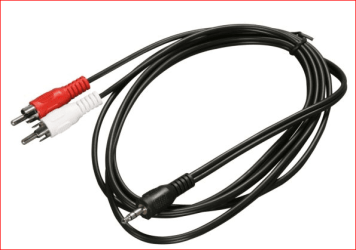
The only way to get audio from your computer to that HTS is by using a cable like this,

rca.PNG

which you would plug the red and white plugs into the corresponding jacks on the HTS, and the 3.5 mm plug into the speaker out on your sound card.
 

My Computer My Computer

At a glance

Win 7 Ultimate x64FX-8350 @ 4.6 GHz so farADATA XPG V1 Series Black 8GB DDR3 1600Sapphire R9 270x Dual-X
Computer type
PC/Desktop
Computer Manufacturer/Model Number
Me
OS
Win 7 Ultimate x64
CPU
FX-8350 @ 4.6 GHz so far
Motherboard
Asus M5A97 EVO
Memory
ADATA XPG V1 Series Black 8GB DDR3 1600
Graphics Card(s)
Sapphire R9 270x Dual-X
Sound Card
Xonar DGX w/ Corsair Vengence 1300
Monitor(s) Displays
Acer S232HL Abid
Screen Resolution
1920x1080
Hard Drives
120 GB OCZ Vertex 3
500 GB Seagate 7200.12
PSU
Antec Earthwatts 650W Green
Case
Antec Three Hundred
Cooling
Cooler Master 212 EVO
Keyboard
Logitech G510
Mouse
Logitech G500s
Internet Speed
35000/3000
Thanks a lot. Well then only thing i need now is that cable :)
 

My Computer My Computer

At a glance

Microsoft Windows 7 UltimateAMD Athlon(tm) II X2 250 Processor, 3000 Mhz,...2.0 GBNvidia Geforce GT 440 512mb GDDR5 memory
Computer Manufacturer/Model Number
-
OS
Microsoft Windows 7 Ultimate
CPU
AMD Athlon(tm) II X2 250 Processor, 3000 Mhz, 2 Core(s)
Memory
2.0 GB
Graphics Card(s)
Nvidia Geforce GT 440 512mb GDDR5 memory
Sound Card
NVIDIA High Definition Audio
Screen Resolution
1680 x 1050
Hard Drives
1 TB
Back
Top