Why is only half of my RAM usable?

hkBattousai

New member
Member
Local time
5:24 PM
Messages
64
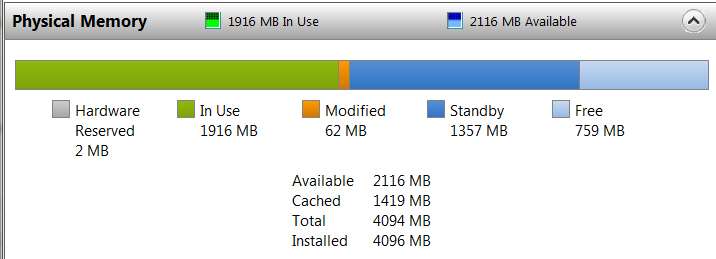
I have performance problems. Even though I have 4GB RAM installed physically, my harddisk runs like crazy. A moment ago, I encountered the system report below, which says that only 2GB of my RAM is usable.

What is the meaning of this?

Here is the screenshot:
unlednzs.png
 

My Computer My Computer

At a glance

Windows 7 Ultimate x64Intel i5 7502x2GB DDR3 Dual-kitATI Radeon HD4670
OS
Windows 7 Ultimate x64
CPU
Intel i5 750
Motherboard
Gigabyte P55A U3DR
Memory
2x2GB DDR3 Dual-kit
Graphics Card(s)
ATI Radeon HD4670
Sound Card
Onboard
Monitor(s) Displays
Samsung SyncMaster P2350
Hard Drives
Western Digital 1TB, 64MB cache, internal
Samsung Story 1.5TB, external
PSU
400W rated, 460W max
Case
CoolerMaster
Cooling
Air
Uncheck Max mem from msconfig (Windows Key+R>msconfig>Boot>Advanced options)

Post a screen shot of the Memory Tab in Resource Monitor
You can view this in Resource Monitor. Start > type "resource" > Open Resource Monitor > Memory Tab > Physical Memory.

Enable memory remap in your BIOS if it is supported
 

My Computer My Computer

At a glance

Windows 10 Pro x64, Arch LinuxIntel Core 2 Quad Q8200 OC'd 3.08GHz8GB DDR2 900MhzMSI GT730 2GB GDDR5 (Kepler)
Computer type
PC/Desktop
Computer Manufacturer/Model Number
Custom Build
OS
Windows 10 Pro x64, Arch Linux
CPU
Intel Core 2 Quad Q8200 OC'd 3.08GHz
Motherboard
Asus Rampage formula LGA775
Memory
8GB DDR2 900Mhz
Graphics Card(s)
MSI GT730 2GB GDDR5 (Kepler)
Sound Card
Supreme FX2
Monitor(s) Displays
Samsung LS22F350 LED
Screen Resolution
1080P
Hard Drives
Kingston SSDNow UV400 120GB, 500GB Hitachi, 2TB Samsung, 500GB Seagate FreeAgent, 640GB Samsung, 160GB Toshiba (Arch)
PSU
AeroCool 500W Bronze
Cooling
Cooler Master V6 + 3X fans
Keyboard
Prolink keyboard
Mouse
Logitech M705
Internet Speed
1MiB/s
Browser
Chrome Beta

My Computer My Computer

At a glance

Windows 7 Ultimate x64Intel i5 7502x2GB DDR3 Dual-kitATI Radeon HD4670
OS
Windows 7 Ultimate x64
CPU
Intel i5 750
Motherboard
Gigabyte P55A U3DR
Memory
2x2GB DDR3 Dual-kit
Graphics Card(s)
ATI Radeon HD4670
Sound Card
Onboard
Monitor(s) Displays
Samsung SyncMaster P2350
Hard Drives
Western Digital 1TB, 64MB cache, internal
Samsung Story 1.5TB, external
PSU
400W rated, 460W max
Case
CoolerMaster
Cooling
Air
2053MB of your RAM is allocated to the hardware, probably to your Radeon HD4670. That amount cannot be used at all. But if you want more memory just add more RAM
 

My Computer My Computer

At a glance

Windows 10 Pro x64, Arch LinuxIntel Core 2 Quad Q8200 OC'd 3.08GHz8GB DDR2 900MhzMSI GT730 2GB GDDR5 (Kepler)
Computer type
PC/Desktop
Computer Manufacturer/Model Number
Custom Build
OS
Windows 10 Pro x64, Arch Linux
CPU
Intel Core 2 Quad Q8200 OC'd 3.08GHz
Motherboard
Asus Rampage formula LGA775
Memory
8GB DDR2 900Mhz
Graphics Card(s)
MSI GT730 2GB GDDR5 (Kepler)
Sound Card
Supreme FX2
Monitor(s) Displays
Samsung LS22F350 LED
Screen Resolution
1080P
Hard Drives
Kingston SSDNow UV400 120GB, 500GB Hitachi, 2TB Samsung, 500GB Seagate FreeAgent, 640GB Samsung, 160GB Toshiba (Arch)
PSU
AeroCool 500W Bronze
Cooling
Cooler Master V6 + 3X fans
Keyboard
Prolink keyboard
Mouse
Logitech M705
Internet Speed
1MiB/s
Browser
Chrome Beta

My Computer My Computer

At a glance

Windows 10, Home Clean InstallIntel Core2 processsor Q8200(2.33Ghz 1333FSB)...6 gbATI Radeon 256MB HD3650
Computer type
PC/Desktop
Computer Manufacturer/Model Number
Dell XPS 420
OS
Windows 10, Home Clean Install
CPU
Intel Core2 processsor Q8200(2.33Ghz 1333FSB) Quad Core Tech
Motherboard
Dell
Memory
6 gb
Graphics Card(s)
ATI Radeon 256MB HD3650
Sound Card
Intergrated 7.1 Channel Audio
Monitor(s) Displays
Dell SP2009W 20"
Hard Drives
640 GB Serial ATA Hard drive
Cooling
Fan
Keyboard
Dell USB Keyboard
Mouse
Dell Premium Optical USB
Internet Speed
DSL 2.85

My Computer My Computer

At a glance

Win 7 Ultimate x64FX-8350 @ 4.6 GHz so farADATA XPG V1 Series Black 8GB DDR3 1600Sapphire R9 270x Dual-X
Computer type
PC/Desktop
Computer Manufacturer/Model Number
Me
OS
Win 7 Ultimate x64
CPU
FX-8350 @ 4.6 GHz so far
Motherboard
Asus M5A97 EVO
Memory
ADATA XPG V1 Series Black 8GB DDR3 1600
Graphics Card(s)
Sapphire R9 270x Dual-X
Sound Card
Xonar DGX w/ Corsair Vengence 1300
Monitor(s) Displays
Acer S232HL Abid
Screen Resolution
1920x1080
Hard Drives
120 GB OCZ Vertex 3
500 GB Seagate 7200.12
PSU
Antec Earthwatts 650W Green
Case
Antec Three Hundred
Cooling
Cooler Master 212 EVO
Keyboard
Logitech G510
Mouse
Logitech G500s
Internet Speed
35000/3000
The 4670 should have it's own memory. there may be a bios setting to turn off dedicated graphics memory.
 

My Computers My Computers

  • At a glance

    Windows 11 ProRyzen 9 5900X32GB G Skill DDR4-3600EVGA RTX 3080 FTW 3 Ultra
    Computer type
    PC/Desktop
    Computer Manufacturer/Model Number
    ALWAYS UNDER CONSTRUCTION
    OS
    Windows 11 Pro
    CPU
    Ryzen 9 5900X
    Motherboard
    Asus X570 Crosshair Viii Hero
    Memory
    32GB G Skill DDR4-3600
    Graphics Card(s)
    EVGA RTX 3080 FTW 3 Ultra
    Sound Card
    On Board/Sennheiser PC37X Headset
    Monitor(s) Displays
    3 X Asus 27"
    Screen Resolution
    2560x1440
    Hard Drives
    2 X 1 TB NVME drives
    PSU
    EVGA 850
    Case
    Phanteks Eclipse P400A
    Cooling
    EVGA 280 AIO
    Keyboard
    Logitech G510s/ Logitech G13
    Mouse
    Logitech G502
    Internet Speed
    24/1
    Antivirus
    ESET/MBAM Pro/SAS Pro
    Browser
    Chrome/ Firefox/ Edge
  • At a glance

    Windows 11 ProIntel Ultra 9 288V32 GB LPDDR5X 8533
    Computer type
    Laptop
    System Manufacturer/Model Number
    Dell 16 Plus
    OS
    Windows 11 Pro
    CPU
    Intel Ultra 9 288V
    Memory
    32 GB LPDDR5X 8533
    Monitor(s) Displays
    16" Mini-LED HDR600 Touch 90 Hz
    Screen Resolution
    2560X1600
    Hard Drives
    1 TB NVME
My problem is solved after taking RAM out of its socket and then replugging it. I think there was a physical disconnection in the RAM socket. Now my system works fine.
 

My Computer My Computer

At a glance

Windows 7 Ultimate x64Intel i5 7502x2GB DDR3 Dual-kitATI Radeon HD4670
OS
Windows 7 Ultimate x64
CPU
Intel i5 750
Motherboard
Gigabyte P55A U3DR
Memory
2x2GB DDR3 Dual-kit
Graphics Card(s)
ATI Radeon HD4670
Sound Card
Onboard
Monitor(s) Displays
Samsung SyncMaster P2350
Hard Drives
Western Digital 1TB, 64MB cache, internal
Samsung Story 1.5TB, external
PSU
400W rated, 460W max
Case
CoolerMaster
Cooling
Air
The 4670 should have it's own memory. there may be a bios setting to turn off dedicated graphics memory.

Doesn't matter if it has its own memory. It will need PCI-e address space and will map to the upper part of the 4GB unless memory remapping is available and enabled. It doesn't need physical memory but it does need address space, which it will take away from that being used by physical RAM.

That is a huge amount of reserved ddress space though. Did you move your graphics card from one PCI-E slot to another?
 

My Computer My Computer

At a glance

Windows 10 Pro. EFI boot partition, full EFI ...i7 4770k 4.4GHz (44-44-43-43 turbo) @ 1.248V16GB (8GBx2) @2200 MHz G.skill Sniper 10-11-1...MSI GTX 970 Gaming 4G
Computer type
PC/Desktop
Computer Manufacturer/Model Number
Home built (GeneO industries)/Model 4
OS
Windows 10 Pro. EFI boot partition, full EFI boot
CPU
i7 4770k 4.4GHz (44-44-43-43 turbo) @ 1.248V
Motherboard
ASUS Maximus VI Hero
Memory
16GB (8GBx2) @2200 MHz G.skill Sniper 10-11-10-30-1, 1.6V
Graphics Card(s)
MSI GTX 970 Gaming 4G
Sound Card
Onboard SupremeFX Audio
Monitor(s) Displays
NEC Spectraview 2490WUXi-SV
Screen Resolution
1920 x 1200
Hard Drives
Samsung 850 Pro 256GB (OS), Samsung 2x 128GB 840 Pro SSD in RAID0, 3x WD Blue 6Gb/s 1TB RAID0, WD 2TB Black external USB 3.0, 2TB WD20EARS Green external USB 3.0, 2x 500GB Seagate and 1 750 GB external USB, 1x 350GB external USB3
PSU
Seasonic X-850 (2012 KM3 model)
Case
Fractal Design Define R4
Cooling
NH-D14, NF-F12, NF-A15; NF-P14, NF-P12,NF-A14, S12A PWM
Keyboard
Cooler Master Storm Quickfire Rapid - Brown
Mouse
Logitech G602
Internet Speed
126.4 Mb/s down, 24.3 Mb/s up
Other Info
USB 3.0 x8 , SATA III x8, eSATA, USB 2.0 x6. Samsung DVD R/W drive.

WEI: CPU 7.8, Memory 7.9, Graphics 7.9, Disk 7.9
The 4670 should have it's own memory. there may be a bios setting to turn off dedicated graphics memory.

Doesn't matter if it has its own memory. It will need PCI-e address space and will map to the upper part of the 4GB unless memory remapping is available and enabled. It doesn't need physical memory but it does need address space, which it will take away from that being used by physical RAM.
Just in passing, I have a 512MB HD4670 card in my ASUS P5Q3 motherboard, and it takes zero memory from my 4GB of RAM.

memorymap.jpg
 

My Computer My Computer

At a glance

Windows 7 Pro x64 (1), Win7 Pro X64 (2)i5-3350p 3.1Ghz/6MB-cache (1); E8400 3.0Ghz/6...8GB PC3-12800 DDR3 (1); 4GB PC3-10600 DDR3 (2)ATI HD7750 (1), (see TV cards); ATI R7 250 (2)
Computer type
PC/Desktop
Computer Manufacturer/Model Number
Home-built, two systems (1) and (2)
OS
Windows 7 Pro x64 (1), Win7 Pro X64 (2)
CPU
i5-3350p 3.1Ghz/6MB-cache (1); E8400 3.0Ghz/6MB-cache (2)
Motherboard
ASUS P8Z77-V Pro (1); ASUS P5Q3 (2)
Memory
8GB PC3-12800 DDR3 (1); 4GB PC3-10600 DDR3 (2)
Graphics Card(s)
ATI HD7750 (1), (see TV cards); ATI R7 250 (2)
Sound Card
Realtek ALC892 HD Audio (1); Realtek ALC1200 HD Audio (2)
Monitor(s) Displays
Eizo HD2441W LCD, Eizo S2433W (1); Eizo 24" S2433W (2)
Screen Resolution
1920x1200, 1920x1200 (1); 1920x1200 (2)
Hard Drives
(1) 1TB SATA-II (7200RPM), 2x2TB SATA-III (7200RPM), 250GB SATA-III (10000RPM) for OS; 2x2TB external USB 3.0

(2) 320GB SATA-II (7200RPM), 750GB SATA-II (7200RPM), 150GB SATA-II (10000RPM) for OS; 2TB external USB 3.0
PSU
Nesteq ECS-6001 600W (1); Nesteq ECS-5001 500W (2)
Case
Acousti-Case 360 (1) and (2)
Cooling
Noctua NH-U12P SE2 for CPU, 2x120mm case fans (1) and (2)
Keyboard
IBM PS/2 (1) and (2)
Mouse
Logitech MX Revolution wireless (1); Microsoft wired (2)
Internet Speed
100mbps down / 10mbps up
Antivirus
Microsoft Security Essentials; Malwarebyte Anti-Malware Pro
Browser
Firefox
Other Info
Ceton InfiniTV 4-tuner cablecard-enabled TV card as well as Hauppauge HVR-2250 OTA/ATSC 2-tuner TV card in (1), running under Win7 WMC
The 4670 should have it's own memory. there may be a bios setting to turn off dedicated graphics memory.

Doesn't matter if it has its own memory. It will need PCI-e address space and will map to the upper part of the 4GB unless memory remapping is available and enabled. It doesn't need physical memory but it does need address space, which it will take away from that being used by physical RAM.
Just in passing, I have a 512MB HD4670 card in my ASUS P5Q3 motherboard, and it takes zero memory from my 4GB of RAM.

If you look at the mapped I/O addresses in the Device Manager you can see how this is all laid out.

memorymap.jpg


That's is because it is remapped to addresses above your usable RAM. Actually, I believe a chunk of your RAM that corresponds to the upper part of the 4GB address space used by the PCI-e graphics is mapped to a higher address space. It is just easier thinking about the graphics/PCI-E i/o space being mapped up above your RAM addresses.
 
Last edited:

My Computer My Computer

At a glance

Windows 10 Pro. EFI boot partition, full EFI ...i7 4770k 4.4GHz (44-44-43-43 turbo) @ 1.248V16GB (8GBx2) @2200 MHz G.skill Sniper 10-11-1...MSI GTX 970 Gaming 4G
Computer type
PC/Desktop
Computer Manufacturer/Model Number
Home built (GeneO industries)/Model 4
OS
Windows 10 Pro. EFI boot partition, full EFI boot
CPU
i7 4770k 4.4GHz (44-44-43-43 turbo) @ 1.248V
Motherboard
ASUS Maximus VI Hero
Memory
16GB (8GBx2) @2200 MHz G.skill Sniper 10-11-10-30-1, 1.6V
Graphics Card(s)
MSI GTX 970 Gaming 4G
Sound Card
Onboard SupremeFX Audio
Monitor(s) Displays
NEC Spectraview 2490WUXi-SV
Screen Resolution
1920 x 1200
Hard Drives
Samsung 850 Pro 256GB (OS), Samsung 2x 128GB 840 Pro SSD in RAID0, 3x WD Blue 6Gb/s 1TB RAID0, WD 2TB Black external USB 3.0, 2TB WD20EARS Green external USB 3.0, 2x 500GB Seagate and 1 750 GB external USB, 1x 350GB external USB3
PSU
Seasonic X-850 (2012 KM3 model)
Case
Fractal Design Define R4
Cooling
NH-D14, NF-F12, NF-A15; NF-P14, NF-P12,NF-A14, S12A PWM
Keyboard
Cooler Master Storm Quickfire Rapid - Brown
Mouse
Logitech G602
Internet Speed
126.4 Mb/s down, 24.3 Mb/s up
Other Info
USB 3.0 x8 , SATA III x8, eSATA, USB 2.0 x6. Samsung DVD R/W drive.

WEI: CPU 7.8, Memory 7.9, Graphics 7.9, Disk 7.9
any os reserves part of the ram memory for device bus like gpu, pci cards, display buffer etc. due to this part of your ram is showing as system reserved and cannot be addressed by the cpu. the best solution would be to put more ram rather than limiting the ram for system reserved processes from the bios.

hope it helps you out
 

My Computer My Computer

At a glance

Windows 7 Professional 64-bitAMD Phenom II X6 1050TGSkill Trident 1600 MHz 4 GB KitMSi N580GTX Lightning Edition
Computer Manufacturer/Model Number
`
OS
Windows 7 Professional 64-bit
CPU
AMD Phenom II X6 1050T
Motherboard
M4A87TD-m EVO\USB3
Memory
GSkill Trident 1600 MHz 4 GB Kit
Graphics Card(s)
MSi N580GTX Lightning Edition
Sound Card
On board
Monitor(s) Displays
dell ST2210 22" Full HD
Screen Resolution
1920x1080
Hard Drives
WD Caviar Green 1TB @ 3 GBps
WD Black Caviar 1TB @ 6 GBps
PSU
Cooler Master GX750
Case
CoolerMaster HAF922
Cooling
Stock
Keyboard
Logitech Classic Keyboard
Mouse
Logitech MX518
Internet Speed
BSNL unlimited @ 512 kbps
any os reserves part of the ram memory for device bus like gpu, pci cards, display buffer etc. due to this part of your ram is showing as system reserved and cannot be addressed by the cpu. the best solution would be to put more ram rather than limiting the ram for system reserved processes from the bios.

hope it helps you out

The OS does not reserve RAM, it reserves virtual address space. It doesn't use RAM for PCI-e/graphics card space. Adding RAM won't make a difference. You will just be wasting your money.
 
Last edited:

My Computer My Computer

At a glance

Windows 10 Pro. EFI boot partition, full EFI ...i7 4770k 4.4GHz (44-44-43-43 turbo) @ 1.248V16GB (8GBx2) @2200 MHz G.skill Sniper 10-11-1...MSI GTX 970 Gaming 4G
Computer type
PC/Desktop
Computer Manufacturer/Model Number
Home built (GeneO industries)/Model 4
OS
Windows 10 Pro. EFI boot partition, full EFI boot
CPU
i7 4770k 4.4GHz (44-44-43-43 turbo) @ 1.248V
Motherboard
ASUS Maximus VI Hero
Memory
16GB (8GBx2) @2200 MHz G.skill Sniper 10-11-10-30-1, 1.6V
Graphics Card(s)
MSI GTX 970 Gaming 4G
Sound Card
Onboard SupremeFX Audio
Monitor(s) Displays
NEC Spectraview 2490WUXi-SV
Screen Resolution
1920 x 1200
Hard Drives
Samsung 850 Pro 256GB (OS), Samsung 2x 128GB 840 Pro SSD in RAID0, 3x WD Blue 6Gb/s 1TB RAID0, WD 2TB Black external USB 3.0, 2TB WD20EARS Green external USB 3.0, 2x 500GB Seagate and 1 750 GB external USB, 1x 350GB external USB3
PSU
Seasonic X-850 (2012 KM3 model)
Case
Fractal Design Define R4
Cooling
NH-D14, NF-F12, NF-A15; NF-P14, NF-P12,NF-A14, S12A PWM
Keyboard
Cooler Master Storm Quickfire Rapid - Brown
Mouse
Logitech G602
Internet Speed
126.4 Mb/s down, 24.3 Mb/s up
Other Info
USB 3.0 x8 , SATA III x8, eSATA, USB 2.0 x6. Samsung DVD R/W drive.

WEI: CPU 7.8, Memory 7.9, Graphics 7.9, Disk 7.9
In many of the newer AMD systems it has a bios setting for sideport, UMA and sideport+UMA. If you have a dedicated graphics card, you can change the default Sideport+uma to just sideport. UMA designates a portion of your physical memory to graphics use exclusively and is not available to the rest of the system. By disabling that you will free up memory.
 

My Computers My Computers

  • At a glance

    Windows 11 ProRyzen 9 5900X32GB G Skill DDR4-3600EVGA RTX 3080 FTW 3 Ultra
    Computer type
    PC/Desktop
    Computer Manufacturer/Model Number
    ALWAYS UNDER CONSTRUCTION
    OS
    Windows 11 Pro
    CPU
    Ryzen 9 5900X
    Motherboard
    Asus X570 Crosshair Viii Hero
    Memory
    32GB G Skill DDR4-3600
    Graphics Card(s)
    EVGA RTX 3080 FTW 3 Ultra
    Sound Card
    On Board/Sennheiser PC37X Headset
    Monitor(s) Displays
    3 X Asus 27"
    Screen Resolution
    2560x1440
    Hard Drives
    2 X 1 TB NVME drives
    PSU
    EVGA 850
    Case
    Phanteks Eclipse P400A
    Cooling
    EVGA 280 AIO
    Keyboard
    Logitech G510s/ Logitech G13
    Mouse
    Logitech G502
    Internet Speed
    24/1
    Antivirus
    ESET/MBAM Pro/SAS Pro
    Browser
    Chrome/ Firefox/ Edge
  • At a glance

    Windows 11 ProIntel Ultra 9 288V32 GB LPDDR5X 8533
    Computer type
    Laptop
    System Manufacturer/Model Number
    Dell 16 Plus
    OS
    Windows 11 Pro
    CPU
    Intel Ultra 9 288V
    Memory
    32 GB LPDDR5X 8533
    Monitor(s) Displays
    16" Mini-LED HDR600 Touch 90 Hz
    Screen Resolution
    2560X1600
    Hard Drives
    1 TB NVME
This can also occur if you have two different types of memory installed. I saw this on a Dell Precision T5400 where 4x2GB (8GB) of RAM was added to a workstation that already had 4x512M (2GB) of RAM installed, filling all available slots. Recognized and identified the size of each DIMMS, however total memory as stated by BIOS was 5GB.

Windows 7 x64 Pro also saw 10GB, but only 5GB was available. Removing the 4x512MB modules allowed both the BIOS and the operating system to "see" 8GB.
 

My Computer My Computer

At a glance

Win7 Pro
OS
Win7 Pro
Help!!

my RAM doesent get enabled, it says i have 12gb but only 4GB usable, I have tried to enable ''memory reamp feature'' I have tried also to use maximum memory on BOOT advanced options on msconfig, but nothing works.

realy want to use it all.
 

My Computer My Computer

At a glance

windows 7 professional
OS
windows 7 professional
my RAM doesent get enabled, it says i have 12gb but only 4GB usable, I have tried to enable ''memory reamp feature'' I have tried also to use maximum memory on BOOT advanced options on msconfig, but nothing works.

realy want to use it all.
Can you please provide more details about your hardware. Your "system specs" are empty.

Also, can you run CPU-Z and post screenshots here of its various tabs? In particular its Memory and SPD tabs (with SPD for each of your memory slots) would be very useful.

Finally, can you post a screenshot from TASKMGR, -> Performance tab -> RESOURCE MONITOR button -> MEMORY tab, and then the lower part of the window that shows PHYSICAL MEMORY.
 

My Computer My Computer

At a glance

Windows 7 Pro x64 (1), Win7 Pro X64 (2)i5-3350p 3.1Ghz/6MB-cache (1); E8400 3.0Ghz/6...8GB PC3-12800 DDR3 (1); 4GB PC3-10600 DDR3 (2)ATI HD7750 (1), (see TV cards); ATI R7 250 (2)
Computer type
PC/Desktop
Computer Manufacturer/Model Number
Home-built, two systems (1) and (2)
OS
Windows 7 Pro x64 (1), Win7 Pro X64 (2)
CPU
i5-3350p 3.1Ghz/6MB-cache (1); E8400 3.0Ghz/6MB-cache (2)
Motherboard
ASUS P8Z77-V Pro (1); ASUS P5Q3 (2)
Memory
8GB PC3-12800 DDR3 (1); 4GB PC3-10600 DDR3 (2)
Graphics Card(s)
ATI HD7750 (1), (see TV cards); ATI R7 250 (2)
Sound Card
Realtek ALC892 HD Audio (1); Realtek ALC1200 HD Audio (2)
Monitor(s) Displays
Eizo HD2441W LCD, Eizo S2433W (1); Eizo 24" S2433W (2)
Screen Resolution
1920x1200, 1920x1200 (1); 1920x1200 (2)
Hard Drives
(1) 1TB SATA-II (7200RPM), 2x2TB SATA-III (7200RPM), 250GB SATA-III (10000RPM) for OS; 2x2TB external USB 3.0

(2) 320GB SATA-II (7200RPM), 750GB SATA-II (7200RPM), 150GB SATA-II (10000RPM) for OS; 2TB external USB 3.0
PSU
Nesteq ECS-6001 600W (1); Nesteq ECS-5001 500W (2)
Case
Acousti-Case 360 (1) and (2)
Cooling
Noctua NH-U12P SE2 for CPU, 2x120mm case fans (1) and (2)
Keyboard
IBM PS/2 (1) and (2)
Mouse
Logitech MX Revolution wireless (1); Microsoft wired (2)
Internet Speed
100mbps down / 10mbps up
Antivirus
Microsoft Security Essentials; Malwarebyte Anti-Malware Pro
Browser
Firefox
Other Info
Ceton InfiniTV 4-tuner cablecard-enabled TV card as well as Hauppauge HVR-2250 OTA/ATSC 2-tuner TV card in (1), running under Win7 WMC
Help!

I'm having the same issue.
I have reseated each of the 4 RAM modules.
With all 4 modules installed it shows 8.00 GB (3.21 GB usable).
I have booted with only 2 installed, and it shows as 4.00 GB installed, but still the 3.21 usable.
 

Attachments

  • 1.png
    1.png
    4.6 KB · Views: 22
  • 2.png
    2.png
    25.8 KB · Views: 1

My Computer My Computer

At a glance

Win 7 Pro, 32-biti7 8604 x 2gig
Computer type
PC/Desktop
Computer Manufacturer/Model Number
HP
OS
Win 7 Pro, 32-bit
CPU
i7 860
Memory
4 x 2gig
I really just think it has something to do with the motherboard, I have 2 other pc`s that it`s happened on and I`ve never found a way to change it.

And simply installing 64 bit is not the answer either.
 

My Computer My Computer

At a glance

Windows 10 Pro x64Intel Core i7 6700KGSkill TridentZ RGB 16GB 3600 16-16-16-36EVGA GTX 980 Ti SC x2
Computer type
PC/Desktop
Computer Manufacturer/Model Number
Skylake Special #666
OS
Windows 10 Pro x64
CPU
Intel Core i7 6700K
Motherboard
Asus Sabertooth Z170 Mark 1
Memory
GSkill TridentZ RGB 16GB 3600 16-16-16-36
Graphics Card(s)
EVGA GTX 980 Ti SC x2
Sound Card
Realtek High Definition
Monitor(s) Displays
AOC G2460PG
Screen Resolution
1920 x 1080 144Hz
Hard Drives
Samsung 860 Pro 256GB, Seagate Barracuda 4TB x2
PSU
EVGA 1000 P2, EVGA White Custom Braided Cables
Case
Corsair Vengeance C70 Gunmetal Black
Cooling
Corsair H100i v2, Corsair ML120 x2, Thermal Grizzly Kryonaut
Keyboard
Logitech G910 Orion Spectrum
Mouse
Logitech G700s
Internet Speed
Verizon Fios Quantum Gateway 75/75
Antivirus
Windows Defender, Malwarebytes Free 3.8.3
Browser
Chrome
Other Info
Corsair SP120 x4, LG Blu-ray Drive, Durabrand HT-395 100 Watt Dolby Digital Amp, Corsair H2100 Wireless 7.1 Headset
Savage one your issue is because you are using 32bit windows

If you were using 64bit you would be able to use all of the ram sorry to say but you wasted money on a 8gb kit

Hardware reserve is either onboard graphics gobbled it up or another device that uses shared ram

if he had a solid GPU it wouldn't be much for hardware reserve because it has it's own dedicated ram
 

Attachments

  • 32.PNG
    32.PNG
    3.9 KB · Views: 19

My Computer My Computer

At a glance

Windows 10 Home Premium 64bit sp1Intel I7-6700K @ 4.6 Ghz 1.344 volts everyday OC32GB G-Skill TridentZ 3200mhz 16-18-18-38 DDR4Sli Gigabyte Windforce GTX 980 G1
Computer type
PC/Desktop
Computer Manufacturer/Model Number
CoreI7-6700K MrFingerIII Special Builds
OS
Windows 10 Home Premium 64bit sp1
CPU
Intel I7-6700K @ 4.6 Ghz 1.344 volts everyday OC
Motherboard
Asrock Fatality K6 Z170 Socket 1151
Memory
32GB G-Skill TridentZ 3200mhz 16-18-18-38 DDR4
Graphics Card(s)
Sli Gigabyte Windforce GTX 980 G1
Sound Card
AC97 Creative Rage Tactic 3D Headphones Bluetooth
Monitor(s) Displays
27" Asus ROG Swift PG278Q G-Sync 48" Vizio Smart HD TV
Screen Resolution
2560x1440p 27"- 48" Currently Gaming at 2560x1440p Res 2K
Hard Drives
250GB Samsung Evo840SSD Seagate baracuda 500 GB WD Mybook 500Gb 1TB Seagate Barracuda
PSU
HX1050w Corsair Silver 80plus certified crosfire/sli
Case
Enthod Pro Full Tower
Cooling
Corsair H110i GT 280 mm High Performance WaterBlock
Keyboard
Logitech wireless keyboard
Mouse
Logitech wireless mouse
Internet Speed
Cox Cable 100+ mb
Antivirus
WebRoot Spysweeper with Antivirus
Browser
IE-10, Chrome, Opera
Other Info
My Other Rig is a AMD FX8320E @4.6Ghz 16GB Ballistic Sport Ram
Mobo Asrock Fatality 990FX 120GB OCZ SSD 1TB Seagate Barracuda Corsair H75 Cooling PSU Corsair CX750
GPU GTX Gigabyte 970G1
Back
Top