Dual disk system booting with incorrect drive letters

ultralame

New member
Here is what I did:

1) Installed Windows 7 Ultimate on a new system with two physical disk drives (c: is an SSD, d: is standard disk)

2) While installing, used SYSPREP to move Users and ProgramData to d:\

3) Pulled the D:\ drive to copy info on it from the system I am replacing

4) MISTAKENLY booted the system and attempted to log in. Got an error (Userprofile was on the missing drive) and shut down. NOTE: Login Picture was missing.

5) Replaced the d: drive.

6) When I boot, I see my profile pic, but I get the error "The user profile services service failed the logon"

7) I had not yet created a second account or enabled the admin account.

8) Opened Repair. In the dos prompt, I see that the boot drive is now "E:\" and the data drive is coming up as c:\ (d:\ = temp and e:\ = DVD for the repair).

9) I tried to restore, but cannot locate a restore point (I know one was created by an install process just before I pulled the drive).

Any ideas? I haven't even created the Admin account in the Repair because I am afraid it will be created with the wrong drive references.
 

My Computer

OS
XP, Vista, W7, all flavors

My Computer

Computer type
PC/Desktop
Computer Manufacturer/Model Number
Self built custom
OS
64-bit Windows 11 Pro for Workstations
CPU
Intel i7-8700K OC'd to 5 GHz
Motherboard
ASUS ROG Maximus XI Formula Z390
Memory
64 GB (4x16GB) G.SKILL TridentZ RGB DDR4 3600 MHz
Graphics Card(s)
ASUS ROG-STRIX-GTX1080TI-O11G-GAMING
Sound Card
Integrated
Monitor(s) Displays
2 x Samsung Odyssey G7 27"
Screen Resolution
2560x1440
Hard Drives
1TB Samsung 990 PRO M.2,
4TB Samsung 990 PRO PRO M.2,
TerraMaster F8 SSD Plus NAS
PSU
Seasonic Prime Titanium 850W
Case
Thermaltake Core P3
Cooling
Corsair Hydro H115i
Keyboard
Logitech wireless K800
Mouse
Logitech MX Master 4
Internet Speed
2 Gb/s Download and 100 Mb/s Upload
Antivirus
Malwarebyte Anti-Malware Premium
Browser
Google Chrome
Other Info
Logitech Z625 speaker system,
Logitech BRIO 4K Pro webcam,
HP Color LaserJet Pro MFP M477fdn,
APC SMART-UPS RT 1000 XL - SURT1000XLI,
Galaxy S23 Plus phone
Thank you for those links, and thanks for the Alignment info. I have done a lot of research on the SSDs, and I had not seen that yet (annoying!). This explains why I have so much better performance after a clean install rather than a clone (that was a while ago though).
 

My Computer

OS
XP, Vista, W7, all flavors
Update for this...

When I initially booted from the install disk and chose Restore from the DIALOG that popped up, it did not find any restore points.

So then I entered the repair section and ran a startup repair. This did not help.

So I went back to the Setup DVD and entered the repair (bypassed Restore choice) and loaded a CMD window to look around (I made no changes).

Then I ran the restore from the list of repair choices, and this found by restore points. I ran back the last restore before my problems and it appears that I am back up and running.
 

My Computer

OS
XP, Vista, W7, all flavors
Thanks Brink/Shawn. I saw that, and since I only had the one profile created the new install was going to be my backup; but the problems I had scare me; if I ever boot without the D: drive, I may lose my ability to log in, as the drive letters may get screwed up (they might get screwed up now!).

I'll look into this, but for the moment I am back up and running.
 

My Computer

OS
XP, Vista, W7, all flavors

My Computer

Computer Manufacturer/Model Number
* BFK Customs *
OS
W 7 64-bit Ultimate
CPU
Intel Q9550 Yorkfield
Motherboard
ASUS P5Q Pro
Memory
8GB Dominator 8500C5D
Graphics Card(s)
ATI : XFX 5870
Sound Card
Realtek HD Audio 7-1
Monitor(s) Displays
1x 47" LCD HDMI & 3x 26" LCD HDMI
Screen Resolution
1920x1080P & 1920x1200
Hard Drives
1x 80GB Intel X25-M G2 SSD : 1x 500GB & 1x 640GB WD Caviar Black(s)
PSU
Corsair 620HX
Case
Cooler Master RC-690
Cooling
Tuniq Tower 120, 2x 140mm and 3x 120mm case fans
Keyboard
Microsoft 500
Mouse
Razer Diamondback 3G
Internet Speed
14 Mb/s
Other Info
1x Koutech 3Gb/s SATA HDD Hot Swap Rack
Thanks. That's a pretty good idea- but isn't there a way to do this without the task scheduler? Seems like this is something that Windows should be doing anyway.
 

My Computer

OS
XP, Vista, W7, all flavors
Hello again.


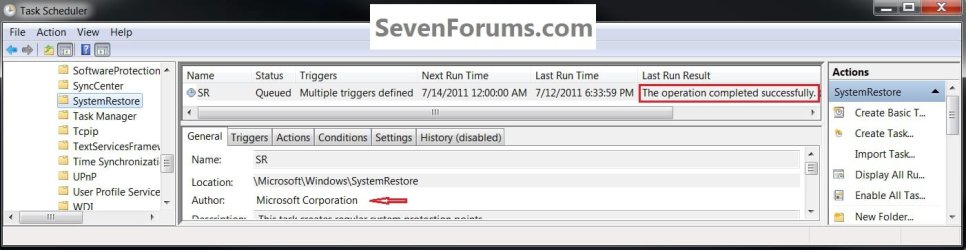
Windows is "supposed" to auto-create SR points on a regular basis but those of us (speaking mostly for myself) that have had a play with SR a lot haven't been able to determine what that specific schedule is supposed to be.

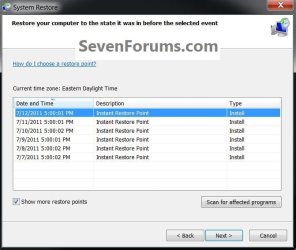
The Windows Task Scheduler is what Windows 7 supposedly uses to create SR points but as you can see it says the "last run" completed successfully though there is no corresponding SR point listed, only the ones created by the task I set to run every day at 5:00 PM.
click to enlarge
TS.jpg
SR.jpg
 

My Computer

Computer Manufacturer/Model Number
* BFK Customs *
OS
W 7 64-bit Ultimate
CPU
Intel Q9550 Yorkfield
Motherboard
ASUS P5Q Pro
Memory
8GB Dominator 8500C5D
Graphics Card(s)
ATI : XFX 5870
Sound Card
Realtek HD Audio 7-1
Monitor(s) Displays
1x 47" LCD HDMI & 3x 26" LCD HDMI
Screen Resolution
1920x1080P & 1920x1200
Hard Drives
1x 80GB Intel X25-M G2 SSD : 1x 500GB & 1x 640GB WD Caviar Black(s)
PSU
Corsair 620HX
Case
Cooler Master RC-690
Cooling
Tuniq Tower 120, 2x 140mm and 3x 120mm case fans
Keyboard
Microsoft 500
Mouse
Razer Diamondback 3G
Internet Speed
14 Mb/s
Other Info
1x Koutech 3Gb/s SATA HDD Hot Swap Rack
Back
Top