Active window changes to inactive on its own

thechamp31

New member
Hello,

I've started to experience a problem with my 9 month old laptop. It happened once a few months ago, then a couple weeks ago, now twice in one week so am under the impression it is only going to get worse.

I have searched a number of forums/threads and some people have similar issues, but not exactly the same. Doesn't seem there were any real resolutions, only people suggesting generic fixes like, 'Did you reboot?'

The problem pops up sporatically. It can happen 20 times in one minute, then disappear for 10 minutes. When I am in an active window, and this can be anything from Word, Outlook, Firefox, Skype, MSN Messenger, or Google Talk, I can be typing away or scrolling down the page in Firefox when all of a sudden the active window becomes inactive. That means that I can no longer type or scroll. Each time this happens I have to re-click on the window. Sometimes it reverts back the next second, sometimes 20 seconds...sometimes minutes. It is very annoying and inconvenient.

I have: rebooted several times, tried changing the background profiles, and created another user account. In that other use account, the issue doesn't occur (yet anyway). That would leave me to believe I may have something wrong with my profile based on other forum topics. If the resolution is to create a new profile, that is a large pain because it takes a long time to get everything the way you want it, all the software you need, and tweaked to your liking. If I have to do this every few months or more, then Windows 7 has some issues.

Anyone have any suggestions or experience something similar?

Thanks.
 

My Computer

Computer Manufacturer/Model Number
Fujitsu Lifebook
OS
Windows 7 Home Premium x64
CPU
P6100 @ 2Ghz
Hi, at least I know I am not alone !!! This is exactly what's happening to me in my 2 week old Dell notebook. I have also tried everything and cannot solve the problem. Help would be appreciated.
 

My Computer

OS
win 7 professional x64
By the way, I have also tried using another account but the problem appeared in the new account very quickly. This did not work for me.
 

My Computer

OS
win 7 professional x64
Welcome thechamp31 and elito to Seven Forums.

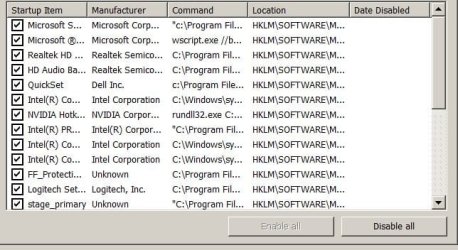
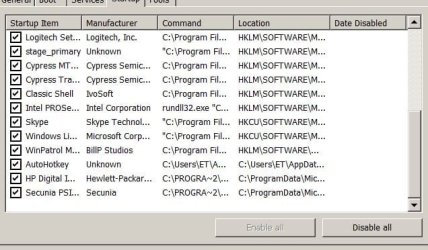
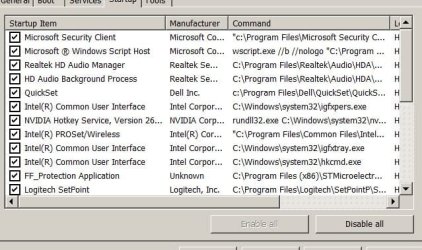
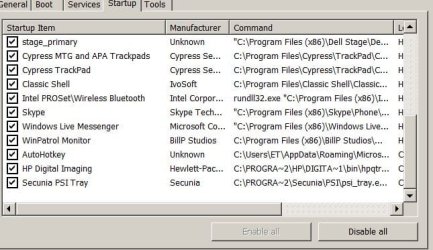
Would you both please http://www.sevenforums.com/93869-post1.html of you startup programs? Type msconfig in the search from the start orb, open the startup tab.
Some programs running in the backgroiund can steal focus.
 

My Computer

Computer type
PC/Desktop
Computer Manufacturer/Model Number
Home Built Desktop By DataTech
OS
Windows 7 Ultimate X64 SP1
CPU
Intel i5-2550K, Differing ~4.4-4.8GHz No built in GPU
Motherboard
ASUS P8Z68-V PRO/GEN3
Memory
16GB G.Skill Sniper 1866MHz @ 2133MHz 2x8GB
Graphics Card(s)
ASUS GTX650TIB-DC2OC-2GD5, (650TI Boost)
Sound Card
Onboard Realtek 5-1
Monitor(s) Displays
Samsung P2570HD
Screen Resolution
1920x1080
Hard Drives
Samsung 840 Pro 256GB SSD for OS, 500GB Seagate Constellation (Enterprise drive) for Data
PSU
Corsair HX650W
Case
Inwin Dragon Rider
Cooling
Hyper 212 EVO w/two Noctua fans, push-pull, @1300 RPM
Keyboard
E-Z Eyes, bright yellow keys with large characters
Mouse
steelseries SENSEI Laser Pro Gaming
Internet Speed
48-51Mbs Mbs down, 11 Mbs up Xfinity Cable
Antivirus
Norton Internet Security 2013
Browser
IE 10, Opera, Pale Moon if needed
Other Info
4 case fans, LG BluRay-RE, ASUS DVD-RW, Mr. Fusion power supply, 1.21 gigawatts.
Capture01.JPG

Capture02.JPG

Hi Britton30, I am attaching the requested screenshots. Thanks for your help.
 

My Computer

OS
win 7 professional x64
Capture1.JPG

Capture2.JPG

I am enclosing a new version of the same screenshots, because the column's width was very narrow. This ones will give a better reading. Thanks
 

My Computer

OS
win 7 professional x64
Thanks. Two things I know don't NEED to run at start are nVIDIA Hotkeys and Windows Live! Messenger, that can be opened without starting with the PC.
Try disabling the first half, reboot, and check for the problem, Leave your Security and AV runing. If you still have the proble, reenable the first half, disable the next half, reboot an check again. If these methods correct the probel, you can next disable half of the half where the problem occurs, and follow this method narrowing it down to one. A reboot will be required after each change.
Before starting http://www.sevenforums.com/tutorials/697-system-restore-point-create.html using Option two in case something goes wrong.
 

My Computer

Computer type
PC/Desktop
Computer Manufacturer/Model Number
Home Built Desktop By DataTech
OS
Windows 7 Ultimate X64 SP1
CPU
Intel i5-2550K, Differing ~4.4-4.8GHz No built in GPU
Motherboard
ASUS P8Z68-V PRO/GEN3
Memory
16GB G.Skill Sniper 1866MHz @ 2133MHz 2x8GB
Graphics Card(s)
ASUS GTX650TIB-DC2OC-2GD5, (650TI Boost)
Sound Card
Onboard Realtek 5-1
Monitor(s) Displays
Samsung P2570HD
Screen Resolution
1920x1080
Hard Drives
Samsung 840 Pro 256GB SSD for OS, 500GB Seagate Constellation (Enterprise drive) for Data
PSU
Corsair HX650W
Case
Inwin Dragon Rider
Cooling
Hyper 212 EVO w/two Noctua fans, push-pull, @1300 RPM
Keyboard
E-Z Eyes, bright yellow keys with large characters
Mouse
steelseries SENSEI Laser Pro Gaming
Internet Speed
48-51Mbs Mbs down, 11 Mbs up Xfinity Cable
Antivirus
Norton Internet Security 2013
Browser
IE 10, Opera, Pale Moon if needed
Other Info
4 case fans, LG BluRay-RE, ASUS DVD-RW, Mr. Fusion power supply, 1.21 gigawatts.
Apologies...I've been travelling and didn't notice there had been some action on this thread. Many thanks for your help. In the past week, it hasn't happened until just recently (which is what jogged my memory to check the forum).

Attached are the print screens.
 

Attachments

My Computer

Computer Manufacturer/Model Number
Fujitsu Lifebook
OS
Windows 7 Home Premium x64
CPU
P6100 @ 2Ghz

My Computer

Computer type
PC/Desktop
Computer Manufacturer/Model Number
Home Built Desktop By DataTech
OS
Windows 7 Ultimate X64 SP1
CPU
Intel i5-2550K, Differing ~4.4-4.8GHz No built in GPU
Motherboard
ASUS P8Z68-V PRO/GEN3
Memory
16GB G.Skill Sniper 1866MHz @ 2133MHz 2x8GB
Graphics Card(s)
ASUS GTX650TIB-DC2OC-2GD5, (650TI Boost)
Sound Card
Onboard Realtek 5-1
Monitor(s) Displays
Samsung P2570HD
Screen Resolution
1920x1080
Hard Drives
Samsung 840 Pro 256GB SSD for OS, 500GB Seagate Constellation (Enterprise drive) for Data
PSU
Corsair HX650W
Case
Inwin Dragon Rider
Cooling
Hyper 212 EVO w/two Noctua fans, push-pull, @1300 RPM
Keyboard
E-Z Eyes, bright yellow keys with large characters
Mouse
steelseries SENSEI Laser Pro Gaming
Internet Speed
48-51Mbs Mbs down, 11 Mbs up Xfinity Cable
Antivirus
Norton Internet Security 2013
Browser
IE 10, Opera, Pale Moon if needed
Other Info
4 case fans, LG BluRay-RE, ASUS DVD-RW, Mr. Fusion power supply, 1.21 gigawatts.
Here you go..thanks.
 

Attachments

  • ss1.JPG
    ss1.JPG
    73.9 KB · Views: 89
  • ss2.JPG
    ss2.JPG
    67.7 KB · Views: 79
  • ss3.JPG
    ss3.JPG
    68.9 KB · Views: 79

My Computer

Computer Manufacturer/Model Number
Fujitsu Lifebook
OS
Windows 7 Home Premium x64
CPU
P6100 @ 2Ghz
For absolute sure, I'd uncheck uTorrent/BitTorrent.

I'd also try unchecking that "Fujitsu hotkey utility".
 

My Computer

Computer type
PC/Desktop
Computer Manufacturer/Model Number
Home-built, two systems (1) and (2)
OS
Windows 7 Pro x64 (1), Win7 Pro X64 (2)
CPU
i5-3350p 3.1Ghz/6MB-cache (1); E8400 3.0Ghz/6MB-cache (2)
Motherboard
ASUS P8Z77-V Pro (1); ASUS P5Q3 (2)
Memory
8GB PC3-12800 DDR3 (1); 4GB PC3-10600 DDR3 (2)
Graphics Card(s)
ATI HD7750 (1), (see TV cards); ATI R7 250 (2)
Sound Card
Realtek ALC892 HD Audio (1); Realtek ALC1200 HD Audio (2)
Monitor(s) Displays
Eizo HD2441W LCD, Eizo S2433W (1); Eizo 24" S2433W (2)
Screen Resolution
1920x1200, 1920x1200 (1); 1920x1200 (2)
Hard Drives
(1) 1TB SATA-II (7200RPM), 2x2TB SATA-III (7200RPM), 250GB SATA-III (10000RPM) for OS; 2x2TB external USB 3.0

(2) 320GB SATA-II (7200RPM), 750GB SATA-II (7200RPM), 150GB SATA-II (10000RPM) for OS; 2TB external USB 3.0
PSU
Nesteq ECS-6001 600W (1); Nesteq ECS-5001 500W (2)
Case
Acousti-Case 360 (1) and (2)
Cooling
Noctua NH-U12P SE2 for CPU, 2x120mm case fans (1) and (2)
Keyboard
IBM PS/2 (1) and (2)
Mouse
Logitech MX Revolution wireless (1); Microsoft wired (2)
Internet Speed
100mbps down / 10mbps up
Antivirus
Microsoft Security Essentials; Malwarebyte Anti-Malware Pro
Browser
Firefox
Other Info
Ceton InfiniTV 4-tuner cablecard-enabled TV card as well as Hauppauge HVR-2250 OTA/ATSC 2-tuner TV card in (1), running under Win7 WMC
Hmm....that should have popped out as a possible culprit, not sure how I overlooked that one. After a reboot, it isn't happening anymore. Although, it is quite random and comes and goes. It was quite bad though right up until then and rebooting alone never helped it before so fingers crossed!

Thanks for your time and I'll keep this open in case it mysteriously pops up again.

Cheers.
 

My Computer

Computer Manufacturer/Model Number
Fujitsu Lifebook
OS
Windows 7 Home Premium x64
CPU
P6100 @ 2Ghz
I have had this very annoying problem but I traced it to a TP-Link WiFi dongle. I updated the firmware and the drivers, and the problem disappeared.
 

My Computer

Computer Manufacturer/Model Number
Locally built clone
OS
Windows 7 Professional 32 bit
CPU
Intel Core 2 Duo CPU 4500 @2.20GHz
Motherboard
ASUS
Memory
2 GB
Graphics Card(s)
NVIDIA 512 Mb memory
Sound Card
Onboard
Monitor(s) Displays
Samsung 2032NW SyncMaster
Hard Drives
4 WD and Hitachi HD of 500 to 1000 GB
Cooling
3 fans
I need help too!

I know this post is now years old - but I am having the same annoying issue. can someone please HELP MEEE!!??!

:cry::cry::cry::cry::cry:
 

My Computer

Computer type
Laptop
Computer Manufacturer/Model Number
dell
OS
Windows 7 64-bit
This can happen with palm drag on a laptop touchpad, cursors jump around, windows change focus. The best way to remedy it is to go into the Touchpad software to decrease the sensitivity, or even better use a mouse and set it to disable the touchpad whenever USB mouse is used.
 
I see that this is an old thread, but I have this exact problem... my computer also has the active window go inactive. (It seems to happen more often if the computer has been on for a long time.) It also seems to happen more and more often as time goes on.

It is not from a touchpad, as I don't have a touchpad. Also, it happens while I type, while I play a game, while I use a mouse or if I am watching a movie on the other side of the room. This window has become inactive three times while I was typing this. :(

I attached a copy of my startup programs.

I'm running Win7 pro 64 bit on a computer with a i7-4770 cpu. I built it myself January of 2014, so it's possible I did something wrong, but everything seems to be good other than this problem.

I hope that someone can advise me.
 

Attachments

  • startup screenshot.png
    startup screenshot.png
    87.3 KB · Views: 2
Last edited:

My Computer

Computer type
PC/Desktop
OS
windows 7 professional 64 bit
CPU
Intel core i7-4770 -- 3.4 ghz, 8 gb cashe
Motherboard
Gigabyte GA-H87 D3H w/ Dual DDR3 1600, CrossFireX, HDMI, DVI
Memory
16 GB
Graphics Card(s)
AMD Radon R9 270x hawk PCI-E
Hard Drives
Sandisk SSD (C:)
Seagate 1TB
WD 1TB Green
Case
Fractal Design R4
Cooling
Noctua NH-C12P SE14 (mx34317)
Antivirus
Kaspersky
Browser
Chrome
Hello,

I've started to experience a problem with my 9 month old laptop. It happened once a few months ago, then a couple weeks ago, now twice in one week so am under the impression it is only going to get worse.

I have searched a number of forums/threads and some people have similar issues, but not exactly the same. Doesn't seem there were any real resolutions, only people suggesting generic fixes like, 'Did you reboot?'

The problem pops up sporatically. It can happen 20 times in one minute, then disappear for 10 minutes. When I am in an active window, and this can be anything from Word, Outlook, Firefox, Skype, MSN Messenger, or Google Talk, I can be typing away or scrolling down the page in Firefox when all of a sudden the active window becomes inactive. That means that I can no longer type or scroll. Each time this happens I have to re-click on the window. Sometimes it reverts back the next second, sometimes 20 seconds...sometimes minutes. It is very annoying and inconvenient.

I have: rebooted several times, tried changing the background profiles, and created another user account. In that other use account, the issue doesn't occur (yet anyway). That would leave me to believe I may have something wrong with my profile based on other forum topics. If the resolution is to create a new profile, that is a large pain because it takes a long time to get everything the way you want it, all the software you need, and tweaked to your liking. If I have to do this every few months or more, then Windows 7 has some issues.

Anyone have any suggestions or experience something similar?

Thanks.
Did you Installed AutoDesk it may interfere in between to turn active window into inactive
 

My Computer

Computer type
PC/Desktop
Computer Manufacturer/Model Number
HP
OS
Windows 7 Ultimate x64 bit
CPU
3.47
Memory
8GB
Graphics Card(s)
1
Hard Drives
1
Antivirus
Eset nod 32
Browser
google chrome
Back
Top