Solved i7 920 C0 Overclock 3.6ghz-3.8ghz help

thepower99

New member
Hi guys I have been running my cpu at 3.8ghz for some time now, as of late i have noticed it is not entirely stable, if i run it to hard for too long i get a BSOD with the error "clock innterrupt not received on a secondary processor within the allocated time interval".
bsod1.jpg (it never actually finishes the "crash dump")
I am aiming for around a 3.6 to 3.8 overclock, which seeing as i have an earler revision C0 chip is probably all i can get. I have a Trition 81 cooler which at the time i got the system was almost the only one available, it seems to work alright but the cpu does get a bit hot, hence the reason for a less aggressive target.
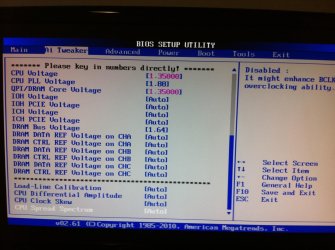
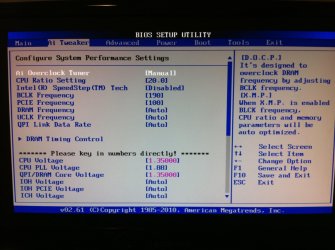
Current timing's below:
Cpu ratio: 20.0
Base clock: 190
PCIE freqency: 100
Cpu Voltage 1.35
Cpu Pll Voltage:1.88
Qpi/Dram Core voltage:1.35
Dram Bus voltage 1.64
Speedstep : disabled

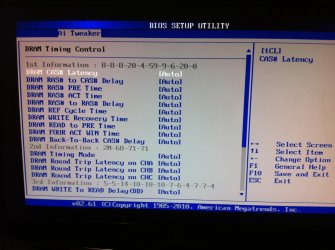
Everything else on auto see images
bios1.jpg
bios2.jpg
bios3.jpg

I would rather it be stable and cool than a high overclock

Any help would be great,
 

My Computer

Computer type
PC/Desktop
Computer Manufacturer/Model Number
Custom
OS
Windows 7 Professional 64bit
CPU
Intel i7 920 OC 3.8ghz
Motherboard
Asus P6T
Memory
20gb Kingston DDR3
Graphics Card(s)
Gtx 460 1gb x2 SLI
Sound Card
Realtek HD audio inbuilt 7.1 surround
Monitor(s) Displays
SyncMaster 2333
Screen Resolution
1920*1080
Hard Drives
Seagate es2 barracuda 1TB,
Kingston 128gb SSD,
3 WD 2TB green drives ,
PSU
1200 watt
Cooling
Trition 81
One thing you can do right off the bat is set the memory timings, command rate (if an option), and the voltage manually.

Another thing is, and I'm presuming here, you can just crank up the multiplier and bus speeds and expect instant stability. You have to do it in incremental steps. Overclocking is a time consuming process and you're going to be doing this for hours (and i do mean hours). If you did work your way to where you're aiming now, what was the last stable frequency/voltage? In any case, 1.35v is a little low for 3.6 or 3.8.
 

My Computer

Computer type
PC/Desktop
Computer Manufacturer/Model Number
Custom
OS
Windows 10 Technical Preview - x64
CPU
Core i5-3570K - 4.5GHz
Motherboard
ASUS Sabertooth Z77 [B. 2003]
Memory
G.Skill Sniper 12GB DDR3-1600
Graphics Card(s)
ASUS GeForce GTX 970 STRIX
Monitor(s) Displays
Acer K272HUL
Screen Resolution
2560x1440
Hard Drives
Samsung 840 Evo 250GB (OS), Samsung Spinpoint F3 HD103SJ 1TB (Games), Seagate Expansion 1TB (Additional storage, Backup)
PSU
Cooler Master Real Power Pro 750W, Corsair HX1000W
Case
HAF-X
Cooling
XSPC Rasa RS360
Keyboard
Gigabyte Osmium, Noppoo Choc Mid 87, Corsair K70 RGB
Mouse
Roccat Kova
Internet Speed
50 Mbps up, 50 Mbps down
Antivirus
BitDefender TS 2013, Malwarebytes AM, SUPERAntiSpyware
Browser
Google Chrome
Other Info
Razer Vespula Gaming Pad, Razer eXactMat, Blackmagic Intensity Pro, Corsair Vengeance 1500 USB Headset, Google/ASUS Nexus 7
One thing you can do right off the bat is set the memory timings, command rate (if an option), and the voltage manually.

Another thing is, and I'm presuming here, you can just crank up the multiplier and bus speeds and expect instant stability. You have to do it in incremental steps. Overclocking is a time consuming process and you're going to be doing this for hours (and i do mean hours). If you did work your way to where you're aiming now, what was the last stable frequency/voltage? In any case, 1.35v is a little low for 3.6 or 3.8.

Not to sure how to set the memory timings which is why i never did it, i am running triple channel memory which i believe complicates things, as well as different brands/modules.
The last it was truly stable, which was quite a while ago 8 months + was at 3.3ghz, almost everything was at auto except the base clock and the cpu voltage, i think the cpu voltage was around 1.3 and the base clock around 170
 

My Computer

Computer type
PC/Desktop
Computer Manufacturer/Model Number
Custom
OS
Windows 7 Professional 64bit
CPU
Intel i7 920 OC 3.8ghz
Motherboard
Asus P6T
Memory
20gb Kingston DDR3
Graphics Card(s)
Gtx 460 1gb x2 SLI
Sound Card
Realtek HD audio inbuilt 7.1 surround
Monitor(s) Displays
SyncMaster 2333
Screen Resolution
1920*1080
Hard Drives
Seagate es2 barracuda 1TB,
Kingston 128gb SSD,
3 WD 2TB green drives ,
PSU
1200 watt
Cooling
Trition 81
Why are you running three different DIMM's?

That alone complicates thing more than necessary.
 

My Computer

Computer type
PC/Desktop
Computer Manufacturer/Model Number
Custom
OS
Windows 10 Technical Preview - x64
CPU
Core i5-3570K - 4.5GHz
Motherboard
ASUS Sabertooth Z77 [B. 2003]
Memory
G.Skill Sniper 12GB DDR3-1600
Graphics Card(s)
ASUS GeForce GTX 970 STRIX
Monitor(s) Displays
Acer K272HUL
Screen Resolution
2560x1440
Hard Drives
Samsung 840 Evo 250GB (OS), Samsung Spinpoint F3 HD103SJ 1TB (Games), Seagate Expansion 1TB (Additional storage, Backup)
PSU
Cooler Master Real Power Pro 750W, Corsair HX1000W
Case
HAF-X
Cooling
XSPC Rasa RS360
Keyboard
Gigabyte Osmium, Noppoo Choc Mid 87, Corsair K70 RGB
Mouse
Roccat Kova
Internet Speed
50 Mbps up, 50 Mbps down
Antivirus
BitDefender TS 2013, Malwarebytes AM, SUPERAntiSpyware
Browser
Google Chrome
Other Info
Razer Vespula Gaming Pad, Razer eXactMat, Blackmagic Intensity Pro, Corsair Vengeance 1500 USB Headset, Google/ASUS Nexus 7
Why are you running three different DIMM's?

That alone complicates thing more than necessary.

Was just the way the build progressed, i had two initially, than bought another one, was than given three
 

My Computer

Computer type
PC/Desktop
Computer Manufacturer/Model Number
Custom
OS
Windows 7 Professional 64bit
CPU
Intel i7 920 OC 3.8ghz
Motherboard
Asus P6T
Memory
20gb Kingston DDR3
Graphics Card(s)
Gtx 460 1gb x2 SLI
Sound Card
Realtek HD audio inbuilt 7.1 surround
Monitor(s) Displays
SyncMaster 2333
Screen Resolution
1920*1080
Hard Drives
Seagate es2 barracuda 1TB,
Kingston 128gb SSD,
3 WD 2TB green drives ,
PSU
1200 watt
Cooling
Trition 81
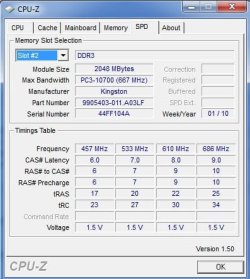
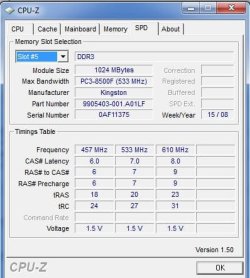
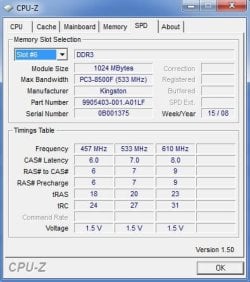
So now you have three DIMM's anyone of which might operate at a lower or higher stock frequency and/or voltage. Have a look and see what they are.

Use CPU-Z.
 

My Computer

Computer type
PC/Desktop
Computer Manufacturer/Model Number
Custom
OS
Windows 10 Technical Preview - x64
CPU
Core i5-3570K - 4.5GHz
Motherboard
ASUS Sabertooth Z77 [B. 2003]
Memory
G.Skill Sniper 12GB DDR3-1600
Graphics Card(s)
ASUS GeForce GTX 970 STRIX
Monitor(s) Displays
Acer K272HUL
Screen Resolution
2560x1440
Hard Drives
Samsung 840 Evo 250GB (OS), Samsung Spinpoint F3 HD103SJ 1TB (Games), Seagate Expansion 1TB (Additional storage, Backup)
PSU
Cooler Master Real Power Pro 750W, Corsair HX1000W
Case
HAF-X
Cooling
XSPC Rasa RS360
Keyboard
Gigabyte Osmium, Noppoo Choc Mid 87, Corsair K70 RGB
Mouse
Roccat Kova
Internet Speed
50 Mbps up, 50 Mbps down
Antivirus
BitDefender TS 2013, Malwarebytes AM, SUPERAntiSpyware
Browser
Google Chrome
Other Info
Razer Vespula Gaming Pad, Razer eXactMat, Blackmagic Intensity Pro, Corsair Vengeance 1500 USB Headset, Google/ASUS Nexus 7
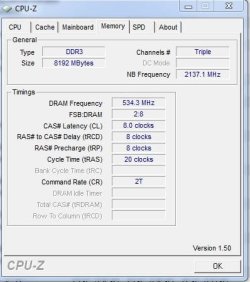
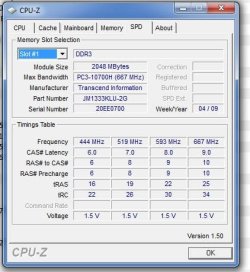
Memory Specs:
1.JPG
2.JPG
3.JPG
4.JPG
5.JPG
6.JPG
7.JPG

I am currently running on default bios settings, don't know if that matters
 

My Computer

Computer type
PC/Desktop
Computer Manufacturer/Model Number
Custom
OS
Windows 7 Professional 64bit
CPU
Intel i7 920 OC 3.8ghz
Motherboard
Asus P6T
Memory
20gb Kingston DDR3
Graphics Card(s)
Gtx 460 1gb x2 SLI
Sound Card
Realtek HD audio inbuilt 7.1 surround
Monitor(s) Displays
SyncMaster 2333
Screen Resolution
1920*1080
Hard Drives
Seagate es2 barracuda 1TB,
Kingston 128gb SSD,
3 WD 2TB green drives ,
PSU
1200 watt
Cooling
Trition 81
I wouldn't recommend trying to overclock any further as it's most likely the inconsistency in the DIMM's that's causing the BSOD's. I wouldn't at all be surprised if you got Memory Management stop screens because of this.

Get yourself 8GB of identical DIMMs and then you can worry about getting to 3.6 or 3.8, or at least (for the time being) remove the Corsair and Kingston sticks.
 

My Computer

Computer type
PC/Desktop
Computer Manufacturer/Model Number
Custom
OS
Windows 10 Technical Preview - x64
CPU
Core i5-3570K - 4.5GHz
Motherboard
ASUS Sabertooth Z77 [B. 2003]
Memory
G.Skill Sniper 12GB DDR3-1600
Graphics Card(s)
ASUS GeForce GTX 970 STRIX
Monitor(s) Displays
Acer K272HUL
Screen Resolution
2560x1440
Hard Drives
Samsung 840 Evo 250GB (OS), Samsung Spinpoint F3 HD103SJ 1TB (Games), Seagate Expansion 1TB (Additional storage, Backup)
PSU
Cooler Master Real Power Pro 750W, Corsair HX1000W
Case
HAF-X
Cooling
XSPC Rasa RS360
Keyboard
Gigabyte Osmium, Noppoo Choc Mid 87, Corsair K70 RGB
Mouse
Roccat Kova
Internet Speed
50 Mbps up, 50 Mbps down
Antivirus
BitDefender TS 2013, Malwarebytes AM, SUPERAntiSpyware
Browser
Google Chrome
Other Info
Razer Vespula Gaming Pad, Razer eXactMat, Blackmagic Intensity Pro, Corsair Vengeance 1500 USB Headset, Google/ASUS Nexus 7
remove the Corsair and Kingston sticks.

Yep.

You have 3 different brands populating all dimms - no wonder you're having an issue.

Stick with matched sets.
 

My Computer

Computer type
PC/Desktop
Computer Manufacturer/Model Number
Systems by SmartEyeball
OS
8 Pro x64
CPU
i7 3770K 4.6GHz
Motherboard
ASUS P8Z77 WS
Memory
16GB G.Skill Trident X 2666mhz
Graphics Card(s)
x2 EVGA 780 Ti Superclocked SLI
Sound Card
SB X-FI Surround 5.1 PRO USB / ATH-AD900 Headphones
Monitor(s) Displays
x3 Dell U2410 / 58" Samsung
Screen Resolution
5760*1200/ 1920*1200
Hard Drives
2x Intel 520 240GB (RAID 0) * 2x WD Caviar Blacks 2TB (RAID 0) * 2TB WD Caviar Black * Sony Optirac DVD
PSU
Silverstone Strider Evolution 1200W
Case
Thermaltake Level 10 GT Snow Edition
Cooling
Noctua NH-D14
Keyboard
Topre Realforce // Ducky Shine MX Black // Filco Ninja TKL
Mouse
Thermaltake Theron (Highly Recommended) + Razer Imperator
Antivirus
MSE
Browser
IE, FF, WaterFox
Other Info
GT Extreme V2 Sim Racing Cockpit + 40" LCD and K/B Mouse stand ▼
Fanatec CSR Elite Wheel + Clubsport V1 Pedals + CSR shifter/7G-H ▼Saitek X52 Pro ▼ TrackIR 5 Pro
Buttkicker v2 Seat Rumbler with Dedicated 5.1 and Sub Woofer attached to frame ▼
=
Bloody Big Grin
I wouldn't recommend trying to overclock any further as it's most likely the inconsistency in the DIMM's that's causing the BSOD's. I wouldn't at all be surprised if you got Memory Management stop screens because of this.

Get yourself 8GB of identical DIMMs and then you can worry about getting to 3.6 or 3.8, or at least (for the time being) remove the Corsair and Kingston sticks.
How do you get 8GB with Triple Channel memory? it's going to be 6GB or 9GB. Remember, he has 6 DDR3 slots and you use 3 at a time for Triple Channel.
 

My Computer

Computer Manufacturer/Model Number
HAL-9000
OS
Windows 7 Ultimate 64bit
CPU
Intel i7 3770K
Motherboard
Asus Sabertooth Z77
Memory
16GB DDR3 1333 Corsair XMS3
Graphics Card(s)
XFX HD6950 2GB EyeFinity
Sound Card
Logitech G35 & Sennheiser PC135 & VIA HD
Monitor(s) Displays
23" HP 2310e, 23" Samsung B2230, 21.5" Viewsonic
Screen Resolution
5760x1080
Hard Drives
16TB of Storage
128GB & 256GB Crucial M4 SSD's, 2X 1TB WD Black, 3x 2TB WD, 3x 2TB Samsung F4, 1.5TB Seagate, WD 500GB,
PSU
Antec True Power New 650watt
Case
Cooler Master HAF-932
Cooling
Corsair H60 Hydro Cooler, 3x 230mm Fans, 2x120mm Fan
Keyboard
Logitech G15 and G13
Mouse
Logitech G700 Gaming Mouse
Internet Speed
50/10 Mbit
Other Info
Speakers : Alesis M1 Active Mk2 Studio Monitors , APC RS 1200 UPS, HP 4500DN Color Laser, HP P1006 mono Laser, Kodak 8500 Dye-Sub, Epson 1280 inkjet, Epson Worforce 610 MFC
How do you get 8GB with Triple Channel memory? it's going to be 6GB or 9GB. Remember, he has 6 DDR3 slots and you use 3 at a time for Triple Channel.

4, 2, and 2.

Of course I wouldn't recommend mixing different densities either and it likely slipped my mind when I said it, but the point still stands. :p
 

My Computer

Computer type
PC/Desktop
Computer Manufacturer/Model Number
Custom
OS
Windows 10 Technical Preview - x64
CPU
Core i5-3570K - 4.5GHz
Motherboard
ASUS Sabertooth Z77 [B. 2003]
Memory
G.Skill Sniper 12GB DDR3-1600
Graphics Card(s)
ASUS GeForce GTX 970 STRIX
Monitor(s) Displays
Acer K272HUL
Screen Resolution
2560x1440
Hard Drives
Samsung 840 Evo 250GB (OS), Samsung Spinpoint F3 HD103SJ 1TB (Games), Seagate Expansion 1TB (Additional storage, Backup)
PSU
Cooler Master Real Power Pro 750W, Corsair HX1000W
Case
HAF-X
Cooling
XSPC Rasa RS360
Keyboard
Gigabyte Osmium, Noppoo Choc Mid 87, Corsair K70 RGB
Mouse
Roccat Kova
Internet Speed
50 Mbps up, 50 Mbps down
Antivirus
BitDefender TS 2013, Malwarebytes AM, SUPERAntiSpyware
Browser
Google Chrome
Other Info
Razer Vespula Gaming Pad, Razer eXactMat, Blackmagic Intensity Pro, Corsair Vengeance 1500 USB Headset, Google/ASUS Nexus 7

Attachments

  • OVERCLOCK.PNG
    OVERCLOCK.PNG
    40.6 KB · Views: 13
Last edited:

My Computer

Computer Manufacturer/Model Number
Custom
OS
Windows 7 Ultimate 64bit
CPU
Intel Core i7 920
Motherboard
GA-EX58-UD3R Rev 1 F11 Bios
Memory
8 Gigs DDR3 RAM @ 1600mhz per stic
Graphics Card(s)
GTX 285
Sound Card
Realtek HD Audio
Monitor(s) Displays
Dell 19inch 16:10
Screen Resolution
1440x900
Hard Drives
Western Digital x2 500gig 7200rpm in Raid 0
PSU
OCZ Modular Extreme 700W PSU
Case
Antec 1200
Internet Speed
15mbps down 2 up
Other Info
Coolermaster V8 Cpu Cooler
Hey guys thanks for the advice, in the end i have gone for a lower overclock until i can get matched ram as recommended, now running stable at 3.33ghz, not the best, but works for now.

@SevenNerd I would be interested in knowing your actual overclock settings, the guide you linked is the one i originally used to OC to 3.8ghz, but for whatever reason wasn't that stable under heavy load (memory most likely as discussed).

@ Terronium 12 & Zepher I have 6 ddr3 slots as mentioned, configuration is a mess, I have in no particular order, 2gb,2gb,1gb,1gb,1gb,1gb, All the 1gb modules are of the same set i believe, one of the 2gb is Kingston, and the other 2gb is some other brand.

@ Smarteyeball I see that now, I'm in Aus so prices are fun /s, i will try to get a matched 8gb set in the near future, i take it 1600mhz is the way to go??
 

My Computer

Computer type
PC/Desktop
Computer Manufacturer/Model Number
Custom
OS
Windows 7 Professional 64bit
CPU
Intel i7 920 OC 3.8ghz
Motherboard
Asus P6T
Memory
20gb Kingston DDR3
Graphics Card(s)
Gtx 460 1gb x2 SLI
Sound Card
Realtek HD audio inbuilt 7.1 surround
Monitor(s) Displays
SyncMaster 2333
Screen Resolution
1920*1080
Hard Drives
Seagate es2 barracuda 1TB,
Kingston 128gb SSD,
3 WD 2TB green drives ,
PSU
1200 watt
Cooling
Trition 81
Another tried and true peice of advice I can give is to never use another users settings, even if they have the same hardware as you do. Too many variables at play. You can, on the other hand, use another's settings as a template of sorts.
 

My Computer

Computer type
PC/Desktop
Computer Manufacturer/Model Number
Custom
OS
Windows 10 Technical Preview - x64
CPU
Core i5-3570K - 4.5GHz
Motherboard
ASUS Sabertooth Z77 [B. 2003]
Memory
G.Skill Sniper 12GB DDR3-1600
Graphics Card(s)
ASUS GeForce GTX 970 STRIX
Monitor(s) Displays
Acer K272HUL
Screen Resolution
2560x1440
Hard Drives
Samsung 840 Evo 250GB (OS), Samsung Spinpoint F3 HD103SJ 1TB (Games), Seagate Expansion 1TB (Additional storage, Backup)
PSU
Cooler Master Real Power Pro 750W, Corsair HX1000W
Case
HAF-X
Cooling
XSPC Rasa RS360
Keyboard
Gigabyte Osmium, Noppoo Choc Mid 87, Corsair K70 RGB
Mouse
Roccat Kova
Internet Speed
50 Mbps up, 50 Mbps down
Antivirus
BitDefender TS 2013, Malwarebytes AM, SUPERAntiSpyware
Browser
Google Chrome
Other Info
Razer Vespula Gaming Pad, Razer eXactMat, Blackmagic Intensity Pro, Corsair Vengeance 1500 USB Headset, Google/ASUS Nexus 7
Back
Top